
1. Introduction
This user manual provides essential information for the safe and efficient use of your Gigaset COMFORT 500A Trio cordless phone system. This system includes a base station and three cordless handsets, designed for reliable communication in your home or office. Please read these instructions carefully before initial use to ensure proper setup and operation.
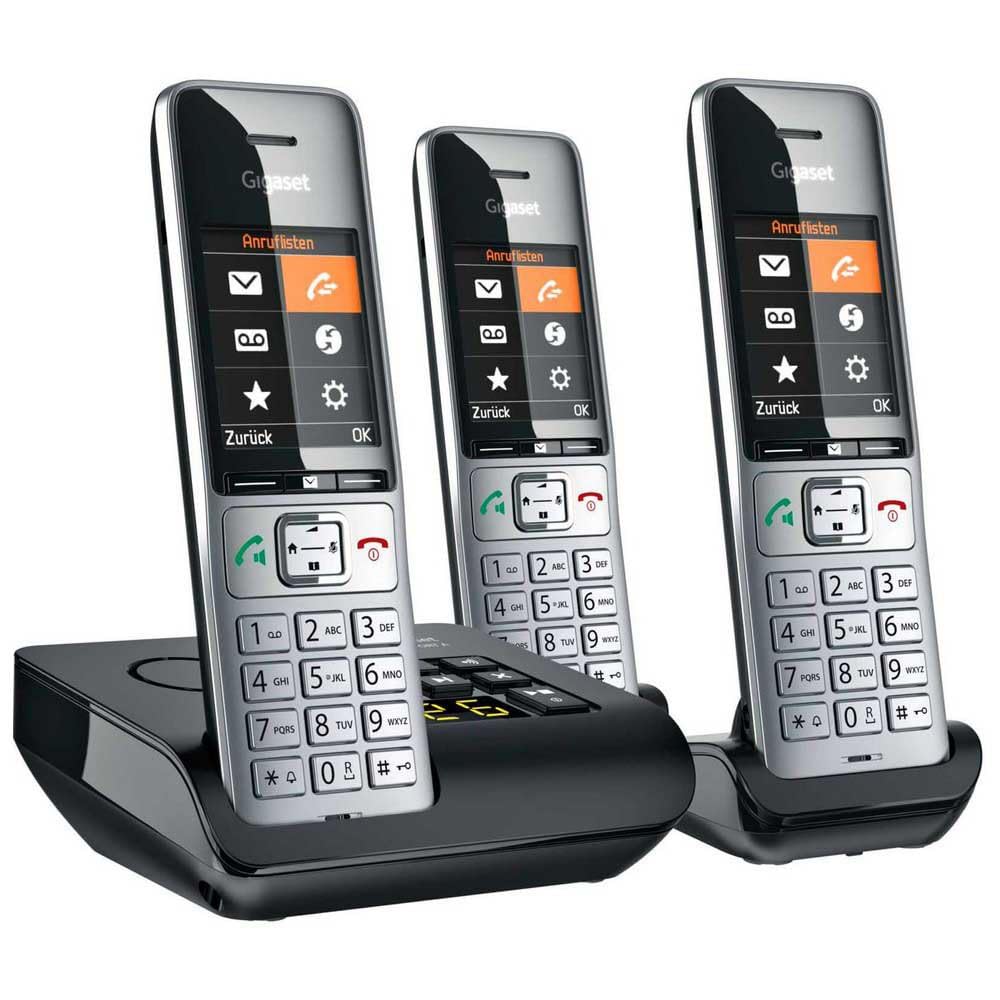
Image 1.1: The Gigaset COMFORT 500A Trio system, featuring a black base station with an integrated answering machine and three silver and black cordless handsets.
2. Package Contents
Verify that all items are present in your package. If any items are missing or damaged, contact your retailer immediately.
- 1x Gigaset COMFORT 500A Base Station
- 3x Gigaset COMFORT 500A Handsets
- 3x Handset Battery Covers
- 6x AAA Rechargeable Batteries (2 per handset)
- 1x Power Adapter for Base Station
- 1x Phone Line Cable
- 2x Handset Charging Cradles (for the two additional handsets)
- 2x Power Adapters for Charging Cradles
- 1x User Manual (this document)
3. Safety Instructions
Observe the following safety precautions to prevent injury or damage to your device:
- Use only the provided power adapters and phone line cable.
- Use only the specified rechargeable batteries. Do not use non-rechargeable batteries.
- Do not expose the device to water, moisture, or extreme temperatures.
- Avoid placing the base station or charging cradles near heat sources or direct sunlight.
- Do not open the device casing. Repairs should only be performed by authorized service personnel.
- Keep the device out of reach of children.
4. Setup
4.1. Connecting the Base Station
- Place the base station on a flat, stable surface, away from other electronic devices that may cause interference.
- Connect the supplied phone line cable to the TEL socket on the base station and to your telephone wall socket.
- Connect the supplied power adapter to the POWER socket on the base station and plug it into a mains power outlet.
- For the additional charging cradles, connect their respective power adapters and plug them into mains power outlets.
4.2. Installing Handset Batteries
- Open the battery compartment cover on the back of each handset.
- Insert the two supplied AAA rechargeable batteries, observing the correct polarity (+/-).
- Close the battery compartment cover until it clicks into place.
- Place each handset into its respective base station or charging cradle to charge. The display will indicate charging. Allow at least 8 hours for the initial charge.

Image 4.2.1: A close-up view of a Gigaset COMFORT 500A handset, highlighting its clear display, navigation keys, and numeric keypad. The handset is designed for comfortable handling.
4.3. Handset Registration
Your handsets are typically pre-registered to the base station at the factory. If a handset displays "Register Handset" or similar, follow these steps for manual registration:
- On the base station, press and hold the registration/paging button (usually marked with a signal icon) for approximately 3 seconds. The base station will enter registration mode.
- On the handset, navigate to the menu, select Settings, then Registration, and Register Handset.
- Enter the system PIN (default is usually 0000). Confirm with OK.
- The handset will search for the base station and register. A confirmation message will appear on the handset display once successful.
5. Operating Your Phone
5.1. Making and Receiving Calls
- Making a Call: Pick up a handset, dial the number, and press the green call key. Alternatively, dial first, then press the call key.
- Receiving a Call: When the phone rings, press the green call key.
- Ending a Call: Press the red end call key or place the handset back in its cradle.
- Caller ID: Incoming call numbers will be displayed if the service is active and supported by your network provider.
5.2. Using the Digital Answering Machine
The Gigaset COMFORT 500A Trio includes an integrated digital answering machine in the base station.
- Activating/Deactivating: Access the answering machine menu via the handset or use the dedicated button on the base station (if available).
- Listening to Messages: New messages are indicated on the handset display and/or by a flashing LED on the base station. Press the play button on the base station or navigate through the handset menu to listen.
- Recording an Announcement: You can record a personalized outgoing message through the handset menu.
5.3. Phonebook
Store frequently used numbers in the phonebook for quick dialing.
- Saving a Contact: Navigate to the Phonebook menu, select "New Entry," enter the name and number, then save.
- Dialing from Phonebook: Open the Phonebook, scroll to the desired contact, and press the green call key.
5.4. Settings
Customize your phone system through the handset's settings menu.
- Volume: Adjust handset speaker, ringer, and earpiece volume.
- Ringtones: Select different melodies for internal and external calls.
- Display Language: Change the language of the handset display.
- Date and Time: Set the correct date and time for accurate call logging and answering machine timestamps.
6. Maintenance
6.1. Cleaning
Clean the device surfaces with a soft, damp cloth. Do not use abrasive cleaners or solvents.
6.2. Battery Care
- Always use the specified rechargeable batteries.
- If the handset will not be used for an extended period, remove the batteries to prevent leakage.
- Dispose of old batteries according to local regulations.
7. Troubleshooting
| Problem | Possible Cause | Solution |
|---|---|---|
| No dial tone | Phone line cable not connected or faulty. | Check phone line connection. Try a different phone line socket or cable. |
| Handset display is blank or "Register Handset" appears | Batteries are flat or handset is not registered. | Place handset in base/charger to charge. If still blank, check battery installation. If "Register Handset" appears, follow Section 4.3. |
| Cannot make/receive calls | Base station not powered or phone line issue. | Ensure base station power adapter is connected. Check phone line connection. Contact your service provider if the issue persists. |
| Poor sound quality | Handset too far from base station or interference. | Move closer to the base station. Avoid placing the base near other electronic devices (Wi-Fi routers, microwaves). |
8. Specifications
- Model: L36852-H3023-B111
- Product Type: DECT Cordless Phone System with Digital Answering Machine
- Color: Black, Silver
- Dimensions (Base Station): Approximately 24 x 69 x 2.5 cm (L x W x H)
- Weight (Item): 1 Kilogram (total package weight)
- Talk Time: Up to 4 hours
- Power Source (Handsets): Battery-Powered (Rechargeable AAA batteries)
- Material: Acrylonitrile Butadiene Styrene (ABS)
- Features: Caller ID, Basic Conference Call Capability, Multiple Line Support
- Answering System Type: Digital
- Compatible Devices: PSTN, basic communication devices
9. Warranty and Support
Your Gigaset COMFORT 500A Trio system comes with a 2-year manufacturer's warranty from the date of purchase. Please retain your proof of purchase for warranty claims.
For technical support, service, or further information, please refer to the official Gigaset website or contact your local Gigaset service center. Contact details can typically be found on the Gigaset website or in the warranty card included with your product.


