
1. Important Safety Instructions
Please read these instructions carefully before using your Tower Ceraglide Steam Generator Iron. Keep this manual for future reference.
- Always ensure the voltage on the rating label corresponds to your mains voltage.
- Do not immerse the iron, base, or power cord in water or any other liquid.
- Keep the iron and its cord out of reach of children when it is switched on or cooling down.
- Never leave the iron unattended while it is connected to the mains supply.
- Use the iron only for its intended purpose, which is ironing clothes.
- Exercise caution when handling hot surfaces and steam. Steam can cause burns.
- Unplug the iron from the power outlet before filling or emptying the water tank, and when not in use.
- Do not operate the iron with a damaged cord or plug, or if the iron has been dropped or damaged.
- Place the iron on a stable, heat-resistant surface.
2. Product Overview
Familiarize yourself with the components of your Tower Ceraglide Steam Generator Iron.

Image: The Tower T22023GLD Ceraglide Steam Generator Iron, showcasing its black and champagne gold design with the iron unit resting on its base, featuring a visible water tank.
Key Features:
- 2700W Power: For rapid heat-up and efficient ironing.
- 3 Bar Pressure Steam Generator: Delivers powerful steam to tackle stubborn creases.
- Ceraglide Ceramic Soleplate: Non-stick and scratch-resistant for smooth gliding.
- 80 g/min Continuous Steam Output: Consistent steam for effective wrinkle removal.
- 1.2 Litre Removable Water Tank: Reduces refilling frequency, allowing for longer ironing sessions.
- Vertical Steam Function: Ideal for curtains, hanging garments, and upholstery.
- Anti-Drip Function: Prevents water stains on fabrics.
- Anti-Calc Function: Reduces limescale build-up for prolonged performance.
- Variable Temperature Control: Adjustable settings for different fabric types.

Image: A graphic illustrating the key features of the iron, including 3 bar pressure, Ceraglide ceramic soleplate, 80 grams continuous steam, vertical steam, 1.2L water tank, self-cleaning, and variable temperature control.
3. Setup
Before first use, ensure all packaging materials are removed. Wipe the soleplate with a soft, damp cloth to remove any residue.
Filling the Water Tank:
- Ensure the iron is unplugged from the mains supply.
- Remove the removable water tank from the base unit.
- Fill the water tank with clean tap water up to the 'MAX' indicator. Do not overfill.
- Reinsert the water tank securely into the base unit until it clicks into place.

Image: A hand demonstrating the removal of the transparent water tank from the iron's base unit.
Connecting to Power:
Place the iron unit securely on its base. Plug the power cord into a suitable mains socket.
4. Operating Instructions
Temperature Selection:
- Turn the temperature control dial to select the appropriate heat setting for your fabric type (e.g., wool, silk, nylon, cotton). Refer to the garment's care label.
- The iron will heat up in approximately 35 seconds. The indicator light will turn off when the desired temperature is reached.

Image: A close-up view of the iron's temperature control dial, showing settings for various fabric types like cotton, linen, silk, and nylon.
Steam Ironing:
- Once the iron has reached the selected temperature, press the steam button to activate continuous steam. The iron delivers 80 g/min of continuous steam.
- For stubborn creases, press the steam shot button for an extra burst of steam.
- Move the iron smoothly over the fabric. The Ceraglide ceramic soleplate ensures effortless gliding.

Image: The steam generator iron actively producing steam, demonstrating its powerful output for effective ironing.
Vertical Steaming:
The vertical steam function is suitable for removing creases from hanging clothes, curtains, and upholstery. Hold the iron vertically, ensuring it is heated to the maximum temperature, and press the steam button to release steam towards the fabric.
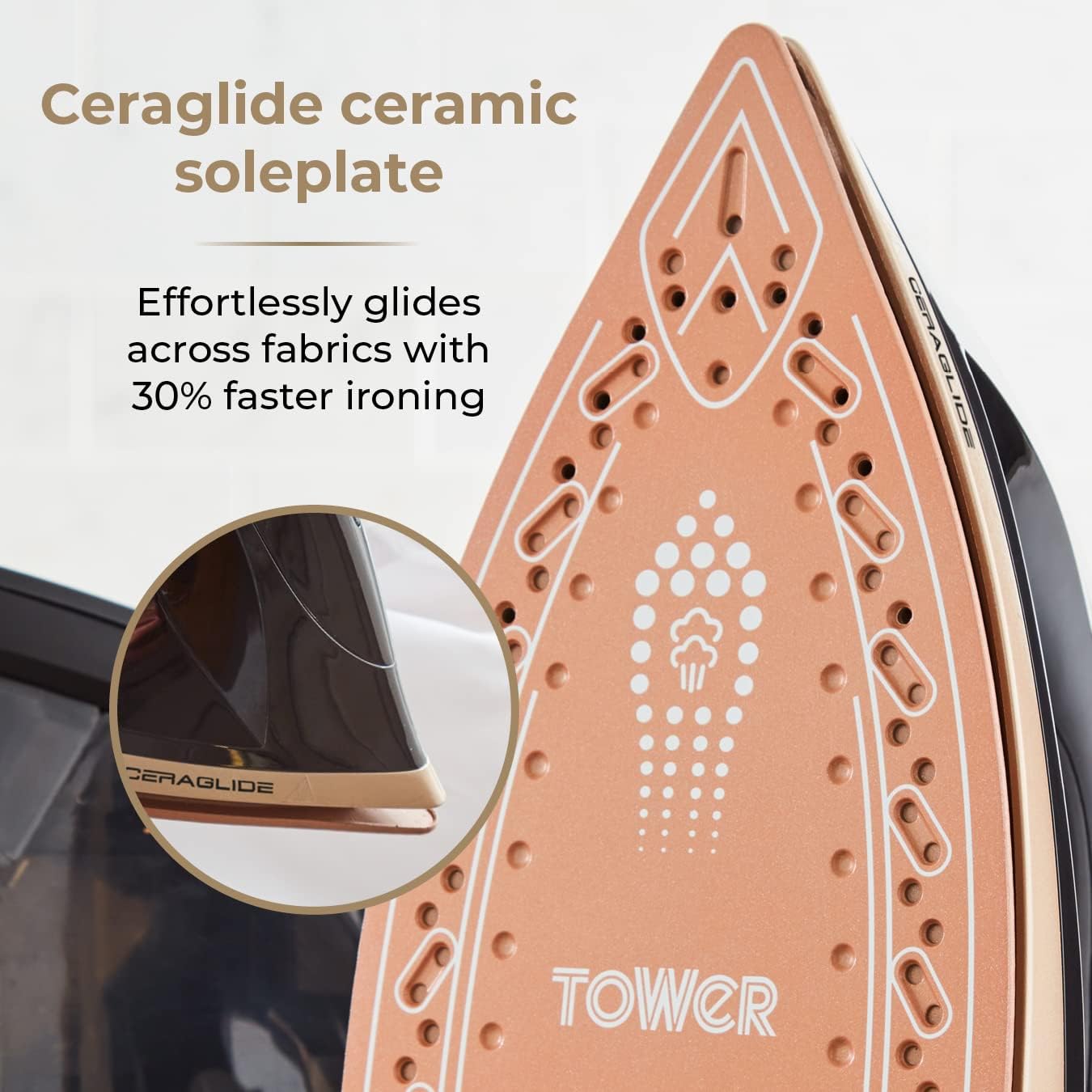
Image: A close-up of the Ceraglide ceramic soleplate, highlighting its smooth, non-stick surface designed for effortless gliding across fabrics.
Dry Ironing:
For dry ironing, ensure the water tank is empty or the steam function is turned off. Select the desired temperature and iron without steam.
5. Maintenance and Cleaning
Regular maintenance ensures optimal performance and extends the lifespan of your iron.
After Each Use:
- Unplug the iron and allow it to cool down completely.
- Empty any remaining water from the tank.
- Wipe the soleplate with a damp cloth to remove any fabric starch or residue.
- Clean the exterior of the iron with a soft, damp cloth. Do not use abrasive cleaners.
Anti-Calc Function:
The integrated anti-calc system helps to reduce limescale build-up. For areas with very hard water, consider using a mix of tap water and distilled water (50/50 ratio) to further minimize scale.
Storage:
Once cooled and emptied, store the iron in an upright position on its base in a dry, safe place. The power cord can be wrapped around the base for tidy storage.
6. Troubleshooting
If you encounter any issues, refer to the following common problems and solutions:
| Problem | Possible Cause | Solution |
|---|---|---|
| Iron does not heat up. | Not plugged in; power outlet fault; temperature dial set to minimum. | Check power connection; test outlet with another appliance; adjust temperature dial. |
| No steam or insufficient steam. | Water tank empty; temperature too low; steam button not pressed. | Fill water tank; increase temperature setting; press steam button. |
| Water leakage from soleplate. | Temperature too low for steam; water tank overfilled; anti-drip system activated. | Allow iron to reach full temperature before steaming; do not overfill tank; ensure anti-drip is functioning. |
| White flakes on clothes. | Limescale build-up. | Perform anti-calc cleaning; use distilled water in hard water areas. |
7. Specifications
- Model Number: T22023GLD
- Power: 2700 Watts
- Voltage: 230 Volts
- Steam Pressure: 3 bar
- Continuous Steam Output: 80 g/min
- Water Tank Capacity: 1.2 Litres
- Soleplate Type: Ceraglide Ceramic
- Product Dimensions (L x W x H): 18.5 x 36 x 25 cm
- Item Weight: 2.28 Kilograms
- Special Features: Vertical Steam, Anti-Drip, Anti-Calc, 3 Temperature Settings, Dry Ironing Option
8. Warranty and Support
Your Tower T22023GLD Ceraglide Steam Generator Iron comes with a standard 1-year warranty. An extended 2-year warranty is available upon product registration online, providing a total of 3 years of coverage.

Image: A graphic displaying a '3 Year Guarantee' logo, indicating the product's warranty period.
For warranty claims, technical support, or spare parts information, please visit the official Tower website or contact their customer service department. Please have your model number (T22023GLD) and proof of purchase ready.


