
1. Product Overview
This Mantian Android Car Stereo is designed to enhance your driving experience with advanced features and seamless integration. It operates on an Android system, offering a 9-inch touch screen display, wireless CarPlay and Android Auto compatibility, GPS navigation, HiFi audio, and support for a backup camera.
Compatibility
This 9-inch Android car stereo is specifically designed for Honda CRV models from 2007, 2008, 2009, 2010, and 2011. It includes a Plug and Play wiring harness for simplified installation.

Image: Dashboard compatibility guide. Ensure your vehicle's central control panel matches the 'Low Configuration' (Option A) shown for proper fitment.
2. Package Contents
Please verify that all items listed below are included in your package:
- Android Car Stereo Unit
- GPS Antenna
- Microphone
- Backup Camera
- Power Cable
- RCA Cable
- USB Cable (2 units)
- Reversing Video Input Cable
- User Manual

Image: Visual representation of the product size and included accessories in the package.
3. Installation Guide
Professional installation is recommended. Ensure the vehicle's power is disconnected before beginning installation.
3.1. Initial Fitment Check
Before proceeding with the full installation, confirm that the car stereo unit fits correctly into your Honda CRV's dashboard opening. The unit is designed for a seamless fit without requiring an additional frame for 2007-2011 models.

Image: The Android car stereo after installation in a Honda CRV dashboard, showing its integrated appearance.
3.2. Wiring the Backup Camera
The included backup camera requires proper wiring to function. Connect the video signal cable from the camera to the 'Reversing Video Input' on the stereo unit. The camera's power cable should be connected to the vehicle's reverse light circuit to activate automatically when reverse gear is engaged. Ensure the 'BACK' wire from the stereo's harness is also connected to the reverse light signal.
Video: Detailed instructions on how to wire the backup camera to the car stereo system.

Image: Illustration of the rear camera functionality and steering wheel control interface.
3.3. General Installation Steps
For a visual guide on the removal of the factory radio and installation of the new unit, please refer to the video below. This video demonstrates the process for a Honda CRV 2010, which is applicable to models from 2007-2011.
Video: A customer-provided video demonstrating the removal of the original car stereo and installation of an aftermarket unit in a Honda CRV 2010.
4. Operating Instructions
This section details the various functions and how to operate your Mantian Android Car Stereo.
4.1. Wireless CarPlay & Android Auto
Effortlessly connect your smartphone via Bluetooth or USB cable to access navigation, music streaming, and internet radio applications. This feature provides a seamless and feature-rich driving experience.

Image: Display showing the wireless CarPlay and Android Auto interface with various app icons and voice command examples.

Image: Visual steps for connecting Apple CarPlay wirelessly via Bluetooth and Wi-Fi.

Image: Visual steps for connecting Android Auto wirelessly via Bluetooth and Wi-Fi.
Video: Instructions on how to connect wireless CarPlay and Android Auto to the car stereo.
4.2. In-Dash GPS Navigation
The car stereo supports both online and offline maps, including popular applications like Waze, IGO, and Sygic. It features voice guidance and 2D/3D map views. The split-screen function allows you to play Bluetooth music while navigating.

Image: GPS navigation display showing online and offline map options, with a car dashboard background.
4.3. HiFi Audio & EQ Settings
Enjoy high-fidelity audio with sound effect customization options including Pop, Rock, Jazz, and Classical presets. The 15-band graphic equalizer allows for precise audio tuning. The system is compatible with subwoofers and features full RCA output support for car headrest video output.

Image: HiFi audio interface with equalizer settings and a demonstration of RCA output to rear screens.

Image: FM RDS Radio interface alongside HiFi audio settings, showing frequency selection and equalizer.
4.4. Bluetooth & Voice Control
The unit features a built-in microphone and supports an external microphone for improved call clarity, ensuring a safer driving experience. Utilize voice commands for hands-free operation, including making calls and playing music.
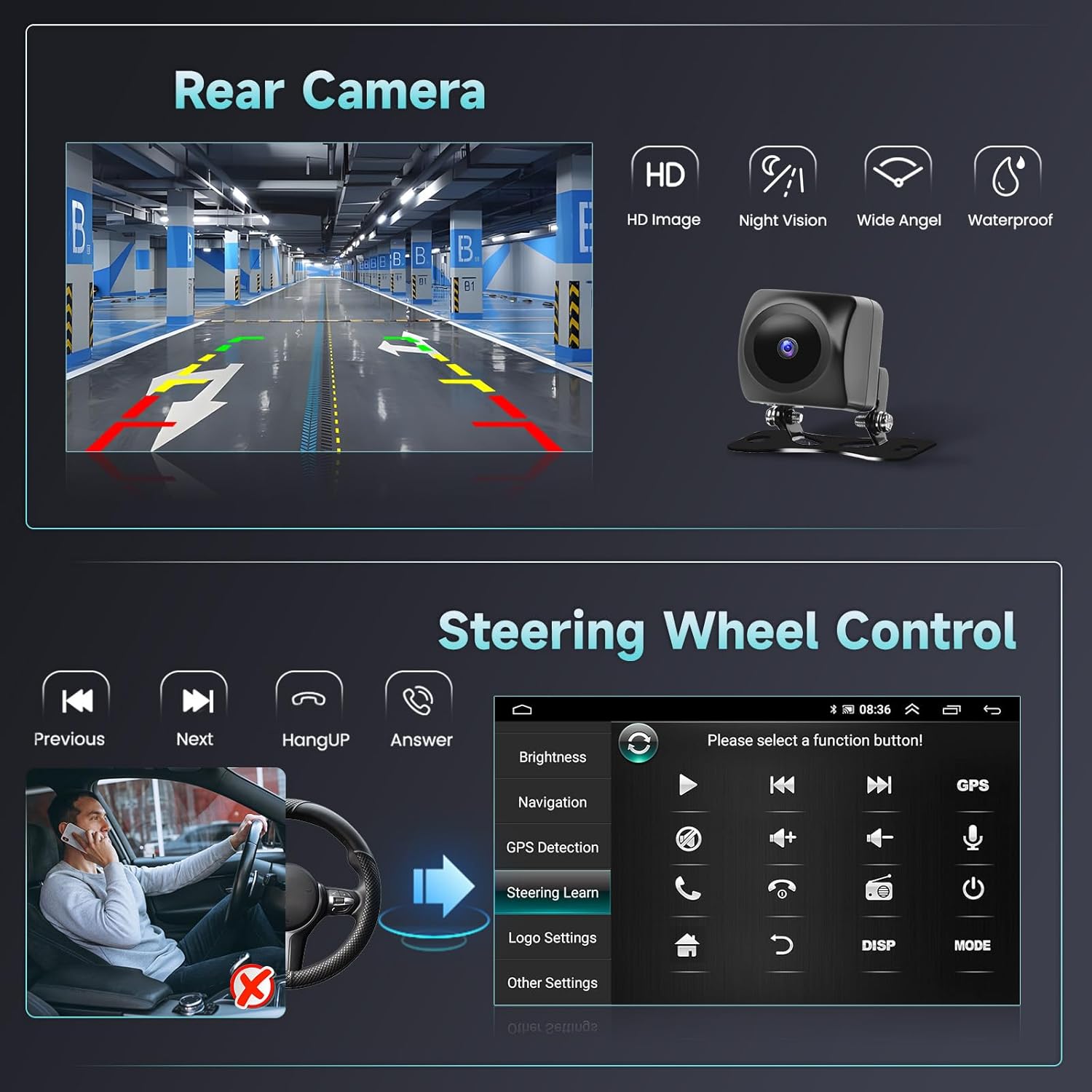
Image: Features of dual microphones, voice control, and Bluetooth connectivity for hands-free communication and music.
4.5. FM RDS Radio
Access local radio stations with the FM radio function. It offers reliable reception and provides emergency information where available.
Image: FM RDS Radio interface alongside HiFi audio settings, showing frequency selection and equalizer.
4.6. Steering Wheel Control (SWC)
The unit supports car steering wheel control functions, allowing you to switch songs, change channels, and adjust volume directly from your steering wheel. This helps maintain focus on the road.
Image: Illustration of the rear camera functionality and steering wheel control interface.
4.7. Split Screen Functionality
The split-screen feature enhances multitasking, allowing you to view navigation and media playback simultaneously, or manage calls while using other applications.

Image: Examples of split-screen configurations on the car stereo, such as map with music, map with call, and video playback.
4.8. Media Integration
With WiFi connectivity, you can download various applications from the Play Store, including streaming services and social media. The unit also supports Mirror Link for Airplay and Android Cast.

Image: Overview of seamless integration features including WiFi for apps like Facebook, Twitter, TikTok, YouTube, Netflix; GPS navigation; and Bluetooth for calls and music.

Image: Instructions for using Mirror Link, including Apple Airplay and Android Cast, to project phone screens onto the car stereo.
Video: A demonstration of various features of the 4G+64GB car stereo radio for Honda CRV 2007-2011, including CarPlay, online maps, WiFi, app downloads, steering wheel controls, EQ, and music playback.
Video: A demonstration of the multi-functional display of the car MP5 player, showcasing its various features and user interface.
5. Troubleshooting
This section addresses common issues you might encounter with your car stereo.
- Backup Camera Displaying Grey/Cloudy Image or No Guidelines: If the backup camera image is unclear or lacks guidelines, navigate to the car settings app, then to factory settings, and finally to video settings. Adjust the 'Reverse video resolution settings' to either NTSC or PAL, depending on your camera's standard.
- Wireless CarPlay/Android Auto Connection Issues: Ensure both Bluetooth and Wi-Fi are enabled on your smartphone and the car stereo. If connection fails, try restarting the Bluetooth on both devices and re-pairing. For persistent issues, check for any pending software updates for the car stereo.
- Bluetooth Disconnection: If Bluetooth frequently disconnects, ensure there are no other active Bluetooth devices interfering. Try forgetting the device on both your phone and the stereo, then re-pair.
- No Audio Output to Factory Subwoofer: The unit may require additional wiring or an adapter for compatibility with certain factory subwoofer systems. Consult a professional installer if this issue occurs.
Video: A comparison of different camera types, highlighting the visual differences in quality and features.
6. Specifications
| Feature | Detail |
|---|---|
| Item Weight | 2.99 pounds |
| Product Dimensions | 9.69 x 6.1 x 1.57 inches |
| Display Size | 9 Inches |
| Resolution | 1024 x 600 |
| Operating System | Android |
| RAM | 1GB |
| ROM | 32GB |
| Connectivity Technology | Bluetooth, FM, USB, Wi-Fi |
| Special Features | Bluetooth Microphone, HiFi, Touchscreen, Wireless Android Auto, Wireless Carplay |
| Map Type | Offline Maps/Online Maps, Worldwide |
| Audio Output Mode | Stereo |
| Mounting Type | Panel Mount |
7. Warranty and Support
The Mantian Android Car Stereo comes with a 1-year warranty. For any technical assistance or support, please refer to the contact information provided with your purchase or visit the official Mantian store on Amazon.
The manufacturer, Hikity, is committed to quality, with each car radio undergoing multiple inspections before leaving the factory.