
Introduction
The FMART T9Pro Window Cleaning Robot is an advanced device designed to simplify window cleaning. Featuring ultrasonic atomization intelligent water spray, 3800Pa suction power, and AI intelligent path planning, it offers an efficient and safe solution for maintaining clean windows. This manual provides comprehensive instructions for setup, operation, maintenance, and troubleshooting to ensure optimal performance and longevity of your robot.
What's in the Box
Upon unboxing your FMART T9Pro, please verify that all the following components are included:
- Safety Tether x 1
- Water Spray Bottle x 1
- Instruction Guide x 1
- Remote Control x 1
- Power Adapter x 1
- Microfiber Cloth x 10
- Network Cable x 1

Image: The FMART T9Pro robot with its included accessories, such as the remote control and microfiber cleaning pads.
Product Overview and Features
The FMART T9Pro is engineered with several key features to provide an effective and convenient window cleaning experience:
- Powerful Suction: Equipped with up to 3800Pa of suction power, the robot intelligently adjusts suction based on the glass's dirt level, ensuring deep and efficient cleaning. This strong suction keeps the robot securely attached to the window surface.
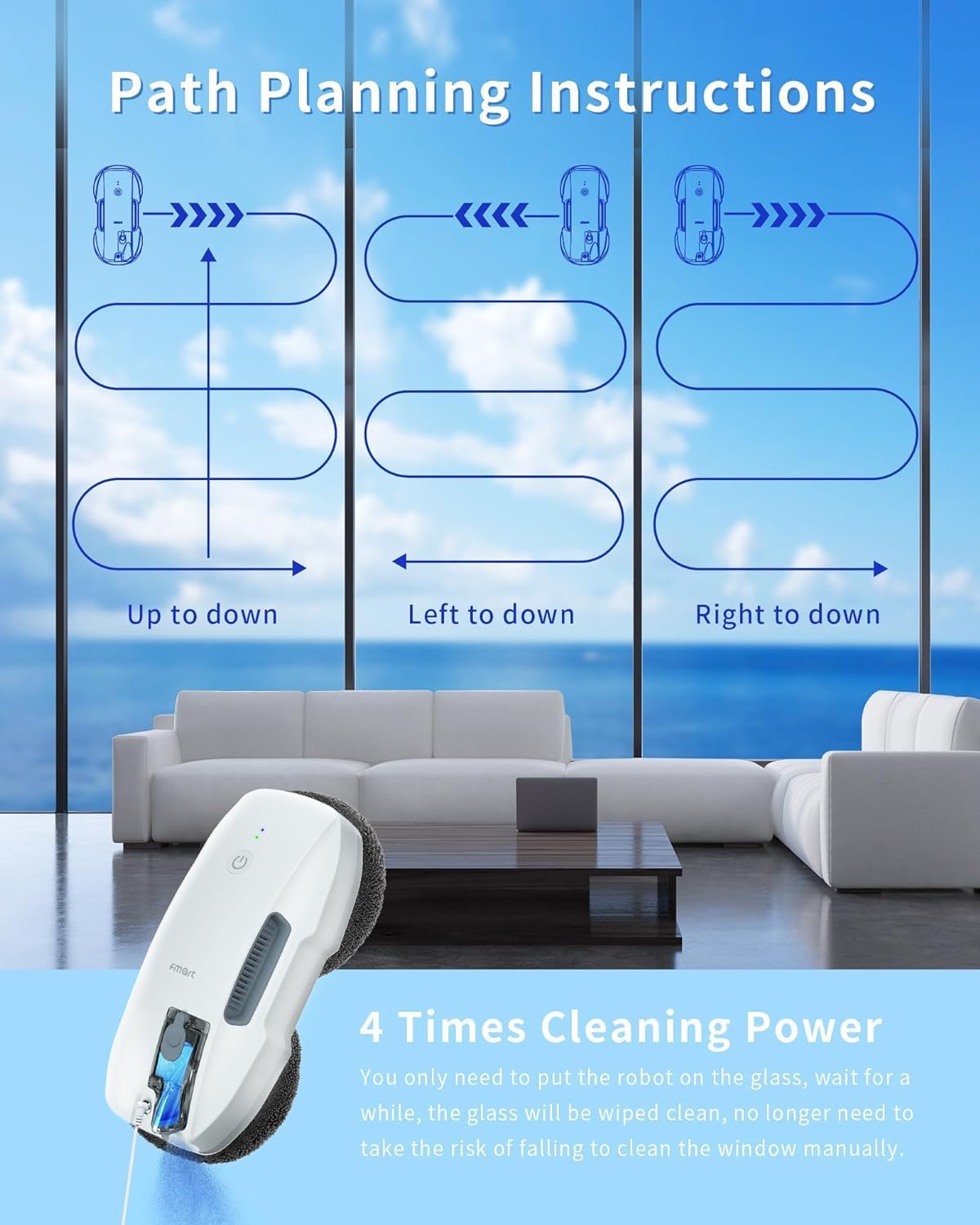
Image: Illustration of the robot's powerful 3800Pa suction, demonstrating how it adheres to the glass.
- Ultrasonic Atomization Spraying: The robot features an ultrasonic atomization system that mimics human breath, spraying a fine 12µm mist. This mist evenly penetrates dirt, dissolves grime, and minimizes water spots and streaks, allowing one refill to clean 215-270 square feet thoroughly.

Image: The robot cleaning a large window, highlighting its hands-free operation and spray function.
- AI Intelligent Path Planning & Edge Detection: The T9Pro utilizes AI intelligent edge detection to identify frames, adjust direction, and avoid obstacles. It also works effectively on frameless glass, ensuring comprehensive coverage. The intelligent path planning optimizes the cleaning route for maximum efficiency.
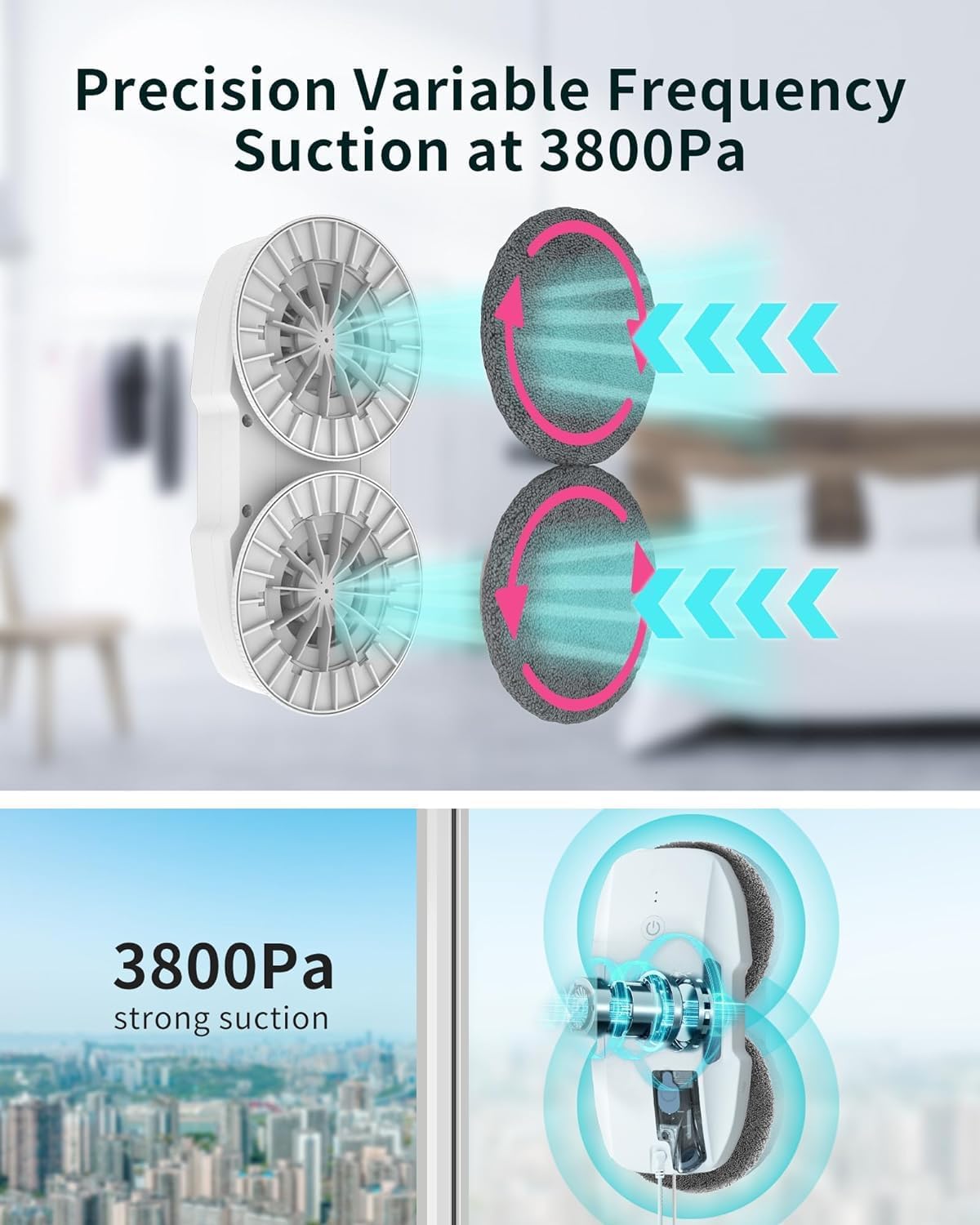
Image: Visual representation of the robot's intelligent path planning, showing different cleaning patterns.
- Multiple Cleaning Modes: The robot offers three cleaning modes: automatic, deep, and manual, to suit various cleaning needs. After completing a cycle, it automatically returns to its starting point, making it ideal for large or hard-to-reach surfaces.
- Safety Anti-Fall System: An embedded UPS (Uninterruptible Power Supply) system allows the robot to continue operating for up to 30 minutes during an unexpected power outage, enhancing safety and reliability. A safety tether is also included for additional security.

Image: A visual demonstration of the robot's cleaning effectiveness on various types of window dirt, including rain stains, sand, and bird droppings.
- Remote Control: The included remote control allows for easy operation and selection of cleaning modes.

Image: Close-up of the remote control, detailing its functions such as start/stop, direction buttons, and spray options.
Official Product Videos
T9 Robot Window Cleaner User Guide
Video: A comprehensive user guide for the T9 Robot Window Cleaner, demonstrating its features and operation. This video provides a visual walkthrough of how to use the robot effectively.
FMART T9 window cleaner robot Upgrade Ultrasonic Spray
Video: This video highlights the upgraded ultrasonic spray feature of the FMART T9 window cleaner robot, showing how it efficiently applies cleaning solution to the window surface.
Buyer evaluation window cleaning robot
Video: A detailed buyer evaluation of the window cleaning robot, showcasing its performance and user experience. This video is longer and provides an in-depth look at the robot in action.
Setup
- Initial Charge: Before the first use, charge the automatic window cleaner for 3-5 hours. This ensures the internal UPS battery is sufficiently powered for safe operation.
- Attach Safety Tether: Always attach the safety tether to a secure anchor point before placing the robot on the window. This is a critical safety measure to prevent falls.
- Connect Power: Ensure the power adapter is securely connected to the robot and a power outlet. The robot requires continuous power during operation.
- Fill Water Tank: Open the water tank cap and fill it with clean water or a suitable window cleaning solution. Close the cap securely.
- Attach Microfiber Cloths: Ensure the microfiber cleaning cloths are properly attached to the robot's cleaning pads. For best results, ensure they are clean and slightly damp.
- Placement: Place the robot firmly on the window surface. The suction will engage automatically once powered on.
Operating Instructions
- Power On: Press the power button on the robot or the remote control to turn on the device. The robot will adhere to the glass surface.
- Select Cleaning Mode: Use the remote control to select your desired cleaning mode:
- Automatic Mode: The robot will automatically detect the window size and plan the most efficient cleaning path.
- Deep Cleaning Mode: For heavily soiled windows, this mode performs a more thorough cleaning cycle.
- Manual Mode: Use the direction buttons on the remote control to guide the robot manually for spot cleaning or specific areas.
- Start Cleaning: Press the Start/Stop button on the remote control to begin the cleaning cycle. The robot will start moving and spraying.
- Monitor Progress: The robot will clean the window systematically. It will automatically return to its starting point once the cleaning is complete and emit a beeping sound.
- Power Off and Remove: Once cleaning is finished and the robot has returned to its starting position, press the power button to turn it off. Carefully detach the robot from the window.
Maintenance
Regular maintenance ensures the longevity and optimal performance of your FMART T9Pro:
- Microfiber Cloths: After each use, remove the microfiber cloths from the robot. Wash them with water and mild detergent. Replace cloths as needed, especially if heavily soiled, to prevent streaks. The product includes 10 microfiber cloths for convenience.
- Water Tank: Empty any remaining water or cleaning solution from the tank after use. Rinse the tank with clean water to prevent residue buildup.
- Robot Body: Wipe the exterior of the robot with a soft, dry cloth. Do not use abrasive cleaners or immerse the robot in water.
- Sensors: Periodically clean the sensors on the robot to ensure accurate edge detection and obstacle avoidance. Use a soft, dry cloth to gently wipe them.
- Storage: Store the robot and its accessories in a cool, dry place away from direct sunlight and extreme temperatures.
Troubleshooting
If you encounter any issues with your FMART T9Pro, please refer to the following common troubleshooting tips:
| Problem | Possible Cause | Solution |
|---|---|---|
| Robot does not stick to the window. | Insufficient suction; dirty or wet cleaning pads; power issue. | Ensure power cable is securely connected. Check if cleaning pads are too wet or dirty and replace/clean them. Ensure the window surface is not excessively wet. |
| Robot leaves streaks. | Dirty cleaning pads; incorrect cleaning solution; window too dirty. | Replace or clean microfiber cloths. Use clean water or recommended cleaning solution. For very dirty windows, perform a preliminary wipe or run the robot twice with fresh pads. |
| Robot does not clean corners effectively. | Design limitation. | Due to its design, the robot may not reach the very edges or corners (approx. 2.5x2.5 inches). Manual touch-up may be required for these areas. |
| Robot stops unexpectedly. | Power interruption; obstacle detected; low battery (UPS). | Check power connection. Remove any obstacles. The UPS system provides up to 30 minutes of power; retrieve the robot promptly. |
| Voice prompts are not loud enough. | Motor noise; environmental noise. | The voice prompts may be difficult to hear over the suction motor. Pay attention to visual indicators (LEDs) and the robot's movement. |
For any issues not covered here, or for further assistance, please refer to the full instruction guide included in the box or contact FMART customer support.
Specifications
| Attribute | Detail |
|---|---|
| Brand | FMART |
| Model | T9Pro |
| Suction Power | Up to 3800Pa |
| Special Feature | 3800PA Intelligent Variable Frequency Suction, Ultrasonic Atomization Technology, Intelligent AI Edges, Deep Cleaning Technology, Intelligent Path Planning |
| Color | T9pro |
| Product Dimensions | 5.67"L x 3.6"W x 11.5"H |
| Included Components | Safety Tether, Water Spray Bottle, Instruction Guide, Remote Control, Power Adapter, Microfiber Cloths (x10), Network Cable |
| Filter Type | Cloth |
| Battery Life | 5 years (internal UPS) |
| Voltage | 120 Volts |
| Power Source | Battery Powered (with continuous power connection) |
| Batteries Included | No (1 Lithium Ion battery required for remote) |
| Control Method | Remote |
| Form Factor | Robotic |
| UPC | 717981526664 |
| Item Weight | 2.2 pounds |
| Date First Available | April 26, 2022 |
Warranty and Support
FMART is committed to providing excellent customer service and support for your T9Pro Window Cleaning Robot:
- Warranty: The robotic window cleaner includes a 365-day warranty from the date of purchase.
- Customer Support: For any questions, concerns, or issues, please consult the detailed user manual provided with your product. You can also email FMART customer support anytime. We aim to respond to all inquiries within 24 hours.