
Fmart T9
Fmart T9 Robot Window Cleaner User Manual
Model: T9
1. Introduction
The Fmart T9 Robot Window Cleaner is an advanced automatic device designed to simplify window cleaning. Featuring powerful suction, intelligent navigation, and multiple safety mechanisms, it ensures sparkling clean windows with minimal effort. This manual provides detailed instructions for safe and effective use of your Fmart T9.
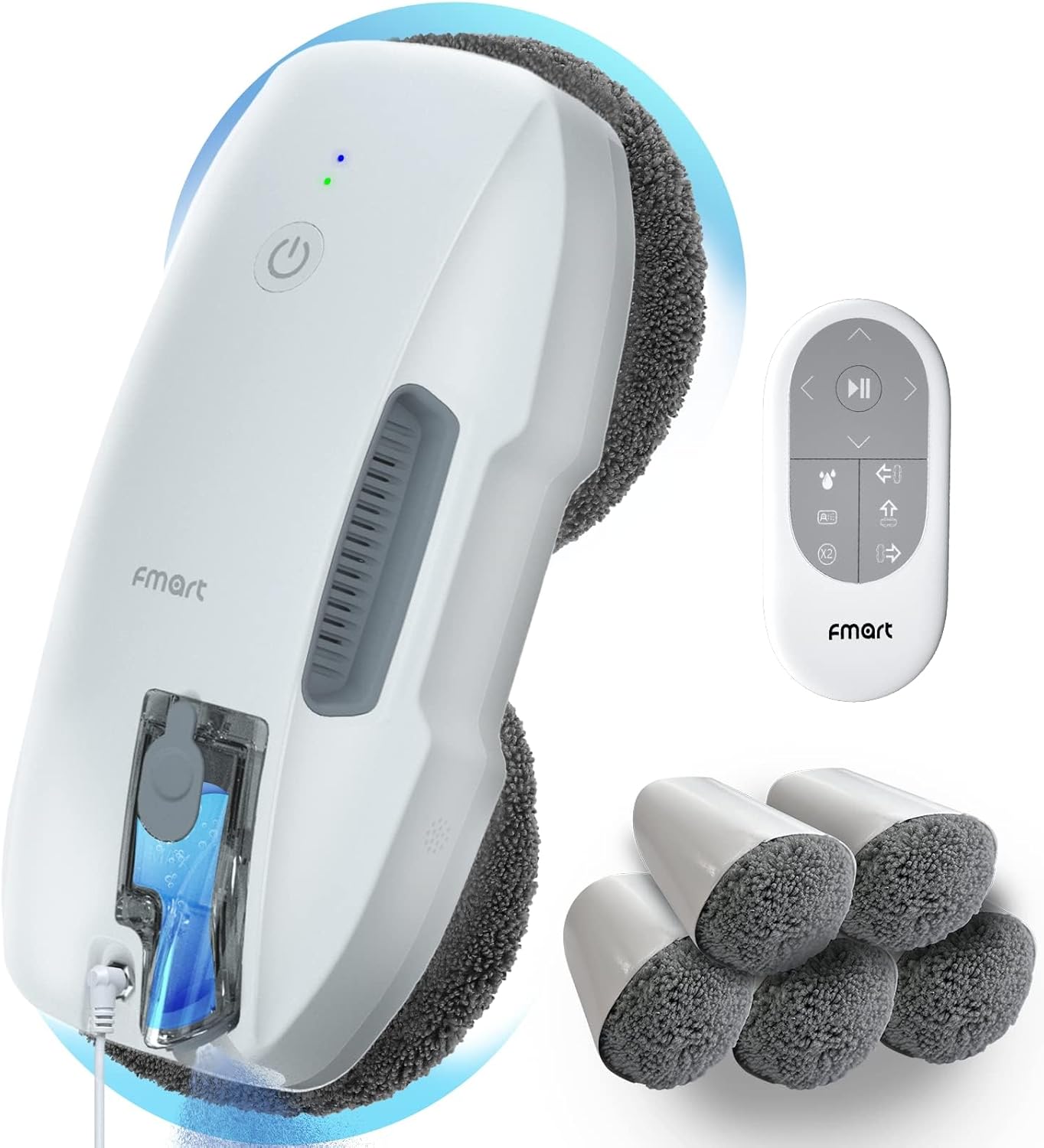
The Fmart T9 Robot Window Cleaner, its remote control, and included cleaning pads.
2. Safety Instructions
Always adhere to the following safety guidelines to prevent injury or damage to the device:
- Before first use, read the entire user manual and watch any demonstration videos provided by the manufacturer.
- Charge the device for 3 hours before its initial operation.
- Ensure the safety rope is securely attached and the power cable is properly connected before starting. The safety rope prevents the device from falling in case of accidental detachment.
- The integrated Uninterruptible Power Supply (UPS) system protects the robot in case of a power outage, allowing it to remain attached to the window for 20-30 minutes while emitting an audible warning.
- Use microfiber cloths that are slightly damp, not soaked. Excess moisture can reduce suction.
- Do not use the robot on curved glass surfaces.
- Remove the protective film from the remote control before use.
- Do not exceed the maximum water level in the reservoir.
- Keep hands and loose clothing away from moving parts during operation.
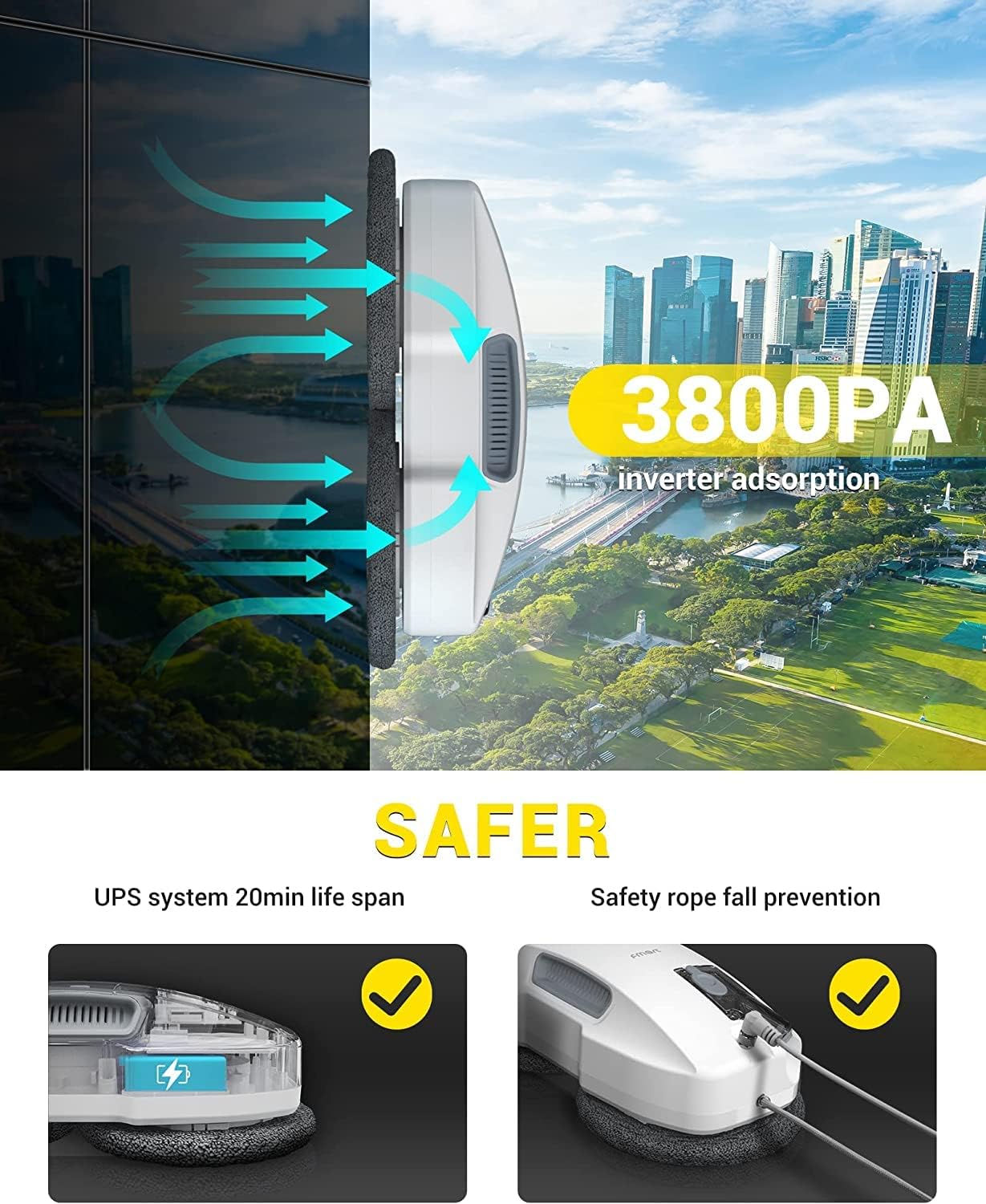
The Fmart T9 features strong suction and a safety rope for fall prevention.
3. Package Contents
Upon opening the package, verify that all the following components are included:
- Fmart T9 Robot Window Cleaner (Main Unit)
- Charger and Power Adapter
- Power Cable (7.5 meters long)
- Safety Rope (5 meters long)
- Remote Control
- Brush Holder (pre-mounted)
- Microfiber Cleaning Cloths (10 pieces)
- Water Bottle (for filling reservoir)
- User Manual (this document)
- Ultrasonic Nozzle (replacement)

All components included in the Fmart T9 Robot Window Cleaner package.
4. Product Features
- Easy Cleaning: Simple one-button start. The intelligent 20ml water tank sprays a 12-micron water mist every 5 seconds. One cleaning cycle covers 25-30 m². Best used with window cleaner or demineralized water.
- Variable Suction (3800 Pa): The robot automatically detects the level of dirt and adjusts suction power accordingly. Increased suction on less dirty surfaces for better results. Suitable for glass, tiles, wooden doors, and all smooth surfaces.
- Fall Protection: Equipped with a power cable and a safety rope. The integrated UPS system provides power for 20-30 minutes during power cuts, keeping the robot attached and sounding an alarm.
- Remote Control: The included remote control allows for easy and flexible operation of the T9 robot.
- Multiple Cleaning Modes: A single press initiates intelligent S-shaped cleaning for optimal, streak-free coverage. Manual control (up/down/left/right) is possible via the remote control. The robot automatically returns to its starting point after cleaning.
- Wet and Dry Dual Cleaning Power: Downward-facing spray nozzle with intelligent water flow control prevents waste. Innovative microfiber discs: the wet disc removes stubborn dirt, while the dry disc polishes instantly without streaks. Rotary motion ensures thorough cleaning for impeccably clean windows, with 50% increased efficiency.
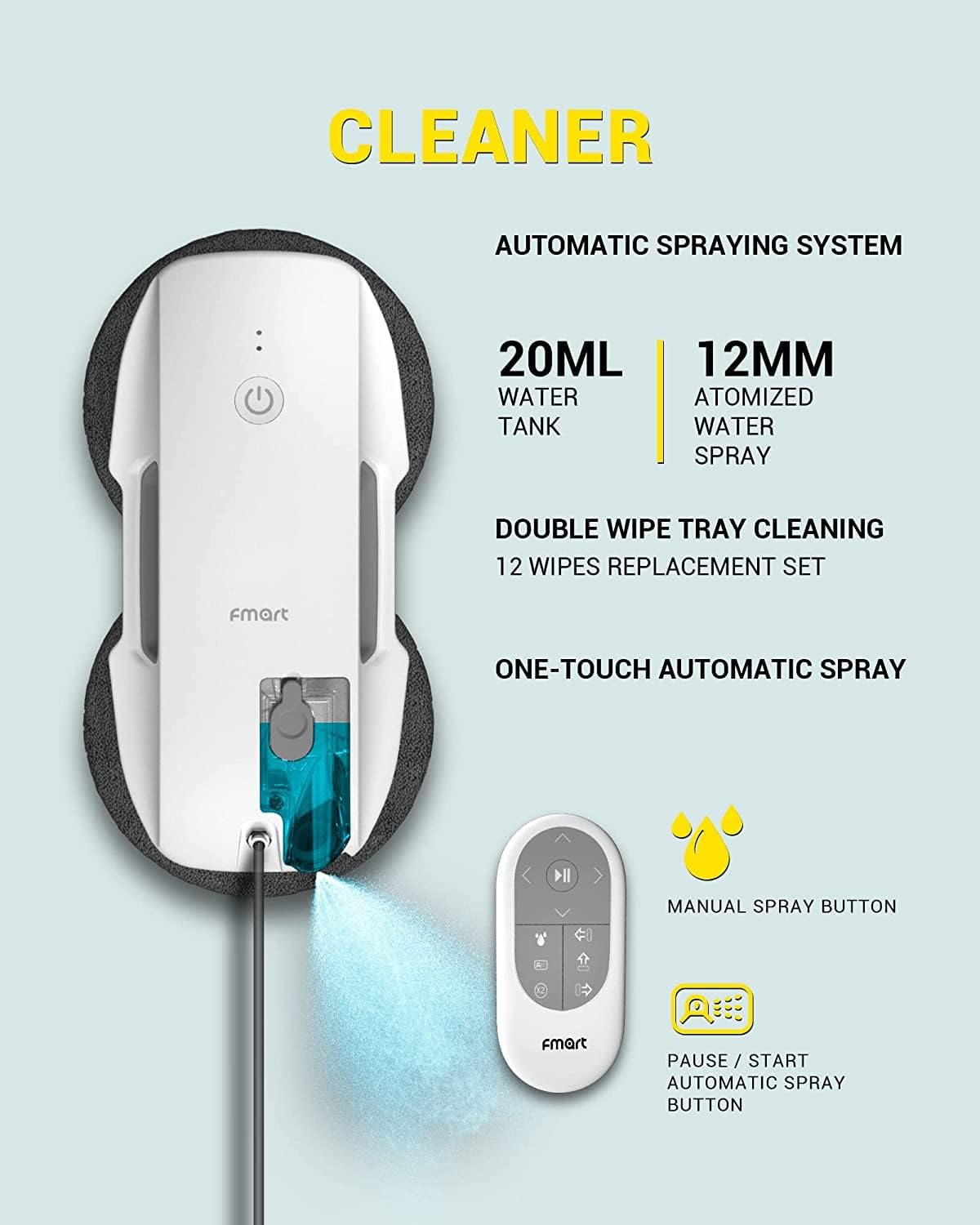
The Fmart T9 features an automatic spraying system for efficient cleaning.
5. Setup
- Charge the Device: Before first use, fully charge the Fmart T9 for approximately 3 hours.
- Attach Safety Rope: Securely screw the safety rope into the designated port on the robot. Attach the other end of the safety rope to a sturdy anchor point.
- Connect Power Cable: Connect the power cable to the robot and then plug the adapter into a power outlet. Ensure the connection is firm to avoid poor contact.
- Install Cleaning Wipes: Attach the microfiber cleaning wipes to the cleaning discs on the underside of the robot. Ensure they are slightly damp, not dripping wet.
- Fill Water Reservoir: Open the water reservoir cap and fill it with window cleaning solution or demineralized water using the provided water bottle. Do not overfill.
- Power On: Press the power button on the robot to turn it on. The indicator light will illuminate.

Visual guide for connecting the safety cable, power cable, installing wipes, filling the reservoir, and starting the robot.
6. Operation
Once the Fmart T9 is set up and powered on, you can begin the cleaning process:
- Placement: Place the robot on the window surface you wish to clean. Ensure it adheres firmly.
- Start Cleaning: Press the "Start" button on the robot or the remote control to initiate the automatic S-shaped cleaning path.
- Manual Control: For specific areas or spot cleaning, use the directional arrows (up/down/left/right) on the remote control to guide the robot manually.
- Automatic Spray: The robot will automatically spray water mist at regular intervals. You can also manually trigger the spray using the dedicated button on the remote control.
- Completion: The robot will automatically return to its starting point once the cleaning cycle is complete and emit an audible signal.
- Removal: Carefully remove the robot from the window surface by holding it firmly and pressing the release button (if applicable) or gently pulling it away.
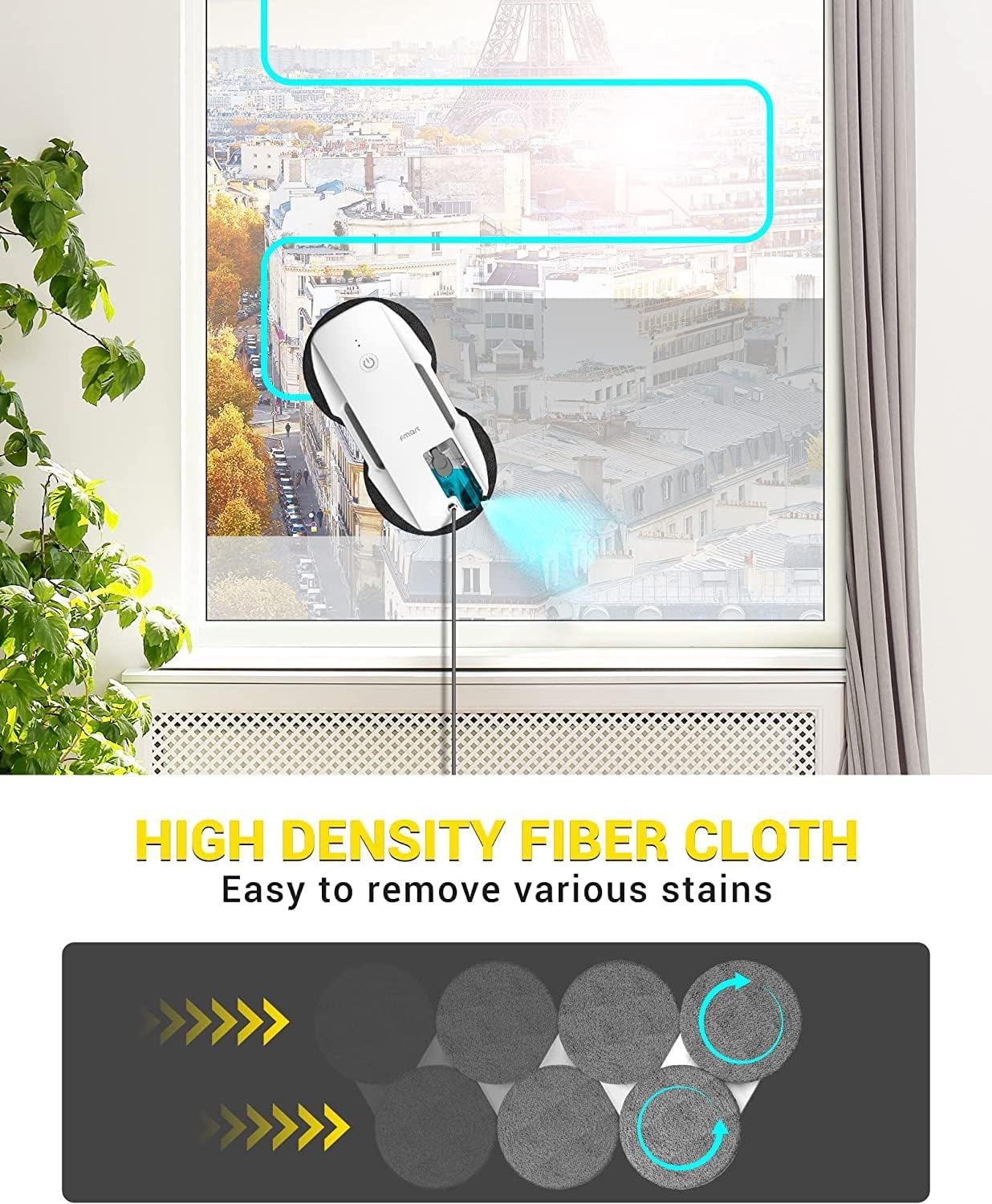
The Fmart T9 follows an intelligent cleaning path for thorough coverage.
7. Maintenance
Regular maintenance ensures optimal performance and longevity of your Fmart T9:
- Cleaning Cloths: After each use, remove the microfiber cleaning cloths. Hand wash them with mild detergent and warm water, or machine wash them according to fabric care instructions. Allow them to air dry completely before re-attaching.
- Water Reservoir: Empty any remaining liquid from the water reservoir after each use. Rinse the reservoir with clean water to prevent residue buildup.
- Nozzles: Periodically check the spray nozzles for blockages. If clogged, gently clean them with a small brush or needle.
- Robot Body: Wipe the exterior of the robot with a soft, dry cloth to remove dust and dirt. Do not use abrasive cleaners or immerse the robot in water.
- Storage: Store the robot in a cool, dry place away from direct sunlight when not in use.
8. Troubleshooting
| Problem | Possible Cause | Solution |
|---|---|---|
| Robot does not adhere to the window. | Insufficient suction power; cloths too wet; surface too dirty or uneven. | Ensure power cable is connected and secure. Check if cloths are only slightly damp. Clean the window surface manually first if heavily soiled. Do not use on curved glass. |
| Streaks or marks left on the window. | Cloths are too dirty or too dry; insufficient cleaning solution; water quality. | Replace or clean cloths. Ensure reservoir is filled with appropriate cleaning solution or demineralized water. Consider a second pass with fresh, dry cloths for polishing. |
| Robot stops unexpectedly. | Power interruption; battery low (UPS activated); obstacle detected. | Check power connection. If UPS is active, remove robot within 20-30 minutes. Clear any obstacles on the window surface. |
| Remote control not working. | Batteries are dead or incorrectly inserted; protective film not removed. | Replace remote control batteries. Ensure protective film is removed. Point remote directly at the robot. |
9. Specifications
| Feature | Detail |
|---|---|
| Brand | Fmart |
| Model Name | Fmart T9Pro (T9 variant) |
| Color | White |
| Product Dimensions (L x W x H) | 29L x 14W x 9H cm (approx. 14 x 20 x 29 cm; 980 grams) |
| Item Weight | 980 g |
| Battery Life (UPS) | 20 minutes (for power outage protection) |
| Special Features | Wired operation, AI Edge Detection, Anti-fall, Variable Suction Control |
| Suction Power | 3800 Pa |
| Water Tank Capacity | 20 ml |
| Filter Type | HEPA |
| Cleaning Path Width | 14.4 cm |
10. Warranty and Support
Fmart is committed to providing high-quality products and excellent customer service.
- Warranty: The Fmart T9 Robot Window Cleaner comes with up to 24 months warranty. Please retain your proof of purchase for warranty claims.
- Return Policy: A 30-day money-back guarantee is offered. Refer to your purchase platform for specific return procedures.
- Customer Service: For any questions, technical support, or warranty inquiries, please contact Fmart customer service. Prompt 24-hour email support is available.
- Spare Parts: Information regarding the availability of spare parts is currently unavailable.

Fmart offers dedicated customer support for product inquiries and assistance.
Related documentsT9

Ask a question about this manual
Ask about setup, troubleshooting, compatibility, parts, safety, or missing instructions. Manuals+ will review the question and use this page’s manual context to help answer it.