
1. Introduction
This manual provides detailed instructions for the proper use and care of your Samyang 135mm F1.8 Full Frame Telephoto Lens for Sony E-mount cameras. Please read this manual thoroughly before using the product to ensure optimal performance and longevity.
The Samyang 135mm F1.8 AF Full Frame Telephoto Lens is designed for high-performance imaging, offering sharp detail, pleasing bokeh, and advanced focus control. Its 135mm focal length is suitable for portraiture, close-ups, landscapes, and astrophotography, providing a focused field of view and subject separation. The wide F1.8 aperture, combined with a sophisticated optical design, ensures sharp results with smooth background blur.
2. What's in the Box
Verify that all items are present in the package:
- Samyang 135mm F1.8 Lens
- Lens Hood
- Front Lens Cap
- Rear Lens Cap
- Carrying Pouch
- User Manual (this document)
- Warranty Card
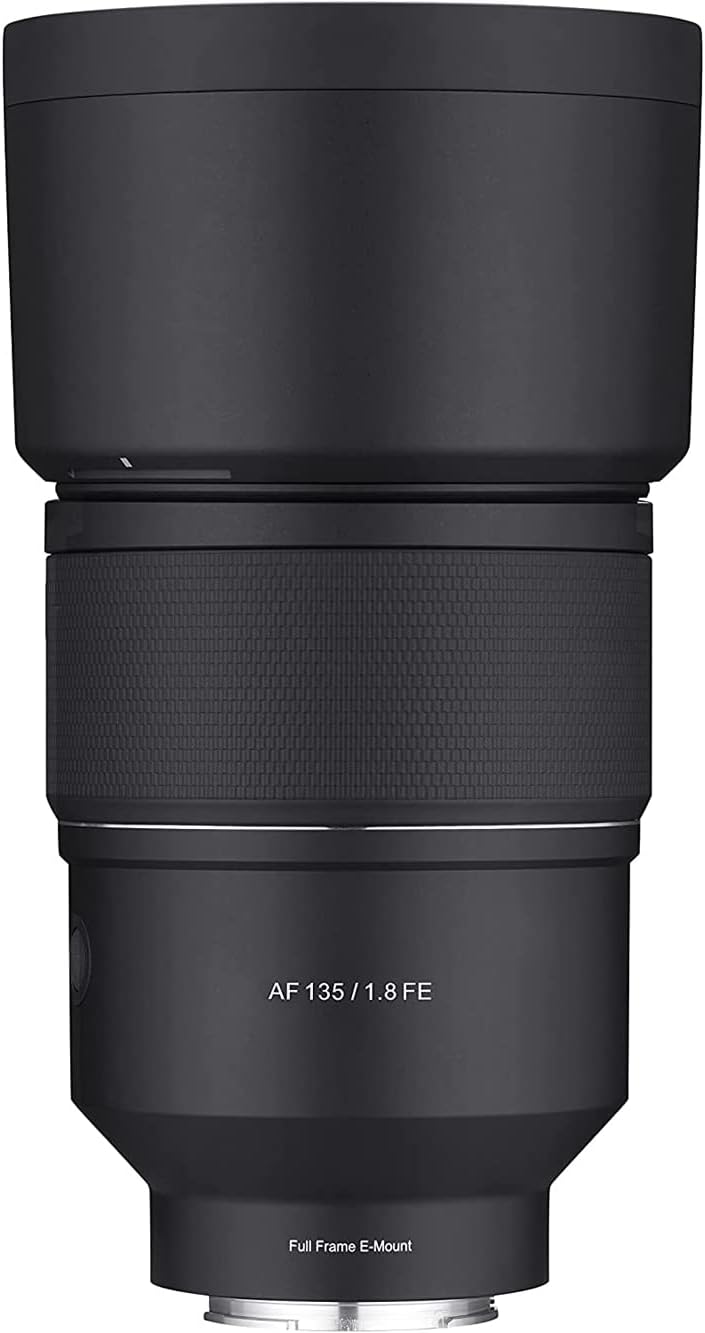
Image: Samyang 135mm F1.8 lens with its included lens hood, shown from a front-facing perspective.
3. Setup
3.1 Attaching the Lens
- Ensure your camera is powered off.
- Remove the rear lens cap from the lens and the body cap from your camera.
- Align the white index mark on the lens barrel with the corresponding white index mark on your camera's lens mount.
- Insert the lens into the camera mount and rotate it clockwise until it clicks into place. Do not force the lens.
- Attach the lens hood by aligning its mark with the mark on the front of the lens and twisting until it locks.

Image: The Samyang 135mm F1.8 lens, displaying its rear optical element and the camera mount. Control switches are visible on the side of the lens barrel.
3.2 Removing the Lens
- Ensure your camera is powered off.
- Press and hold the lens release button on your camera body.
- Rotate the lens counter-clockwise until it detaches from the camera body.
- Immediately attach the rear lens cap to the lens and the body cap to your camera to protect the sensor and lens elements.
4. Operating the Lens
4.1 Autofocus (AF) System
The lens features a Linear STM autofocus motor, providing fast, smooth, and quiet autofocus performance. This is beneficial for both still photography and video recording, minimizing focus breathing.
4.2 Focus Hold Button
The Focus Hold Button allows you to lock the focus at a specific distance. This button can often be customized via your camera's menu to perform other functions, such as Eye AF activation.
4.3 Custom Switch
The Custom Switch provides additional control options. In its default setting, it may control aperture silently, which is useful for video. Refer to your camera's manual for potential customization options for this switch.
4.4 Focus Range Limiter
The Focus Range Limiter switch optimizes autofocus speed by restricting the focus range. This is particularly useful when you know your subject will be within a certain distance, preventing the lens from hunting across its full focus range.
- FULL: Allows focusing across the entire range (0.69m to infinity).
- 0.69m - 2m: Limits focus to close-up distances (0.69 meters to 2 meters).
- 1.5m - ∞: Limits focus to longer distances (1.5 meters to infinity).

Image: An illustration of the Samyang 135mm F1.8 lens, pointing out the locations of the Focus Hold Button, Custom Switch, and Focus Range Limiter for user reference.
4.5 Manual Focus (MF)
To use manual focus, set your camera to MF mode. Rotate the focus ring on the lens to adjust focus. The lens features a micro-pattern focus ring for enhanced grip and precise control.
4.6 Aperture and Bokeh
The wide F1.8 aperture allows for significant light gathering and shallow depth of field, producing smooth, aesthetically pleasing background blur (bokeh). The optical design, including an ultra-precision aspherical lens, contributes to refined and natural bokeh.

Image: A sample portrait photograph demonstrating the shallow depth of field and smooth background blur achievable with the Samyang 135mm F1.8 lens.
4.7 Minimum Focusing Distance
The lens has a minimum focusing distance of 0.69 meters (2.26 feet) and a maximum magnification of 0.243x, enabling detailed close-up photography.
5. Maintenance and Care
- Cleaning the Lens: Use a soft, lint-free cloth or a lens brush to remove dust. For smudges or fingerprints, use a specialized lens cleaning solution and a microfiber cloth. Apply solution to the cloth, not directly to the lens.
- Storage: When not in use, always attach the front and rear lens caps. Store the lens in a cool, dry place, away from direct sunlight and extreme temperatures. Use the provided carrying pouch for added protection.
- Weather Sealing: The lens features weather sealing to protect against dust and light moisture. While it offers protection, avoid exposing the lens to heavy rain or submerging it in water.

Image: An internal diagram of the lens highlighting the weather-sealed areas, indicating protection against environmental elements.
6. Troubleshooting
| Problem | Possible Cause | Solution |
|---|---|---|
| Lens not recognized by camera | Improper attachment; dirty electrical contacts. | Re-attach the lens securely. Clean the lens and camera electrical contacts with a clean, dry cloth. Ensure camera firmware is up to date. |
| Autofocus is slow or inaccurate | Low light conditions; Focus Range Limiter set incorrectly; dirty lens elements. | Ensure adequate lighting. Adjust the Focus Range Limiter to "FULL" or the appropriate range. Clean the front and rear lens elements. Update lens firmware if available. |
| Images are blurry | Incorrect focus; camera shake; dirty lens. | Verify focus settings. Use a faster shutter speed or tripod. Clean lens elements. |
7. Specifications
| Feature | Detail |
|---|---|
| Brand | Samyang |
| Model Number | SYIO13518-E |
| Focal Length | 135mm |
| Maximum Aperture | F1.8 |
| Lens Type | Telephoto Prime |
| Compatible Mountings | Sony E-mount |
| Minimum Focusing Distance | 0.69m (2.26ft) |
| Maximum Magnification | 0.243x |
| Optical Design | 13 elements in 11 groups (including 3 ED, 2 HR, 1 U-ASP) |
| Autofocus Motor | Linear STM |
| Weather Sealing | Yes |
| Product Dimensions | 7.87 x 3.94 x 1.97 inches |
| Item Weight | 2.64 pounds (approx. 1.2 kg) |
8. Warranty and Support
For warranty information, please refer to the Warranty Card included with your product. Keep your proof of purchase for warranty claims.
A digital version of this user manual is available for download. For further assistance or technical support, please visit the official Samyang website or contact their customer service.
Official User Manual (PDF): Download PDF


