1. Introduction
This manual provides comprehensive instructions for the installation, operation, and maintenance of your alpina Smart Home Wi-Fi Outdoor Camera. Please read this manual thoroughly before using the product to ensure proper function and safety. Keep this manual for future reference.
2. Safety Information
Observe the following safety precautions to prevent damage to the product or injury to yourself:
- Ensure the power adapter is connected to a suitable power source (100-240V / 50-60Hz).
- Do not expose the camera to extreme temperatures or humidity beyond its IP54 rating.
- Do not attempt to disassemble or modify the camera. This will void the warranty.
- Keep the camera and its components out of reach of children.
- Use only the provided power adapter.
- Ensure the mounting surface is strong enough to support the camera.
3. Package Contents
Verify that all items are present in the package:
- 1x alpina Smart Home Wi-Fi Outdoor Camera
- 1x Mounting Kit (fixation and screws)
- 1x Power Adapter
- 1x User Manual (this document)

Image: The alpina Smart Home Wi-Fi Outdoor Camera and its packaging. The box highlights features like Full HD, IP54 rating, and app control.
4. Product Features
The alpina Smart Home Wi-Fi Outdoor Camera is designed for external surveillance, offering a range of functionalities for monitoring your property.
- Full HD 1080p Resolution: Provides clear and detailed video footage.
- Pan and Tilt Functionality: Allows for remote adjustment of the camera's viewing angle (85° tilt, 355° pan).
- Night Vision: Infrared night vision up to 10 meters for monitoring in low-light or dark conditions.
- Motion and Sound Detection: Alerts you via push notifications on your smartphone when activity is detected.
- Two-Way Audio: Enables communication through the camera with a built-in microphone and speaker.
- IP54 Weather Resistance: Certified dustproof and protected against water splashes from any direction, suitable for outdoor use.
- alpina Smart Home App Control: Manage and view live footage, control camera movement, and receive alerts from your smartphone.
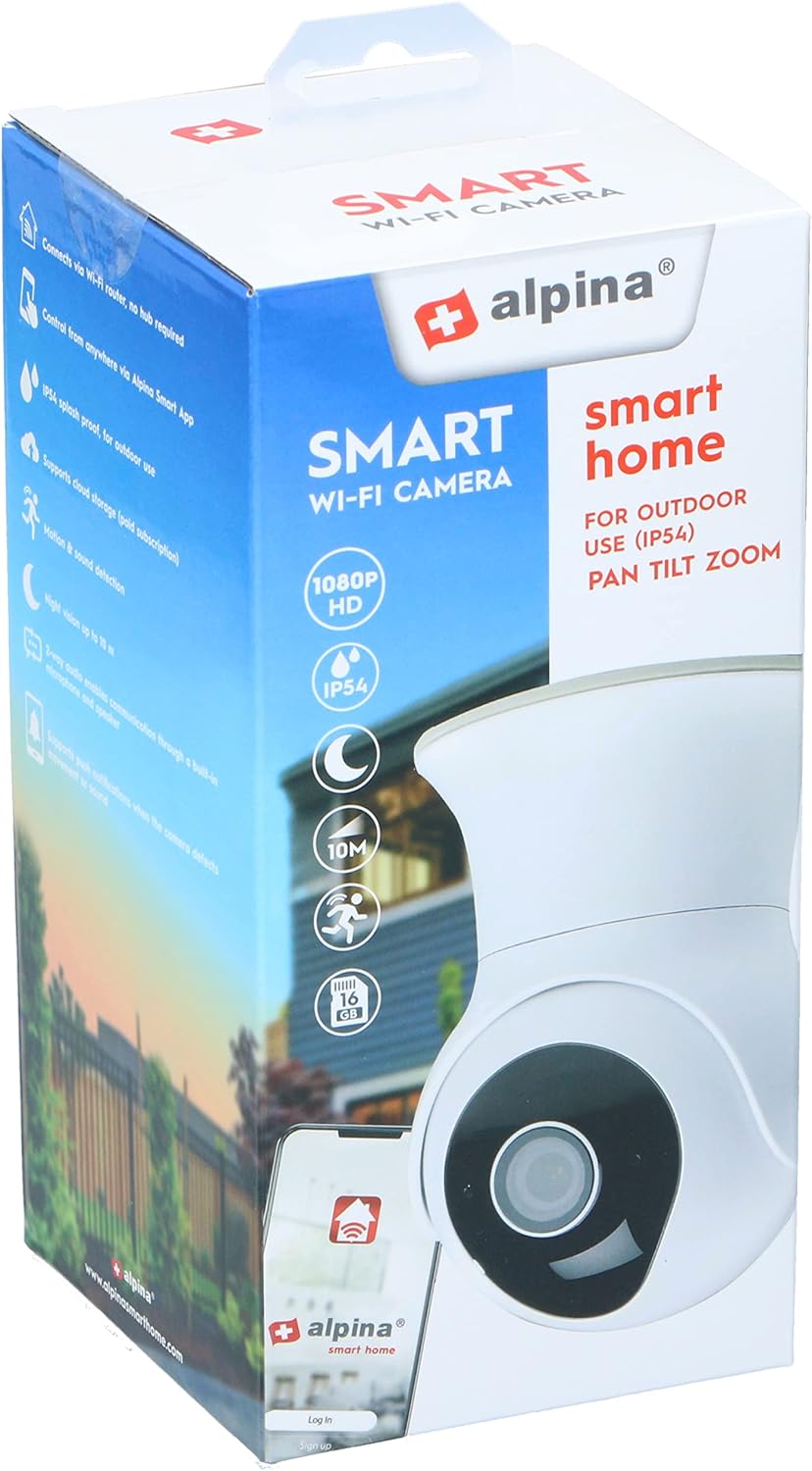
Image: The camera's pan and tilt capabilities are illustrated, showing a 85-degree vertical tilt and a 355-degree horizontal pan rotation.

Image: A smartphone screen shows a live feed from the camera, highlighting key features such as push notifications, motion and sound detection, and two-way audio communication.
5. Setup Instructions
5.1. App Installation
- Download the alpina Smart Home app from the Google Play Store (for Android devices) or the Apple App Store (for iOS devices).
- Register for a new account or log in if you already have one.
5.2. Camera Installation
- Choose a strategic outdoor location for mounting the camera, ensuring it is within Wi-Fi range.
- Use the provided mounting kit (screws and fixation) to securely attach the camera to a wall or ceiling.
- Connect the camera to the power adapter and plug it into a power outlet. The camera will power on and enter pairing mode (indicated by a flashing LED).
5.3. Pairing the Camera with the App
- Open the alpina Smart Home app on your smartphone.
- Tap the "+" icon to add a new device.
- Select "Security Camera" or the appropriate camera type from the list.
- Follow the on-screen instructions to connect the camera to your Wi-Fi network. This typically involves scanning a QR code generated by the app with the camera lens or entering your Wi-Fi credentials.
- Once connected, the camera's LED indicator will turn solid, and you will see the camera feed in the app.
- Name your camera for easy identification.
6. Operating Instructions
6.1. Live View
From the app's main screen, tap on your camera's name to access the live video feed. You can view real-time footage of your monitored area.
6.2. Pan and Tilt Control
Within the live view interface, use the directional controls (usually arrows or a joystick icon) to remotely adjust the camera's horizontal (pan) and vertical (tilt) angles to cover different areas.
6.3. Two-Way Audio
To use the two-way audio feature, tap the microphone icon in the app. Hold the button to speak, and release to listen. Ensure your smartphone's microphone is enabled for the app.
6.4. Motion and Sound Detection
Configure motion and sound detection settings in the app's camera settings. You can adjust sensitivity levels and set up notification schedules. When motion or sound is detected, the camera will send a push notification to your smartphone.
6.5. Recording and Snapshots
The app allows you to manually record video clips or take snapshots from the live view. These recordings and images are typically stored within the app or on a connected cloud service (if subscribed).
7. Maintenance
7.1. Cleaning
To clean the camera lens and body, use a soft, dry cloth. Do not use harsh chemicals, solvents, or abrasive cleaners, as these can damage the camera's surface or lens coating.
7.2. Environmental Considerations
While the camera is IP54 rated for dust and water resistance, avoid direct exposure to high-pressure water jets or prolonged submersion. Ensure the power adapter connection is protected from moisture.
8. Troubleshooting
If you encounter issues with your camera, refer to the following common solutions:
- Camera not connecting to Wi-Fi:
- Ensure the camera is within range of your Wi-Fi router.
- Verify your Wi-Fi password is correct.
- Restart your router and the camera.
- Ensure your Wi-Fi network is 2.4GHz, as the camera may not support 5GHz networks.
- No live video feed:
- Check your internet connection.
- Ensure the camera is powered on and connected to Wi-Fi.
- Restart the app.
- Motion/Sound detection not working:
- Verify detection settings are enabled and sensitivity is adjusted correctly in the app.
- Check app notification permissions on your smartphone.
- Two-way audio issues:
- Ensure your smartphone's microphone and speaker are functioning and app permissions are granted.
- Check the camera's microphone and speaker for obstructions.
9. Specifications
| Model Number | 8711252264653 |
| Camera Type | Pan, Tilt, Zoom (PTZ) Dome |
| Video Resolution | Full HD 1080p |
| Video Compression | H.264 |
| Frame Rate | 25fps |
| Lens Size | 4 mm |
| Power Input | 100-240V / 50-60Hz, 1A |
| Pan Angle | 355° |
| Tilt Angle | 85° |
| IP Rating | IP54 (Dustproof, Splashproof) |
| Night Vision Range | Up to 10 meters |
| Wireless Technology | Wi-Fi (2.4 GHz) |
| Dimensions (L x W x H) | 7.6 x 7.6 x 10.7 cm |
| Weight | 460 grams |
| Material | Metal |
| Color | White |
10. Warranty and Support
For warranty information and technical support, please refer to the official alpina Smart Home website or contact their customer service. Details regarding specific warranty periods and support channels are typically provided with your purchase documentation or on the manufacturer's website.
Spare parts availability information is not available in the provided product data.


