1. Introduction
Thank you for choosing the LVYUAN Pure Sine Wave Power Inverter 1600W. This manual provides essential information for the safe and efficient operation, installation, and maintenance of your inverter. Please read this manual thoroughly before use and retain it for future reference.
2. Safety Information
WARNING: Failure to follow these safety instructions may result in electric shock, fire, or serious injury.
- This inverter is designed for DC12V systems only. Do not connect it to DC24V or other voltage systems.
- Ensure proper ventilation around the inverter to prevent overheating. Do not block the cooling fan vents.
- Keep the inverter away from water, moisture, flammable materials, and corrosive substances.
- When connecting electrical appliances, ensure the inverter's capacity matches the appliance's power consumption. Refer to the capacity calculation guidelines in Section 6.
- The maximum power for a single AC output receptacle must not exceed 1500W. The total rated power when using multiple receptacles simultaneously is 2500W.
- When connecting inductive loads (e.g., motors, compressors), calculate the startup peak power as 3 to 7 times the rated power. This prevents damage to the equipment from excessive current during startup.
- Always connect the inverter to the battery with correct polarity (red to positive, black to negative). Reverse connection will damage the unit.
- Do not disassemble or modify the inverter. Servicing should only be performed by qualified personnel.
3. Product Overview
3.1 Key Features
- Pure Sine Wave Output: Provides stable and clean power, suitable for sensitive electronics and motor-driven appliances.
- High Power Output: 1600W continuous power with 3200W peak surge capability.
- Multiple Output Ports: Three AC 100V outlets and three USB ports for versatile charging.
- LCD Display: Real-time monitoring of input voltage, output voltage, and output power.
- Smart Cooling Fan: Temperature-controlled fan activates at 45°C to ensure stable operation and extend product lifespan.
- Comprehensive Protection: Includes low voltage, overvoltage, over-temperature, overload, short circuit, and reverse connection protection.
- Remote Control Function: Conveniently power the inverter on or off from a distance.
3.2 Package Contents
- LVYUAN Pure Sine Wave Power Inverter 1600W
- Battery Connection Cables (16sq x 2)
- Digital Remote Controller
- Fuses (x4)
- User Manual
3.3 Product Diagram
 Figure 1: LVYUAN Pure Sine Wave Power Inverter 1600W and accessories.
 Figure 2: Front panel showing AC outlets and USB ports.
 Figure 3: Rear panel with DC input terminals and cooling fans.
4. Setup
4.1 Placement
- Place the inverter in a dry, well-ventilated area, away from direct sunlight, heat sources, and moisture.
- Ensure there is sufficient space around the inverter for proper airflow, especially around the cooling fans.
- Mount the inverter on a stable, non-flammable surface.
4.2 Battery Connection
- Ensure the inverter's power switch is in the OFF position.
- Connect the red battery cable to the positive (+) terminal of the inverter and the positive (+) terminal of the 12V DC battery.
- Connect the black battery cable to the negative (-) terminal of the inverter and the negative (-) terminal of the 12V DC battery.
- Ensure all connections are tight and secure to prevent loose connections and sparking.
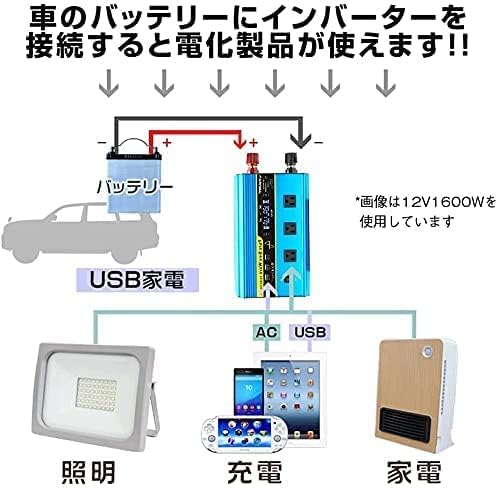 Figure 4: Example of connecting the inverter to a car battery.
 Figure 5: Example of a solar power system connection with the inverter.
4.3 Frequency Setting (50Hz/60Hz)
The inverter supports both 50Hz and 60Hz output frequencies. The frequency can be switched using a dedicated button or switch on the unit (refer to the product's physical interface for exact location). Ensure the selected frequency matches the requirements of your connected appliances.
5. Operation
5.1 Powering On/Off
- After connecting the inverter to the battery, switch the inverter's power button to the ON position. The LCD display will illuminate, showing input voltage, output voltage, and output power.
- To power off, switch the inverter's power button to the OFF position.
5.2 Using AC Outlets
- Plug your AC appliances into the three AC 100V outlets.
- Remember that a single outlet supports a maximum of 1500W, and the total combined output for all AC outlets is 2500W.
5.3 Using USB Ports
- Connect your USB-powered devices to the three USB ports for charging.
5.4 Remote Control
The included digital remote controller allows you to turn the inverter ON (button A) or OFF (button B) from a distance.
 Figure 6: Digital Remote Controller.
6. Maintenance
6.1 Cleaning
- Regularly clean the exterior of the inverter with a dry, soft cloth.
- Ensure the cooling vents are free from dust and debris to maintain optimal airflow.
6.2 Cooling Fan
The inverter features smart cooling fans that activate automatically when the internal temperature reaches 45°C. Ensure the fans are not obstructed and are operating correctly. If the fans are excessively noisy or not spinning, contact support.
 Figure 7: Inverter cooling fans.
6.3 Fuse Replacement
The inverter is equipped with internal fuses for protection. If a fuse blows, the inverter may stop functioning. Replacement fuses are included. If you suspect a blown fuse, consult a qualified technician for replacement. Do not attempt to replace fuses yourself unless you are experienced with electrical repairs.
6.4 Storage
If storing the inverter for an extended period, ensure it is clean, dry, and disconnected from all power sources. Store it in a cool, dry place.
7. Troubleshooting
This section outlines common issues and their potential solutions. If the problem persists, contact customer support.
| Problem | Possible Cause | Solution |
|---|---|---|
| No power output / Inverter does not turn on | Loose battery connection Low battery voltage Inverter switch is OFF Blown fuse | Check and secure battery cables Charge or replace battery Turn inverter switch ON Consult technician for fuse replacement |
| Overload alarm / Shutdown | Connected appliance exceeds inverter's rated power High startup surge from inductive load | Reduce load or use lower power appliance Ensure inverter capacity is sufficient for peak startup power (3-7x rated power for inductive loads) |
| Over-temperature alarm / Shutdown | Poor ventilation Blocked cooling fans Ambient temperature too high | Ensure adequate ventilation Clear any obstructions from fans Move inverter to a cooler environment |
| Low voltage alarm / Shutdown | Battery voltage too low (below DC10V for alarm, DC9V for shutdown) | Charge or replace battery |
| Overvoltage shutdown | Input voltage too high (above DC16V) | Check battery voltage; ensure it is within DC11V-15V range |
| Reverse connection protection | Battery cables connected with incorrect polarity | Disconnect immediately and reconnect with correct polarity (red to +, black to -) |
 Figure 8: Inverter protection features.
8. Specifications
| Parameter | Value |
|---|---|
| Rated Output Power | 1600W |
| Peak Output Power | 3200W |
| Input DC Voltage Range | DC11V ~ 15V |
| Output AC Voltage | AC100V ±5% |
| Output Frequency | 50Hz / 60Hz (Switchable) |
| Output Waveform | Pure Sine Wave |
| Conversion Efficiency | >88% |
| Standby Current (Power ON) | 0.8A |
| Standby Current (Power OFF) | <0.1A |
| Operating Temperature | 0℃ ~ 45℃ |
| Low Voltage Alarm | DC10V ±0.5V |
| Low Voltage Shutdown | DC9V ±0.5V |
| Overvoltage Shutdown | DC16V |
| Over-temperature Protection | >75℃ |
| Dimensions (L x W x H) | 313mm x 160mm x 110mm |
| Weight | 2.5kg |
| Display Type | LCD |
| AC Outlets | 3 (Max 1500W per outlet, 2500W total) |
| USB Ports | 3 |
8.1 Dimensions
 Figure 9: Product Dimensions.
8.2 Pure Sine Wave Output
This inverter produces a pure sine wave output, which is identical to the electricity supplied by household power outlets. This makes it suitable for all types of electrical appliances, including sensitive electronics and devices with motors or compressors, which may not operate correctly or may be damaged by modified sine wave inverters.
 Figure 10: Pure Sine Wave vs. Modified Sine Wave.
8.3 Inverter Capacity Calculation Guidelines
When selecting an inverter, it is crucial to consider the power consumption of your appliances. There is approximately 10-20% conversion loss when converting DC to AC. For continuous operation, it is recommended to choose an inverter with at least 20% more capacity than the total power consumption of your appliances.
For appliances with motors or compressors (e.g., refrigerators, air conditioners, power tools), the startup current (surge power) can be 3 to 7 times their rated power. Ensure your inverter's peak power capacity can handle this surge.
 Figure 11: Inverter Capacity Calculation Method 1.
 Figure 12: Inverter Capacity Calculation Method 2.
 Figure 13: Power Consumption Guidelines for various appliances.
9. Warranty and Support
LVYUAN offers a permanent warranty for its inverters, demonstrating confidence in product quality and durability. Domestic support services are available to assist with any inquiries or issues.
For technical assistance, troubleshooting, or warranty claims, please contact LVYUAN customer support through the official channels provided at the point of purchase or on the LVYUAN brand website.


