1. Introduction
This manual provides essential instructions for the safe and effective use of your Flujoy 1300mAh/3.7V Li-Polymer replacement battery, model CS-MDX310SL. This battery is specifically designed as a replacement for MODECOM MX3 HD devices and is compatible with part number 1ICP4/44/54(3PIN60. Please read this manual thoroughly before installation and use to ensure optimal performance and safety.
2. Important Safety Information
Failure to follow these safety instructions may result in fire, electric shock, injury, or damage to the battery or device. Keep these instructions in a safe place for future reference.
- DO NOT attempt to disassemble, open, or service the battery pack.
- Replace ONLY with the battery pack designated for this product.
- DO NOT crush, puncture, short external contacts, or dispose of in fire or water.
- DO NOT store above 60°C (140°F).
- New battery pack must be fully charged before use.
- To reduce risk of fire or burns, read instructions in operating guide before using the battery.

Image 2.1: Rear view of the battery, displaying critical safety warnings and manufacturer information. This side includes instructions to fully charge the new battery before use and warnings against fire or burns.
3. Setup and Installation
This battery is intended as a direct replacement. Installation typically involves opening the device, carefully removing the old battery, and connecting the new one. Due to variations in device design, specific installation steps are not provided here. Always refer to your MODECOM MX3 HD device's original instruction manual or a qualified technician for detailed installation procedures.
- Ensure your device is powered off and disconnected from any power source before beginning installation.
- Carefully open your device according to its manufacturer's instructions.
- Disconnect the old battery. Note the orientation of the wires (red, white, black) and their connection points.
- Connect the new Flujoy battery, ensuring the wires are correctly aligned with the device's terminals. The battery features three wires (red, white, black) with yellow protective tape on the ends.
- Secure the battery within the device, ensuring no wires are pinched.
- Close the device and proceed to initial charging.
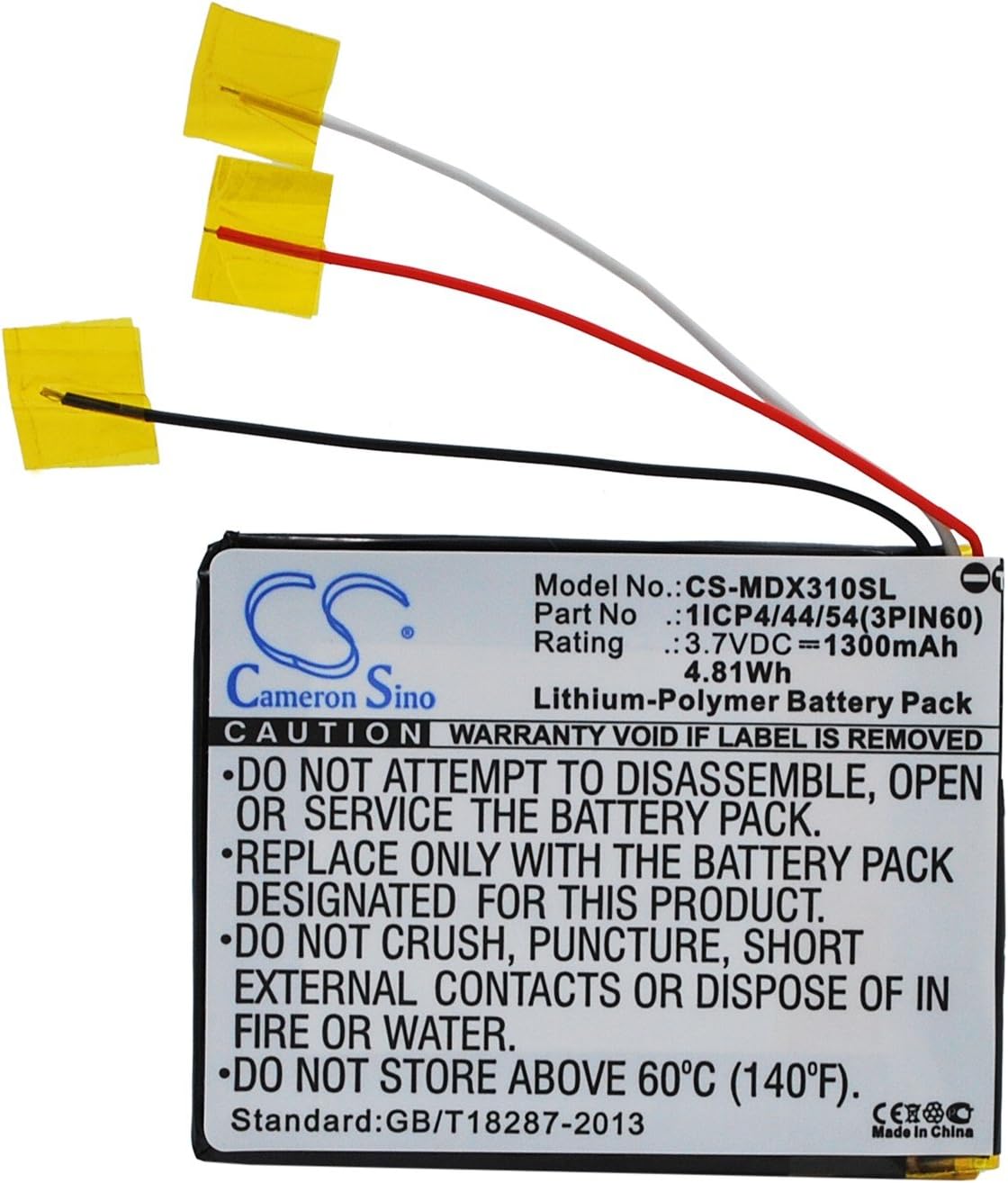
Image 3.1: Front view of the Flujoy replacement battery, showing its label with model number CS-MDX310SL, part number 1ICP4/44/54(3PIN60, and electrical specifications. The three connection wires are clearly visible.
4. Operation
After successful installation, the battery is ready for use. For optimal performance and longevity, follow these operational guidelines:
- Initial Charge: Fully charge the new battery before its first use. This helps calibrate the battery's charge indicator and ensures maximum capacity.
- Charging: Use only the charger supplied with your MODECOM MX3 HD device or a compatible charger. Avoid using damaged chargers or cables.
- Discharging: It is generally recommended to avoid completely draining Li-Polymer batteries. Recharge when the device indicates low battery.
- Temperature: Operate the device with the battery within its recommended temperature range (typically 0°C to 45°C or 32°F to 113°F). Extreme temperatures can degrade battery performance and lifespan.
5. Maintenance and Storage
Proper maintenance and storage can significantly extend the life of your battery.
- Regular Use: For best results, use your device regularly. If the device is not used for extended periods, perform a full charge and discharge cycle at least once every three months.
- Storage: If storing the battery for a long time, ensure it is charged to approximately 50-60% capacity. Store in a cool, dry place, away from direct sunlight and extreme temperatures. Do not store above 60°C (140°F).
- Cleaning: Keep the battery and device contacts clean and dry. Use a soft, dry cloth to wipe away any dust or debris.
- Disposal: Do not dispose of the battery in household waste. Follow local regulations for proper disposal of Li-Polymer batteries, which often involves recycling centers.
6. Troubleshooting
If you encounter issues with your Flujoy replacement battery, consider the following common solutions:
- Battery Not Charging:
- Ensure the charger and cable are functioning correctly.
- Verify that the battery is properly installed and its connectors are clean and secure.
- Check the device's charging port for any obstructions or damage.
- Short Battery Life:
- Ensure the battery has been fully charged before use.
- Reduce background applications or device settings that consume excessive power.
- Operating in extreme temperatures can reduce battery life.
- Device Not Powering On:
- Confirm the battery is fully charged.
- Re-check the battery installation to ensure all connections are firm.
- If the issue persists, the problem may not be battery-related. Consult your device's manual or a technician.
7. Specifications
| Feature | Detail |
|---|---|
| Brand | Flujoy |
| Model Number | CS-MDX310SL |
| Compatible Device Models | MODECOM MX3 HD |
| Compatible Part Number | 1ICP4/44/54(3PIN60 |
| Battery Type | Li-Polymer |
| Capacity | 1300mAh |
| Watt-Hours (Wh) | 4.81Wh |
| Voltage | 3.7V |
| Battery Dimensions (mm) | 55.2 x 43.8 x 4.6 mm |
| Battery Dimensions (inches) | 2.17 x 1.72 x 0.18 inches |
| Item Weight | 1.73 ounces |
| Certifications | ISO9001, RoHS, CE, UN38.3, MSDS |

Image 7.1: Angled view of the Flujoy battery, highlighting the label with its model number, part number, voltage, and capacity. This image provides a clear view of the battery's physical characteristics and printed specifications.
8. Warranty Information
Flujoy offers a 60-day warranty for this replacement battery. This warranty covers manufacturing defects and performance issues under normal use. Within this period, you are eligible for a full refund or a free replacement if the product does not meet expectations or exhibits defects. Please retain your proof of purchase for warranty claims.
9. Customer Support
For further assistance, technical support, or warranty claims, please contact your retailer or the Flujoy customer service department. When contacting support, please have your product model number (CS-MDX310SL) and proof of purchase readily available.
For general inquiries or to find more information about Flujoy products, you may visit the official Flujoy presence on the platform where the product was purchased.