
1. Introduction
Thank you for choosing the Hssio Portable Bladeless Neck Fan M5. This manual provides essential information for the safe and efficient operation of your device. Please read it thoroughly before use and retain it for future reference.

Image 1.1: The Hssio Portable Bladeless Neck Fan M5, featuring a sleek blue design.
2. Package Contents
Verify that all items listed below are present in your package:
- 1 x Hssio Portable Bladeless Neck Fan M5
- 1 x USB-C Charging Cable
- 1 x User Manual (this document)

Image 2.1: Contents included in the Hssio Neck Fan package.
3. Product Overview
The Hssio M5 Neck Fan is designed for personal cooling with a hands-free, wearable design. It features bladeless technology for safety and a 360° surround airflow system.
Key Features:
- Bladeless Design: Ensures safe use for all ages, preventing hair entanglement.
- 360° Surround Airflow: Provides comprehensive cooling around the neck and face.
- LED Digital Display: Shows battery level and fan speed settings.
- Adjustable Fit: The fan's structure is designed to be flexible for a comfortable fit.

Image 3.1: The Hssio Neck Fan M5 worn around the neck, highlighting its discreet and modern appearance.
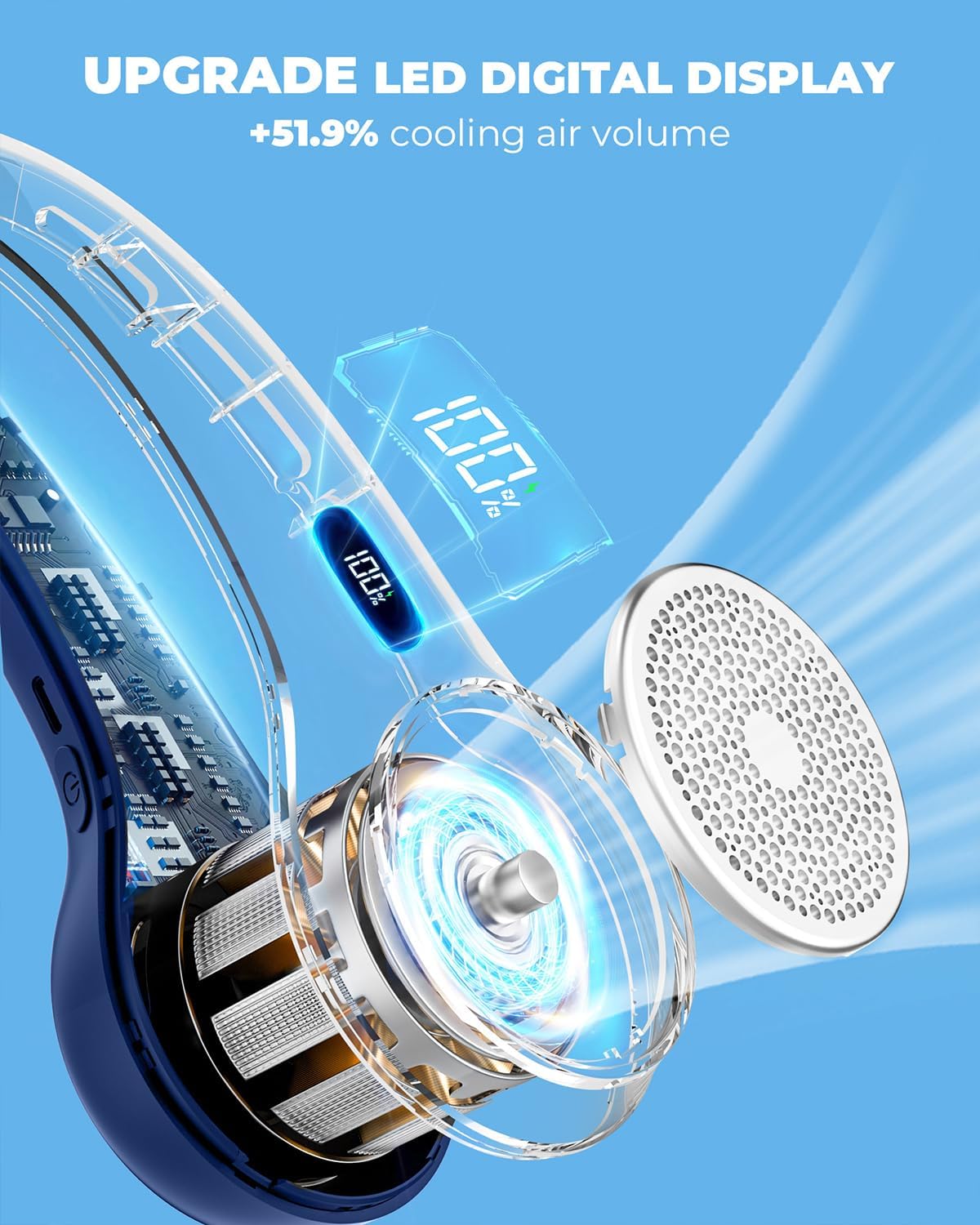
Image 3.2: Detailed view of the fan's internal components and LED digital display.

Image 3.3: Illustration of the 360° airflow and adjustable nature of the fan.
4. Setup
Charging the Device:
- Locate the USB-C charging port on the side of the neck fan.
- Connect the provided USB-C charging cable to the fan and plug the other end into a compatible USB power adapter (not included) or a computer USB port.
- The LED digital display will show the charging status. A full charge typically takes 3-4 hours.
- Once fully charged, disconnect the charging cable.
The fan is equipped with a 4000mAh high-capacity battery, providing 3 to 12 hours of operation depending on the speed setting.

Image 4.1: Charging port and battery capacity details.
5. Operating Instructions
The Hssio M5 Neck Fan features a simple push-button control for power and speed adjustment.
Power On/Off and Speed Adjustment:
- Power On: Press the power button once to turn on the fan at Speed 1 (Soft Wind).
- Adjust Speed: Subsequent presses of the power button will cycle through the speeds:
- Speed 1: Soft Wind (Ideal for quiet rest)
- Speed 2: Comfortable Wind (Suitable for home working)
- Speed 3: Strong Wind (Recommended for daily exercise or intense cooling)
- Power Off: After Speed 3, pressing the button again will turn the fan off.
The LED digital display will indicate the current fan speed and remaining battery percentage.

Image 5.1: Visual representation of the three fan speed settings and their recommended uses.
6. Maintenance
Proper maintenance ensures the longevity and optimal performance of your neck fan.
Cleaning:
- Ensure the fan is powered off and disconnected from any power source before cleaning.
- Wipe the exterior of the fan with a soft, dry, or slightly damp cloth. Do not use abrasive cleaners or solvents.
- Do not immerse the fan in water or any other liquid.
- Use a soft brush or compressed air to gently clean any dust from the air inlets and outlets.
Storage:
- Store the fan in a cool, dry place away from direct sunlight and extreme temperatures.
- If storing for an extended period, charge the battery to approximately 50% every three months to maintain battery health.
7. Troubleshooting
If you encounter any issues with your Hssio M5 Neck Fan, refer to the following common problems and solutions:
| Problem | Possible Cause | Solution |
|---|---|---|
| Fan does not turn on. | Battery is depleted. | Charge the fan using the provided USB-C cable. |
| Low airflow. | Fan speed is too low. | Press the power button to increase the fan speed. |
| Low airflow. | Air inlets/outlets are obstructed. | Ensure no clothing, hair, or debris is blocking the air vents. Clean if necessary. |
| Fan makes unusual noise. | Debris inside the fan. | Power off the fan and gently try to remove any visible debris. If the noise persists, contact customer support. |
| Battery life is shorter than expected. | Operating at high speed continuously. | Lower the fan speed to extend battery life. Ensure the fan is fully charged before use. |
If the problem persists after attempting these solutions, please contact Hssio customer support.
8. Specifications
| Feature | Detail |
|---|---|
| Model | M5 |
| Brand | Hssio |
| Color | Blue |
| Design | Wearable Bladeless Neck Fan |
| Power Source | Battery Powered (Cordless) |
| Battery Capacity | 4000mAh Lithium Polymer |
| Running Time | 3-12 hours (depending on speed) |
| Charging Time | Approximately 3-4 hours |
| Charging Port | USB-C |
| Airflow | 360° Surround Cooling Air, 70% increased air volume |
| Fan Speeds | 3 (Soft, Comfortable, Strong) |
| Noise Level | 25 dB |
| Control Method | Push Button (Touch) |
| Product Dimensions | 2.4"D x 8.5"W x 5.5"H (6.1cm D x 21.6cm W x 14cm H) |
| Item Weight | 200 Grams (7.1 ounces) |
| Voltage | 5 Volts |
| Wattage | 20 watts |
| UPC | 790757389601 |

Image 8.1: Key specifications of the Hssio Neck Fan M5.
9. Safety Information
To ensure safe operation and prevent damage, please observe the following safety precautions:
- Do not attempt to disassemble, repair, or modify the device. This will void the warranty and may cause injury.
- Keep the fan away from water, moisture, and high humidity.
- Avoid exposing the fan to direct sunlight or high temperatures for extended periods.
- Do not insert fingers or foreign objects into the air outlets or inlets.
- Use only the provided charging cable or a certified USB-C cable for charging.
- Keep out of reach of small children.
- If the fan exhibits abnormal behavior, emits smoke, or has a strange odor, immediately power it off and disconnect it from the power source. Contact customer support.
10. Warranty and Support
Hssio provides a limited warranty for this product. For detailed warranty information, please refer to the warranty card included with your purchase or visit the official Hssio website.
For technical support, troubleshooting assistance, or any questions regarding your Hssio Portable Bladeless Neck Fan M5, please contact our customer service team through the retailer where you purchased the product or via the contact information provided on the Hssio official website.
Please have your model number (M5) and purchase details ready when contacting support.