
Joyroom JR-T03S Pro
Contents
Joyroom JR-T03S Pro TWS Bluetooth Earphones User Manual
Model: JR-T03S Pro
Introduction
Thank you for choosing the Joyroom JR-T03S Pro TWS Bluetooth Earphones. This manual provides detailed instructions on how to set up, operate, and maintain your earphones to ensure optimal performance and longevity. Please read this manual carefully before use and retain it for future reference.

Image: Joyroom JR-T03S Pro TWS Bluetooth Earphones in their open charging case, showcasing the earbuds and the case's interior.
Package Contents
Please check the package for the following items:
- Joyroom JR-T03S Pro TWS Earphones (Left and Right)
- Charging Case
- USB Charging Cable
- Silicone Ear Tips (Various Sizes: Small, Medium, Large)
- User Manual

Image: A close-up of the customizable silicone ear tips in small, medium, and large sizes, designed for an optimal seal and active noise cancellation.
Setup
1. Charging the Earphones and Case
Before first use, fully charge the earphones and the charging case. Place the earphones into the charging case. Connect the USB charging cable to the charging port on the case and a power source. The indicator light on the case will show charging status.
- Charging Case: Connect to a USB power adapter. The indicator light will illuminate during charging.
- Earphones: Place them into the charging case. They will charge automatically.

Image: The Joyroom JR-T03S Pro charging case, highlighting its compact design and the 360 mAh battery capacity for extended use.
2. Bluetooth Pairing
- Ensure the earphones are charged.
- Open the charging case. The earphones will automatically enter pairing mode, indicated by a flashing light (refer to specific light patterns in the full manual if available).
- On your device (smartphone, tablet, etc.), enable Bluetooth.
- Search for "JR-T03S Pro" in the list of available Bluetooth devices.
- Select "JR-T03S Pro" to connect. Once connected, a voice prompt or indicator light will confirm successful pairing.
Note: The earphones will automatically reconnect to the last paired device when taken out of the case, if Bluetooth is enabled on the device.
Operating Instructions
Power On/Off
- Power On: Open the charging case, and the earphones will power on automatically.
- Power Off: Place the earphones back into the charging case and close the lid. They will power off automatically and begin charging.
Touch Controls
The JR-T03S Pro earphones feature touch-sensitive controls on each earbud. Specific functions may vary slightly, but common controls include:
- Play/Pause: Single tap on either earbud.
- Next Track: Double tap on the right earbud.
- Previous Track: Double tap on the left earbud.
- Answer/End Call: Single tap on either earbud.
- Reject Call: Long press on either earbud.
- Activate Voice Assistant: Triple tap on either earbud.
Noise Cancellation and Transparency Modes
The earphones support Active Noise Cancellation (ANC) and Transparency modes. These modes can be switched by a long press on the side touch position of an earbud.
- Active Noise Cancellation (ANC): Reduces ambient noise for an immersive audio experience.
- Transparency Mode: Allows you to hear your surroundings clearly while still enjoying your audio, facilitating interaction without removing the earbuds.
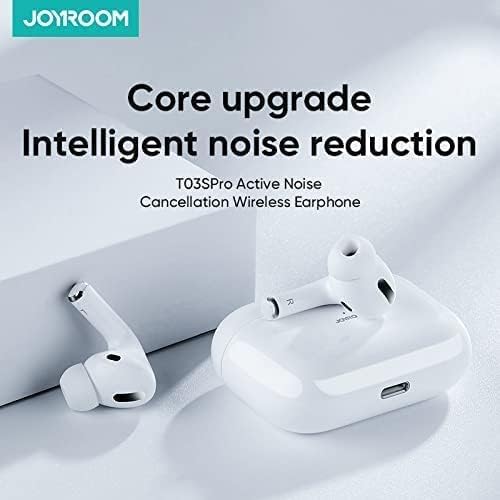
Image: A diagram highlighting the core upgrade in intelligent noise reduction technology for the T03SPro Active Noise Cancellation Wireless Earphone.

Image: An illustration demonstrating the Active Noise Cancellation (ANC) experience, indicating up to 90% noise reduction achieved by the earphone's technology.

Image: A woman wearing the Joyroom JR-T03S Pro earbuds in an urban setting, illustrating the seamless switching between Noise Cancelling and Transparency modes for various environments.
Call Quality and Microphone
The earphones are equipped with an auxiliary call noise-cancelling microphone to enhance call clarity by reducing environmental noise.

Image: A comparative diagram showing how the imported microphone assists in call noise cancellation, distinguishing between clear voice capture and reduction of environmental noise.
Maintenance
- Cleaning: Regularly clean the earbuds, ear tips, and charging case with a soft, dry, lint-free cloth. Do not use liquids or abrasive cleaners.
- Storage: When not in use, store the earphones in their charging case to protect them from dust and damage.
- Battery Care: To preserve battery life, avoid fully discharging the earphones and charging case frequently. Charge them regularly, even if not in constant use.
- Water Resistance: These earphones are not waterproof. Avoid exposure to water or excessive moisture.
Troubleshooting
| Problem | Solution |
|---|---|
| Earphones not pairing |
|
| No sound from one earbud |
|
| Charging case not charging |
|
| Noise Cancellation not effective |
|
Specifications
Key technical specifications for the Joyroom JR-T03S Pro TWS Bluetooth Earphones:
- Model Name: JR-T03S Pro
- Item Model Number: JR-T03S
- Brand: Joyroom
- Connectivity Technology: Wireless, Bluetooth
- Headphones Form Factor: In Ear
- Noise Control: Active Noise Cancellation
- Sensitivity: 93 dB
- Driver Size: 13mm dynamic
- Charging Case Battery Capacity: 360 mAh
- Color: White
- UPC: 6941237115584

Image: The retail packaging for the Joyroom JR-T03S Pro, detailing various product specifications and features.
Warranty and Support
Joyroom products are designed and manufactured to the highest quality standards. For information regarding warranty coverage, technical support, or service inquiries, please refer to the official Joyroom website or contact your local distributor. Keep your purchase receipt as proof of purchase.
For further assistance, please visit the official Joyroom store: Joyroom Official Store
Documents and downloads
Ask a question about this manual
Ask about setup, troubleshooting, compatibility, parts, safety, or missing instructions. Manuals+ will review the question and use this page’s manual context to help answer it.