
Important Safety Information
- Water Resistance: Do not press any buttons while the watch is submerged in water. Avoid wearing the watch during hot showers or in environments with steam to prevent water mist from entering the watch casing.
- Temperature Exposure: Do not expose the watch to strong direct sunlight for extended periods or place it near fire to prevent damage to internal components and materials.
- Backlight: This PDS-625 model watch features a single-color backlight. It does not support multi-color lighting.
Product Overview
Key Features
- Multi-Functional: Includes Alarm, Stopwatch, and Dual-Display capabilities.
- High-Brightness Backlight: Features a single-color backlight for clear visibility in low-light conditions.
- Waterproof: Designed for water resistance (refer to 'Water Resistance Guidelines' for details).
- Durable Construction: Made with high-quality materials for extended life.
Package Contents
- 1 x PINDOWS PDS-625 Wrist Watch
- 1 x Watch Box
- 1 x Product Manual (this document)
Watch Components
The PINDOWS PDS-625 watch features a digital display with an analog-style overlay. It includes multiple buttons for mode selection, setting adjustments, and backlight activation. The specific layout and function of each button will be detailed in the 'Operating Instructions' section.
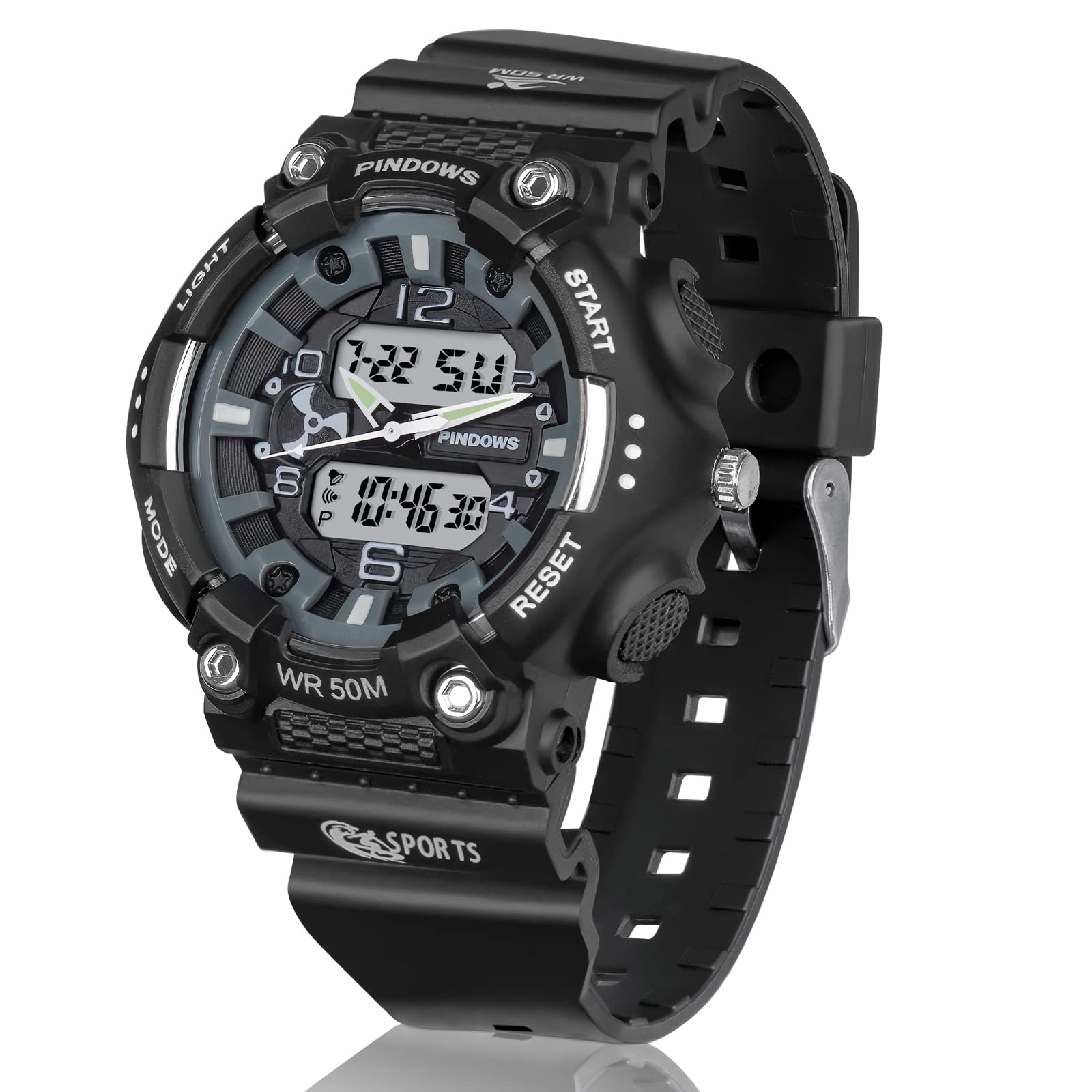
Image: Front view of the PINDOWS PDS-625 Digital Sport Watch, showcasing its dual-display and button layout.
Setup
Battery Installation
The PINDOWS PDS-625 watch requires two CR2 batteries for operation. If the display is blank or dim, battery replacement may be necessary. It is recommended to have battery replacement performed by a qualified technician to ensure proper sealing and water resistance.
Setting Time and Date
- Press the MODE button repeatedly until the time setting mode is displayed (usually indicated by flashing digits).
- Use the RESET or START button to adjust the flashing digits (hours, minutes, seconds, date, month, year).
- Press the MODE button again to cycle through the settings (e.g., hours to minutes, minutes to date).
- Once all settings are correct, press the MODE button one last time to exit the setting mode and save the changes.
Operating Instructions
Mode Selection
Press the MODE button to cycle through the different functions of the watch: Time Display, Alarm, and Stopwatch.
Using the Alarm Function
- Navigate to the Alarm mode using the MODE button.
- Press and hold the RESET button to enter alarm setting mode. The alarm hour digits will flash.
- Use the START button to adjust the hour.
- Press the MODE button to move to the minute setting, then use the START button to adjust the minutes.
- Press the RESET button to confirm and exit alarm setting.
- To turn the alarm ON/OFF, press the START button while in Alarm mode. An alarm icon will appear/disappear on the display.
Using the Stopwatch Function
- Navigate to the Stopwatch mode using the MODE button. The display will show '00:00:00'.
- Press the START button to begin timing.
- Press the START button again to pause timing.
- Press the RESET button to reset the stopwatch to '00:00:00'.
Backlight Operation
Press the LIGHT button (typically located on the top-left side of the watch) to activate the backlight. The backlight will illuminate the display for a few seconds, providing visibility in dark conditions. This model features a single-color backlight.

Image: Close-up view of the PINDOWS PDS-625 watch display with the single-color LED backlight activated, showing time and date.
Water Resistance Guidelines
The PINDOWS PDS-625 watch is rated for 50M (5 ATM) water resistance. This means it is suitable for:
- Cold baths
- Handwashing
- Swimming in shallow water
- Exposure to rain
Important: Do not press any buttons while the watch is wet or submerged. Avoid hot water, steam, or diving, as these can compromise the watch's water resistance seals.

Image: Visual representation of the PINDOWS PDS-625 watch's 50M water resistance, showing its suitability for activities like cold baths, handwashing, swimming, and use in rain.
Maintenance
Cleaning
Wipe the watch regularly with a soft, dry cloth to remove dust and dirt. For stubborn stains, a slightly damp cloth can be used, followed by immediate drying. Avoid using harsh chemicals or abrasive materials, which can damage the watch's finish.
Battery Replacement
When the watch display becomes dim or stops functioning, it may be time to replace the two CR2 batteries. It is recommended to take the watch to a professional watch repair service for battery replacement to ensure the water resistance seal is properly maintained.
Storage
When not in use for extended periods, store the watch in a cool, dry place away from direct sunlight and extreme temperatures. Keep it away from strong magnetic fields to prevent interference with its timekeeping accuracy.
Troubleshooting
- Display is blank or dim: Check if the batteries need replacement. If recently replaced, ensure they are inserted correctly.
- Time is inaccurate: Re-set the time following the 'Setting Time and Date' instructions. If the issue persists, battery replacement may be necessary.
- Buttons are unresponsive: Ensure the watch is not wet. If the issue continues, there might be an internal malfunction requiring professional service.
- Water inside the watch: Immediately stop using the watch and seek professional repair. Do not attempt to dry it yourself, as this can cause further damage.
Specifications
| Feature | Specification |
|---|---|
| Model Number | PDS-625 |
| Dial Size | 4.2 cm (1.69 inches) |
| Band Length | 24 cm (9.1 inches) |
| Product Dimensions | 23 x 4.2 x 1.8 cm |
| Weight | 50 g |
| Band Material | PU |
| Case Material | ABS |
| Back Cover & Buckle | Stainless Steel |
| Dial Window Material | Highly Transparent Resin Glass |
| Batteries Required | 2 x CR2 batteries |
| Water Resistance | 50M (5 ATM) |
Warranty and Support
PINDOWS offers a 1-year refund service for this product. If you encounter any issues or have questions regarding the operation or functionality of your PDS-625 Digital Sport Watch, please refer to this manual or contact PINDOWS customer support for assistance.
For further support, please visit the official PINDOWS website or contact your retailer.
