
Samsung S22
Samsung Galaxy S22 5G User Manual
Model: S22 | 128GB, Phantom White, Unlocked (Renewed)
1. Overview
This manual provides essential information for setting up, operating, and maintaining your Samsung Galaxy S22 5G smartphone. This device is a renewed product, professionally inspected, tested, and cleaned by Amazon qualified vendors to ensure it is in 'Excellent condition', meaning the screen and body show no signs of cosmetic damage visible from 12 inches away, and the battery exceeds 80% capacity relative to new.

Figure 1: Samsung Galaxy S22 5G, Phantom White
2. Getting Started
2.1 Unboxing and Initial Inspection
Upon receiving your device, carefully unbox it and inspect for any visible damage. Your renewed Samsung Galaxy S22 5G should be in excellent condition. The package typically includes:
- Samsung Galaxy S22 5G Smartphone
- Power Adapter
- USB Cable
- SIM Tray Ejector
2.2 SIM Card Installation
To use cellular services, you need to install a Nano SIM card. Use the provided SIM tray ejector tool to open the SIM card slot located on the bottom edge of the device. Insert your Nano SIM card into the tray with the gold contacts facing down, then reinsert the tray into the phone.

Figure 2: Front view of the Samsung Galaxy S22 5G
2.3 Initial Power On and Setup
Press and hold the Power button (located on the right side) until the Samsung Galaxy logo appears. Follow the on-screen instructions to complete the initial setup, including language selection, Wi-Fi connection, Google account login, and security settings (fingerprint, face recognition, PIN/pattern).
Video 1: Unboxing and initial setup of the Samsung Galaxy S22 5G, demonstrating the phone's sleek design and quick boot-up process.
3. Operating Your Device
3.1 Basic Navigation
The Samsung Galaxy S22 5G features a 6.1-inch AMOLED touchscreen display. Navigate the interface using gestures:
- Swipe Up/Down: Access the app drawer or notification panel.
- Swipe Left/Right: Navigate between home screens or app pages.
- Tap: Select items or open applications.
- Pinch-to-Zoom: Zoom in or out on images and web pages.
Video 2: Demonstration of the smooth user interface and app navigation on the Samsung Galaxy S22 5G.
3.2 Camera Features
The device is equipped with a versatile camera system, including a 33 MP rear-facing camera and a 33 MP front-facing camera. Key features include:
- Shooting Modes: Single Take, Portrait, Photo, Video, Pro, Pro Video, Slow Motion, Hyperlapse, Food.
- Video Capture: Up to 8K resolution at 60+ FPS.
- Advanced Lenses: Wide-angle, mid-range, and zoom lenses for various photographic needs.

Figure 3: Nightography feature for enhanced low-light photography.
3.3 Connectivity
The Samsung Galaxy S22 5G supports 5G cellular technology, Wi-Fi, and Bluetooth for seamless connectivity. It is unlocked for all carriers, providing flexibility in choosing your service provider.
3.4 Security Features
Enhance your device security with:
- Face Recognition: Unlock your phone using your face.
- Fingerprint Sensor: Secure and quick access with your fingerprint.
- PIN/Pattern/Password: Standard security options.
4. Maintenance
4.1 Battery Care
The device is powered by a 3700 mAh Lithium-Ion battery, offering an average life of 14 hours talk time. To maximize battery lifespan:
- Avoid extreme temperatures.
- Use the provided USB cable and power adapter for charging.
- Enable power-saving modes when needed.

Figure 4: Fast charging capability of the Samsung Galaxy S22 5G.
4.2 Cleaning Your Device
Use a soft, lint-free cloth to clean the screen and body. Avoid harsh chemicals or abrasive materials. The device is water-resistant, but it is not waterproof; avoid submerging it in liquids.
4.3 Software Updates
Regularly check for and install software updates to ensure optimal performance, security, and access to new features. Navigate to Settings > Software update to check for available updates.
5. Troubleshooting
If you encounter issues with your device, consider the following common solutions:
- Device unresponsive: Press and hold the Power button and Volume Down button simultaneously for about 10 seconds to force restart.
- Connectivity issues: Toggle Wi-Fi or Bluetooth off and on, or restart your device. Check your network settings.
- App crashes: Clear the app's cache (Settings > Apps > [App Name] > Storage > Clear cache) or reinstall the app.
- Battery draining quickly: Review app usage in battery settings, reduce screen brightness, or disable unnecessary features.
For more complex issues, refer to Samsung's official support resources or contact customer service.
6. Specifications
| Feature | Detail |
|---|---|
| Brand | Samsung |
| Model Name | Samsung S22 |
| Operating System | Android 12.0 |
| RAM Memory Installed Size | 8 GB |
| CPU Model | Snapdragon |
| CPU Speed | 2.5 GHz |
| Memory Storage Capacity | 128 GB |
| Screen Size | 6.1 Inches |
| Display Type | AMOLED |
| Resolution | 1080 x 2340 Pixels |
| Refresh Rate | 60 Hz |
| Color | Phantom White |
| SIM Card Slot Count | Dual SIM |
| Connector Type | Lightning |
| Biometric Security Feature | Face Recognition |
| Water Resistance Level | Water Resistant |
| Headphones Jack | No headphone jack |
| Rear Camera Resolution | 33 MP |
| Front Camera Resolution | 33 MP |
| Video Capture Resolution | 8K |
| Battery Capacity | 3700 Milliamp Hours |
| Average Battery Life | 14 Hours |
| Item Dimensions | 5.75 x 2.78 x 0.3 inches |
| Item Weight | 0.36 Pounds |
| Wireless Provider | Unlocked for All Carriers |
| Cellular Technology | 5G |
7. Warranty and Support
Your renewed Samsung Galaxy S22 5G comes with a 90-Day Warranty. This warranty covers defects in materials and workmanship under normal use. For warranty claims or technical support, please refer to the Amazon Renewed program guidelines or contact the vendor directly.
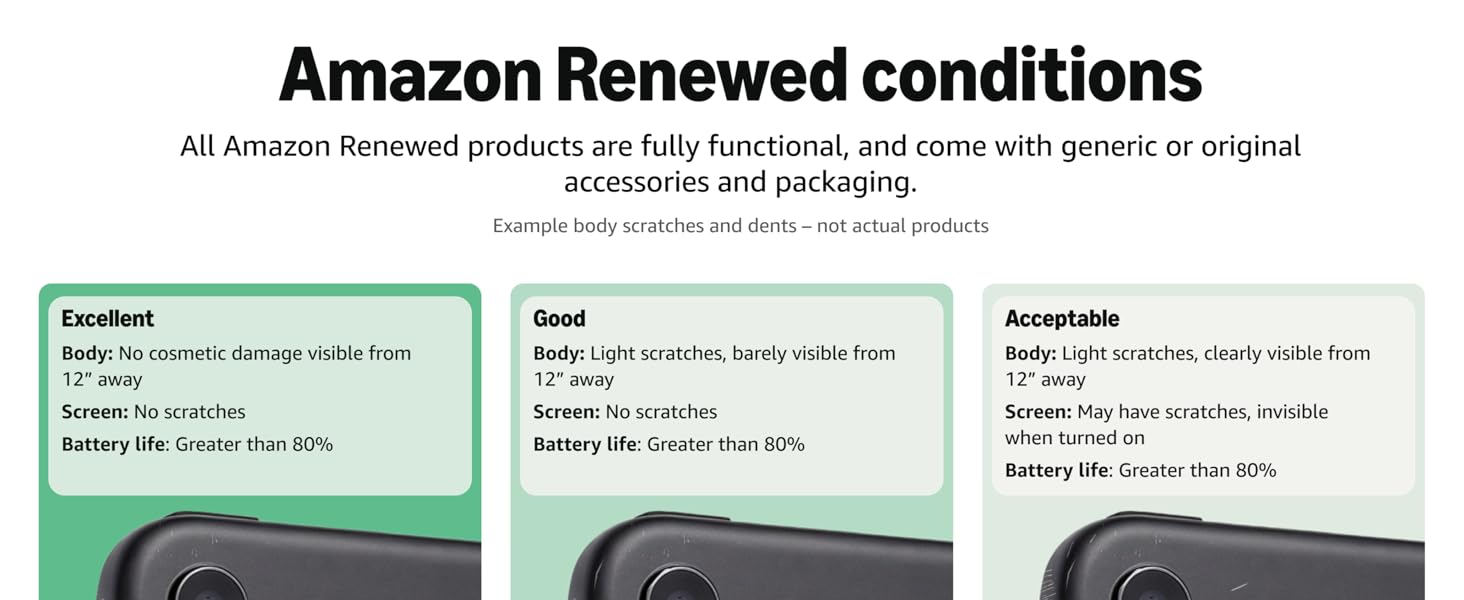
Figure 5: Amazon Renewed product condition guidelines.
For additional assistance, visit the Samsung Support website or the Amazon Renewed Help page.
Related documentsS22


Ask a question about this manual
Ask about setup, troubleshooting, compatibility, parts, safety, or missing instructions. Manuals+ will review the question and use this page’s manual context to help answer it.