1. Introduction
This manual provides essential instructions for the setup, operation, maintenance, and troubleshooting of your LumiTek R/C Nite Titan remote control car. The Nite Titan is a 1:10 scale vehicle featuring 2.4 GHz remote control technology, designed for high-speed driving and drifting. It includes customizable LED lighting for enhanced visual effects. This product is recommended for users aged 8 and up.
2. Package Contents
Please verify that all items listed below are present in your package:
- LumiTek R/C Nite Titan Car
- 2.4 GHz Remote Control
- USB Charging Cable
- Customizable LED Piping
- Instruction Manual (this document)

3. Setup
3.1 Remote Control Battery Installation
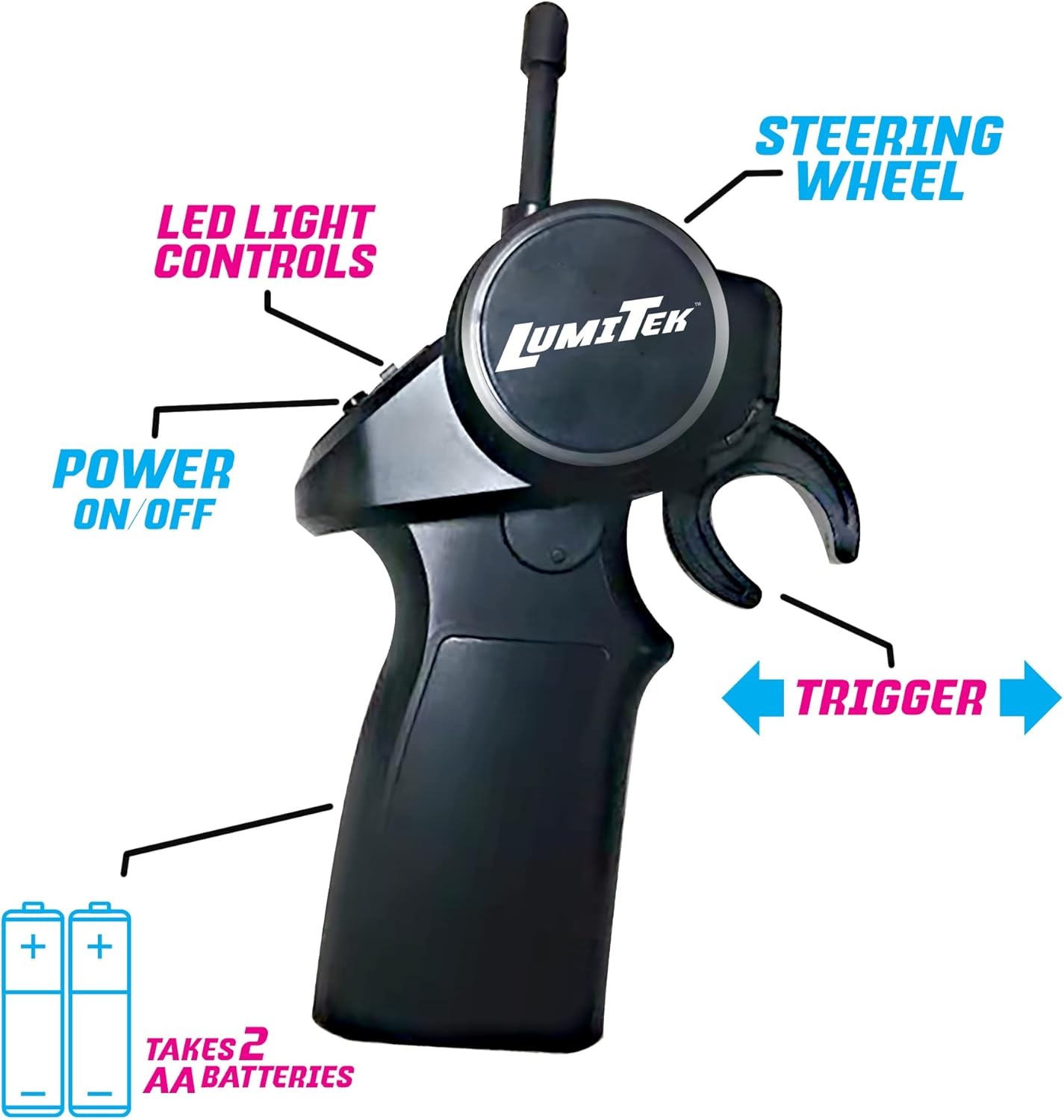
- Locate the battery compartment on the back of the remote control.
- Open the battery cover.
- Insert two (2) AA batteries, ensuring correct polarity (+/-).
- Close the battery cover securely.
3.2 Car Battery Charging
The Nite Titan car uses a rechargeable battery. Use the provided USB charging cable.
- Connect the small end of the USB charging cable to the charging port on the car.
- Connect the large end of the USB charging cable to a standard USB power adapter (not included) or a computer USB port.
- The charging indicator light (if present) will show the charging status. Refer to the car's specific indicator for details.
- Once fully charged, disconnect the cable. Charging typically takes approximately 60-90 minutes for a full charge.
3.3 Pairing the Car and Remote
The 2.4 GHz system typically pairs automatically:
- Ensure the car battery is charged and installed.
- Turn on the car using its power switch.
- Turn on the remote control using its power switch.
- The car and remote should automatically connect. If not, turn both off and on again.
4. Operating Instructions
4.1 Basic Controls
- Steering Wheel: Rotate left or right to steer the car.
- Trigger: Pull the trigger towards you to move the car forward. Push the trigger away from you to move the car backward or to brake.
- LED Light Controls: Use the dedicated button(s) on the remote to cycle through different LED lighting modes or to turn them on/off.

4.2 Driving Tips
- Operate the car on smooth, flat surfaces for optimal performance, especially for drifting.
- Practice gentle steering and throttle inputs to master control.
- The car's slick rear wheels are designed for drifting. Experiment with steering and throttle combinations to initiate and maintain drifts.
4.3 Driving Demonstration Video
5. Customizing LED Lighting
The LumiTek R/C Nite Titan includes customizable LED piping to personalize your car's appearance.
- Carefully remove the car's body shell to access the chassis.
- Plan your desired LED piping design on the car's body.
- Secure the LED piping into the designated channels or attachment points on the car's body. Ensure connections are firm.
- Replace the car's body shell, ensuring no wires are pinched.
- Use the remote control's LED button to activate and cycle through the lighting effects.


5.3 LED Customization Video
6. Maintenance
6.1 Cleaning
- Turn off the car and remote control before cleaning.
- Use a soft, dry cloth to wipe down the car's body and wheels.
- For stubborn dirt, a slightly damp cloth can be used, but ensure no moisture enters electronic components.
- Avoid using harsh chemicals or solvents.
6.2 Battery Care and Storage
- Always fully charge the car's battery before storage.
- Remove AA batteries from the remote control if not in use for extended periods to prevent leakage.
- Store the car and remote in a cool, dry place away from direct sunlight and extreme temperatures.
7. Troubleshooting
If you encounter issues with your Nite Titan, refer to the following common problems and solutions:
| Problem | Possible Cause | Solution |
|---|---|---|
| Car does not respond to remote. | Low battery in car or remote; Not paired; Car/remote off. | Charge car battery; Replace remote batteries; Ensure both are powered on and attempt re-pairing. |
| Car runs slowly or inconsistently. | Low car battery; Obstruction in wheels/axles. | Fully charge car battery; Check and clear any debris from wheels. |
| LED lights are not working. | LED control button not pressed; Loose connection; Damaged LED piping. | Press the LED control button on the remote; Check LED piping connections; Contact support if damaged. |
| Poor steering control. | Misaligned wheel; Low remote battery. | Check for physical damage to steering components; Replace remote batteries. |
8. Specifications
- Model: Nite Titan
- Scale: 1:10
- Frequency: 2.4 GHz
- Recommended Age: 8 years and up
- Car Power: Rechargeable Battery (included)
- Remote Power: 2 x AA Batteries (not included)
- Item Weight: 3.51 pounds
- Package Dimensions: 20.16 x 11.61 x 8.46 inches
- Manufacturer: WeCool Toys
9. Safety Information
- Adult supervision is recommended for younger users.
- Do not operate the car in wet conditions or near water.
- Avoid operating the car in crowded areas or near people and pets to prevent accidents.
- Do not touch moving parts during operation.
- Use only the provided charging cable for the car's battery.
- Dispose of batteries responsibly according to local regulations.
10. Warranty and Support
For warranty information or technical support, please contact the manufacturer, WeCool Toys, directly. Refer to the product packaging or their official website for contact details.


