
1. Introduction
The iFORWAY 1228Wh Portable Power Station is a versatile and reliable power solution designed for various applications, including emergency home backup, outdoor camping, and general portable power needs. Featuring a robust LiFePO4 battery, multiple AC outlets, USB-C ports, and solar charging capability, it provides clean and stable power wherever you need it. This manual provides essential information for safe and efficient operation of your power station.
2. Safety Information
Please read and understand all safety instructions before using the iFORWAY 1228Wh Portable Power Station. Failure to follow these instructions may result in electric shock, fire, or serious injury.
- Do not expose the power station to water, rain, or moisture. Keep it dry at all times.
- Do not operate the power station in temperatures exceeding 104°F (40°C) or below 14°F (-10°C).
- Do not disassemble, repair, or modify the unit. Refer all servicing to qualified personnel.
- Ensure proper ventilation during use and charging. Do not block the ventilation openings.
- Keep out of reach of children and pets.
- Use only the provided or approved charging cables and adapters.
- Avoid dropping or subjecting the unit to strong impacts.
- In case of fire, use a dry chemical extinguisher. Water may cause further electrical hazards.
3. Product Overview
Familiarize yourself with the components and ports of your iFORWAY 1228Wh Portable Power Station.

Figure 3.1: Front view of the iFORWAY 1228Wh Portable Power Station, showing the LCD display, AC outlets, and USB ports.
3.1. Ports and Controls

Figure 3.2: Detailed diagram of the power station's input and output ports.
- AC Outlets (x6): 1000W rated power, 2000W surge. For powering standard household appliances.
- USB-C Ports (x2): 100W Power Delivery (PD) max per port. For fast charging laptops, tablets, and smartphones.
- QC3.0 USB-A Ports (x2): Quick Charge 3.0 compatible. For fast charging compatible devices.
- Standard USB-A Ports (x2): For general USB device charging.
- DC Output (5.5x2.1mm): For powering DC-compatible devices.
- Car Socket (13.6V/8A): For powering 12V car appliances.
- AC Input: For charging the power station via wall outlet.
- DC Input (5.5x2.1mm): For charging via DC adapter.
- Solar Input (Anderson Port): 12-30V/7A Max 200W. For charging via solar panels.
- LCD Display: Shows remaining discharge/charge time, input power, output power, and battery level percentage.
- Power Buttons: Separate buttons for AC, DC, and main power on/off.
3.2. Internal Features

Figure 3.3: The advanced Battery Management System (BMS) ensures safe and efficient operation.
- LiFePO4 Battery: Long-lasting and safe lithium iron phosphate battery.
- Battery Management System (BMS): Provides protection against over-charge, over-discharge, over-current, over-voltage, and short-circuit.
- Cooling System: Integrated fan for efficient heat dissipation during operation.
4. Setup
Follow these steps for initial setup of your power station.
4.1. Unboxing and Inspection
- Carefully remove the power station and all accessories from the packaging.
- Inspect the unit for any signs of damage. If damaged, do not use and contact customer support.
- Verify that all included components are present: Power Station, AC adapter, and Charging Cable.

Figure 4.1: The power station and its included accessories.
4.2. Initial Charging
It is recommended to fully charge the power station before first use.
- Connect the AC adapter to the AC Input port on the power station.
- Plug the AC adapter into a standard wall outlet.
- The LCD display will indicate charging status. The unit can be fully charged in approximately 2 hours using the AC input.
5. Operating Instructions
Learn how to effectively use your iFORWAY 1228Wh Portable Power Station.
5.1. Turning On/Off
- To turn on the power station, press and hold the main power button for a few seconds until the LCD screen illuminates.
- To activate AC output, press the AC power button. The AC icon will appear on the display.
- To activate DC output (including USB and car socket), press the DC power button. The DC icon will appear.
- To turn off, press and hold the respective power buttons until the indicators turn off, then press and hold the main power button.
5.2. Connecting Devices
Connect your electronic devices to the appropriate output ports.
- AC Devices: Plug your appliance's power cord into any of the 6 AC outlets. Ensure the total wattage does not exceed 1000W (or 2000W surge).
- USB Devices: Connect your USB-C or USB-A cables to the corresponding ports. The 100W USB-C ports are ideal for fast charging laptops like MacBooks.
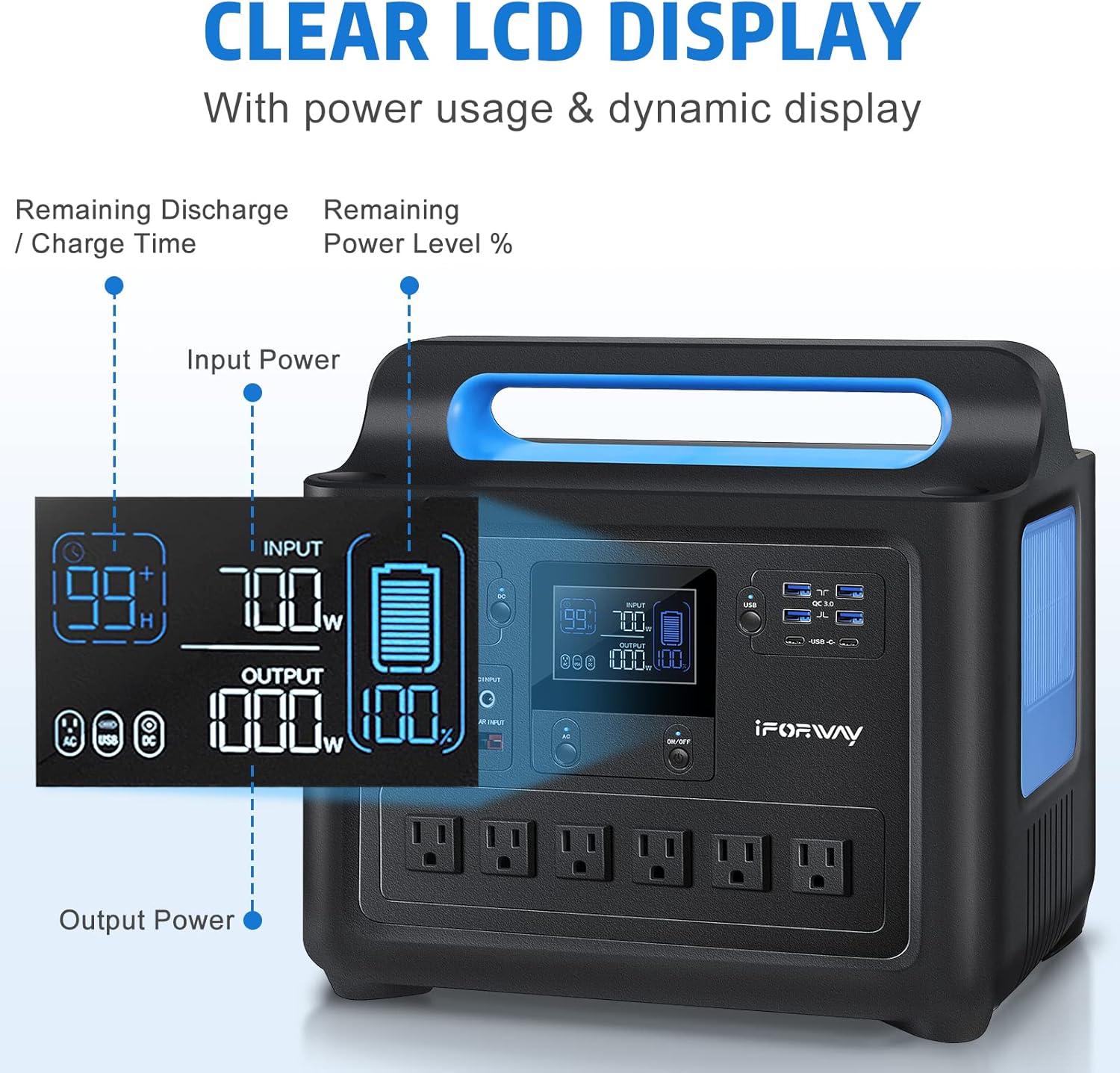
Figure 5.1: The 100W USB-C Power Delivery ports can charge MacBooks rapidly.
- DC Devices: Use the DC output or car socket for compatible 12V devices.
5.3. Uninterruptible Power Supply (UPS) Function
The power station can function as an Uninterruptible Power Supply (UPS) for critical devices.
- Connect the power station to a wall outlet via its AC input.
- Plug your device (e.g., CPAP machine) into one of the power station's AC outlets.
- In case of a power outage, the power station will automatically switch to battery power within 0 seconds, ensuring continuous operation of your connected device.

Figure 5.2: The UPS function provides seamless power during outages, ideal for medical devices.
5.4. Powering Multiple Devices
With its 1228Wh capacity and 1000W output, the power station can power up to 15 devices simultaneously.

Figure 5.3: The power station can support various devices for extended periods, perfect for outdoor adventures.
Example runtimes for common devices:
- CPAP (80W): Approximately 14 hours
- Laptop (40Wh): Approximately 29 times
- Mini Fridge (30W): Approximately 37.7 hours
- Pellet Grill (60W): Approximately 19 hours
- Heating Blanket (80W): Approximately 13 hours
6. Charging the Power Station
Your iFORWAY power station offers multiple charging options.
6.1. AC Wall Charging
The fastest way to charge your power station is via a standard wall outlet.
- Connect the provided AC adapter to the AC Input port.
- Plug the adapter into a 110V-220V wall outlet.
- The power station supports 700W AC input, allowing a full charge from 0% to 100% in approximately 2 hours.
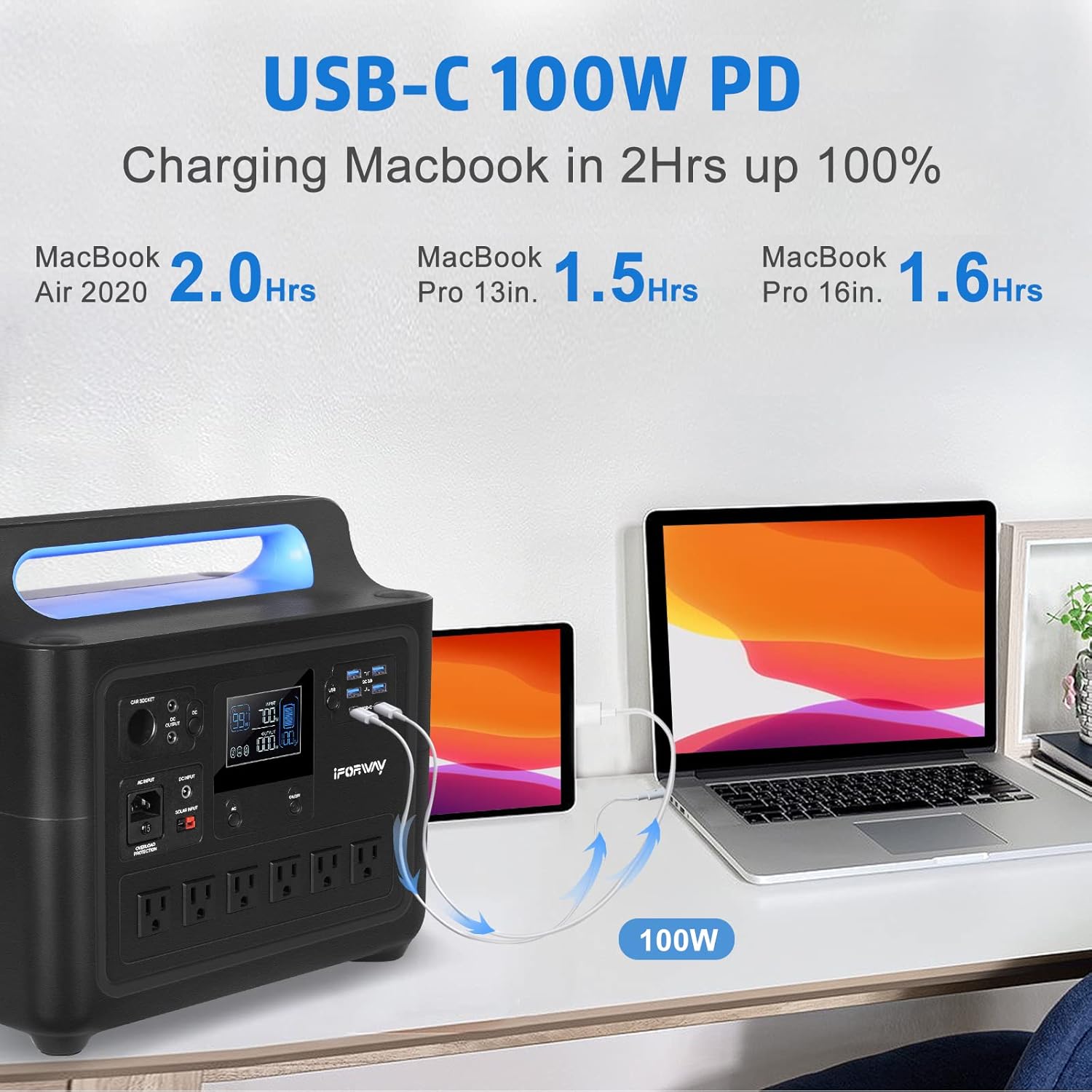
Figure 6.1: Fast recharging from a wall outlet.
6.2. Solar Charging
Utilize solar energy for eco-friendly charging, especially useful outdoors.
- Connect compatible solar panels (12-30V/7A Max 200W) to the Anderson Port (Solar Input) on the power station.
- Optimal charging time with a 200W solar panel is approximately 6.5 hours, depending on sunlight conditions.
6.3. Car Charging
Charge your power station on the go using your vehicle's 12V car outlet.
- Connect the car charging cable to the DC Input port.
- Plug the other end into your vehicle's 12V car outlet.
- Car charging takes approximately 15 hours at 108.8W input.
7. Maintenance
Proper maintenance ensures the longevity and optimal performance of your power station.
7.1. Cleaning
- Always turn off and unplug the power station before cleaning.
- Use a soft, dry cloth to wipe the exterior. Do not use abrasive cleaners or solvents.
- Keep the ventilation openings clear of dust and debris.

Figure 7.1: Ensure the cooling fan vents are kept clear for optimal performance.
7.2. Storage
- Store the power station in a cool, dry place, away from direct sunlight and extreme temperatures.
- For long-term storage, charge the battery to approximately 50-80% every 3-6 months to maintain battery health.
- Avoid storing in areas with high humidity or corrosive substances.
8. Troubleshooting
This section addresses common issues you might encounter with your power station.
| Problem | Possible Cause | Solution |
|---|---|---|
| No power output from AC/DC/USB ports. | Output not enabled; Battery depleted; Overload protection activated; Over-temperature protection activated. | Ensure AC/DC buttons are pressed; Recharge the power station; Reduce connected load; Allow unit to cool down. |
| Power station not charging. | Charging cable/adapter faulty; Input source issue; Over-temperature protection. | Check cable connections; Try a different outlet/source; Allow unit to cool down. |
| LCD display not working. | Unit is off; Malfunction. | Press the main power button; If issue persists, contact customer support. |
| Unit shuts down unexpectedly. | Overload; Low battery; Over-temperature. | Reduce connected load; Recharge the power station; Allow unit to cool down. |
If the problem persists after attempting these solutions, please contact iFORWAY customer support.
9. Specifications
Detailed technical specifications for the iFORWAY 1228Wh Portable Power Station.
| Feature | Specification |
|---|---|
| Model Name | 1228Wh Portable Power Station |
| Model Number | 1228 |
| Battery Type | LiFePO4 (Lithium Iron Phosphate) |
| Capacity | 1228 Watt-hours |
| AC Output | 6 x 1000 Watts (Rated), 2000 Watts (Surge) |
| Voltage | 110 Volts |
| USB-C Output | 2 x 100W Power Delivery (PD) |
| USB-A Output | 2 x QC3.0, 2 x Standard USB-A |
| DC Output | 5.5x2.1mm port, Car Socket (13.6V/8A) |
| AC Input Charging | 700W (Full charge in approx. 2 hours) |
| Solar Input Charging | Anderson Port, 12-30V/7A Max 200W (Full charge in approx. 6.5 hours with 200W solar) |
| Car Input Charging | 108.8W (Full charge in approx. 15 hours) |
| Item Weight | 34 Pounds |
| Product Dimensions | 13.4 x 8.8 x 12 inches |
| Material | ABS Plastic |
| Color | Black |
| Display Type | LCD |
10. Warranty and Support
For warranty information and customer support, please refer to the documentation included with your product or visit the official iFORWAY website. You can also reach out to the seller through the platform where you purchased the product for assistance.
Manufacturer: iFORWAY
UPC: 765546661381