Introduction
Thank you for choosing the Grundig FK 7110 D Filter Coffee Machine. This manual provides important information for the safe and efficient operation, maintenance, and care of your appliance. Please read these instructions carefully before first use and keep them for future reference.
Important Safety Instructions
- Read all instructions before using the appliance.
- Do not touch hot surfaces. Use handles or knobs.
- To protect against fire, electric shock, and injury to persons, do not immerse cord, plugs, or appliance in water or other liquid.
- Close supervision is necessary when any appliance is used by or near children.
- Unplug from outlet when not in use and before cleaning. Allow to cool before putting on or taking off parts, and before cleaning the appliance.
- Do not operate any appliance with a damaged cord or plug or after the appliance malfunctions, or has been damaged in any manner.
- The use of accessory attachments not recommended by the appliance manufacturer may result in fire, electric shock, or injury to persons.
- Do not use outdoors.
- Do not let cord hang over edge of table or counter, or touch hot surfaces.
- Do not place on or near a hot gas or electric burner, or in a heated oven.
- Always attach plug to appliance first, then plug cord into the wall outlet. To disconnect, turn any control to "off", then remove plug from wall outlet.
- Do not use appliance for other than intended use.
Product Overview
Familiarize yourself with the components of your Grundig FK 7110 D Filter Coffee Machine before use.
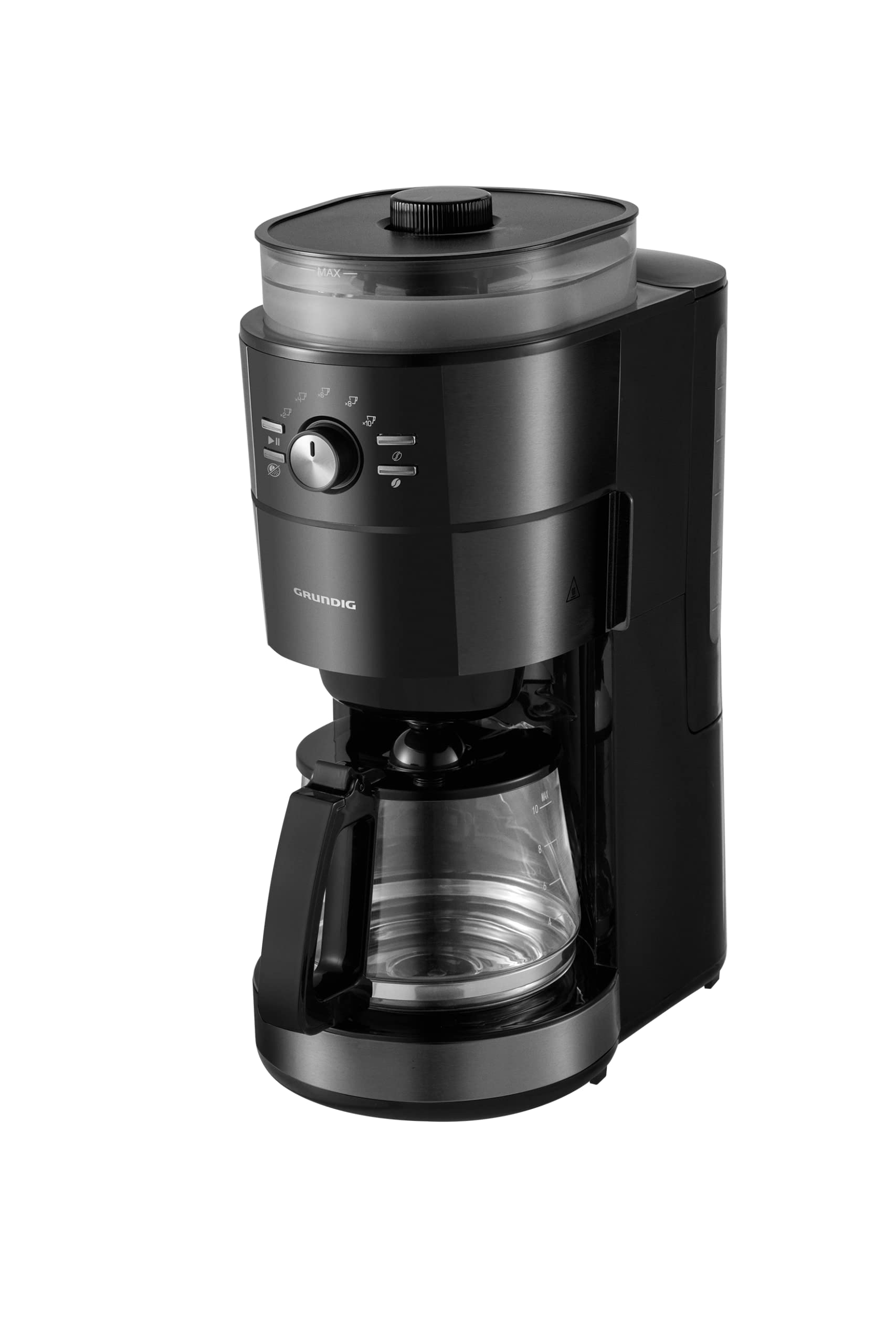
Figure 1: Angled front view of the Grundig FK 7110 D Filter Coffee Machine, showing the integrated grinder, control panel, and glass carafe.

Figure 2: Front view of the coffee machine, highlighting the control panel and brand logo.

Figure 3: Close-up view of the open filter basket, ready for coffee grounds.

Figure 4: Side view of the coffee machine, illustrating the water tank with level indicator.

Figure 5: The glass carafe with handle and lid, featuring measurement markings.
Setup and First Use
- Unpacking: Carefully remove all packaging materials and stickers from the appliance. Keep packaging materials out of reach of children.
- Initial Cleaning: Before first use, clean all removable parts (carafe, filter basket) with warm soapy water. Wipe the exterior of the machine with a damp cloth.
- First Brew Cycle (without coffee):
- Fill the water tank with fresh cold water up to the MAX level.
- Place the empty filter basket into its position.
- Place the glass carafe with its lid on the warming plate.
- Plug the appliance into a suitable power outlet.
- Start a brewing cycle without coffee. This helps to clean the internal components and remove any manufacturing residues.
- Discard the water after the cycle is complete.
- Placement: Place the coffee machine on a stable, flat, heat-resistant surface, away from water sources and heat. Ensure adequate ventilation around the appliance.
Operating Instructions
Follow these steps to brew coffee with your Grundig FK 7110 D:
- Fill Water Tank: Open the water tank lid and fill the tank with fresh, cold water up to the desired level, indicated by the markings on the side. Do not exceed the MAX level.
- Add Coffee Grounds: Open the filter basket compartment. Insert a paper filter (if using) or ensure the permanent filter is clean. Add the desired amount of ground coffee into the filter. For integrated grinding, add whole coffee beans to the bean hopper and select your desired grind setting.
- Place Carafe: Ensure the glass carafe with its lid is correctly placed on the warming plate.
- Select Coffee Strength (if applicable): Use the control panel to select your preferred coffee strength (Low, Medium, High).
- Start Brewing: Press the start button to begin the brewing process. The indicator light will illuminate.
- Keep Warm Function: After brewing, the machine will automatically switch to the keep warm function, maintaining the coffee's temperature for a certain period before automatically shutting off.
- Automatic Shut-off: The appliance features an automatic shut-off function for safety and energy saving. It will turn off after a period of inactivity or after the keep warm cycle concludes.
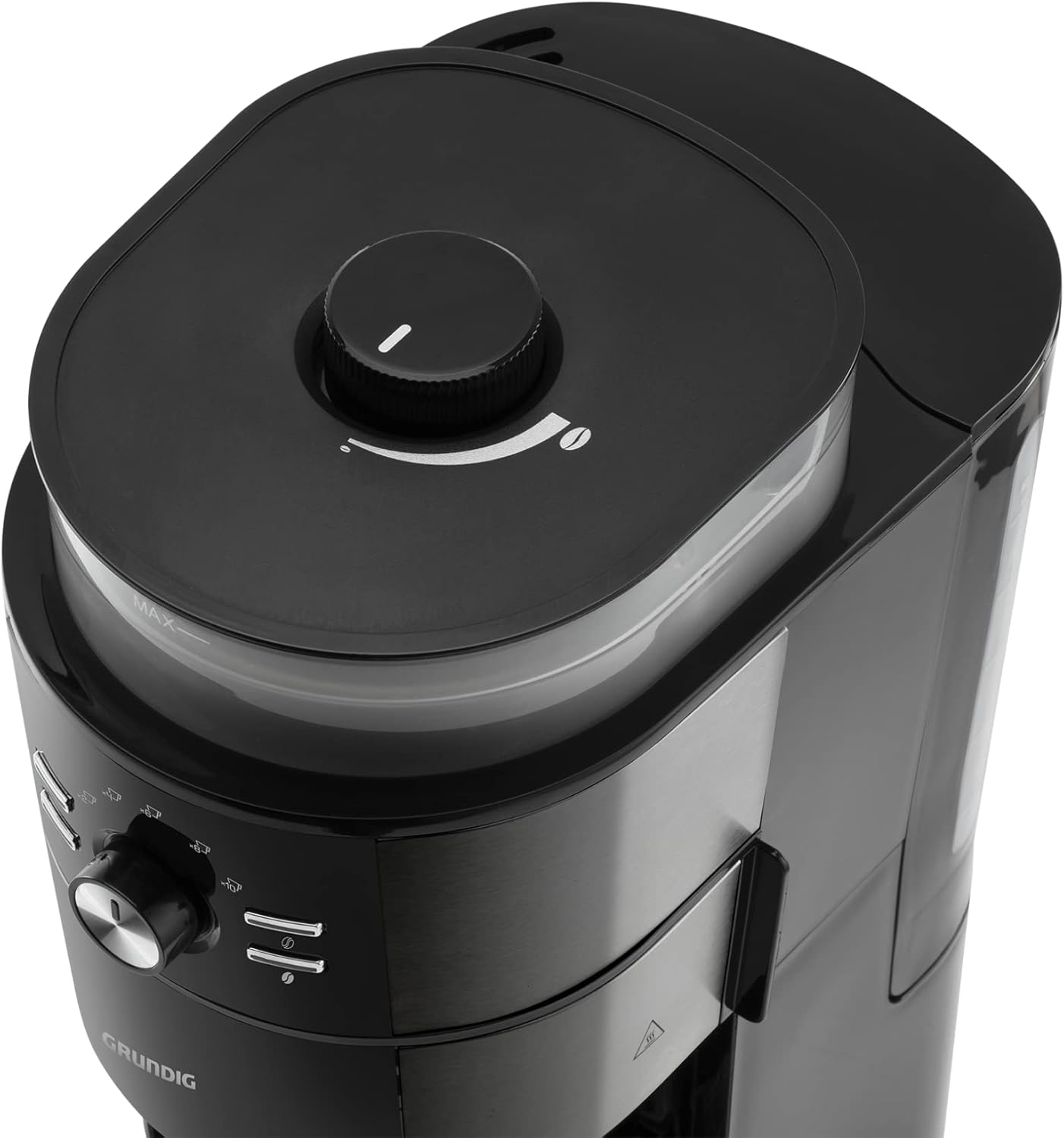
Figure 6: Top view showing the integrated coffee grinder and its adjustment dial for grind size.
Care and Maintenance
Regular cleaning and maintenance will ensure the longevity and optimal performance of your coffee machine.
- Daily Cleaning:
- Always unplug the appliance and allow it to cool completely before cleaning.
- Remove the filter basket and glass carafe. Wash them in warm soapy water, rinse thoroughly, and dry. These parts may also be dishwasher safe (check product manual for specific instructions).
- Wipe the exterior of the coffee machine with a soft, damp cloth. Do not use abrasive cleaners or scourers.
- Clean the warming plate with a damp cloth. Do not immerse the main unit in water.
- Descaling:
- Mineral deposits (limescale) can build up in your coffee machine over time, affecting performance and coffee taste. Descale your machine regularly, depending on water hardness and frequency of use (e.g., every 2-4 months).
- Use a commercial descaling solution suitable for coffee machines or a mixture of white vinegar and water (1 part vinegar to 2 parts water).
- Fill the water tank with the descaling solution.
- Place the empty carafe on the warming plate.
- Run a brewing cycle. After about half the solution has brewed through, turn off the machine and let it soak for 15-30 minutes.
- Turn the machine back on and let the remaining solution brew through.
- After descaling, run at least two full cycles with fresh, clean water to rinse out any descaling solution residue.
Troubleshooting
If you encounter problems with your coffee machine, refer to the table below for common issues and solutions.
| Problem | Possible Cause | Solution |
|---|---|---|
| Coffee does not brew. | Machine not plugged in; power outage; start button not pressed; water tank empty. | Check power connection; ensure power is on; press start button; fill water tank. |
| Coffee tastes weak. | Not enough coffee grounds; coarse grind setting; strength setting too low. | Add more coffee; adjust grinder to a finer setting; select a higher strength setting. |
| Coffee overflows from filter basket. | Too much coffee grounds; filter clogged; carafe not properly placed. | Reduce coffee amount; clean filter; ensure carafe is correctly positioned and lid is on. |
| Machine is noisy during operation. | Normal operation sound; descaling needed. | Some noise is normal during brewing/grinding. If excessive, descale the machine. |
| Coffee is not hot enough. | Warming plate not active; machine needs descaling. | Ensure warming plate is on; descale the machine to improve heating efficiency. |
If the problem persists after trying these solutions, please contact customer support.
Technical Specifications
- Model: Grundig FK 7110 D
- Power: 1000 W
- Carafe Material: Glass
- Product Weight: 3.24 kg
- Color: Dark Inox (Black)
- Features:
- Integrated Coffee Grinder
- Automatic Shut-off
- Coffee Strength Selection (Low-Medium-High)
- Water Level Indicator
- Keep Warm Function
- Drip Stop Function
- Recommended Use: Home and Office Kitchen
Warranty and Customer Support
Your Grundig FK 7110 D Filter Coffee Machine is covered by a Two-Year Arçelik A.Ş. Guarantee.
For any questions, service requests, or technical support, please contact Grundig Customer Service.

Figure 7: Grundig Home Service information, indicating support for small home appliances.
Grundig Home Service: For service requests regarding your small home appliances, you can call 444 0 8881 to arrange a home visit. This service, including warranty-covered products, is free of charge.
Please have your model number (FK 7110 D) and purchase date ready when contacting support.


