
Product Overview
The COLSUR S29 is a versatile device combining multiple functions: a digital alarm clock, wireless charger, USB charging port, Bluetooth speaker, FM radio, and a night light with an integrated phone holder. This manual provides instructions for its setup, operation, and maintenance to ensure optimal performance.

Image: Front view of the COLSUR S29 Digital Alarm Clock, showcasing its LED display and integrated phone holder.
Package Contents
Please check the package for the following items:
- COLSUR S29 Digital Alarm Clock
- Power Adapter
- USB Type-C Cable
- User Manual

Image: Contents of the COLSUR S29 package, including the alarm clock, power adapter, and USB cable.
Product Features
- Digital LED Display with 3 adjustable brightness levels.
- Wireless Charging Pad for Qi-enabled devices.
- USB Charging Port for additional device charging.
- Bluetooth Speaker for audio playback.
- FM Radio with automatic station search.
- Alarm Clock with adjustable volume and snooze function (5 minutes, up to 3 times).
- Night Light with 3 adjustable colors/brightness levels.
- Integrated Phone Holder.
- Built-in battery for portability.
Controls and Display
Familiarize yourself with the buttons and display indicators on your COLSUR S29.
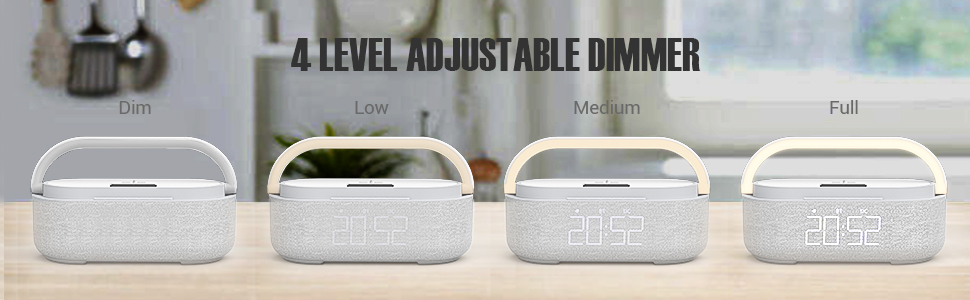
Image: Diagram showing the control buttons on the top panel of the COLSUR S29, including Mode, Switch, BT, FM, Volume/Track controls, and Alarm/Brightness buttons.
- MODE Button: Short press to enter settings, long press to return to the main screen.
- SWITCH Button: Switches between setting areas and display modes.
- BT Button: Short press to enter Bluetooth mode.
- FM Button: Short press to enter FM radio mode, long press to search for stations.
- +/- Buttons: Adjust volume, navigate tracks, or change settings.
- Play/Pause Button: Play or pause audio.
- Alarm/Brightness Button: On/Off alarm in Bluetooth mode, long press to clear Bluetooth record. Adjust screen brightness.
- Night Light Button: Turn on/off night light, snooze settings.
Setup
- Power Connection: Connect the provided USB Type-C cable to the device and the power adapter. Plug the adapter into a wall outlet.
- Initial Power On: The device will power on automatically. The LED display will show the current time.
- Setting the Time:
- Press the MODE button twice. The hour digit will start flashing.
- Use the +/- buttons to adjust the hour.
- Press the SWITCH button to move to the minute setting.
- Use the +/- buttons to adjust the minutes.
- Long press the MODE button to save the time setting.
Operating Instructions
Alarm Clock
- Setting the Alarm:
- Press the MODE button twice. The number representing the hour starts to flash.
- Adjust the hour using the +/- buttons.
- Press the SWITCH button to jump to the minute setting.
- Adjust the minute using the +/- buttons.
- Long press the MODE button to save your alarm time setting.
- Long press the +/- button to turn the alarm on/off. If the alarm is successfully set, the screen will display the alarm icon.
- Snooze Function:
- When the alarm rings, short touch the light pole to activate snooze mode for 5 minutes.
- The snooze interval is 5 minutes for a total of three times.
- To exit snooze mode, short press the +/- button.
- Turning Off the Alarm:
- To turn off the alarm directly, long touch the light pole (2 seconds or more).
- Adjusting Alarm Volume:
- While the alarm clock rings, press the +/- buttons to adjust the volume (16 levels).
- The alarm volume has a memory function and is controlled independently of the radio volume.

Image: Detailed instructions on how to set the alarm, use the snooze function, and adjust alarm volume on the COLSUR S29.
FM Radio
- Entering FM Mode: Short press the FM button. The display will show FM characters.
- Automatic Station Search: Long press the Play/Pause button to search for radio stations.
- Changing Stations: Use the +/- buttons to switch between saved stations.
- Adjusting Volume: Use the +/- buttons to adjust the radio volume.

Image: A person relaxing while the COLSUR S29 plays FM radio, illustrating the radio function and volume control.
Bluetooth Speaker
- Entering Bluetooth Mode: Short press the BT button. The device will enter pairing mode.
- Pairing: On your mobile device, search for "COLSUR S29" in the Bluetooth settings and connect.
- Audio Playback: Once paired, you can play audio from your device through the COLSUR S29 speaker.
- Clearing Bluetooth Record: Long press the Play/Pause button in Bluetooth mode to clear the pairing record.
Wireless Charging
- Place your Qi-enabled smartphone on the designated wireless charging pad on top of the device.
- Ensure the phone is centered on the charging pad for optimal charging.
- The charging indicator on your phone will confirm charging has begun.

Image: A smartphone being wirelessly charged on the COLSUR S29, demonstrating the charging pad and night light feature.
USB Charging Port
Connect your device's USB charging cable to the USB port on the COLSUR S29 to charge it.
Night Light
- Turning On/Off: Short touch the light pole to turn the night light on or off.
- Adjusting Brightness/Color: Continue touching the light pole to cycle through 3 levels of brightness/color options.

Image: The COLSUR S29 displaying different brightness levels of its night light, from dim to full illumination.
LED Display Brightness
The LED display offers 3 levels of brightness (low, medium, high). Use the dedicated brightness button (often combined with alarm or other functions, refer to "Controls and Display" section) to adjust the display brightness.
Maintenance
- Cleaning: Use a soft, dry cloth to clean the device. Do not use liquid cleaners or aerosols.
- Storage: Store the device in a cool, dry place when not in use for extended periods.
- Power: Always use the provided power adapter and cable.
Troubleshooting
| Problem | Possible Cause | Solution |
|---|---|---|
| Device does not power on. | No power connection. | Ensure the power adapter is securely connected to the device and a working power outlet. |
| Wireless charging not working. | Phone not Qi-enabled or not positioned correctly. | Verify your phone supports Qi wireless charging. Reposition the phone on the charging pad. Remove any thick phone cases. |
| FM radio reception is poor. | Weak signal or interference. | Adjust the device's position. |
| Bluetooth device cannot pair. | Device not in pairing mode or already connected to another device. | Ensure the COLSUR S29 is in Bluetooth pairing mode. Disconnect from other Bluetooth devices. Clear previous Bluetooth records if necessary (long press Play/Pause button). |
| Alarm does not sound. | Alarm not set or volume too low. | Verify the alarm is set and the alarm icon is displayed. Increase the alarm volume. |
Specifications
- Model Number: S29
- Brand: COLSUR
- Dimensions (L x W x H): 8 x 3.81 x 10 cm (3.15 x 1.5 x 3.94 inches)
- Weight: 1.03 Kilograms (2.27 lbs)
- Power Source: Battery Powered (1 A battery included)
- Display Type: Digital LED
- Connectivity: USB, Bluetooth
- Material: ABS, Robust Material, Integrated Halbach Magnetic Ring
- Frame Material: Wood (Note: Product images show a fabric/plastic finish, but specifications list wood as frame material.)
- Special Features: Wireless Charging, FM Radio, Bluetooth Speaker, Dimmable Night Light, USB Charging Port, Phone Holder.
Warranty and Support
The COLSUR S29 comes with a 3-year warranty. For online customer service and support, please refer to the contact information provided with your purchase or visit the official COLSUR website.
For further assistance, please contact:
- Manufacturer: COLSUR
- Seller: Imego Life EU
- Amazon Product Link: COLSUR S29 Product Page
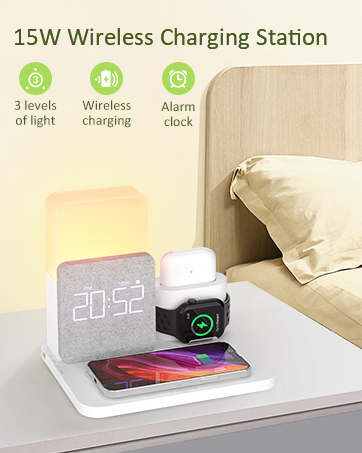
Image: A customer service representative, symbolizing available support for the COLSUR S29.


