
Olakids TQ10015
Contents
OLAKIDS Kids Ride-on Truck Instruction Manual
Model: TQ10015
1. Product Overview
The OLAKIDS Kids Ride-on Truck is a 2-seater 12V electric vehicle designed to provide a realistic and safe driving experience for children. It features a robust design with double openable doors, bright LED lights, and a functional steering wheel. This toy car offers dual control modes: children can operate it using the foot pedal and steering wheel, or parents can take control via the included 2.4GHz remote. Enhanced with entertainment features like built-in music, Bluetooth, USB, and AUX connectivity, it ensures an engaging playtime. Safety features include a soft start function, spring suspension, and a seat belt, making it suitable for various terrains.

Figure 1.1: Front view of the OLAKIDS Kids Ride-on Truck in pink.
2. Safety Information
Please read all safety warnings and instructions carefully before assembly and operation to ensure safe use of the product. Failure to follow these instructions may result in serious injury.
- Recommended Age: This product is suitable for children aged 3 years and older.
- Adult Supervision Required: Always supervise children when they are operating the vehicle.
- Weight Limit: Do not exceed the maximum weight capacity of 110 lbs (50 kg).
- Seat Belt Use: Always ensure the child is securely fastened with the provided seat belt before operation.
- Safe Driving Environment: Operate the vehicle on flat, dry surfaces away from roads, steep inclines, swimming pools, or other hazards.
- Soft Start Function: The vehicle is equipped with a soft start function to prevent sudden acceleration, ensuring a smoother and safer ride.
- Compliance: This product complies with US CPSIA and ASTM Requirements, and DOE & CEC Requirements for electrical energy efficiency. It is made of safe materials, free from BPA, PVC, Phthalates, Lead, Latex, and Formaldehyde, with no sharp points or edges.
3. Package Contents
Before beginning assembly, please ensure all parts listed below are present and undamaged. If any parts are missing or damaged, contact customer support immediately.
- 1 x Kids Ride-on Car
- 1 x Remote Control (AAA battery not included)
- 1 x Charger
- 1 x Audio Cable
- 1 x Use Guide (Instruction Manual)
4. Assembly Instructions
Assembly of the OLAKIDS Ride-on Truck requires adult supervision and basic tools. Please follow the detailed steps provided in the included Use Guide for proper assembly. Ensure all connections are secure before first use.
- Unpack Components: Carefully remove all parts from the packaging and lay them out.
- Wheel Installation: Attach the 4 wear-resistant wheels, ensuring they are securely fastened. The 12-inch wheels are designed with spring suspension for various terrains.
- Steering Wheel & Dashboard: Install the rotatable steering wheel and connect any necessary wiring for dashboard functions (music, lights, horn).
- Seat & Seat Belt: Secure the comfortable seat and ensure the adjustable seat belt is properly installed.
- Battery Connection: Connect the 12V/7AH battery according to the instructions. Ensure the battery is fully charged before initial use (8-12 hours charging time).
- Final Checks: Verify all screws, bolts, and connections are tight and secure. Test all functions (lights, music, horn, driving modes) before allowing a child to operate the vehicle.

Figure 4.1: Key features for assembly and comfort, including the easy-grip handle, comfortable seat with safety belt, rearview mirror, and openable door with lock.

Figure 4.2: Illustration of the 12-inch big wheels with spring suspension, designed for various road types.
5. Operating Instructions
The OLAKIDS Ride-on Truck offers two primary driving modes for flexibility and safety.
5.1. Child Self-Driving Mode
Children can operate the vehicle independently using the foot pedal and steering wheel. This mode allows for a hands-on driving experience.
- Starting: Press the power button to turn on the vehicle.
- Acceleration: Press the foot pedal to move forward. The soft start function ensures a gradual acceleration.
- Steering: Use the steering wheel to control direction.
- Braking/Slowing: Release the foot pedal to brake or slow down.
- Forward/Backward: Use the operation lever (shifter) to select forward or reverse motion.

Figure 5.1: Child operating the ride-on truck in self-driving mode.
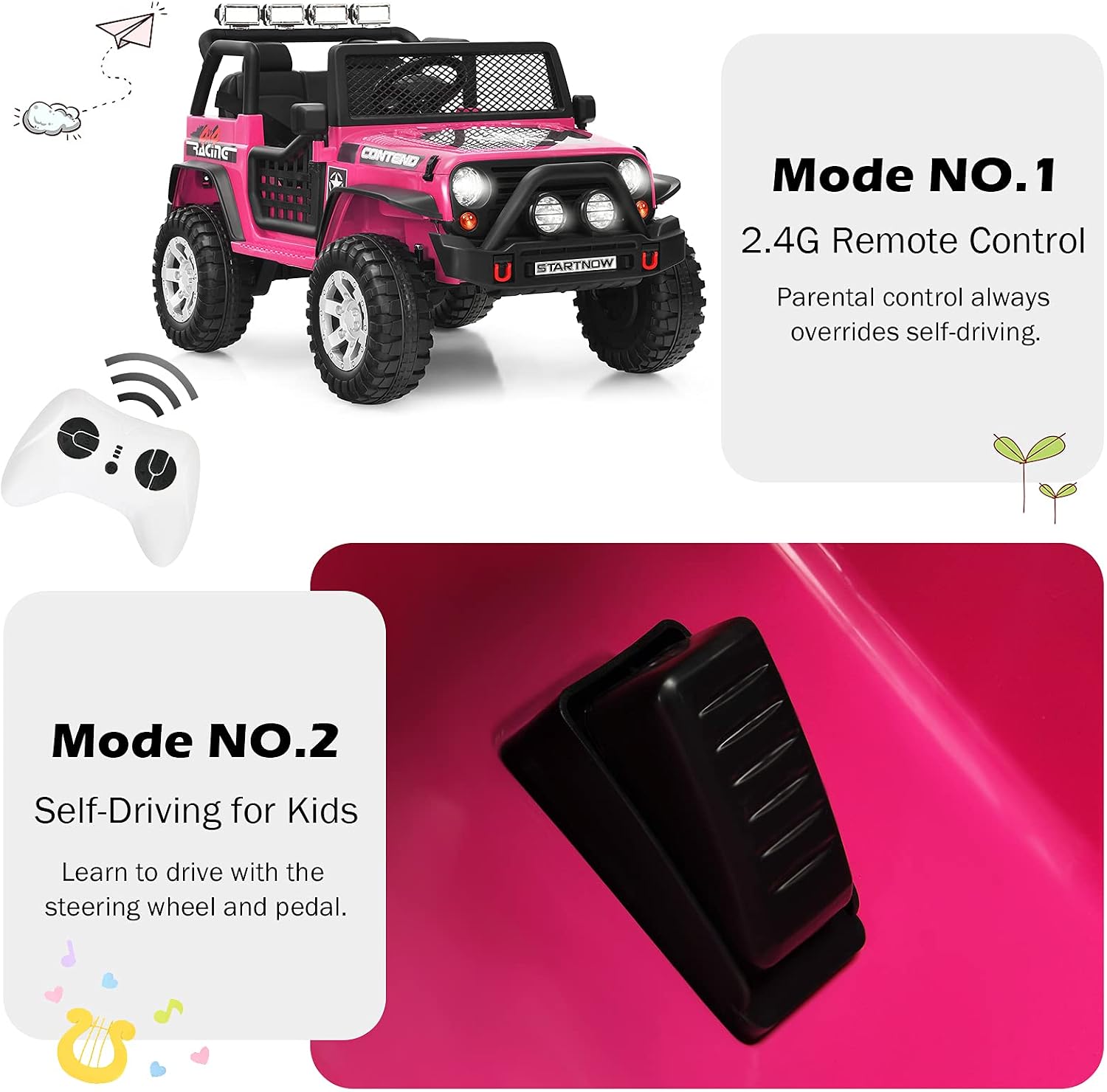
Figure 5.2: Illustration of the two driving modes: Remote Control and Self-Driving.
5.2. Parental Remote Control Mode
For younger children or added safety, parents can control the vehicle using the 2.4GHz remote control. Parental control always overrides self-driving input.
- Pairing: Follow the remote control's specific instructions to pair it with the vehicle.
- Controls: Use the joystick or directional buttons on the remote to control forward/backward movement and left/right steering.
- Speed Selection: The remote allows for speed adjustment (2 speeds available).
- Emergency Stop: The remote typically includes an emergency stop button for immediate halting of the vehicle.
5.3. Entertainment Features
The ride-on truck is equipped with various entertainment options:
- Music: Built-in music can be played via the dashboard controls.
- Bluetooth: Connect your Bluetooth-enabled device to stream music.
- USB/AUX: Use the USB outlet or AUX input to connect external music devices.
- Radio: Tune into radio stations for additional audio content.
- Horn: Press the horn button for realistic sound effects.
- LED Lights: The bright LED lights can be turned on/off via the dashboard.
- Rocking Mode: The vehicle features a rocking function for stationary entertainment.

Figure 5.3: Dashboard controls for various functions.
6. Battery Charging and Maintenance
Proper battery care is essential for the longevity and performance of your ride-on truck.
- First Charge: Charge the battery for 8-12 hours before the first use. Do not overcharge.
- Regular Charging: Recharge the battery after each use. Typical charging time is 8-12 hours.
- Charger Use: Only use the charger provided with the product. Using an unauthorized charger may damage the battery and void the warranty.
- Storage: If storing the vehicle for an extended period, charge the battery fully every 30 days to maintain its health.
- Cleaning: Clean the vehicle with a soft, damp cloth. Do not use abrasive cleaners or solvents.
- Portability: A portable handle is located under the car for easy transportation when the battery is low or for storage.
7. Troubleshooting
This section addresses common issues you might encounter with your ride-on truck.
| Problem | Possible Cause | Solution |
|---|---|---|
| Vehicle does not move. | Battery is low or not connected; power switch is off; loose wire connection. | Charge the battery; ensure power switch is ON; check all wire connections. |
| Vehicle moves slowly. | Low battery; overloaded vehicle; operating on rough terrain. | Recharge the battery; reduce weight; operate on smoother surfaces. |
| Lights or music not working. | Loose wire connection; damaged component. | Check connections to lights/music module; contact customer support if damaged. |
| Remote control not working. | Remote batteries are dead; remote not paired; interference. | Replace remote batteries (1.5V AAA); re-pair the remote; move away from sources of interference. |
8. Specifications
| Feature | Detail |
|---|---|
| Model Number | TQ10015 |
| Battery | 12V/7AH |
| Charging Time | 8-12 hours |
| Maximum Weight Capacity | 110 lbs (50 kg) |
| Net Weight | 44 lbs (20 kg) |
| Product Dimensions (L x W x H) | 45” x 28.5” x 29” (114.3 cm x 72.4 cm x 73.7 cm) |
| Seat Base Dimension (L x W) | 18.5” x 8” (47 cm x 20.3 cm) |
| Material | PP + Steel |
| Recommended Age | 3+ Years Old |

Figure 8.1: Product dimensions and weight capacity.
9. Warranty and Support
For any questions, concerns, or assistance with your OLAKIDS Ride-on Truck, please contact Olakids customer support. Refer to your purchase documentation for specific warranty details and contact information.
- Customer Support: For technical assistance or parts replacement, please reach out to the manufacturer's customer service.
- Returns: This product typically offers a 30-day easy return policy. Please check with your retailer for specific return conditions.
Ask a question about this manual
Ask about setup, troubleshooting, compatibility, parts, safety, or missing instructions. Manuals+ will review the question and use this page’s manual context to help answer it.