
1. Introduction
Welcome to the user manual for your Samsung Galaxy S22 Smartphone. This guide will help you understand the features and functions of your device, from initial setup to advanced usage and maintenance. The Galaxy S22 redefines smartphone capabilities with its advanced camera system, vibrant display, and powerful performance.
2. What's in the Box
Upon unboxing your Samsung Galaxy S22, please ensure all the following items are present:
- Samsung Galaxy S22 Smartphone
- USB Cable
Note: Other accessories such as a power adapter, SIM ejector tool, or headphones may be sold separately depending on your region and retailer.
3. Product Overview
Familiarize yourself with the physical components of your Galaxy S22.
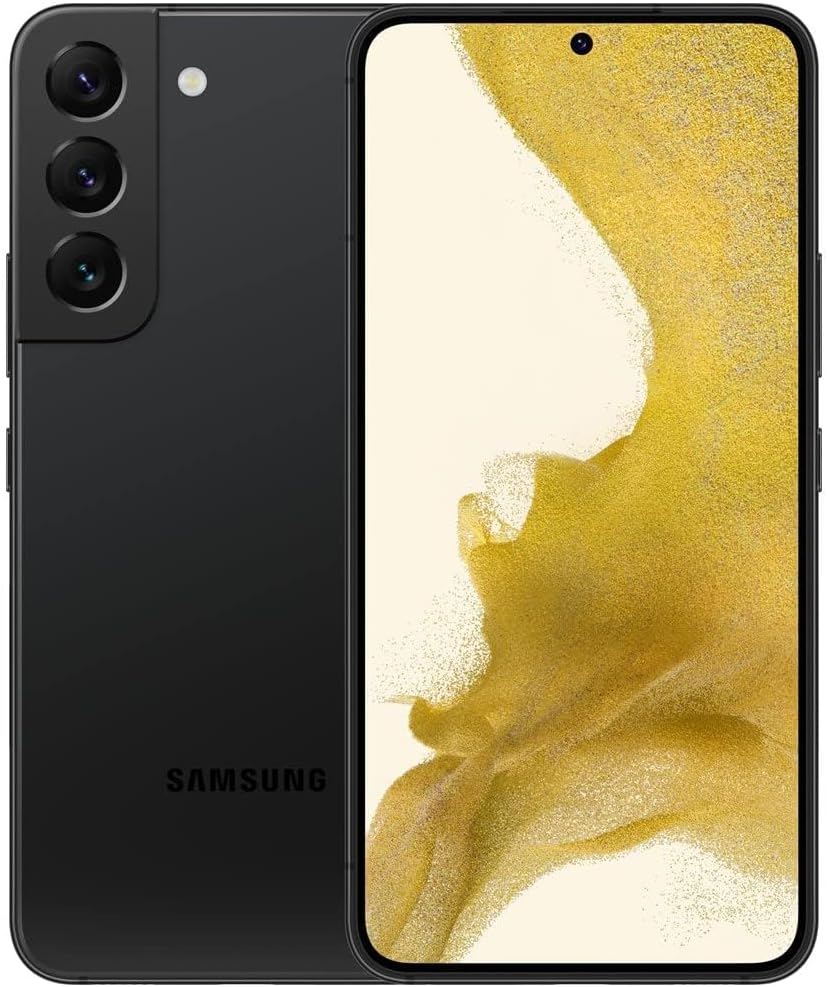
Figure 3.1: Front and back view of the Samsung Galaxy S22. The phone features a sleek design with a triple camera array on the rear and a punch-hole front camera.

Figure 3.2: Side view of the Galaxy S22, highlighting the power button and volume rocker on the right side of the device.
3.1. Camera System
The Galaxy S22 is equipped with an advanced camera system designed for high-quality photography and videography.

Figure 3.3: Detailed view of the Galaxy S22 camera specifications. The rear camera setup includes a 12MP ultrawide camera, a 50MP wide-angle camera, and a 10MP telephoto camera with 3x optical zoom. The front camera is 10MP.
- Rear Cameras: 50MP Wide-angle, 12MP Ultra-wide, 10MP Telephoto with 3x optical zoom.
- Front Camera: 10MP for high-quality selfies.
3.2. Display
The device features a 6.1-inch Infinity-O FHD+ Dynamic AMOLED 2X Display with a 120Hz refresh rate, offering a smooth and bright viewing experience. Vision Booster technology enhances visibility in various lighting conditions.
3.3. Buttons and Ports
- Power Button: Located on the right side, used to power on/off or wake/sleep the device.
- Volume Buttons: Located above the power button, used to adjust media and call volume.
- USB-C Port: Located at the bottom, used for charging and data transfer.
- SIM Card Slot: Located at the bottom, for inserting your Nano-SIM card.
4. Setup
4.1. Inserting the SIM Card
- Locate the SIM card tray on the bottom edge of the phone.
- Insert the SIM ejector tool (if available) or a small paperclip into the hole on the tray to open it.
- Place your Nano-SIM card into the tray with the gold contacts facing down.
- Gently push the tray back into the slot until it clicks into place.
4.2. Charging the Device
Before first use, it is recommended to fully charge your Galaxy S22.
- Connect the USB cable to the phone's USB-C port.
- Connect the other end of the USB cable to a compatible power adapter (sold separately) and plug it into a wall outlet.
- The device supports 25W Super-Fast Charging.
4.3. Powering On/Off
- To Power On: Press and hold the Power button until the Samsung logo appears.
- To Power Off: Press and hold the Power button and Volume Down button simultaneously, then tap 'Power off' on the screen. Alternatively, swipe down from the top of the screen to open the Quick Settings panel, then tap the Power icon and select 'Power off'.
5. Operating Your Device
5.1. Basic Navigation
The Galaxy S22 runs on Android 12 with Samsung's One UI 4.1 interface. Navigate using gestures or traditional navigation buttons.
5.2. Making Calls and Sending Messages
- Calls: Open the Phone app, enter the number, and tap the call icon.
- Messages: Open the Messages app, tap the new message icon, enter the recipient, and type your message.
5.3. Using the Camera
Capture stunning photos and videos with the versatile camera system.
- 8K Video Recording: Record videos with incredible detail.
- Night Mode: Enhance photos and videos in low-light conditions.
- Portrait Mode: Apply professional-looking background blur to your photos.
- 30x Space Zoom: Get closer to distant subjects with advanced zoom capabilities.
5.4. Display Features
- Vision Booster: Automatically optimizes color and brightness for optimal viewing in any environment.
- Adaptive Screen: Adjusts display settings based on ambient light and content.
6. Maintenance
6.1. Battery Care
To maximize your battery's lifespan:
- Avoid extreme temperatures.
- Use only Samsung-approved chargers and cables.
- Consider enabling power-saving modes when battery is low.
- For long-term storage, charge the battery to about 50%.
6.2. Cleaning Your Device
Use a soft, lint-free cloth to clean the screen and body of your phone. Avoid harsh chemicals or abrasive materials.
6.3. Software Updates
Regularly check for and install software updates to ensure your device has the latest features, security patches, and performance improvements. You can usually find this option in the phone's Settings menu under 'Software update'.
7. Troubleshooting
This section addresses common issues you might encounter with your Galaxy S22.
| Problem | Possible Cause / Solution |
|---|---|
| Device does not power on | Ensure the battery is charged. Press and hold the Power button for at least 10 seconds to force restart. |
| Poor battery life | Close background apps, reduce screen brightness, disable unnecessary features (GPS, Bluetooth, Wi-Fi when not in use). Consider replacing the battery if it's an older device. |
| Device overheating | Avoid prolonged heavy usage (e.g., gaming, 8K video recording). Close unused apps. Ensure good ventilation. |
| Network connectivity issues | Check SIM card insertion. Restart the device. Verify network settings or contact your service provider. |
| Screen unresponsive | Force restart the device. If the issue persists, consider a factory reset (backup data first). |
If you continue to experience issues, please refer to the Warranty and Support section for further assistance.
8. Specifications
Key technical specifications for the Samsung Galaxy S22:
| Feature | Specification |
|---|---|
| Product Dimensions | 5.75 x 2.78 x 0.3 inches |
| Item Weight | 5.8 ounces |
| Item Model Number | Galaxy S22 |
| Operating System | Android |
| RAM | 8 GB |
| Memory Storage Capacity | 128 GB |
| Screen Size | 6.1 Inches |
| Resolution | 1080 x 2340 |
| Refresh Rate | 120 hertz |
| Battery Capacity | 3700 Milliamp Hours |
| CPU Model | Snapdragon |
| CPU Speed | 3 GHz |
| Connectivity Technologies | Bluetooth, Wi-Fi, USB, NFC |
| Special Features | 120Hz Display, Fast-acting AI |
9. Warranty and Support
Your Samsung Galaxy S22 Smartphone is covered by a return policy that allows for refund or replacement within 90 days of purchase. For detailed warranty information, terms, and conditions, please refer to the documentation provided at the time of purchase or visit the official Samsung support website.
For technical support, service, or to find authorized service centers, please visit the official Samsung support website or contact their customer service line. Keep your proof of purchase handy for any warranty claims.


