
klipsch RP-5000F II Eby
Contents
Klipsch Reference Premiere RP-5000F II Floorstanding Speaker User Manual
Model: RP-5000F II Eby | Brand: Klipsch
Introduction
This manual provides essential information for the setup, operation, and maintenance of your Klipsch Reference Premiere RP-5000F II Floorstanding Speaker. Designed to deliver incredible cinematic sound, these speakers feature advanced acoustic technologies and a refined aesthetic. Please read this manual thoroughly before use to ensure optimal performance and longevity of your product.
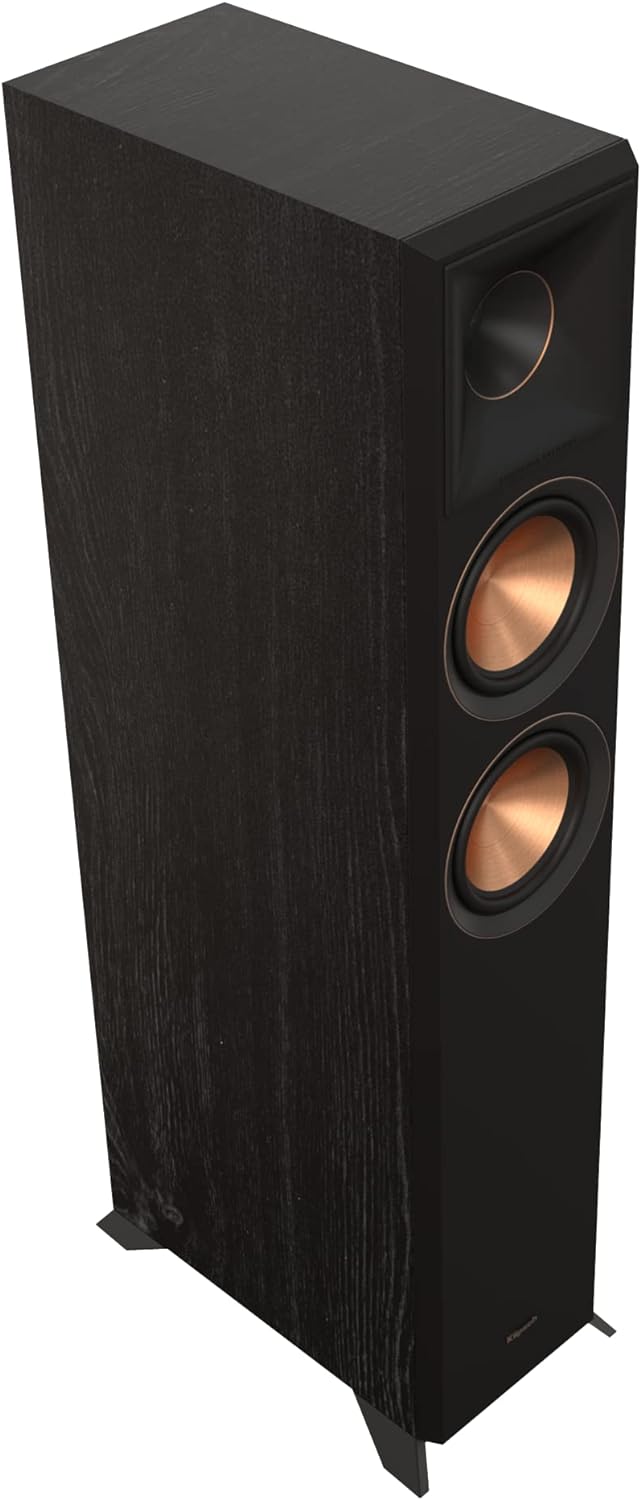
Figure 1: Front angled view of the Klipsch RP-5000F II Floorstanding Speaker in Ebony finish.
What's in the Box
- (1) RP-5000F II Floorstanding Speaker
- Dolby Atmos jumper wires (if applicable)
Setup
Speaker Placement
Optimal speaker placement is crucial for sound quality. Position floorstanding speakers equidistant from the primary listening position. For stereo setups, ensure speakers are angled slightly towards the listener (toe-in) for a focused soundstage. Avoid placing speakers directly into corners, which can overemphasize bass.

Figure 2: Example of speaker placement in a home environment.
Connecting Your Speakers
The RP-5000F II speakers feature dual input terminals for bi-wiring or bi-amping capabilities. This allows for separate high and low-frequency current paths, potentially reducing distortion and improving clarity.
- Standard Connection: Use a single pair of speaker wires to connect the main input terminals (usually labeled "Main" or "L/H") to your amplifier or receiver. Ensure positive (+) terminals on the speaker connect to positive (+) terminals on the amplifier, and negative (-) to negative (-).
- Bi-wiring/Bi-amping: If your amplifier supports it, connect separate speaker wires to the high-frequency (HF) and low-frequency (LF) terminals on the speaker. Remove the metal jumpers connecting the HF and LF terminals before bi-wiring/bi-amping.

Figure 3: Rear view of the speaker with input terminals for connection.
Dolby Atmos Integration
These speakers are designed for easy Dolby Atmos integration. Hidden connections on the back allow for seamless attachment of compatible Dolby Atmos elevation speakers (sold separately), reducing wire visibility and enhancing cable management for an immersive sound experience.

Figure 4: Dolby Atmos module integrated on top of the speaker.
Operating Your Speakers
Once connected to your audio receiver or amplifier, your Klipsch RP-5000F II speakers are ready for use. Ensure your receiver/amplifier is powered on and set to the correct input source. Adjust volume levels gradually to avoid sudden loud sounds.
Audio Source Compatibility
These speakers are compatible with a wide range of audio sources, including:
- Audio Receivers
- Amplifiers
- Televisions (via receiver/amplifier)
- Gaming Consoles (via receiver/amplifier)
- Music Players (via receiver/amplifier)
Key Features
Bigger Tractrix Horn
A new, larger 90° x 90° silicone composite hybrid Tractrix horn provides crisper, clearer sound by efficiently transferring high-frequency waves into the listening area. The phase plug and compression molded silicone face ensure smooth frequency response.

Figure 5: Detail of the Tractrix horn design.
Linear Travel Suspension (LTS) Titanium Diaphragm Tweeter
The exclusive 1" Linear Travel Suspension minimizes distortion for enhanced, detailed performance. LTS tweeters are a hallmark of previous Reference Premiere speakers, making it a core component for natural sound reproduction.
Vented Tweeter Design
The vented tweeter housing reduces standing waves that create unwanted harmonics, resulting in enhanced detail and clarity in high-frequency reproduction.
All-New Cerametallic Woofers
Updated for absolutely flawless sound reproduction, minimum distortion, and maximum efficiency, these copper-spun 5.25" Cerametallic woofers are a signature Reference Premiere series speaker feature.

Figure 6: Detail of the Cerametallic woofer.
Tractrix Ports
Utilizing Tractrix geometry, the Reference Premiere ports allow for the most efficient, fastest air transfer from the cabinet for cleaner, more powerful bass, reducing port noise.
Advanced Cabinet Design
Additional bracing and a divided cabinet minimize vibrations, ensuring a cleaner sound. The improved input panel and furniture-grade materials and finishes make this speaker a statement piece for any room.
Removable Grille
The magnetic grille allows for an elegant transition from a powerful showstopper to a discrete performance piece, offering aesthetic flexibility.
Maintenance
To maintain the appearance and performance of your Klipsch RP-5000F II speakers, follow these guidelines:
- Cleaning: Dust the cabinet surfaces with a soft, dry cloth. For stubborn marks, use a slightly damp cloth with a mild, non-abrasive cleaner, then wipe dry immediately. Avoid harsh chemicals or abrasive materials.
- Grille Care: The magnetic grille can be removed for cleaning. Gently brush off dust or use a lint roller.
- Environment: Avoid exposing speakers to direct sunlight, extreme temperatures, or high humidity. Ensure adequate ventilation around the speakers.
- Handling: When moving speakers, lift them carefully from the base. Avoid dragging them, which can damage the feet or the floor.
Troubleshooting
| Problem | Possible Cause | Solution |
|---|---|---|
| No Sound | Incorrect wiring, amplifier off, wrong input selected. | Check all speaker wire connections (positive to positive, negative to negative). Ensure amplifier/receiver is powered on and set to the correct input source. |
| Distorted Sound | Overdriven amplifier, loose connections, damaged speaker. | Reduce volume. Check all connections for tightness. If distortion persists at low volumes, contact support. |
| Weak Bass | Incorrect speaker placement, phase issue, room acoustics. | Adjust speaker placement (e.g., closer to walls). Check speaker phase (ensure all speakers are wired correctly). Consider room acoustic treatments. |
| Static or Buzzing Noise | Interference from other electronics, ground loop, faulty cable. | Move speakers away from other electronic devices. Try different power outlets. Replace speaker cables if damaged. |
Specifications
| Feature | Detail |
|---|---|
| Mounting Type | Floor Standing |
| Material | Wood |
| Model Name | RP-5000F II Eby |
| Speaker Type | Tower |
| Special Feature | Bi-Amping Capability |
| Recommended Uses For Product | For Televisions |
| Compatible Devices | Audio Reciever, Amplifiers |
| Subwoofer Diameter | 5.25 Inches |
| Unit Count | 1.0 Count |
| Controller Type | Corded Electric |
| Surround Sound Channel Configuration | 1 |
| Color | Black |
| Included Components | Speaker |
| Product Dimensions | 14.75"D x 8.15"W x 36.1"H |
| Item Weight | 39 Pounds |
| Impedance | 8 Ohm |
| Warranty Type | Limited |
| Number of Items | 1 |
| Control Method | Touch |
| Speaker Size | 5.25 Inches |
| Power Source | Corded Electric |
| Woofer Diameter | 5.25 Inches |
| Tweeter Diameter | 1 Inches |
| Water Resistance Level | Not Water Resistant |
| Subwoofer Connectivity Technology | Wired |
| UPC | 743878046403 |
| Manufacturer | Klipsch |
| First Available Date | May 16, 2022 |
| Country of Origin | USA |
| Speaker Maximum Output Power | 25 Watts |
| Frequency Response | 40 Hz |
| Connectivity Technology | Wired |
| Audio Output Mode | Mono |
Warranty and Support
Your Klipsch RP-5000F II Floorstanding Speaker comes with a Limited Warranty. For specific warranty terms, conditions, and duration, please refer to the warranty card included with your product or visit the official Klipsch website.
For technical support, troubleshooting assistance, or to inquire about replacement parts, please contact Klipsch customer service or visit their official support page. You can find more information and contact details on the Klipsch Store on Amazon.
Documents and downloads
Ask a question about this manual
Ask about setup, troubleshooting, compatibility, parts, safety, or missing instructions. Manuals+ will review the question and use this page’s manual context to help answer it.