
Dhiedas YL-P10BF
Dhiedas Fingerprint Padlock YL-P10BF Instruction Manual
Model: YL-P10BF
Introduction
Thank you for choosing the Dhiedas Fingerprint Padlock. This manual provides detailed instructions for the setup, operation, maintenance, and troubleshooting of your new smart padlock. Please read this manual carefully before use to ensure optimal performance and security.
Product Features
- Multiple Unlock Methods: Fingerprint (up to 20), Bluetooth APP, Mechanical Key, and iWatch (via app).
- Fast Biometric Recognition: Unlocks in 0.2 seconds with advanced biometric technology.
- Smart User Management: Manage up to 1 administrator and 500+ general users via the eSmartlock app. Share unlock permissions, check unlock records, and set unlock schedules.
- Durable and Weatherproof: Constructed from zinc alloy and stainless steel with an IP65 waterproof rating, suitable for outdoor use.
- Long-lasting Battery: Built-in Li-Ion battery provides up to 6 months of standby time or approximately 3000 unlocks on a 30-minute Type-C charge. Features a low power consumption design and low battery alert.
- Emergency Key Backup: Includes 2 mechanical keys for emergency unlocking.
What's in the Box
- 1 x Dhiedas Fingerprint Padlock
- 2 x Mechanical Keys
- 1 x USB-C Cable
- 1 x English Instruction Manual (this document)
Setup
1. Initial Unlock (Factory Mode)
When new, the padlock is in factory mode. Any fingerprint can unlock it. The indicator light will be blue.
Video: Demonstrates unlocking the padlock in factory mode with any fingerprint.
2. App Download and Connection
- Download the 'eSmartLock' app from your device's app store.
- Ensure Bluetooth and GPS are enabled on your smartphone.
- Open the app and click 'Add smart lock'.
- Touch the padlock's fingerprint sensor to wake it up and keep the blue light on. The app will detect the lock.
- Select the detected lock in the app to connect.
Video: Guide on binding the padlock to the eSmartLock app.
3. Fingerprint Registration
- After connecting, navigate to 'User Management' in the app.
- Click 'Add fingerprint' and follow the on-screen prompts.
- Place your finger on the padlock's fingerprint sensor repeatedly until the registration is complete (5 times).
- The padlock supports up to 20 unique fingerprints.

Image: Illustration of the padlock's advanced fingerprint sensor and AI self-learning chip for fast recognition.
4. Adding Sub-accounts and Setting Schedules
- In the app, go to 'Authorization Management'.
- You can share unlock permissions with other users by inputting their sub-account username.
- Set specific unlocking times (e.g., weekdays, specific hours) and the number of allowed unlocks for sub-accounts.
Video: Instructions on how to set up sub-accounts and manage unlocking schedules.

Image: The eSmartlock app interface, highlighting features for sharing guest access and recording activities.
Operating Instructions
1. Unlocking with Fingerprint
- Place a registered finger on the fingerprint sensor.
- The padlock will unlock in approximately 0.2 seconds if the fingerprint is recognized.
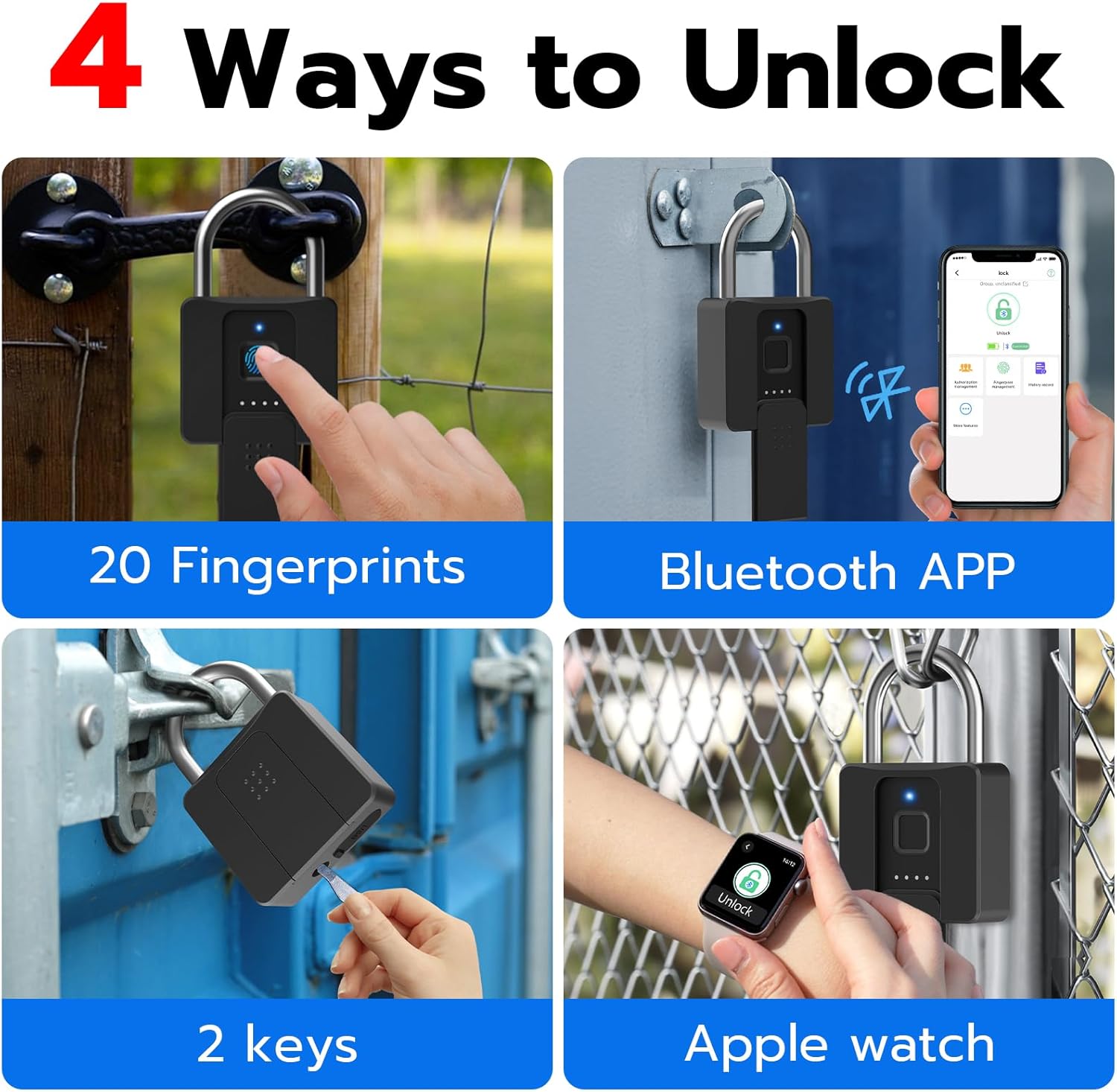
Image: Visual representation of the four unlocking methods: fingerprint, Bluetooth app, mechanical keys, and Apple Watch.
2. Unlocking with Bluetooth App
- Open the eSmartLock app on your smartphone.
- Ensure Bluetooth is enabled and the padlock is within range.
- Tap the 'Unlock' button in the app.
3. Unlocking with Mechanical Key (Emergency)
- Slide the dust cover at the bottom of the padlock to reveal the keyhole.
- Insert one of the provided mechanical keys and turn to unlock.
Video: Demonstrates unlocking the Dhiedas padlock using the mechanical key backup.
4. Locking the Padlock
- Push the shackle down firmly until it clicks into place. The padlock will automatically lock.
Maintenance
1. Charging the Battery
- When the battery is low, the padlock will provide a low battery alert.
- Slide the dust cover to reveal the USB-C charging port.
- Connect the provided USB-C cable to a power source (e.g., wall adapter, power bank).
- A full charge takes approximately 30 minutes.
- If the battery is completely depleted, the padlock will remain locked. Use a portable power bank to charge it or the mechanical key for emergency access.

Image: The padlock connected to a power bank via USB-C for charging, showing battery status indicators.
2. Waterproof and Durability
- The padlock has an IP65 waterproof rating, protecting it from dust and water splashes.
- The zinc alloy body and stainless steel shackle provide excellent cutting and rust resistance.
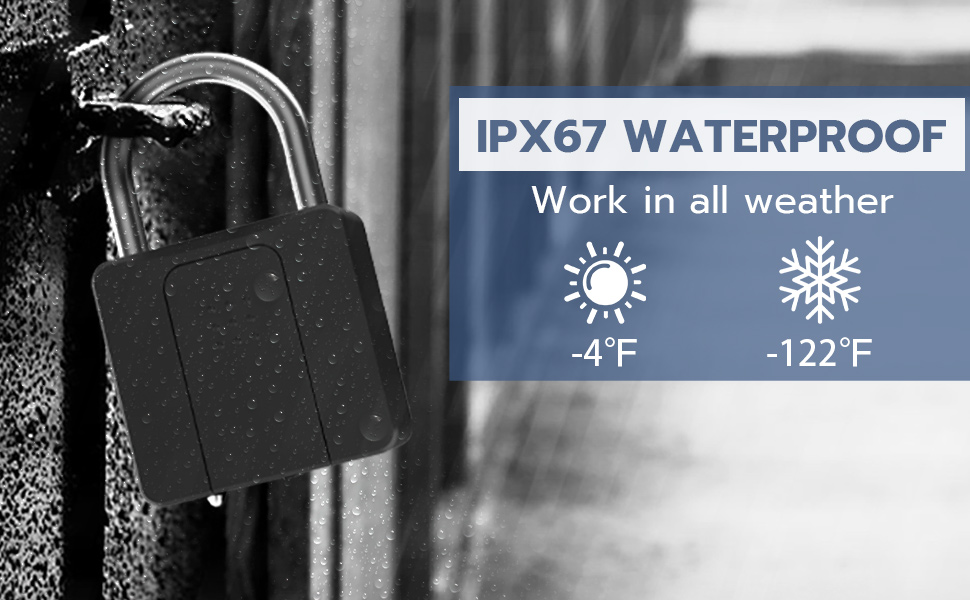
Image: The padlock shown in a wet environment, illustrating its waterproof capabilities.
3. Cleaning
- Wipe the padlock with a soft, dry cloth.
- Avoid using abrasive cleaners or solvents that may damage the finish or internal components.
Troubleshooting
- Padlock not responding: Ensure the battery is charged. Connect to a USB-C power source.
- Fingerprint not recognized: Ensure your finger is clean and dry. Try re-registering your fingerprint in the app.
- App not connecting: Verify Bluetooth and GPS are enabled on your phone. Ensure the padlock is awake (touch the sensor) and within range.
- Padlock stuck in factory mode (any fingerprint unlocks): This indicates the padlock has been reset or was never properly bound to an administrator account. Follow the app setup instructions to bind it and register your fingerprints.
- Restoring to Factory Mode: If you need to reset the padlock, delete it from the app. This will unbind it and restore it to factory settings, allowing any fingerprint to unlock it until a new administrator is set up.
Video: Demonstrates how to delete a sub-account and restore the padlock to factory mode.
Specifications
| Feature | Detail |
|---|---|
| Brand | Dhiedas |
| Model Number | YL-P10BF |
| Lock Type | Biometric, Key, Smart |
| Material | Stainless Steel, Zinc Alloy |
| Item Dimensions (L x W x H) | 2.3 x 0.8 x 3.7 inches |
| Item Weight | 9.92 ounces |
| Connectivity Protocol | Bluetooth |
| Waterproof Rating | IP65 |
| Battery Life | Up to 6 months standby / 3000 unlocks per charge |
| Charging Port | USB-C |
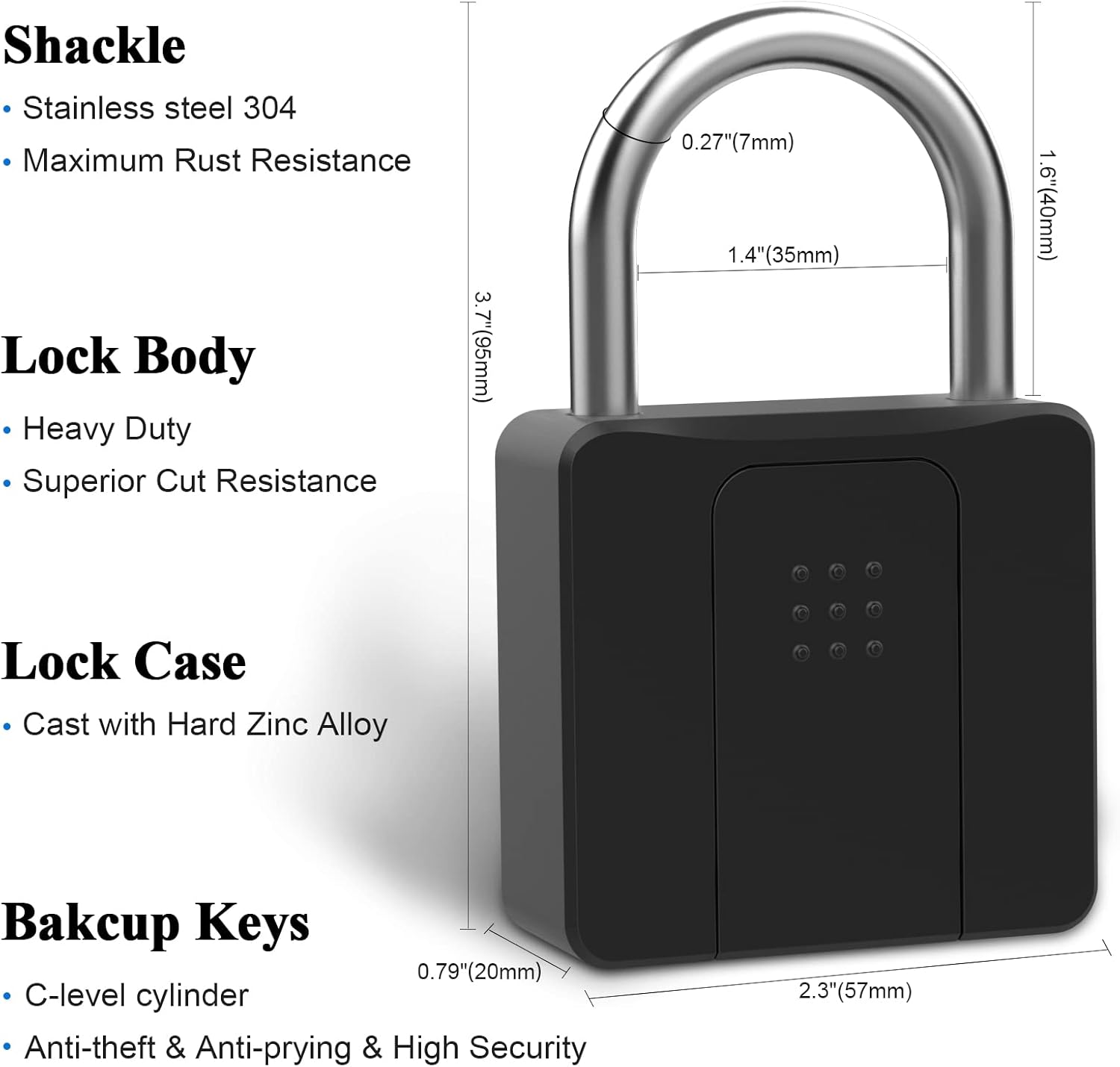
Image: Detailed diagram showing the dimensions and key components of the padlock, including shackle, lock body, and backup keys.
Safety Information
- Do not attempt to disassemble or modify the padlock, as this may void the warranty and compromise security.
- Keep mechanical keys in a safe place, separate from the padlock.
- Ensure the fingerprint sensor is clean for accurate recognition.
- Avoid exposing the padlock to extreme temperatures or corrosive substances.
Warranty and Support
Dhiedas offers a 6-month limited warranty and free lifetime customer service. For any questions or support, please contact us:
- Email: sfyt2005@hotmail.com
- Alternatively, you can message us directly from your Amazon account under "Your Orders" by selecting "Ask a Product Question or Support".
Related documentsYL-P10BF

Ask a question about this manual
Ask about setup, troubleshooting, compatibility, parts, safety, or missing instructions. Manuals+ will review the question and use this page’s manual context to help answer it.