
Lucci Air 21304101
Lucci Air Whitehaven 56-inch Ceiling Fan User Manual
Model: 21304101
Introduction
This manual provides detailed instructions for the installation, operation, and maintenance of your Lucci Air Whitehaven 56-inch 3-blade DC Smart WiFi Controlled Indoor/Outdoor Black Ceiling Fan. Please read this manual thoroughly before installation and use to ensure safe and efficient operation.
The Lucci Air Whitehaven fan features a modern 3-blade design, DC technology for energy efficiency and quiet operation, and smart WiFi control capabilities. It is suitable for both indoor and outdoor locations.
Safety Information
Always follow basic safety precautions when installing and operating electrical appliances. This includes, but is not limited to:
- Ensure power is disconnected at the circuit breaker before installation or servicing.
- All electrical work must be performed by a qualified electrician.
- Mount the fan to a structure capable of supporting the fan's weight (approximately 15 pounds).
- Ensure fan blades are at least 7 feet (2.1 meters) from the floor.
- Do not insert objects into the path of the rotating blades.
Package Contents
Verify that all components are present before beginning installation:
- Ceiling Fan Motor Assembly
- 3 Fan Blades (ABS Plastic)
- Remote Control with Wall Mount
- Mounting Hardware
- 1 x CP2032 Battery (for remote)
- Instruction Manual

Image: The Lucci Air Whitehaven 56-inch ceiling fan, showcasing its sleek black finish and three distinct blades.
Setup and Installation
Installation of the Lucci Air Whitehaven ceiling fan requires assembly and electrical wiring. It is recommended that installation be performed by a licensed electrician.
1. Mounting the Bracket
Secure the mounting bracket to a ceiling joist or a fan-rated outlet box. Ensure the bracket is firmly attached and can support the fan's weight.
2. Wiring Connections
Connect the fan's electrical wires to the household wiring according to local electrical codes. Typically, this involves connecting the live, neutral, and ground wires. Refer to the wiring diagram provided in the physical manual for specific color codes.
3. Assembling the Fan
Attach the fan blades to the motor housing. The Whitehaven fan features three ABS plastic blades designed for optimal airflow. Ensure all screws are tightened securely.

Image: Technical line drawing illustrating the dimensions of the Lucci Air Whitehaven ceiling fan, including its 56-inch diameter and 11.8-inch height.
4. Securing the Fan to the Bracket
Carefully lift the fan assembly and attach it to the mounted bracket. Ensure all safety clips and screws are engaged to prevent accidental detachment.
Operating Instructions
The Lucci Air Whitehaven fan can be controlled via the included remote control or through the Bond Home app for smart WiFi control.
Remote Control Operation
The remote control allows for comprehensive control of the fan's functions:
- Power Button: Turns the fan On/Off.
- Speed Control: Select from 6 fan speeds (I to VI).
- Reverse Switch: Changes the direction of blade rotation for summer (downward airflow) or winter (upward airflow) modes. This is a manual switch on the fan body.
- Light On/Off/Dimming: Controls the integrated light (if applicable to your model). Hold to dim.
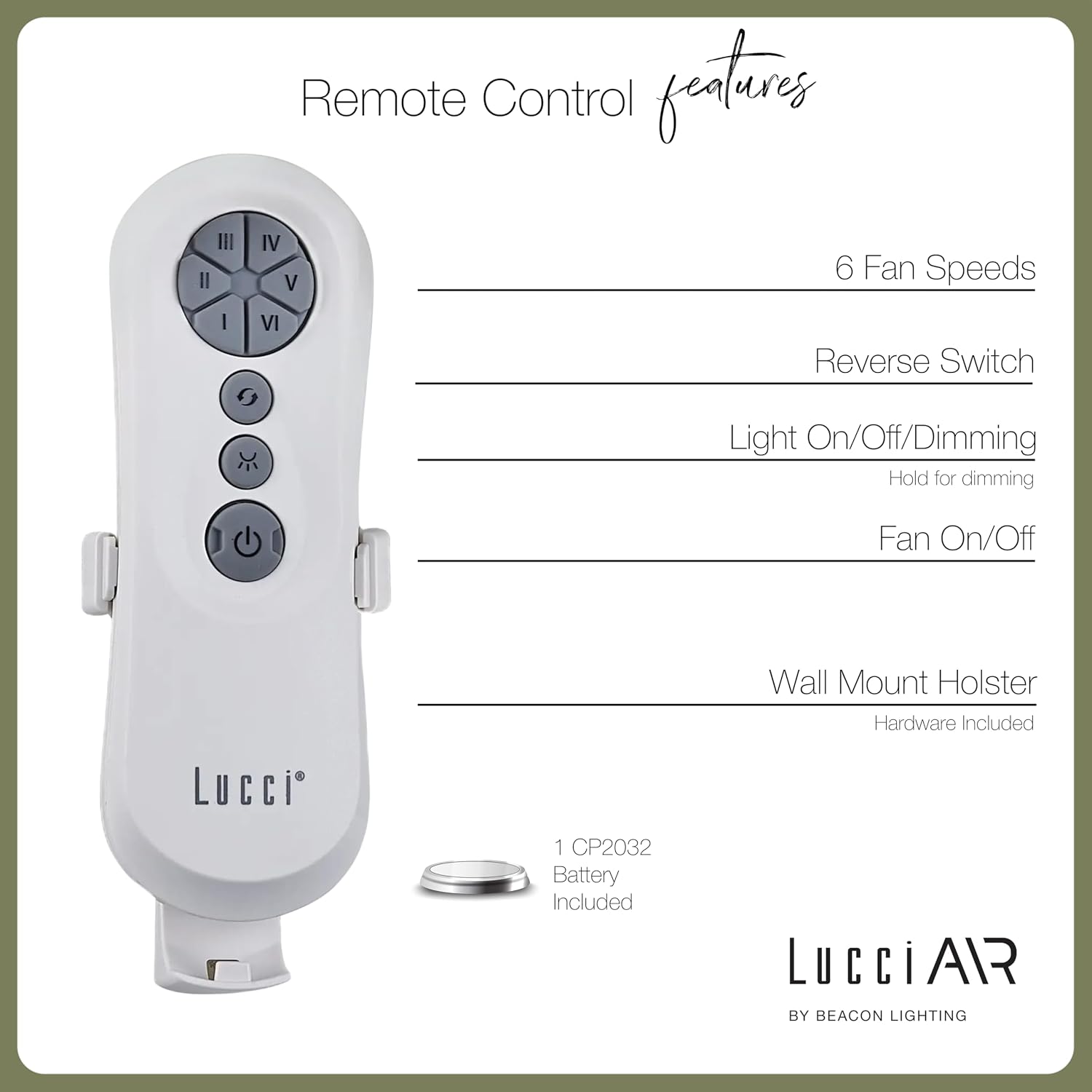
Image: Diagram detailing the features of the Lucci Air remote control, including buttons for 6 fan speeds, reverse switch, light control, and fan power, along with information about the wall mount holster and included battery.
Smart WiFi Control
For advanced control and smart home integration, download the Bond Home app. The app allows you to control your fan from anywhere, set schedules, and integrate with voice assistants.
- Download the "Bond Home" app from your device's app store.
- Follow the in-app instructions to pair your Lucci Air Whitehaven fan.
- Once paired, you can control fan speed, direction, and lighting (if applicable) directly from your smartphone or smart speaker.
Maintenance
Regular maintenance ensures the longevity and optimal performance of your ceiling fan.
- Cleaning: Dust the fan blades and motor housing periodically with a soft, damp cloth. Do not use abrasive cleaners or solvents. The manufacturer recommends "Hand Wash" for care, implying gentle cleaning.
- Blade Inspection: Check that all blade screws are tight at least twice a year. Loose blades can cause wobbling and noise.
- Motor Lubrication: The DC motor is typically sealed and does not require lubrication. Refer to the physical manual for specific instructions if unsure.
- Remote Battery Replacement: Replace the CP2032 battery in the remote control when its range decreases or it stops responding.
Troubleshooting
| Problem | Possible Cause | Solution |
|---|---|---|
| Fan does not start | No power to the fan; Loose wire connections; Remote control battery dead. | Check circuit breaker; Verify all wire connections are secure; Replace remote control battery. |
| Fan wobbles | Loose blade screws; Unbalanced blades; Loose mounting bracket. | Tighten all blade screws; Ensure blades are balanced (balancing kit may be needed); Secure mounting bracket. |
| Remote control not working | Dead battery; Remote not paired with fan. | Replace CP2032 battery; Refer to pairing instructions in the physical manual or Bond Home app. |
| Fan makes noise | Loose screws; Motor hum; Blades hitting an obstruction. | Check and tighten all screws; Ensure no obstructions are in the fan's path. A slight motor hum is normal for DC fans. |
| WiFi control not connecting | Incorrect WiFi password; Router too far; Bond Home app issue. | Verify WiFi credentials; Move router closer or use a WiFi extender; Reinstall Bond Home app or contact Bond Home support. |
Specifications
| Feature | Detail |
|---|---|
| Model Name | Whitehaven |
| Model Number | 21304101 |
| Brand | Lucci Air |
| Dimensions (D x W x H) | 56" x 56" x 11.8" |
| Blade Length | 28 Inches |
| Number of Blades | 3 |
| Blade Material | ABS Plastic |
| Color | Black |
| Power Source | DC (Direct Current) |
| Voltage | 120V |
| Wattage | 35 watts |
| Air Flow Capacity | 7070 Cubic Feet Per Minute (CFM) |
| Number of Speeds | 6 |
| Control Method | Remote, Smart WiFi (Bond Home App) |
| Indoor/Outdoor Usage | Outdoor, Indoor |
| Item Weight | 15 Pounds |
| UPC | 811769032429 |
Warranty and Support
The Lucci Air Whitehaven ceiling fan comes with a limited lifetime warranty. Please retain your proof of purchase for warranty claims.
For technical support, troubleshooting assistance beyond this manual, or warranty inquiries, please contact Lucci Air customer service. Contact information can typically be found on the manufacturer's website or on the product packaging.
For Bond Home app related issues, please refer to the Bond Home support resources.
Additional Product Views

Image: Two Lucci Air Whitehaven fans installed on an outdoor patio, demonstrating their suitability for outdoor use and modern aesthetic in an exterior setting.

Image: A Lucci Air Whitehaven fan installed in an indoor dining room, highlighting its sleek design complementing a modern interior space.

Image: The Lucci Air Whitehaven fan positioned in a contemporary living room, illustrating its integration into a comfortable indoor environment.

Image: A detailed side view of the Lucci Air Whitehaven ceiling fan, emphasizing the slim profile of its blades and motor housing.
Official Product Videos
No official seller videos were found for this product in the provided data.
Related documents21304101


Ask a question about this manual
Ask about setup, troubleshooting, compatibility, parts, safety, or missing instructions. Manuals+ will review the question and use this page’s manual context to help answer it.