
Introduction
This manual provides essential information for the safe and effective use of your KAER Digital Quick Access Electronic Firearm Safe. Please read all instructions carefully before setup and operation to ensure proper functionality and security. This safe is designed to provide secure storage for your firearms and valuables, offering quick access when needed.
Safety Information
WARNING: Failure to follow these safety guidelines may result in serious injury, property damage, or death.
- Always secure the cabinet to the wall or floor using the provided hardware to prevent tipping.
- Keep fingers away from the door when closing to avoid injury.
- Do not overload the cabinet beyond its weight capacity.
- Store keys and access codes in a secure location, away from the safe and out of reach of unauthorized individuals, especially children.
- Ensure firearms are unloaded before storing them in the safe.
- Regularly check the safe's locking mechanism and batteries to ensure proper function.
Product Features
- Dimensions: External dimensions (in): H52 x W9.85 x D8.66. Height from floor: 46.88in.
- Capacity: Stores rifles or shotguns up to 44.68 inches with the shelf, or up to 51 inches without the shelf.
- Interior Protection: Fully wrapped in flannelette to prevent wear and tear on firearms.
- Internal Organization: Features a removable top shelf, a removable pistol rack for four pistols, and two ammunition boxes on the door.
- LED Lighting: Equipped with upgraded LED lights for greater lighting range in the dark.
- Digital Panel: New digital panel with an external battery box design for emergencies and aesthetics.
- Hidden Keyhole: Keyhole is covered by the battery compartment for a hidden design.
- Battery Requirement: Requires 4 AAA batteries (not included).
- Under-Voltage Alarm: Panel includes an under-voltage alarm function (red light indicates low battery).
- Intelligent Alarm System: Incorrect password alarm (3 consecutive incorrect entries trigger a 50-second alarm).
- Vibration Alarm: Long press '#' key for 5 seconds to activate vibration alarm. Automatically lifts after correct unlocking.
- Door Access: 180-degree full access door for easy retrieval.
Setup and Installation
The KAER Digital Safe comes already assembled. For maximum security, it must be securely attached to a wall or floor.
- Placement: Choose a suitable location on the ground, in a closet, garage, or home office.
- Anchoring: The safe has pre-drilled holes for easy attachment. Use the provided bolts to secure it to the floor or wall (or both).

Figure 1: The slim design of the KAER Digital Safe allows for versatile placement in various home environments, including closets, tool rooms, and bedrooms.
Video 1: An overview of the KAER gun safe, demonstrating its features and suitability for home use. This video highlights the safe's compact size and internal organization.
Operating Instructions
1. Digital Lock Operation
- Battery Installation: The digital panel features an external battery box. Slide down the cover to reveal the battery compartment. Insert 4 AAA batteries (not included), ensuring correct polarity. Replace the cover.
- Setting/Changing Passcode: With the door open, press the reset button located on the inside of the door. The keypad lights will illuminate. Enter your desired 3-8 digit password, then press '#'. The safe will beep twice to confirm the new code.
- Unlocking with Passcode: Enter your programmed 3-8 digit password on the keypad, then press '#'. The green light will illuminate, indicating the safe is unlocked. Turn the handle to open the door.
- Under-Voltage Alarm: A red light will illuminate when the safe is opened using the digital code if the battery voltage is low. Replace batteries promptly.
2. Key Access
- In case of battery failure or forgotten code, the safe can be opened using the emergency key.
- Locate the hidden keyhole behind the battery compartment cover. Insert the key and turn it to unlock the safe.
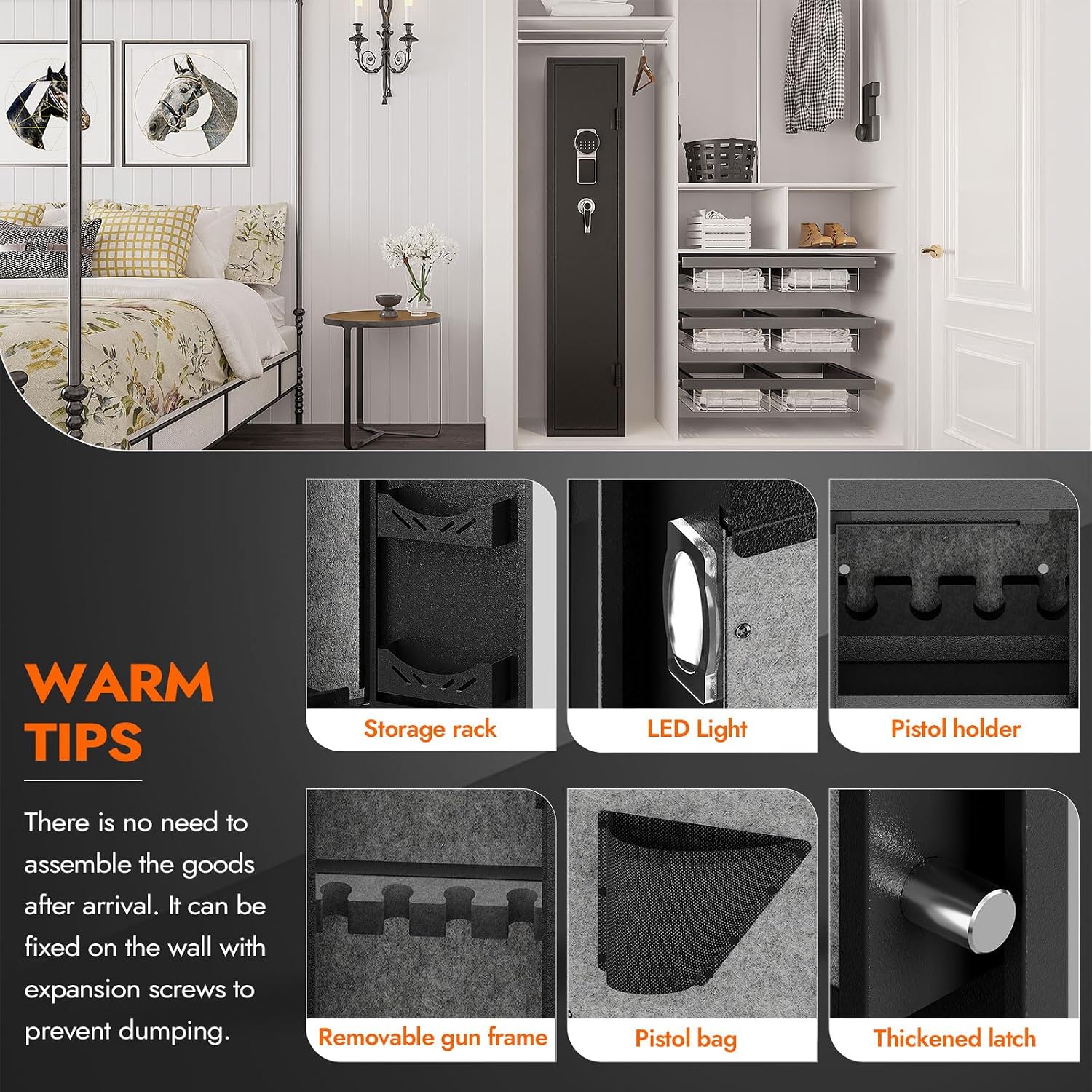
Figure 2: The safe offers multiple unlocking methods, including a digital password (3-12 digits) and an emergency key, with a hidden keyhole for added security.
3. Intelligent Alarm System
- Incorrect Password Alarm: If the password is entered incorrectly 3 times in a row, the safe will enter an alarm state. The alarm will last for 50 seconds. To exit alarm mode, enter the correct password or remove the batteries.
- Vibration Alarm: To turn on the vibration alarm function, long press the '#' key for 5 seconds. The vibration alarm is automatically lifted after each correct unlocking and needs to be reset if desired.

Figure 3: The safe is equipped with an electronic lock system and a vibration alarm function to deter unauthorized access.
Internal Organization
The safe's interior is designed for optimal storage and protection of your firearms and accessories.
- Removable Shelf: A removable shelf is located at the top of the gun cabinet, providing flexible storage space for smaller items or valuables.
- Pistol Rack: A pistol rack is included that can hold four pistols. This rack is also removable, allowing for customization of the interior space.
- Ammunition Storage: Two ammunition boxes are conveniently located on the inside of the door for storing ammunition for rifles and pistols.
- Felt Lining: The entire interior is fully wrapped in soft flannelette to protect your firearms from scratches and damage.
- 180-Degree Door: The door opens a full 180 degrees, providing wide and unobstructed access to the safe's contents.

Figure 4: The interior of the safe features a removable shelf and pistol rack, all lined with felt for protection.

Figure 5: Detailed view of internal components, including the storage rack, LED light, and pistol holder.
Maintenance
To ensure the longevity and optimal performance of your KAER Digital Safe, regular maintenance is recommended.
- Cleaning: Wipe the exterior and interior surfaces with a soft, dry cloth. Avoid using abrasive cleaners or solvents that could damage the finish or felt lining.
- Battery Replacement: Replace the 4 AAA batteries when the under-voltage alarm indicates low power. It is good practice to replace batteries annually, even if no alarm is triggered.
- Lock Mechanism: Periodically check the handle and locking bolts for any signs of wear or obstruction. Ensure they move smoothly.
- Anchoring: Verify that the safe remains securely anchored to the wall or floor. Tighten any loose bolts if necessary.
Troubleshooting
If you encounter issues with your safe, refer to the following common troubleshooting steps:
| Problem | Possible Cause | Solution |
|---|---|---|
| Keypad not responding | Dead batteries | Replace 4 AAA batteries. Use emergency key to open if necessary. |
| Safe alarm sounds unexpectedly | Incorrect code entered multiple times; Vibration alarm activated | Enter correct password to disarm. If vibration alarm, ensure it's reset after each use. |
| Door does not open after correct code/key | Handle not fully turned; Obstruction | Ensure handle is fully rotated. Check for any obstructions preventing the door from opening. |
| Red light on keypad | Low battery voltage | Replace 4 AAA batteries immediately. |
Specifications
| Attribute | Value |
|---|---|
| Brand | KAER |
| Color | Black |
| Recommended Uses | Home |
| Product Dimensions (D x W x H) | 8.6"D x 9.8"W x 51"H |
| Special Feature | Removable Shelf, Alarm System |
| Mounting Type | Wall Mount |
| Item Weight | 50 Pounds |
| Lock Type | Electronic |
| Material | Alloy Steel |
Warranty and Support
Warranty: This product comes with no stated warranty.
For further assistance or detailed instructions, please refer to the official user manual PDF:
For customer support inquiries, please contact the seller directly through the platform where the product was purchased.


