
Introduction
This instruction manual provides detailed guidance for the safe and proper assembly, operation, and maintenance of your 5Rcom UT1002 or UT5002 Universal Tabletop TV Stand Base. Please read this manual thoroughly before installation and retain it for future reference. Ensure all components are present and undamaged before proceeding with assembly.
Important Safety Information
Failure to follow these safety instructions may result in property damage, serious injury, or death. If you do not understand these instructions, or have doubts about the safety of the installation, please contact customer support.
- Weight Capacity: Do not exceed the maximum weight capacity of 132 lbs (60 kg). Overloading can result in serious injury or property damage.
- TV Size Compatibility: Ensure your TV's screen size and VESA pattern are within the specified range for your model (UT1002: 27-55 inches; UT5002: 40-80 inches).
- VESA Compatibility: Verify your TV's VESA mounting pattern (horizontal x vertical) is compatible with the stand. Refer to the "TV Compatibility" section.
- Component Check: Before installation, verify that all parts are included and undamaged. Do not use damaged or defective parts.
- Installation Surface: The tabletop or surface where the stand is placed must be stable, level, and capable of supporting the combined weight of the stand and your television.
- Children: Keep children away from the assembly area. Small parts may be a choking hazard.
- Tools: Use appropriate tools for assembly. Do not overtighten screws.
Parts List and Hardware
Before assembly, ensure you have all the necessary components. Refer to the diagram below for identification.

Image: TV Compatibility and Hardware. This image illustrates various VESA mounting patterns and the assortment of screws and spacers provided for attaching the TV to the stand.
While a detailed list of every nut and bolt is not provided here, the image above shows the types of screws and VESA patterns supported. The stand includes all necessary fittings for assembly and TV attachment.
Setup and Installation
Follow these steps for proper assembly and installation of your TV stand.
1. Check TV Compatibility
- Screen Size: Verify your TV's screen size is within the supported range (UT1002: 27-55 inches; UT5002: 40-80 inches).
- Weight: Ensure your TV's weight does not exceed 132 lbs (60 kg).
- VESA Pattern: Measure the horizontal and vertical distance between the mounting holes on the back of your TV. This is your VESA pattern (e.g., 400x400mm). Refer to the "TV Compatibility" image for supported patterns.

Image: Product Dimensions. This diagram provides the overall dimensions of the TV stand, including base size, pole height, and maximum TV bracket width and height, along with the maximum weight capacity.
2. Assemble the Base and Support Pole
Attach the main support pole to the tempered glass base using the provided hardware. Ensure all screws are tightened securely but do not overtighten.
3. Attach TV Brackets to TV
Identify the correct screws and spacers for your TV's VESA pattern. Attach the vertical TV brackets to the back of your television. Ensure they are securely fastened and level.
4. Mount TV to Stand
Carefully lift your TV and hook the attached brackets onto the main support frame of the stand. Engage the safety lock mechanism to prevent the TV from accidentally dislodging.

Image: Product Details. This image highlights key features such as the safety lock to prevent TV dropping, integrated cable management, and non-slip feet for stability.
5. Adjust Height
The stand offers multiple height adjustment levels. You can adjust the height of the TV plate and the hook positions to achieve your desired viewing height. Ensure the TV is level after adjustment.

Image: Height Adjustment. This diagram shows the adjustable height range of the TV stand, from a low of 27 inches to a high of 35 inches, measured from the base to the top of the TV mounting bracket.
Operating Instructions
Swivel Function
The TV stand features a swivel function, allowing you to rotate your television up to 30 degrees left or right. This provides optimal viewing angles from various positions in your room. Note: The base itself does not swivel; only the TV mounting bracket and attached TV rotate.

Image: Swivel Function. This image demonstrates the TV stand's ability to swivel the attached television 30 degrees to the left and 30 degrees to the right, offering flexible viewing angles.
Cable Management
Utilize the integrated cable management system to organize and conceal your TV and device cables. Route cables neatly along the central pole to maintain a clean and organized appearance.
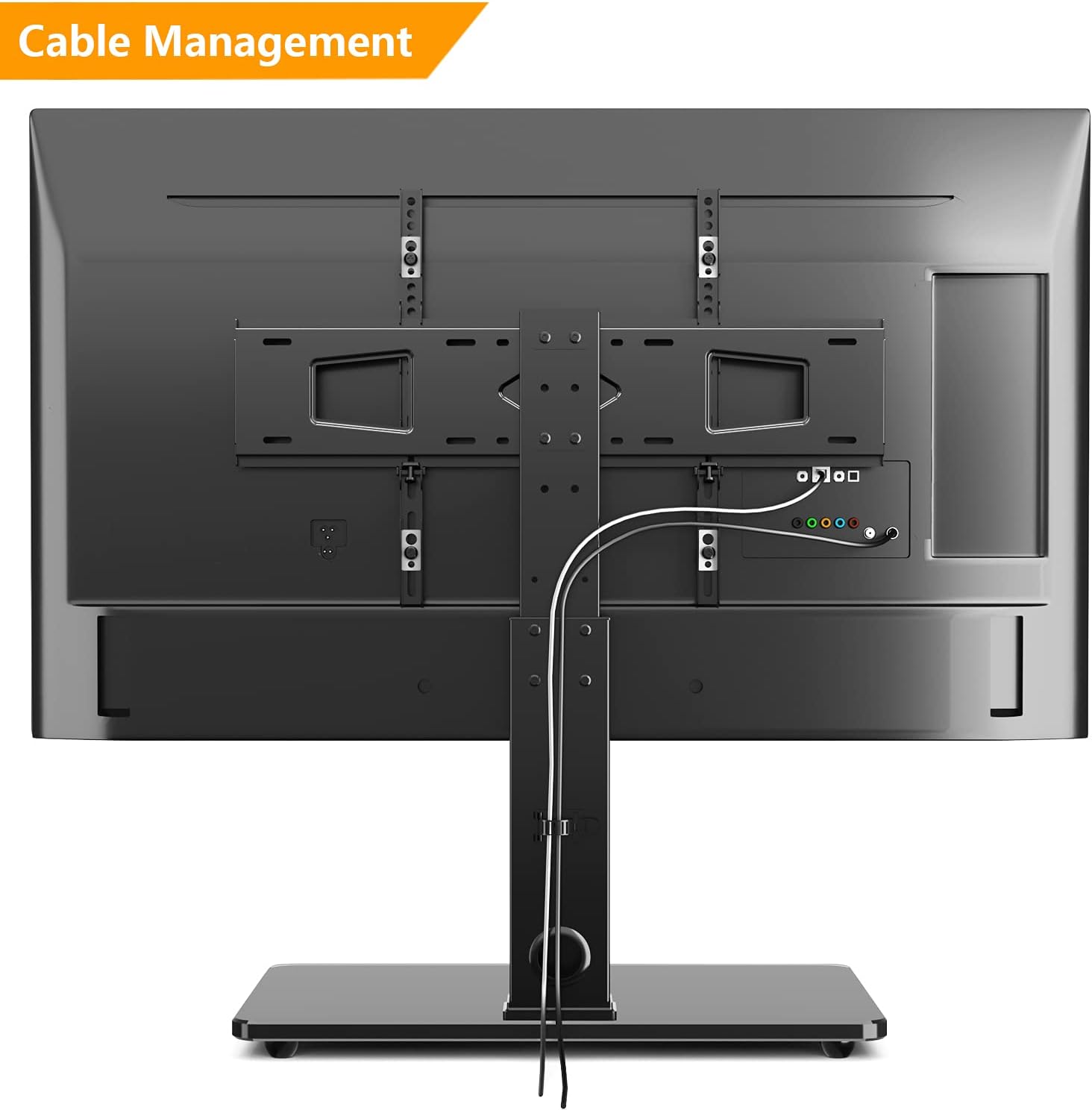
Image: Cable Management. This rear view of the TV stand illustrates how cables can be neatly routed and hidden through the central support pole, contributing to a tidy setup.
Maintenance
- Cleaning: Clean the stand with a soft, dry cloth. For stubborn marks on the glass base, a mild glass cleaner can be used, applied to the cloth first, not directly to the glass. Avoid abrasive cleaners or solvents.
- Periodic Checks: Periodically check all screws and connections to ensure they remain tight and secure. Retighten if necessary.
- Stability: Ensure the stand remains on a stable and level surface.
Troubleshooting
- TV is not level:
Check that the stand is on a level surface. Re-check the installation of the TV brackets on the back of the TV and on the stand to ensure they are correctly aligned and tightened.
- Stand feels unstable:
Ensure all assembly screws are fully tightened. Verify that your TV's weight and size are within the stand's specifications. The stand must be placed on a solid, level surface.
- Cannot attach TV to stand:
Double-check your TV's VESA pattern against the stand's compatibility. Ensure you are using the correct screws and spacers for your TV model. Refer to the "TV Compatibility" image.
Specifications
| Brand | 5Rcom |
| Models | UT1002, UT5002 |
| Mounting Type | Tabletop Mount |
| Movement Type | Swivel |
| Swivel Angle | ±30 Degrees |
| Material | Alloy Steel, Tempered Glass Base |
| Compatible TV Sizes | UT1002: 27-55 inches; UT5002: 40-80 inches |
| Maximum Load Capacity | 132 lbs (60 kg) |
| Height Adjustment | 27 inches to 35 inches (approximate, depending on TV size and mounting points) |
| VESA Compatibility | 100x100mm to 600x400mm (refer to TV Compatibility image for full list) |
Warranty Information
This product comes with a limited warranty. Please refer to the warranty card included with your purchase or contact 5Rcom customer support for specific details regarding coverage and terms. Keep your proof of purchase for warranty claims.
Customer Support
If you have any questions, require assistance with installation, or need to report missing/damaged parts, please contact 5Rcom customer support. Contact information can typically be found on the product packaging or the official 5Rcom website.
For further assistance, please visit the 5Rcom Store on Amazon.

