1. Introduction
The TIZOPO USB Volume Control Multimedia Controller Knob (Model HX-029) is a versatile and easy-to-use device designed to provide convenient audio control for various systems. Featuring a durable metal construction and a responsive rotary knob, it offers plug-and-play functionality without requiring additional drivers. Key features include one-key mute, track navigation, and an adjustable breathing light. This manual provides detailed instructions for setup, operation, and maintenance.
2. Package Contents
- 1 x USB Volume Control Knob
- 1 x USB Cable
- 1 x Instruction Manual
3. Product Overview

Figure 1: Front view of the TIZOPO USB Volume Control Knob, showcasing its sleek design and the central rotary knob.

Figure 2: Detailed view of the TIZOPO USB Volume Control Knob, highlighting its sturdy metal shell, USB port, and anti-slip mat on the base.
4. Setup
The TIZOPO USB Volume Control Knob is designed for simple plug-and-play operation. Follow these steps to set up your device:
- Connect the smaller end of the provided USB cable to the Micro USB port on the back of the volume control knob.
- Connect the larger end of the USB cable to an available USB port on your computer, laptop, or compatible device.
- The device will be automatically recognized by your operating system (Windows, Mac, Linux, Android, iOS) without the need for additional driver installation. The blue breathing light will illuminate upon successful connection.
Video 1: Demonstration of the USB Volume Control Knob's plug-and-play functionality with a mobile phone and a tablet, showing immediate volume and mute control upon connection.
5. Operating Instructions
The TIZOPO USB Volume Control Knob offers intuitive controls for your audio experience:
- Volume Adjustment: Rotate the knob clockwise to increase the system volume. Rotate the knob counter-clockwise to decrease the system volume.
- One-Key Mute/Unmute: Press the top of the knob downwards to instantly mute the audio. Press the knob again to unmute and resume playback.
- Previous/Next Track: To switch tracks, press and hold the knob, then rotate it. Rotate clockwise to skip to the next song. Rotate counter-clockwise to go back to the previous song.
- Breathing Light Control: The device features a blue breathing light. To turn off the light, press and hold the knob for approximately 2 seconds. To turn the light back on, press and hold the knob for another 2 seconds. For a continuous 'Night Mode' where the light stays on, press and hold the knob for more than 8 seconds.
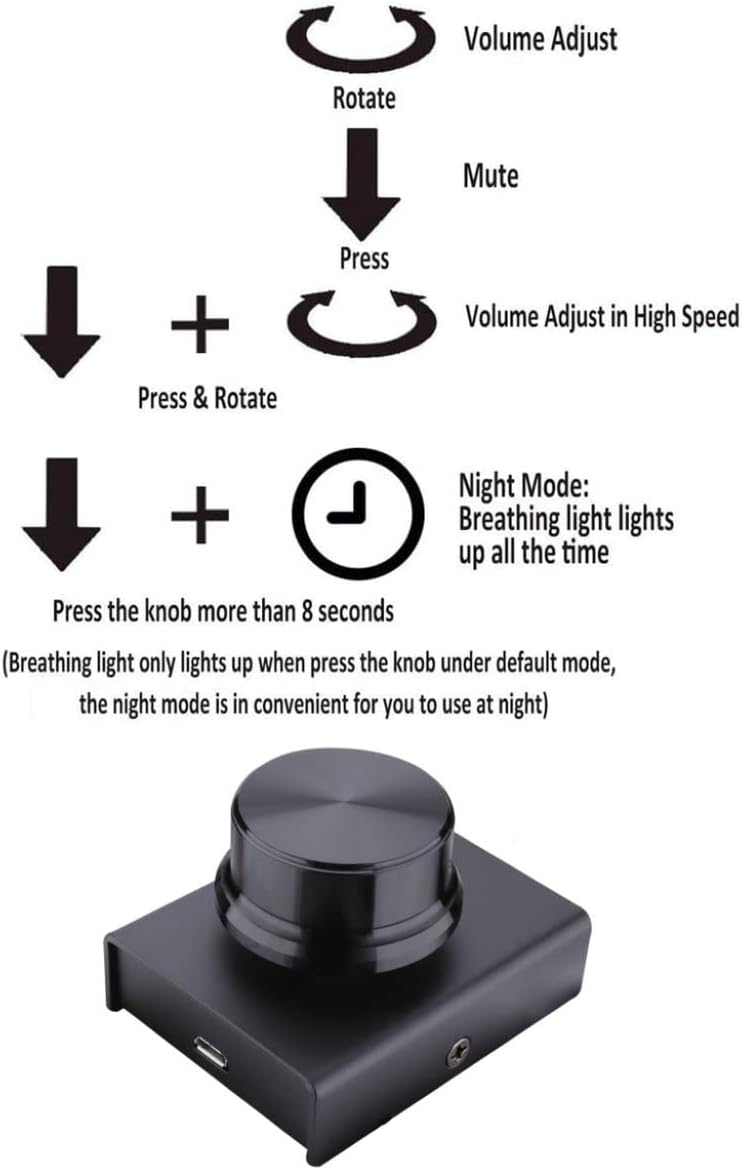
Figure 3: Visual guide illustrating the different operational modes of the USB Volume Control Knob: rotate for volume, press for mute, press and rotate for track control, and long press for night mode.
Video 2: Demonstration of a USB Volume Adjustment Knob's core functions, including increasing/decreasing volume, muting/unmuting, and switching between tracks.
6. Maintenance
To ensure the longevity and optimal performance of your TIZOPO USB Volume Control Knob, please follow these maintenance guidelines:
- Keep the device clean by wiping it with a soft, dry cloth. Avoid using harsh chemicals or abrasive cleaners.
- Protect the device from extreme temperatures, direct sunlight, and moisture.
- Avoid dropping the device or subjecting it to strong impacts.
7. Troubleshooting
If you encounter any issues with your TIZOPO USB Volume Control Knob, please refer to the following common solutions:
- Device not recognized: Ensure the USB cable is securely connected to both the knob and the computer. Try connecting to a different USB port on your computer. Restart your computer.
- No sound or volume control: Verify that the device is recognized by your system. Check your system's audio output settings to ensure the correct device is selected. Ensure the knob is not in mute mode (press the knob to toggle mute).
- Breathing light not working: Check if the light has been turned off (press and hold the knob for 2 seconds to toggle). Ensure the device is properly powered via the USB connection.
If the issue persists, please consult the manufacturer's support resources.
8. Specifications
| Feature | Detail |
|---|---|
| Model Number | HX-029 |
| Dimensions | 2.48 x 1.97 x 1.57 inches |
| Item Weight | 5 ounces |
| Connectivity | USB (Plug and Play) |
| Cable Length | 6.57 ft (included) |
| Material | Aluminum Outer Covering |
9. Compatibility
The TIZOPO USB Volume Control Knob is widely compatible with various operating systems and devices:
- Operating Systems: Windows (XP/Win7/Win8/Win10), Mac OS, Linux, Vista, Android, iOS.
- Devices: Desktop computers, laptops, mobile phones (via OTG), car navigation systems, set-top boxes, and other Android devices.
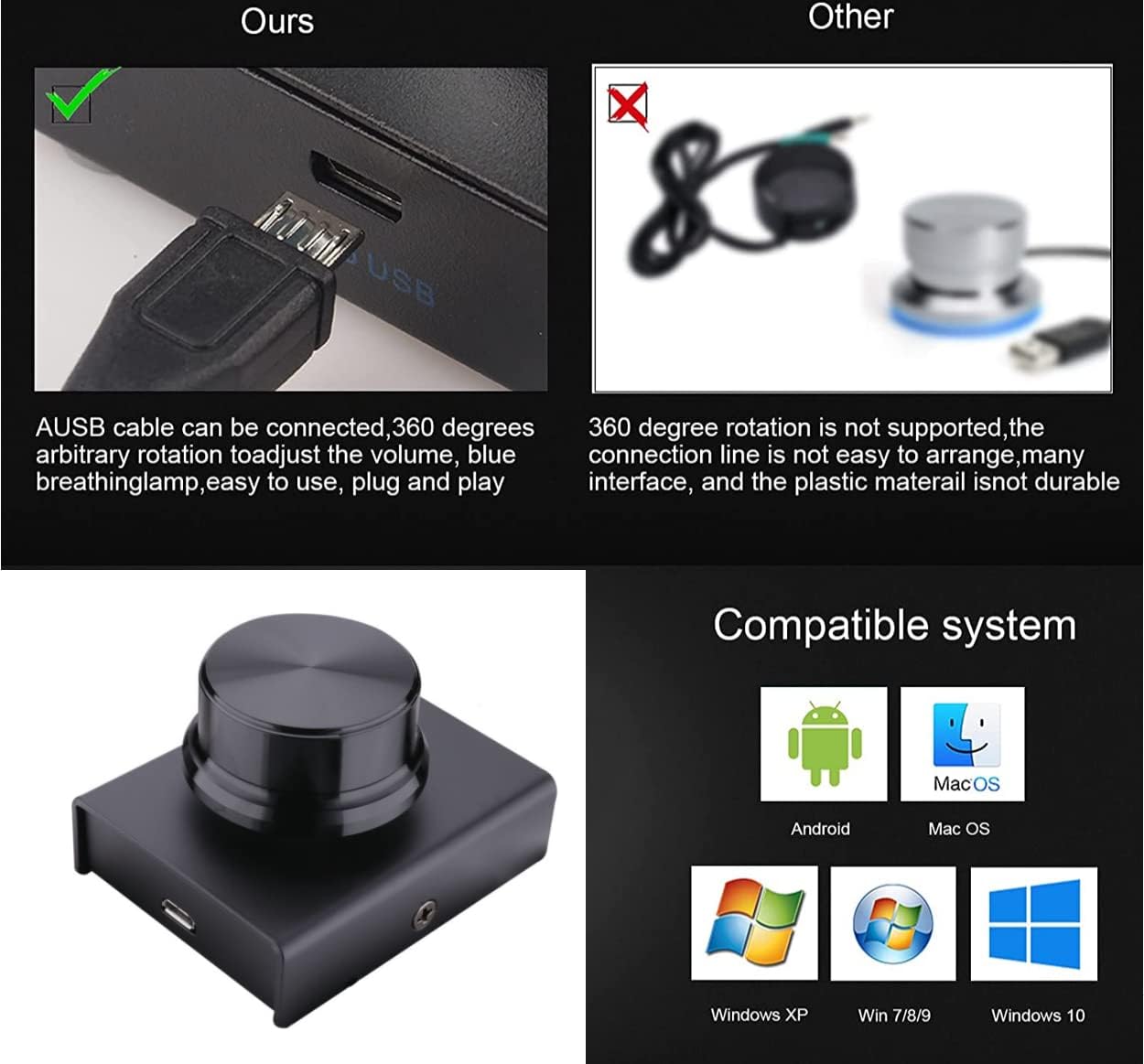
Figure 4: Image illustrating the broad compatibility of the USB Volume Control Knob with various operating systems including Android, Mac OS, Windows XP, Windows 7/8/9, and Windows 10.
10. Warranty and Support
Specific warranty details for the TIZOPO USB Volume Control Multimedia Controller Knob (Model HX-029) are not provided within this manual. For information regarding product warranty, returns, technical support, or to purchase extended protection plans, please refer to the product's original purchase page or visit the official TIZOPO website. Contact information for customer service can typically be found on the manufacturer's website or through your retailer.


