
T-WOLF TF230
T-WOLF TF230 Keyboard and Mouse Set
User Manual
1. Introduction
Thank you for purchasing the T-WOLF TF230 Wired Light-Emitting Keyboard and Mouse Set. This product is designed to provide a comfortable and responsive experience for both office work and gaming. This manual will guide you through the setup, operation, and maintenance of your new peripheral set.
2. Product Features
- Mechanical Feel Design: Enjoy a responsive and tactile typing experience.
- Vibrant Backlighting: Features cool rainbow backlight effects with colorful luminescence for an immersive experience.
- Floating Keycaps: Modern design with floating keycaps for enhanced aesthetics and ease of cleaning.
- Waterproof Keyboard: Designed with a front waterproof structure to prevent damage from spills and simplify cleaning.
- Comfortable Mouse: The mouse features a frosted texture, comfortable non-slip rollers, and cool LED breathing light effects.
- Plug and Play: Simple USB connectivity for quick setup.
- Multimedia Function Keys: Integrated multimedia keys for convenient control.

Figure 2.1: The T-WOLF TF230 Keyboard and Mouse Set showcasing its vibrant rainbow backlighting.

Figure 2.2: Detail of the keyboard's waterproof design, illustrating its spill resistance.
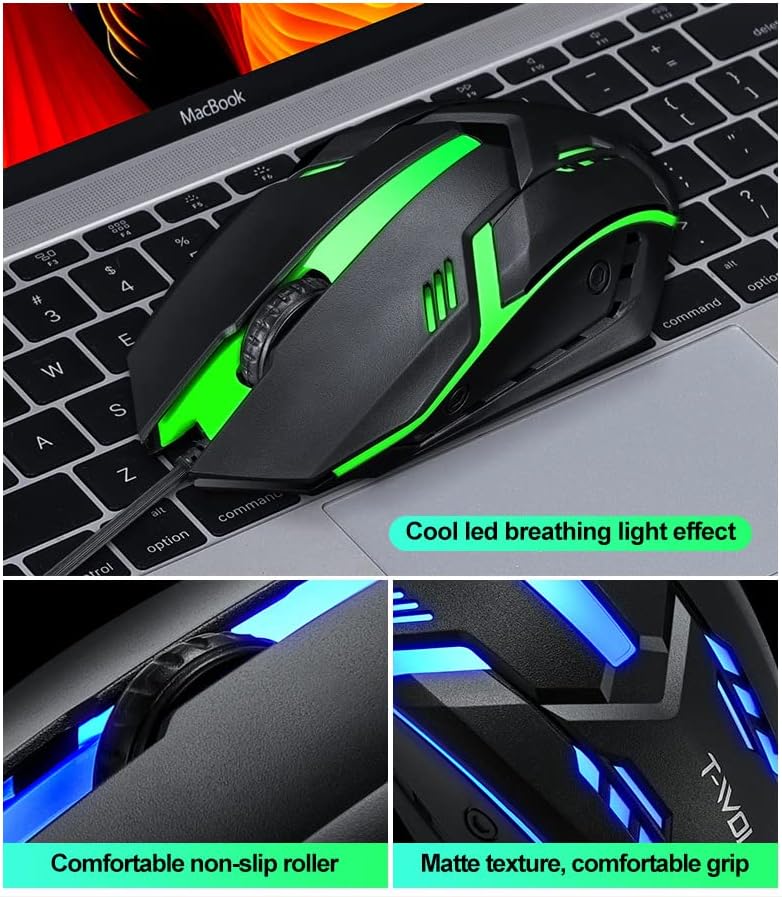
Figure 2.3: Features of the T-WOLF mouse, including its LED lighting, comfortable scroll wheel, and ergonomic grip.
3. Setup
The T-WOLF TF230 Keyboard and Mouse Set is designed for simple plug-and-play installation. Follow these steps to connect your devices:
- Locate an available USB port on your computer.
- Plug the USB connector of the keyboard into the USB port.
- Plug the USB connector of the mouse into another available USB port.
- Your computer should automatically detect and install the necessary drivers. No additional software is required.
- Once installed, the keyboard and mouse will be ready for use.
4. Operating Instructions
4.1 Keyboard Operation
- Standard Typing: Use the keyboard as a standard 104-key layout for typing and data entry.
- Backlight Control: The keyboard features a dedicated key to turn the backlight on or off. This is typically the Scroll Lock key. Press it to toggle the lighting effect.
- Multimedia Keys: Utilize the function keys (F1-F12) in combination with the Fn key (if present, though not explicitly mentioned for this model, it's common for multimedia functions) for quick access to media controls, volume, and other system functions.

Figure 4.1: The Scroll Lock key on the keyboard, used to toggle the backlight effect.
4.2 Mouse Operation
- Standard Navigation: Use the left and right click buttons for standard mouse functions.
- Scroll Wheel: The scroll wheel allows for smooth vertical scrolling through documents and web pages. It also functions as a middle click button.
- DPI Adjustment: The mouse has a photoelectric resolution of 1200dpi. If there is a dedicated DPI button (not explicitly shown but common for gaming mice), press it to cycle through different sensitivity settings.
5. Maintenance
Proper maintenance will extend the lifespan of your T-WOLF TF230 Keyboard and Mouse Set.
- Cleaning the Keyboard: Due to its waterproof design, the keyboard is easy to clean. You can gently wipe the surface with a damp cloth. For deeper cleaning, ensure the keyboard is unplugged and use compressed air to remove debris from between the keys. Avoid submerging the keyboard in water.
- Cleaning the Mouse: Use a soft, dry cloth to wipe the exterior of the mouse. For the optical sensor, use a cotton swab lightly dampened with rubbing alcohol to gently clean the sensor area.
- Cable Care: Avoid sharp bends or kinks in the USB cables to prevent internal wire damage.
- Storage: When not in use for extended periods, store the set in a clean, dry environment away from direct sunlight and extreme temperatures.
6. Troubleshooting
If you encounter issues with your T-WOLF TF230 Keyboard and Mouse Set, please refer to the following common solutions:
- Devices Not Responding:
- Ensure both the keyboard and mouse USB connectors are securely plugged into your computer's USB ports.
- Try plugging the devices into different USB ports on your computer.
- Restart your computer.
- Check your computer's Device Manager (Windows) or System Information (macOS) to see if the devices are recognized.
- Backlight Not Working:
- Press the Scroll Lock key on the keyboard to toggle the backlight on/off.
- Ensure the keyboard is properly connected to the computer.
- Mouse Cursor Jumps or is Erratic:
- Clean the optical sensor on the bottom of the mouse.
- Ensure you are using the mouse on a clean, non-reflective surface. A mouse pad is recommended.
If these steps do not resolve your issue, please contact customer support for further assistance.
7. Specifications

Figure 7.1: Detailed parameter specifications for the T-WOLF TF230 Keyboard and Mouse Set.
| Category | Specification |
|---|---|
| Brand | T-WOLF |
| Manufacturer | Thunder Wolves |
| Model | TF230 |
| Part Number | TF230 |
| Connectivity Technology | Wired USB |
| Keyboard Type | 104 Keys, Mechanical Feel, Floating Keycap |
| Keyboard Features | Backlit (Rainbow Effect), Waterproof Design |
| Keyboard Cable Length | 1.3 meters (approx. 130 cm) |
| Keyboard Dimensions | Approx. 430 x 125 x 30 mm (530 x 145 x 42 mm for packing size) |
| Keyboard Weight | Approx. 400g |
| Mouse Type | Optical Engine, Built-in Counterweight |
| Mouse Resolution | 1200dpi |
| Number of Mouse Buttons | 3D (likely 3 buttons: left, right, scroll click) |
| Mouse Cord Length | 1.35 meters (approx. 135 cm) |
| Mouse Dimensions | Approx. 130 x 68 x 39 mm |
| Mouse Weight | Approx. 95g (bare metal) |
| Compatible OS | Windows 98, 98Se, 2000, XP Home Edition, Advanced Server 2003, Server Enterprise Edition 2003 or later |
| Hardware Platform | PC |
| Batteries Required | No |
8. Warranty and Support
The T-WOLF TF230 Keyboard and Mouse Set comes with a limited warranty against manufacturing defects. Please refer to the retailer's or manufacturer's website for specific warranty terms and conditions.
For technical support, troubleshooting assistance, or warranty claims, please contact the manufacturer, Thunder Wolves, or your point of purchase. Keep your purchase receipt as proof of purchase.
Related documentsTF230


Ask a question about this manual
Ask about setup, troubleshooting, compatibility, parts, safety, or missing instructions. Manuals+ will review the question and use this page’s manual context to help answer it.