1. Introduction
The JOYO DC-15S is a versatile 15-watt portable digital guitar amplifier designed for both electric and acoustic guitars. It features 9 preamp models, a looper, a drum machine with 36 patterns, and built-in modulation, delay, and reverb effects. With its rechargeable battery, the DC-15S offers portability for practice, solo performances, and small gigs. This manual provides detailed instructions for setup, operation, maintenance, and troubleshooting to ensure optimal performance of your amplifier.

Figure 1: JOYO DC-15S Portable Digital Guitar Amplifier
2. What's in the Box
Please check the contents of your package to ensure all items are present:
- JOYO DC-15S Amplifier
- Power Adapter
- Footswitch Pedal
- Power Cable
- 3.5mm 4-Pin Cable
- Connecting Cable (for footswitch)
3. Product Overview
The DC-15S amplifier combines multiple features into a compact and portable unit.

Figure 2: Amplifier Key Features

Figure 3: Connectivity and Portability
Front Panel Controls
The top panel of the DC-15S features various controls for sound shaping and functionality:
- Input Jack: Connect your guitar.
- Gain Knob: Adjusts the input sensitivity and distortion level.
- Tone Knob: Controls the overall tonal character.
- Volume Knob: Adjusts the master output volume.
- Amp Select Knob: Choose from 9 different preamp models.
- Effects Knob: Selects between 4 modulation effects (Flanger, Phaser, Chorus, Tremolo).
- Space Knob: Selects between Delay and Reverb effects.
- Rhythm Knob: Controls the drum machine patterns and volume.
- Looper Button: Activates and controls the looper function.
- Preset Button: Saves and recalls your custom settings.
- Tap Tempo Button: Sets the tempo for delay and drum machine.
- Bluetooth Button: Activates Bluetooth pairing.

Figure 4: Amp Select Knob Detail

Figure 5: Effects and Space Knobs Detail
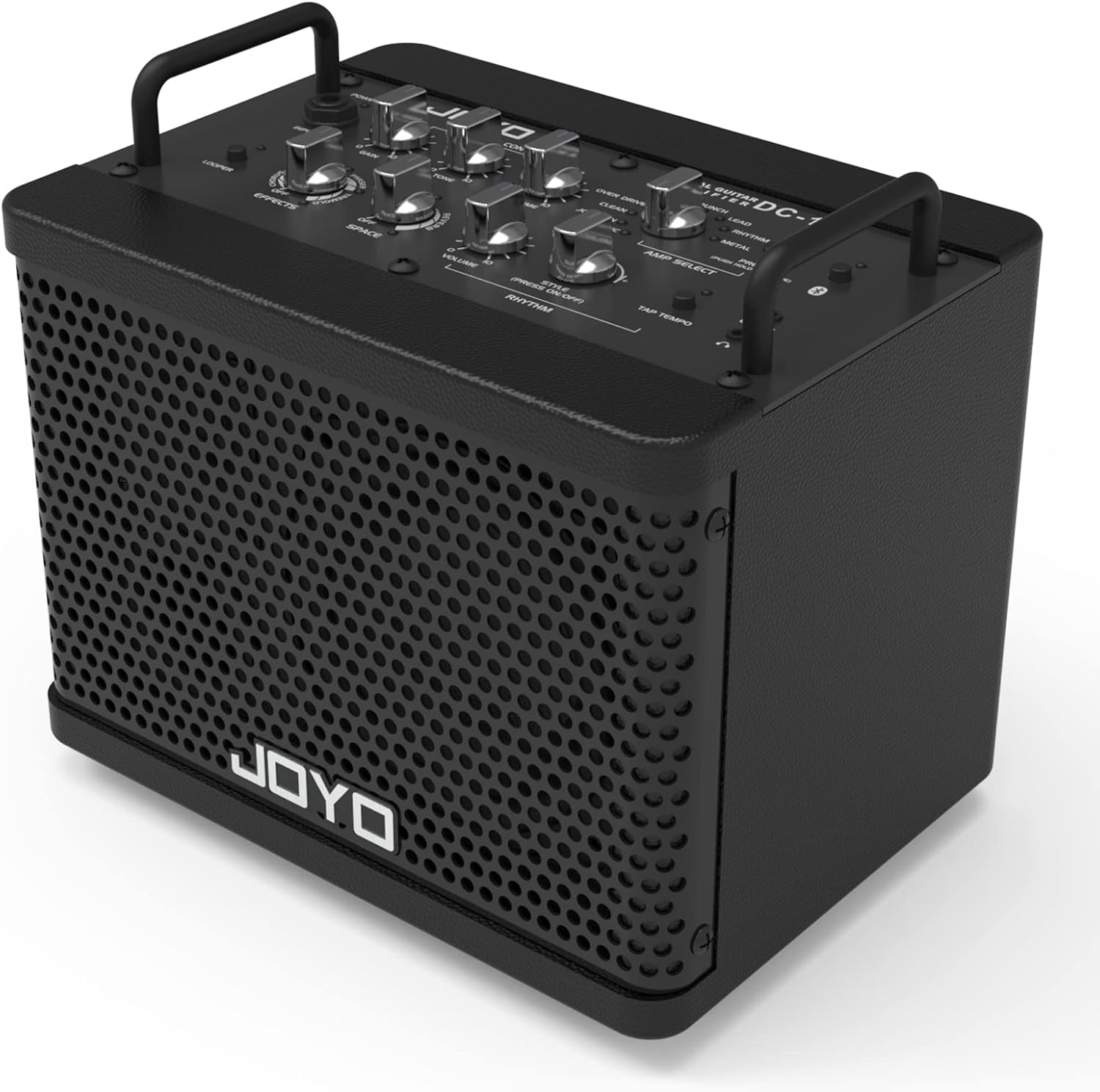
Figure 6: Amplifier Top Panel
4. Setup
4.1 Charging the Battery
The DC-15S features a built-in rechargeable lithium battery. Before first use, fully charge the amplifier using the provided power adapter and cable. A full charge typically provides 8-12 hours of continuous use.
- Connect the power adapter to the DC IN port on the amplifier.
- Plug the power adapter into a suitable power outlet.
- The charging indicator light will illuminate. It will change color or turn off when charging is complete.
4.2 Connecting Your Instrument
To connect your guitar:
- Ensure the amplifier is powered off or the volume is set to minimum.
- Connect one end of a standard 1/4-inch instrument cable to your guitar.
- Connect the other end of the cable to the INPUT jack on the amplifier.
4.3 Pairing Bluetooth
To play audio from an external device via Bluetooth:
- Power on the DC-15S amplifier.
- Press the Bluetooth button on the amplifier. The Bluetooth indicator light will flash, indicating it is in pairing mode.
- On your external device (smartphone, tablet, etc.), enable Bluetooth and search for available devices.
- Select "JOYO DC-15S" from the list of devices.
- Once paired, the Bluetooth indicator light will become solid. You can now play audio through the amplifier.
5. Operating Instructions
5.1 Power On/Off
To power on the amplifier, press and hold the power button. Repeat the action to power off the amplifier.
5.2 Selecting Amp Models
The DC-15S offers 9 distinct preamp models:
- ACOUSTIC
- JC CLEAN
- CLEAN
- OVER DRIVE
- BLUES
- CRUNCH
- LEAD
- RHYTHM
- METAL
Rotate the Amp Select knob to cycle through these models. The corresponding LED will indicate the currently selected model.
5.3 Using Effects
The amplifier includes modulation and space effects:
- Modulation Effects: Rotate the Effects knob to select Flanger, Phaser, Chorus, or Tremolo. Turn the knob to 'OFF' to bypass these effects.
- Space Effects: Rotate the Space knob to select Delay or Reverb. Turn the knob to 'OFF' to bypass these effects.

Figure 7: Built-in Effects
5.4 Drum Machine
The DC-15S features 36 drum patterns. Use the Rhythm knob to select a drum pattern and adjust its volume. The Tap Tempo button can be used to set the tempo of the drum patterns.

Figure 8: Rhythm and Looper Controls
5.5 Looper Function
The built-in looper allows you to record and playback short phrases. Press the Looper button to activate and control recording, playback, and overdubbing. Refer to the footswitch section for easier control during performance.
5.6 Using the Footswitch
The included footswitch provides convenient hands-free control over certain amplifier functions:
- Preset Control: Use the footswitch to switch between saved presets.
- Looper Control: The footswitch can be used to control the looper's recording, playback, and overdub functions, allowing for seamless performance.

Figure 9: Footswitch in Use
6. Maintenance
To ensure the longevity and optimal performance of your JOYO DC-15S amplifier:
- Cleaning: Use a soft, dry cloth to clean the exterior of the amplifier. Avoid using abrasive cleaners or solvents.
- Storage: Store the amplifier in a cool, dry place away from direct sunlight, extreme temperatures, and high humidity.
- Battery Care: For extended storage, ensure the battery is partially charged (around 50%) to maintain battery health. Avoid completely discharging the battery for long periods.
- Transportation: When transporting, ensure the amplifier is securely packed to prevent physical damage.
7. Troubleshooting
If you encounter issues with your DC-15S amplifier, refer to the following common problems and solutions:
- No Sound Output:
- Check if the amplifier is powered on and the volume knob is turned up.
- Ensure your instrument cable is securely connected to both the guitar and the amplifier's INPUT jack.
- Verify that the guitar's volume is turned up.
- If using effects, ensure they are not set to 'OFF' or at minimum levels.
- Amplifier Shuts Down Automatically:
- The amplifier has a power-saving mode and will automatically shut down within 5 minutes if there is no signal input. This is normal operation.
- Ensure the battery is sufficiently charged. Connect the power adapter if the battery is low.
- Bluetooth Not Pairing:
- Ensure the Bluetooth button on the amplifier has been pressed and the indicator light is flashing.
- Make sure Bluetooth is enabled on your external device and it is within range.
- Try restarting both the amplifier and your external device.
- Distorted or Unclear Sound:
- Adjust the Gain and Tone knobs. High gain settings can lead to distortion, especially with certain amp models.
- Check your guitar's output level.
8. Specifications
| Output Wattage | 15 Watts |
| Item Weight | 9.77 pounds (4.43 kg) |
| Product Dimensions | 7.28 x 10.04 x 9.25 inches (18.5 x 25.5 x 23.5 cm) |
| Battery Type | 1 Lithium Polymer battery (included) |
| Battery Life | 8-12 hours (approx.) |
| Body Material | Acrylonitrile Butadiene Styrene (ABS), Metal |
| Color | Black |
| Compatible Devices | Guitar, Double Bass, Keyboard, Speaker |
| Connector Type | 3.5mm Jack, 6.35mm Jack |

Figure 10: Amplifier Dimensions
9. Warranty and Support
JOYO products are manufactured to high-quality standards. While specific warranty details may vary by region, JOYO is committed to providing excellent customer service.
If you encounter any product issues or require technical assistance, please contact the seller directly through your order details. JOYO aims to resolve any concerns within 24 hours.
For further information or to explore other JOYO products, please visit the official JOYO store online.


