
1. Introduction
The Voswitch UV120 is a 12-gang switch panel power system designed for 12V battery vehicles and boats. This system provides a centralized and waterproof solution for controlling various accessories. It features a waterproof power module and a customizable switch panel, offering multiple operational modes for each button and integrated low-voltage protection.

Image: The Voswitch UV120 system, showing the 12-gang switch panel and the main power module.
2. Package Contents
Before installation, please verify that all components are present in the package:
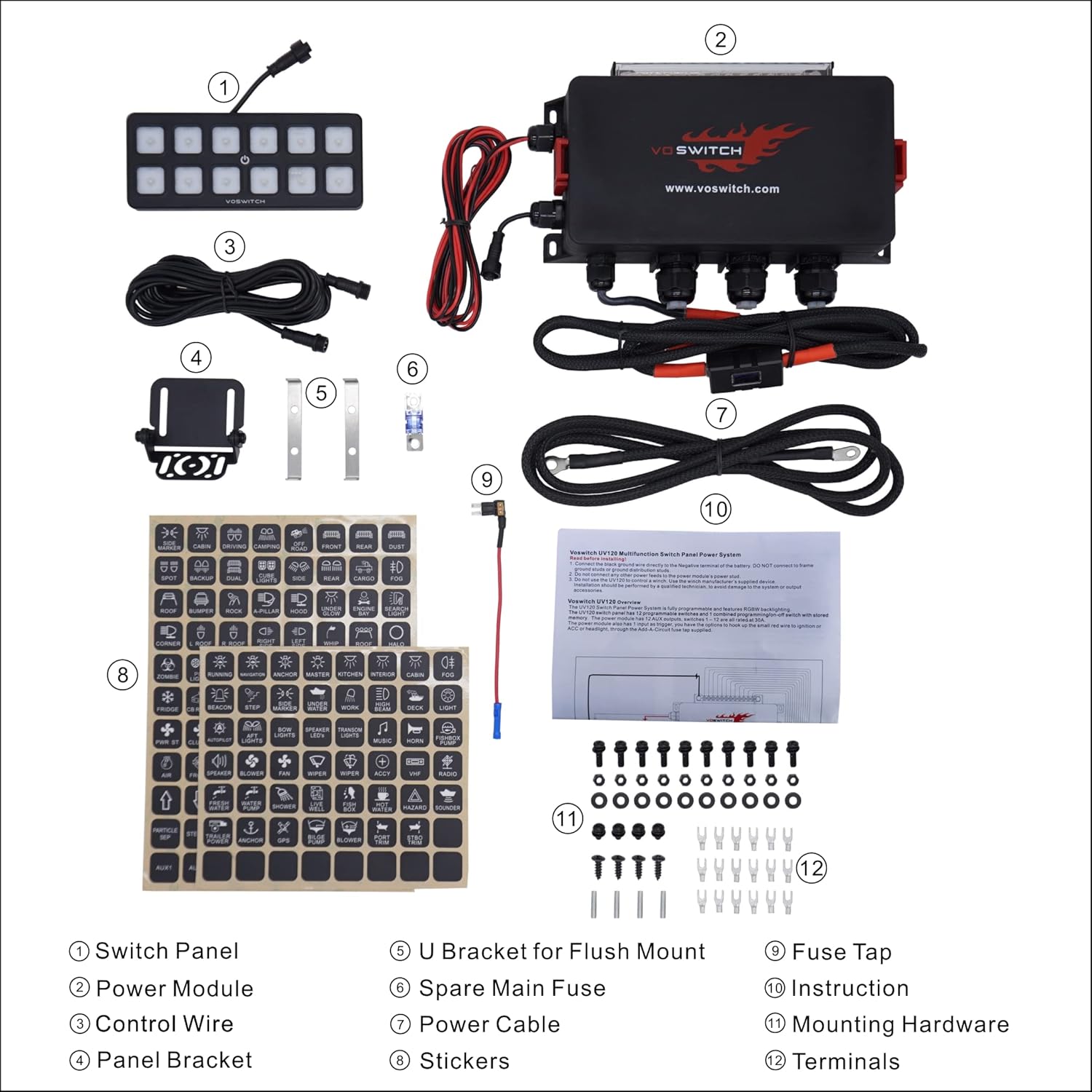
Image: Diagram illustrating all components included in the Voswitch UV120 package.
- Switch Panel
- Power Module
- Control Wire
- Panel Bracket
- U Bracket for Flush Mount
- Spare Main Fuse
- Power Cable
- Stickers (for switch labeling)
- Fuse Tap
- Instruction Manual (this document)
- Mounting Hardware (screws, nuts)
- Terminals
3. Technical Specifications

Image: Detailed specifications for the Voswitch UV120 power module and switch panel.
| Feature | Specification |
|---|---|
| Dimensions (W x D x H) | 10.82" x 7.20" x 2.36" |
| Material | Nylon |
| Temperature Rating | -4°F to 248°F (-20°C to 120°C) |
| Water and Dust Proof Rating | IP66 |
| Total Amp Rating | 100A max |
| Each Circuit Amp Rating | 30A |
| Low Voltage Cut Off (LVCO) | Cuts off at 11.0VDC, cuts back in at 12.4VDC |
| Installation Options | Direct to battery or ignition activated |
| Power Cable Size | 8 AWG |
| Feature | Specification |
|---|---|
| Dimensions (W x D x H) | 6.69" x 0.47" x 2.75" |
| Housing Material | ABS |
| Switch Membrane Material | Polycarbonate |
| Temperature Rating | -4°F to 212°F (-20°C to 100°C) |
| Water and Dust Proof Rating | IP66 |
| Backlighting Color Options | Red, Blue, Green, White (dimmable) |
| Switch Functions | ON/OFF, Momentary, Flash, Quick Flash, Flash & Strobe Combo, Strobe |
| Special Features | Master switch capability, High/Low combo settings |
4. Installation Guide
The Voswitch UV120 offers flexible installation options for both the power module and the switch panel. Ensure the vehicle's battery is disconnected before beginning any electrical work.
4.1 Power Module Installation
The power module is waterproof and designed for under-hood installation. It can be mounted directly to the battery or configured for ignition-activated operation.

Image: The power module showing its waterproof connectors and ground bus bar.

Image: Example installation of the power module within a vehicle's engine bay.
Important Note:
The UV120 panel is not compatible with the UV100 power module. Connecting a UV120 panel to a UV100 power module will result in damage to the unit.
4.2 Switch Panel Mounting Options
There are four primary methods for mounting the switch panel:

Image: Visual guide to the four different mounting options for the switch panel.
- Dash Surface Mount: Drill holes for the M5 mounting studs and a harness feed-through. Secure the threaded studs into the switch panel and fasten with the supplied M5 nuts.
- Bracket Mount: Utilize the provided panel bracket to install the keypad onto the dashboard or overhead console.
- Ball Mount: For flexible positioning, a RAM MOUNT ball mount (e.g., RAM® Diamond Ball Base Part#: RAM-B-238U, purchased separately) can be used. Mount the switch panel to a flat surface with two M5x8mm screws.
- Flush Mount: Cut a rectangular opening measuring 2.598" x 6.574" with a 0.209" corner radius. Insert the supplied threaded studs into the threaded holes on the back of the switch panel. Place the switch panel into the opening and slide the two mounting brackets over the studs. Secure with M5 nuts.
5. Operation
The Voswitch UV120 switch panel offers advanced control over your vehicle's accessories with customizable button functions and backlight settings.
5.1 Switch Functions
Each of the 12 switches can be programmed with one of six different operational features:
- ON/OFF: Standard toggle function.
- Momentary: Activates only while the button is pressed.
- Flash: Activates and deactivates in a flashing pattern.
- Quick Flash: A faster flashing pattern.
- Flash & Strobe Combo: Combines flashing and strobing effects.
- Strobe: Activates in a strobing pattern.
Additionally, the system supports advanced configurations:
- Any two switches can be set for a High/Low combo, allowing linked operation.
- Any single switch can be designated as a Master switch to control several other linked switches simultaneously.

Image: Illustration of the UV120 switch panel highlighting its special features and programmable functions.
5.2 Backlight Customization
The keypad backlight can be adjusted to suit user preference and visibility conditions.
- Color Options: The backlight can be set to Red, Blue, Green, or White.
- Dimmable Brightness: The brightness of the backlight is adjustable.

Image: The switch panel displaying various backlight color options (Red, Green, Blue, White).
6. Maintenance
The Voswitch UV120 system is designed for ease of maintenance, featuring replaceable components to ensure long-term functionality.
- Replaceable Relays and Fuses: Unlike solid-state systems, the UV120 utilizes universal relays and fuses that can be easily replaced. This design minimizes maintenance costs and simplifies troubleshooting.
- Waterproof Design: The power module and switch panel are waterproof (IP66 rated), requiring minimal protection from environmental elements. However, regular inspection for debris or damage to seals is recommended.
- Cleaning: Clean the switch panel and power module with a damp cloth. Avoid abrasive cleaners or solvents that could damage the surfaces or seals.
7. Troubleshooting
This section addresses common issues and provides solutions for the Voswitch UV120 system.
- System Not Powering On:
- Check the main power cable connection to the battery.
- Verify the main fuse (100A max) is intact. A spare main fuse is included in the package.
- If using ignition-activated power, ensure the ignition signal wire is correctly connected and receiving power.
- Accessory Not Activating:
- Confirm the specific circuit fuse (up to 30A per circuit) for the accessory is not blown.
- Check the wiring connection between the power module output and the accessory.
- Ensure the switch function is correctly programmed (e.g., ON/OFF, Momentary).
- Low Voltage Cut-Off (LVCO) Activation:
- The system is designed to cut off power at 11.0VDC to protect your vehicle's battery and ensure enough power to start the vehicle.
- If the system cuts off, recharge your vehicle's battery. Power will be restored when the battery voltage reaches 12.4VDC.
- Minimize accessory usage when the vehicle engine is off to prevent battery drain.
- Switch Panel Backlight Issues:
- If the backlight is not working or is dim, check the connection of the control wire between the switch panel and the power module.
- Ensure backlight brightness settings are adjusted correctly.
- Incorrect Switch Panel Functionality:
- Refer to the programming instructions (not detailed in this manual, but typically found in a separate programming guide or on the manufacturer's website) to reconfigure switch functions if they are not behaving as expected.
8. Warranty and Support
Voswitch products are designed for durability and reliability. For specific warranty information, please refer to the warranty card included with your product or visit the official Voswitch website. For technical support, troubleshooting assistance, or to inquire about replacement parts, please contact Voswitch customer service through their official channels.
Voswitch Official Website: www.voswitch.com
We specialize in power distribution technologies and proudly design in the USA. Our products are assembled in China.


