
1. Introduction
This manual provides comprehensive instructions for the installation, operation, and maintenance of the Ygpmoiki LCD Screen Display Touch Screen Digitizer Replacement for the Alcatel 1SE 2020 (models 5030, 5030D). This replacement part is designed to address issues such as dead touch, slow response, unresponsive screen areas, and broken glass, restoring full display and touch functionality to your device.
2. Safety Information
- Power Off: Always ensure your device is completely powered off and disconnected from any power source before beginning any repair.
- Static Electricity: Take precautions against static electricity, which can damage electronic components. Use an anti-static wrist strap if available.
- Handle with Care: LCD screens and digitizers are fragile. Handle the replacement part and your device's internal components with extreme care to prevent damage.
- Eye Protection: Consider wearing eye protection to guard against small flying debris or glass shards.
- Professional Assistance: If you are uncomfortable performing the repair yourself, seek assistance from a qualified technician.
3. Package Contents
Verify that all items are present in your package:
- 1x Ygpmoiki LCD Screen Display Touch Screen Digitizer Replacement for Alcatel 1SE 2020 (6.22")
- 1x Set of basic repair tools

Image 1: The Ygpmoiki LCD Screen Display Touch Screen Digitizer Replacement for Alcatel 1SE 2020. This image shows the complete replacement unit, including the display panel and the attached flex cables.
4. Compatibility
This replacement screen is specifically designed for the following Alcatel models:
- Alcatel 1SE 2020
- Alcatel 5030
- Alcatel 5030D
Please verify your phone's model number before proceeding with installation to ensure compatibility.
5. Setup and Installation
The following steps outline the general procedure for replacing the screen. Specific details may vary slightly depending on your device's exact construction. Refer to online repair guides or videos for your specific model if needed.
5.1 Pre-Installation Check
- Inspect the New Screen: Before removing your old screen, carefully inspect the new replacement screen for any visible damage (cracks, scratches, bent flex cables).
- Test Functionality (Optional but Recommended): If possible, connect the new screen's flex cables to your phone's motherboard without fully installing it. Power on the phone to test the display and touch functionality. Do not apply adhesive or fully install until you confirm it works correctly.
5.2 Required Tools
The included tool kit typically contains:
- Small screwdrivers (Phillips, Pentalobe, etc.)
- Pry tools (plastic spudgers, opening picks)
- Suction cup
Additional tools like a heat gun or hairdryer (to soften adhesive), tweezers, and adhesive strips may be beneficial.
5.3 Installation Steps
- Power Off Device: Ensure your Alcatel 1SE 2020 is completely powered off.
- Remove SIM Tray: Eject the SIM card tray.
- Open Back Cover: Carefully use a pry tool to separate the back cover from the phone frame. Heat may be required to soften adhesive.
- Disconnect Battery: Locate and disconnect the battery flex cable from the motherboard to prevent short circuits.
- Disconnect Old Screen: Disconnect the flex cables of the old screen from the motherboard. These typically include the display and digitizer cables.
- Remove Old Screen: Carefully remove the damaged screen from the phone frame. This may involve heating the edges to loosen adhesive and using pry tools. Clean any remaining adhesive from the frame.
- Connect New Screen: Connect the flex cables of the new Ygpmoiki replacement screen to the corresponding connectors on the motherboard. Ensure they are seated correctly and securely.
- Test New Screen: Reconnect the battery and briefly power on the phone to test the new screen's display and touch functionality. Check for dead pixels, touch responsiveness across the entire screen, and proper color display. Power off the device after testing.
- Secure New Screen: Disconnect the battery again. Apply new adhesive strips or glue around the phone frame where the screen sits. Carefully place the new screen into the frame, ensuring it is aligned correctly. Press gently around the edges to secure it.
- Reassemble Device: Reconnect the battery flex cable. Reattach the back cover, ensuring all clips engage properly. Insert the SIM tray.
- Final Check: Power on your device and perform a thorough check of all screen functions.
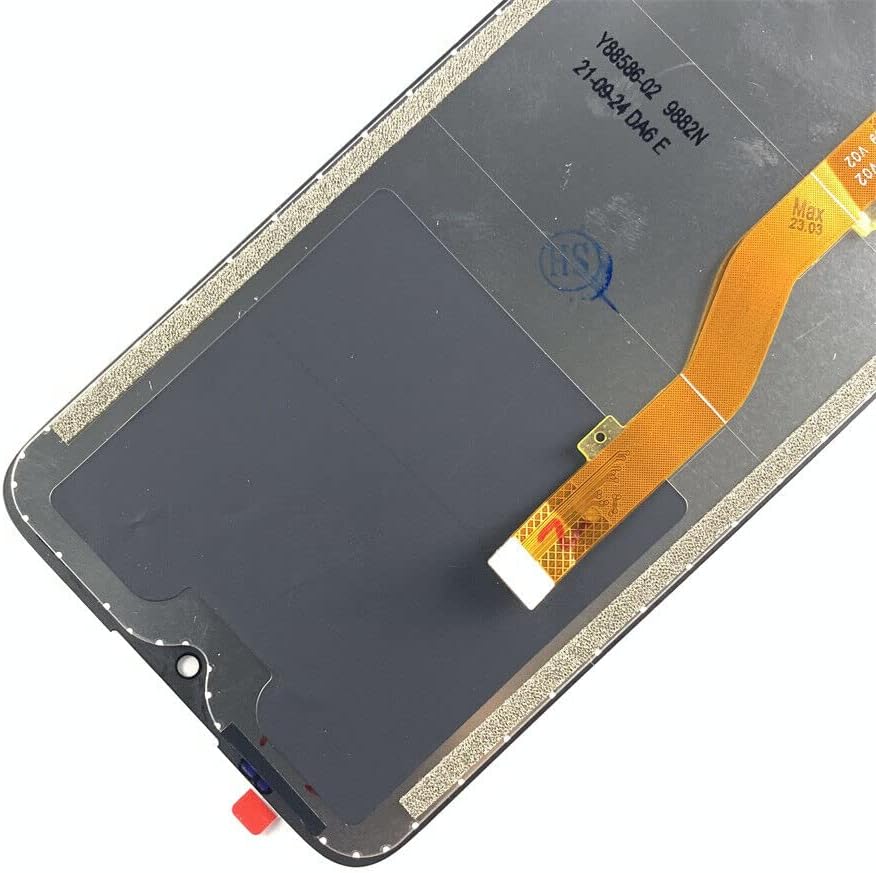
Image 2: Close-up view of the flex cables on the Ygpmoiki replacement screen. These cables are crucial for connecting the display and touch functions to the phone's motherboard.
6. Operating (Post-Installation Testing)
After installation, perform the following checks to ensure full functionality:
- Display Test: Check for any dead pixels, discoloration, or uneven backlighting. View various images and colors to confirm display quality.
- Touch Test: Open a drawing application or dialer and drag your finger across the entire screen to ensure touch responsiveness in all areas. Verify multi-touch gestures.
- Brightness Adjustment: Confirm that screen brightness can be adjusted correctly.
- Proximity Sensor: Test the proximity sensor (usually near the earpiece) by making a call and bringing the phone to your ear; the screen should turn off.
7. Maintenance
To prolong the life of your new screen:
- Cleaning: Use a soft, lint-free cloth and a screen-safe cleaner (or distilled water) to gently wipe the screen. Avoid harsh chemicals.
- Protection: Consider using a screen protector and a protective case to guard against scratches and impacts.
- Avoid Pressure: Do not apply excessive pressure to the screen, as this can cause damage.
8. Troubleshooting
| Problem | Possible Cause | Solution |
|---|---|---|
| Screen not turning on / No display |
|
|
| Touch not responding / Partial touch response |
|
|
| Screen flickering / Discoloration |
|
|
9. Specifications
- Product Type: LCD Screen Display Touch Screen Digitizer Replacement
- Compatibility: Alcatel 1SE 2020, 5030, 5030D
- Screen Size: 6.22 inches
- Manufacturer: Ygpmoiki
- Item Weight: 4.2 ounces
- Package Dimensions: 6.69 x 3.54 x 0.39 inches
10. Warranty and Support
For any questions regarding installation, troubleshooting, or product defects, please contact the seller directly through the platform where the purchase was made. Refer to your purchase documentation for specific warranty terms and conditions.
It is recommended to test the screen thoroughly before final installation and removal of any protective films or adhesive liners, as these actions may affect return eligibility.