
Introduction
This manual provides detailed instructions for the installation, operation, and maintenance of the JUSTPRO JC-A2 Dual-System Acoustic Guitar Pickup. This active pickup system is designed to enhance the sound of your acoustic guitar, offering a blend of magnetic pickup and microphone for versatile sound reproduction.
Product Features
- Active Pickup System: Amplifies and modifies the original signal, enhancing sound quality with professional-grade lossless audio transmission.
- Dual Coil Design: Features six independently adjustable magnetic columns for clear, full, warm, and soft sound. Double coils are stacked to effectively eliminate noise.
- Dual Pickup System (Coil and Microphone): Allows independent adjustment of both pickup and microphone volumes, ideal for fingerstyle players. The built-in Japanese microphone captures board playing and finger picking nuances.
- Fast Charging & Long Battery Life: A 5-10 minute charge provides approximately 10 hours of use. The patented high-capacity battery offers a 10,000 cycle life without replacement and features high safety performance.
- Volume and Tone Control: Integrated controls for precise sound shaping.
- Easy Installation: Designed for sound holes from 3.82" (97mm) to 4.33" (110mm) diameter. Features a plug-and-play design with no drilling required.
Package Contents

Image: The JUSTPRO JC-A2 pickup unit, output cable, USB charging cable, Allen wrench, and instruction manual are included in the package.
Please check the package to ensure all components are present:
- JUSTPRO JC-A2 Pickup Unit
- Output Cable (1/4" jack assembly)
- USB Charging Cable
- Allen Wrench (for magnetic column adjustment)
- Instruction Manual
Compatibility
The JUSTPRO JC-A2 pickup is designed for acoustic steel string guitars. It is compatible with sound holes ranging from 3.82 inches (97mm) to 4.33 inches (110mm) in diameter.

Image: This pickup is suitable for steel/bronze string folk guitars, but not for nylon string classical guitars.
Important: This pickup is not suitable for classical guitars with nylon strings. Please verify your guitar type and sound hole diameter before installation.
Setup and Installation
The JUSTPRO JC-A2 pickup is designed for quick and easy installation without the need for drilling.
- Measure Sound Hole: Ensure your guitar's sound hole diameter is between 3.82" (97mm) and 4.33" (110mm).
- Position the Pickup: Gently slide the pickup into the sound hole, positioning it between the strings and the soundboard.
- Secure the Pickup: The pickup is designed to fit snugly. Adjust its position for optimal string alignment.
- Connect Output Cable: Plug the 1/4" jack assembly into the pickup's output port. Route the cable safely out of the sound hole and connect it to your amplifier or audio interface.
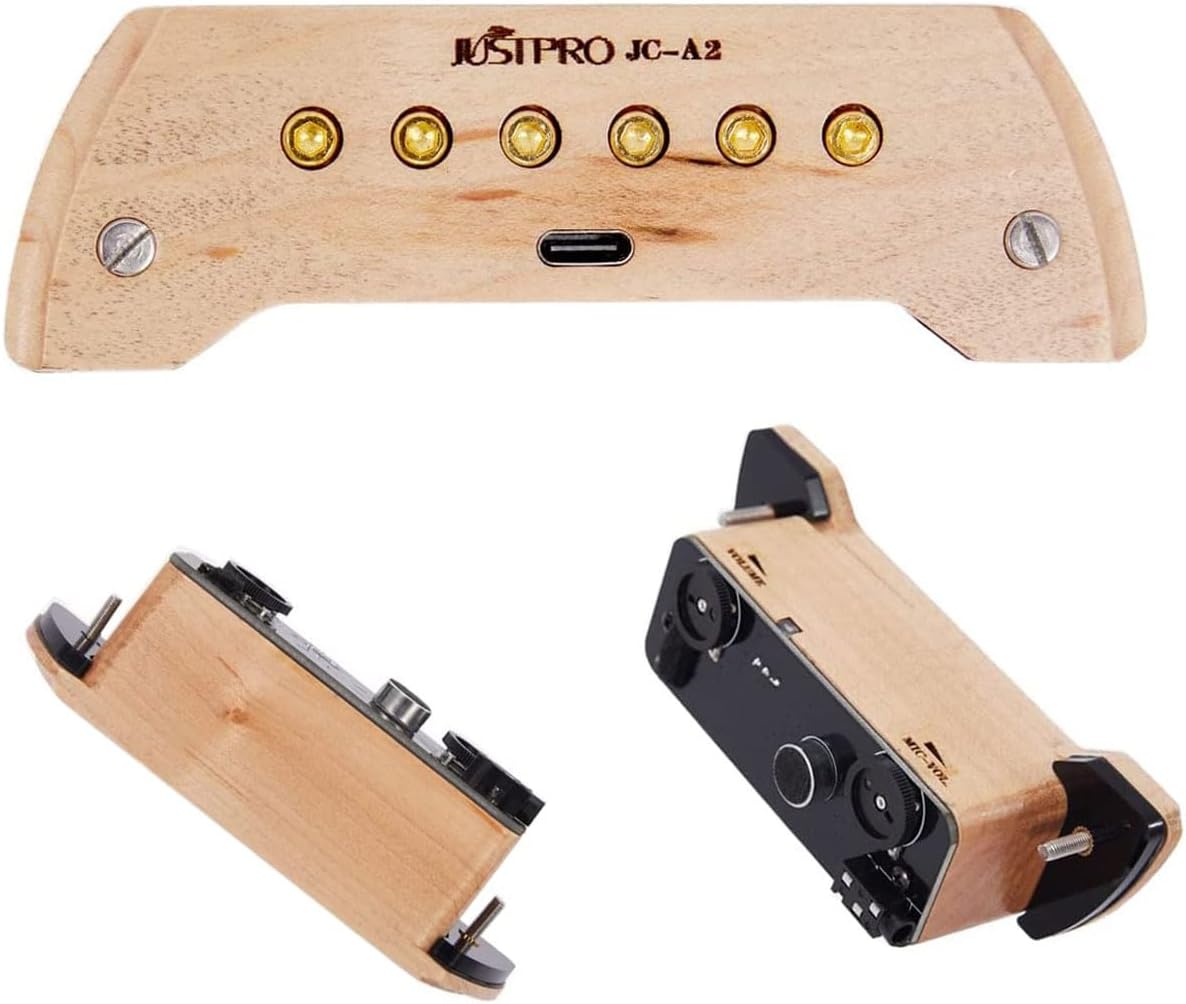
Image: The pickup unit securely installed within the guitar's sound hole, showing its fit and string alignment.

Image: Demonstrates the simple, drill-free installation of the pickup, highlighting the output jack connection.
Operating Instructions
Basic Operation
Once installed, connect the pickup's output cable to your amplifier, mixer, or audio interface. The pickup is active and will immediately begin transmitting sound.
Volume and Tone Adjustment
The JC-A2 features independent volume controls for both the magnetic coil pickup and the built-in microphone. These controls are located on the underside of the pickup unit, accessible from the sound hole.

Image: Shows the two adjustment knobs for pickup volume and microphone volume, along with the built-in microphone.
- Pickup Volume Adjustment: Controls the output level of the magnetic coil pickup.
- Microphone Volume Adjustment: Controls the output level of the built-in microphone, which is sensitive to body taps and finger picking sounds.
- Adjust these controls to achieve your desired blend and overall output level.
Video: A demonstration of the JUSTPRO Humbucker Dual System Acoustic Guitar Pickup in use, showcasing its sound capabilities.
Video: Another demonstration highlighting the sound of the JUSTPRO Humbucker Pickup with its dual system.
Charging
The JUSTPRO JC-A2 pickup features a built-in rechargeable battery. To charge the unit:
- Locate the USB charging port on the pickup unit.
- Connect the provided USB charging cable to the pickup and to a standard USB power source (e.g., computer, USB wall adapter).
- A full charge takes approximately 5-10 minutes and provides up to 10 hours of continuous use.

Image: Illustrates the quick charging capability (5 minutes for 10 hours of use) and the long-lasting, safe battery.

Image: A view of the internal circuitry, highlighting the patented high-capacity capacitors designed for safety and longevity.
Adjustments
Adjusting Magnetic Columns
The six magnetic columns on the pickup can be individually adjusted to fine-tune the balance and output of each string. This allows for personalized sound shaping.
- Use the provided Allen wrench to carefully turn the screws located above each magnetic column.
- Raise a column to increase the output of that string, or lower it to decrease the output.
- Experiment with different heights to achieve optimal string balance and tone.

Image: Details the adjustable magnetic columns on the double coil pickup, which allow for individual string volume balancing.
Maintenance
- Cleaning: Wipe the pickup unit with a soft, dry cloth. Avoid using harsh chemicals or abrasive materials.
- Storage: When not in use for extended periods, store the pickup in a cool, dry place.
- Battery Care: Although the battery has a long cycle life, it is recommended to charge it periodically if stored for a long time to maintain its health.
Troubleshooting
| Problem | Possible Cause | Solution |
|---|---|---|
| No Sound Output | Battery is low or depleted. Output cable not properly connected. Amplifier/mixer input issue. | Charge the pickup. Ensure cable is securely plugged into both pickup and amplifier. Check amplifier settings and connections. |
| Weak or Distorted Sound | Low battery. Volume controls set too low. Magnetic columns improperly adjusted. | Charge the pickup. Increase pickup and/or microphone volume. Adjust magnetic columns for better string balance. |
| Excessive Noise/Hum | Interference from other electronics. Grounding issue. Microphone volume too high. | Move away from sources of interference. Ensure proper grounding of your audio setup. Lower microphone volume. |
| Pickup Does Not Fit Sound Hole | Sound hole diameter is outside the specified range. | Verify your guitar's sound hole diameter. The pickup fits 3.82" (97mm) to 4.33" (110mm). |
Specifications
| Feature | Detail |
|---|---|
| Model Number | JC-A2 |
| Item Weight | 0.529 ounces (approximately 15g) |
| Product Dimensions | 4.17 x 1.38 x 0.87 inches (10.6 x 3.5 x 2.2 cm) |
| Battery Type | Lithium Ion (2 included) |
| Charging Time | 5-10 minutes for 10 hours of use |
| Compatible Sound Hole Diameter | 3.82" (97mm) to 4.33" (110mm) |
| Guitar Pickup Configuration | Humbucker (H) |
| Body Material | Maple, Metal |
Warranty and Support
JUSTPRO products are manufactured with quality and performance in mind. For warranty information, technical support, or service inquiries, please refer to the contact information provided on the product packaging or visit the official JUSTPRO website. Please retain your proof of purchase for warranty claims.