
Introduction
Thank you for choosing the MODSTER Mini Dasher 4WD Brushed Electric 1:14 RTR Monster Truck. This manual provides essential information for the safe operation, setup, maintenance, and troubleshooting of your new remote-controlled vehicle. Please read this manual thoroughly before operating the Mini Dasher to ensure proper use and longevity of the product.
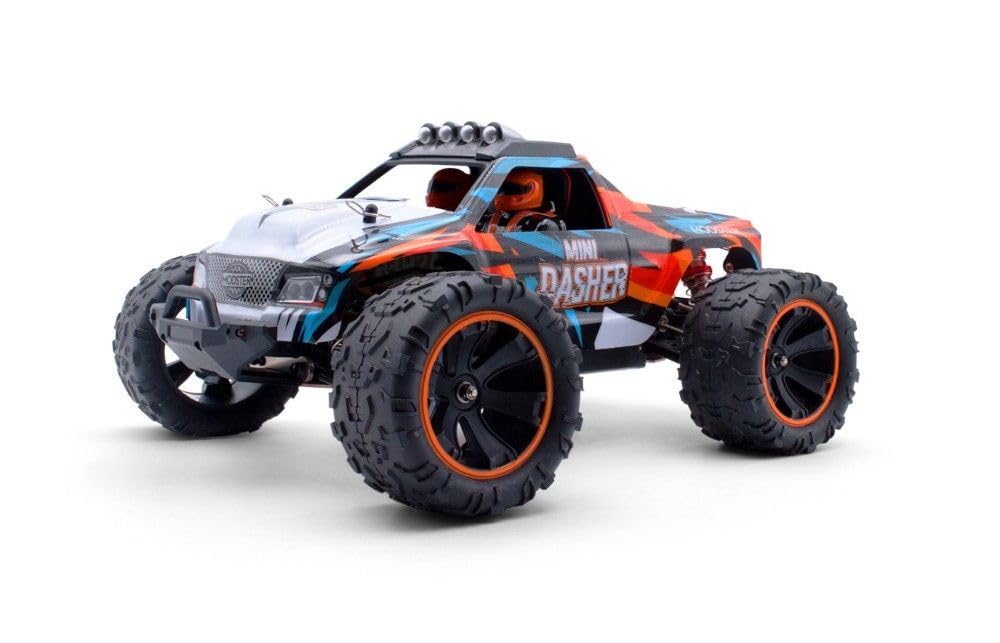
Image: The MODSTER Mini Dasher Monster Truck, showcasing its vibrant design and robust wheels.
Included Components:
- MODSTER Mini Dasher RC Truck (RTR - Ready-to-Run)
- 2.4 GHz Remote Control
- 7.4 V 1500 mAh LiPo Battery
- USB Charging Cable
- User Manual
Setup
1. Battery Charging
The vehicle is powered by a 7.4V 1500 mAh LiPo battery. Before first use, fully charge the battery using the provided USB charging cable. Connect the USB cable to a compatible USB power source (e.g., computer USB port, USB wall adapter) and then connect the battery. The charging indicator will show the charging status. Do not leave the battery unattended during charging.
2. Battery Installation (Vehicle)
- Locate the battery compartment on the vehicle.
- Carefully insert the charged LiPo battery into the compartment.
- Secure the battery and close the compartment cover.
3. Remote Control Battery Installation
Install 2x AA batteries (not included) into the remote control's battery compartment, observing correct polarity.
4. Pairing the Remote Control
- Ensure the vehicle's battery is connected and the vehicle is powered off.
- Turn on the remote control.
- Turn on the vehicle. The remote control and vehicle should automatically pair. If not, refer to the specific pairing instructions in the included printed manual.
Operating Instructions
Basic Controls
- Throttle Trigger: Pull to accelerate forward, push to brake/reverse.
- Steering Wheel: Turn left or right to steer the vehicle.

Image: Side profile of the Mini Dasher, highlighting its ground clearance and wheel design for off-road adventures.
Dual Rate Function (Speed Adjustment)
The remote control features a dual-rate function, allowing continuous adjustment of the maximum speed from 0% to 100%. This is particularly useful for beginners to learn control at lower speeds. Adjust the corresponding dial or switch on the remote control to set the desired maximum speed.
Driving Environment
The Mini Dasher is designed for both on-road and off-road use. Its Ultragrip tires provide excellent traction on various surfaces. Always operate the vehicle in open areas free from obstacles, people, or animals.
Maintenance
Cleaning
After each use, especially after off-road driving, clean the vehicle to remove dirt, dust, and debris. Use a soft brush or compressed air for hard-to-reach areas. Avoid using water directly on electronic components.
Component Inspection
Regularly inspect the following components for wear, damage, or looseness:
- Oil Pressure Shocks: Check for leaks or damage.
- Metal Drive Shafts & CVD Cardans: Ensure they are free from bends or excessive wear.
- Suspension Arm Mounts & Shock Towers: Verify they are secure and undamaged.
- Wheel Mounts & Axle Carriers: Check for tightness and integrity.
- Encapsulated Gearbox: Ensure no foreign objects have entered.
- Tires: Inspect for punctures or excessive wear.

Image: Detailed view of the front suspension and wheel, showing the robust construction and tire tread.
Storage
When not in use, store the Mini Dasher in a cool, dry place away from direct sunlight and extreme temperatures. Remove the battery from the vehicle and the remote control if storing for extended periods.
Troubleshooting
| Problem | Possible Cause | Solution |
|---|---|---|
| Vehicle does not respond to remote control. |
|
|
| Vehicle runs slowly or has reduced power. |
|
|
| Vehicle pulls to one side. |
|
|
| Unusual noises during operation. |
|
|
Technical Specifications
| Feature | Detail |
|---|---|
| Scale | 1:14 |
| Drive System | 4WD (Four-Wheel Drive) |
| Motor Type | 550 Brushed Motor |
| Max Speed | Up to 60 km/h (37 mph) |
| Length | 310 mm (12.2 inches) |
| Width | 235 mm (9.25 inches) |
| Height | 140 mm (5.5 inches) |
| Wheelbase | 186 mm (7.3 inches) |
| Tire Dimensions | 85 x 45 mm |
| Weight | Approx. 1000 g (2.2 lbs) |
| Battery | 7.4 V 1500 mAh LiPo |
| Radio System | 2.4 GHz |
| Model Number | MD11393 |
Safety Information
WARNING:
- Never operate the model on public roads or highways, as this could endanger traffic.
- Never use the model in crowded areas, near or on people or animals, to avoid property damage and/or personal injury.
- This product is recommended for users aged 14 years and older.
- LiPo Battery Safety:
- Always charge LiPo batteries on a fire-resistant surface and never leave them unattended during charging.
- Do not overcharge or over-discharge LiPo batteries.
- Do not puncture, impact, or disassemble LiPo batteries.
- If the battery swells, leaks, or becomes hot, discontinue use immediately and dispose of it properly.
- Keep fingers, hair, and loose clothing away from moving parts.
- Always turn off the vehicle and remote control when not in use.
Warranty Information
For information regarding the product warranty, please refer to the documentation included with your purchase or contact your retailer. Warranty terms and conditions may vary by region and retailer.
Customer Support
Should you encounter any issues or require further assistance, please contact your retailer or visit the official MODSTER website for support resources and contact information.

