
1. Introduction
This manual provides comprehensive instructions for the safe and efficient use of your Cantonape 2000W Pure Sine Wave Power Inverter. This device converts 12V DC battery power into stable 110V/120V AC household electricity, suitable for a wide range of applications from vehicles and RVs to off-grid solar systems and emergency power backup.
2. Product Features and Components
The Cantonape 2000W Pure Sine Wave Power Inverter is designed for reliability and ease of use. Key features include:
- High Power Output: Provides 2000 Watts continuous pure sine wave power and 4000 Watts peak power.
- Pure Sine Wave Output: Delivers clean and stable AC power, ideal for sensitive electronics.
- High Efficiency: Conversion efficiency greater than 90%.
- Multiple Outlets: Equipped with 3 US AC outlets and multiple USB ports for versatile connectivity.
- Intelligent Display: LCD and LED display shows real-time battery voltage, output voltage, and load status.
- Advanced Protection: Built-in safeguards against overload, short circuit, over-temperature, reverse polarity, and under/over voltage.
- Smart Cooling: Intelligent temperature-controlled cooling fan adjusts speed based on internal temperature.
- Durable Construction: Rugged aluminum body provides advanced protection and efficient cooling.

Figure 2.1: Cantonape 2000W Pure Sine Wave Power Inverter with included battery cables.

Figure 2.2: Front and rear view of the Cantonape 2000W Power Inverter highlighting AC sockets, ON/OFF switch, LCD display, USB ports, positive and negative terminals, and cooling fan.
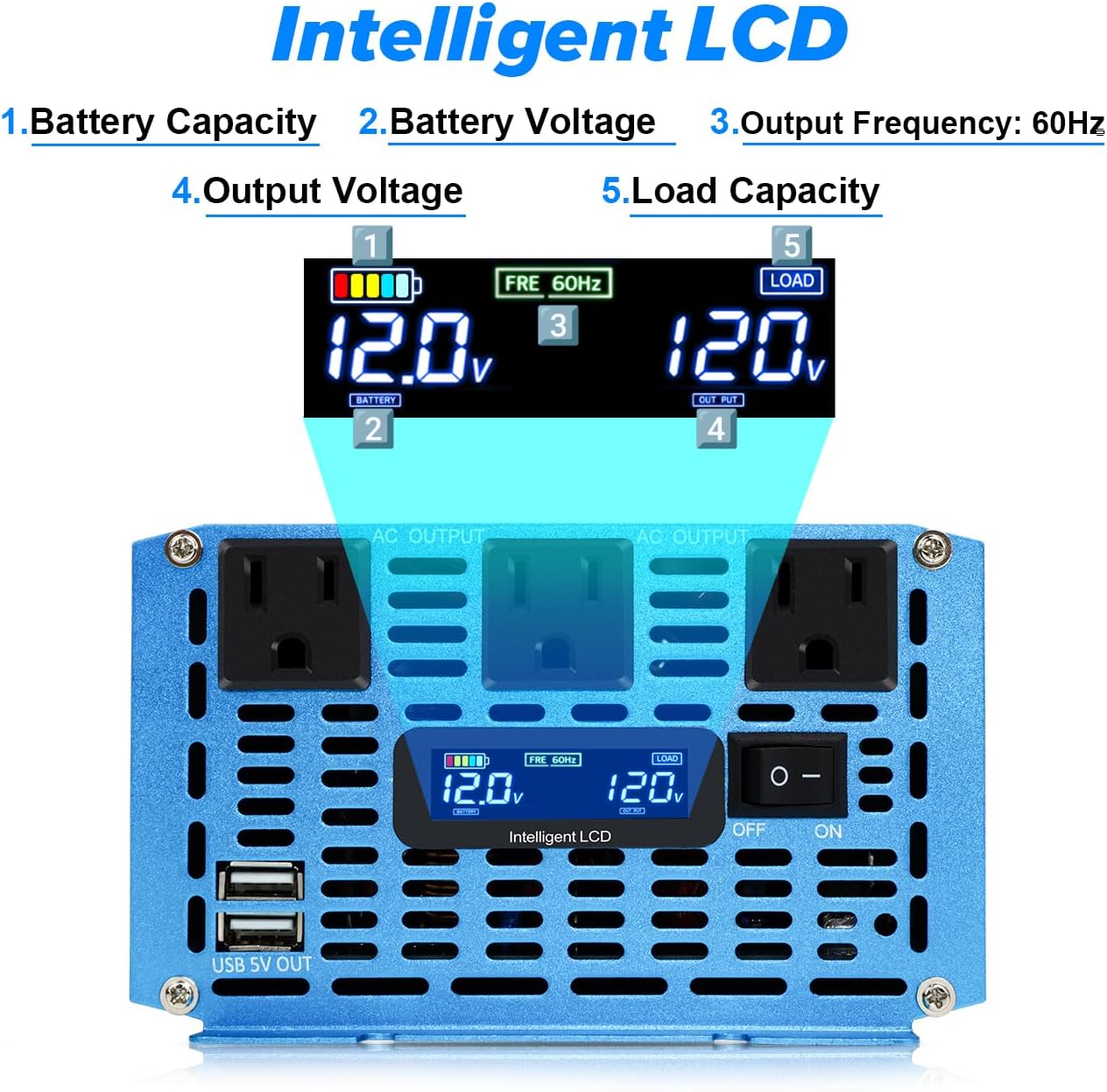
Figure 2.3: Close-up of the Intelligent LCD display on the Cantonape 2000W Power Inverter showing battery capacity, battery voltage, output frequency, output voltage, and load capacity.
3. Safety Information
To ensure safe operation and prevent damage to the inverter or connected devices, please observe the following safety guidelines:
- Always use the standard battery cables provided with the inverter. Using inadequate cables may prevent full power output and pose a safety risk.
- Never connect the inverter directly to grid power.
- Ensure correct polarity when connecting to the battery: red cable to the positive (+) terminal and black cable to the negative (-) terminal. Reverse polarity connection is strictly forbidden.
- Do not overload the inverter. The continuous power rating is 2000 Watts. For inductive loads (e.g., refrigerators, iceboxes, power drills, washing machines, water pumps, microwave ovens, vacuum cleaners, hair dryers, etc., with motors inside), choose an inverter whose continuous power is 3-7 times higher than the appliance's rated watts, as these devices have high starting power requirements. For example, a 150W icebox may have a starting power as high as 1000W.
- The inverter includes built-in replaceable fuses for protection. Extra 40A fuses are provided for replacement if the original ones are burned due to accidental overload or short circuit.
- The inverter features multiple protections: Overload, Short Circuit, Over Heat, Reverse Polarity, Under Voltage, and Over Voltage.
4. Setup and Installation
Follow these steps to set up your Cantonape 2000W Pure Sine Wave Power Inverter:
- Prepare the Inverter: Ensure the inverter's main ON/OFF switch is in the "OFF" position.
- Connect Battery Cables: Connect the provided red battery cable to the positive (+) terminal of your 12V DC battery and to the positive (+) terminal on the inverter. Connect the black battery cable to the negative (-) terminal of your 12V DC battery and to the negative (-) terminal on the inverter. Ensure all connections are tight and secure.
- Remote Control Setup (Optional): If using the remote control, connect its cable to the designated remote port on the inverter.
Video 4.1: This video demonstrates how to reset the remote control for the Cantonape Power Inverter, a useful step during initial setup or if the remote is unresponsive.
5. Operation
Operating your inverter is straightforward:
- Power On: Flip the main ON/OFF switch on the inverter to the "ON" position. Alternatively, if connected, use the remote control's ON button. The LCD display will illuminate.
- Monitor Display: The intelligent LCD display will show the battery voltage, output voltage (110V/120V AC), output frequency (60Hz), and the current load capacity. This allows you to monitor the inverter's status in real-time.
- Connect Devices: Plug your AC appliances into the 3 US outlets. For USB-powered devices, use the available USB ports.
- Power Off: When finished, turn off all connected appliances, then switch the inverter's main ON/OFF switch to "OFF" or use the remote control's OFF button.

Figure 5.1: The Cantonape 2000W Power Inverter can power a wide range of devices, including household appliances and sensitive electronics.
Video 5.1: This video demonstrates the ZETAWALE Pure Sine Wave Inverter, showcasing its LCD display and remote control functionality, which is similar to the Cantonape model.
Video 5.2: This video provides an overview of a 2000W Pure Sine Wave Inverter, demonstrating its features and general operation with various loads.
6. Maintenance
Regular maintenance ensures the longevity and optimal performance of your inverter:
- Fuse Replacement: The inverter uses replaceable fuses. If an overload or short circuit occurs and a fuse blows, replace it with one of the extra 40A fuses provided. Always ensure the inverter is off and disconnected from the battery before replacing fuses.
- Cooling Fan: The intelligent cooling fan operates automatically. Ensure the fan vents are clear of obstructions to allow proper airflow. Periodically clean any dust or debris from the vents.
- Cleanliness: Keep the inverter clean and dry. Avoid exposure to moisture, dust, and extreme temperatures.
7. Troubleshooting
The inverter's intelligent display and audible alerts help diagnose common issues:
- Error Codes: The inverter will display error codes on the LCD if an issue is detected. For example, an "E1" code typically indicates low voltage, while an "E5" code may indicate a short circuit. Refer to the display for specific error messages.
- No Power Output: Check battery connections for tightness and correct polarity. Ensure the battery is adequately charged. Verify the inverter's ON/OFF switch is in the "ON" position.
- Overload Protection: If the inverter shuts down due to overload, disconnect some appliances, then turn the inverter off and on again to reset. Ensure the total wattage of connected devices does not exceed the inverter's continuous power rating.
- Over-Temperature: If the inverter overheats, the cooling fan will activate. If the temperature remains too high, the inverter may shut down. Ensure proper ventilation and clear any obstructions from the fan vents.
8. Specifications
| Feature | Specification |
|---|---|
| Continuous Power | 2000 Watts |
| Peak Power | 4000 Watts |
| Input DC Voltage | 12V |
| Output AC Voltage | 110V/120V |
| Output Frequency | 60Hz |
| Output Waveform | Pure Sine Wave |
| AC Outlets | 3 US Outlets |
| USB Output | 5V (multiple ports, specific amperage not detailed in specs) |
| Conversion Efficiency | > 90% |
| Item Weight | 8.3 pounds |
| Product Dimensions | 15.7 x 5.9 x 3.5 inches |
9. Warranty and Support
Your Cantonape 2000W Pure Sine Wave Power Inverter comes with a 12-Months Warranty. For any technical assistance, troubleshooting, or warranty claims, please contact Cantonape customer support through your retailer or the official Cantonape website. Ensure you have your purchase details and product model number ready when contacting support.