
Bloody ES9Pro
Bloody ES9Pro FPS RGB Gaming Mouse User Manual
Model: ES9Pro
Introduction
This manual provides detailed instructions for the setup, operation, and maintenance of your Bloody ES9Pro FPS RGB Gaming Mouse. Designed for professional FPS gamers, this mouse offers precision, customization, and durability to enhance your gaming experience.
Product Features
- PMW3389 Sensor: Provides no latency, precise control, and lightning-fast response.
- Adjustable CPI: Ranging from 100 to 16000 for optimal sensitivity.
- 2000Hz Report Rate: Ensures rapid data transmission to your computer.
- 400 IPS Tracking Speed: High-speed tracking for swift movements.
- 4M Onboard Memory: Stores up to 120K macros for personalized settings.
- Fully Programmable Buttons: Customize buttons for different gaming scenarios.
- Smooth X'Glide Metal Feet: Improves mouse glide and durability on all surfaces.
- 15-Zone RGB Animation: Customizable RGB lighting effects.
Setup
Connecting Your Mouse
- Unpack the Bloody ES9Pro FPS RGB Gaming Mouse from its packaging.
- Locate an available USB port on your computer.
- Plug the USB connector of the mouse into the USB port.
- Your computer should automatically detect and install the necessary drivers.
Software Installation (Optional, for Advanced Customization)
For full customization of buttons, macros, CPI settings, and RGB lighting, download and install the official Bloody Esports Software from the manufacturer's website. The software allows you to:
- Create and manage multiple profiles for different games.
- Program individual buttons with custom functions or macros.
- Adjust CPI sensitivity stages.
- Customize RGB lighting effects and colors.
Operating Instructions
DPI/CPI Adjustment
The mouse features adjustable CPI settings from 100 to 16000. You can typically cycle through preset CPI levels using dedicated buttons on the mouse, or fine-tune them via the Bloody Esports Software.

Image: Overview of Bloody ES9Pro mouse highlighting key performance specifications like 16000 CPI resolution, 50G acceleration, 400 IPS tracking speed, and 2000Hz report rate.
Programmable Buttons and Macros
The ES9Pro mouse is equipped with multiple programmable buttons. Use the Bloody Esports Software to assign custom functions, complex macros, or specific game commands to these buttons. The 4M onboard memory allows you to save up to 120K macros, ensuring your personalized settings are always available.
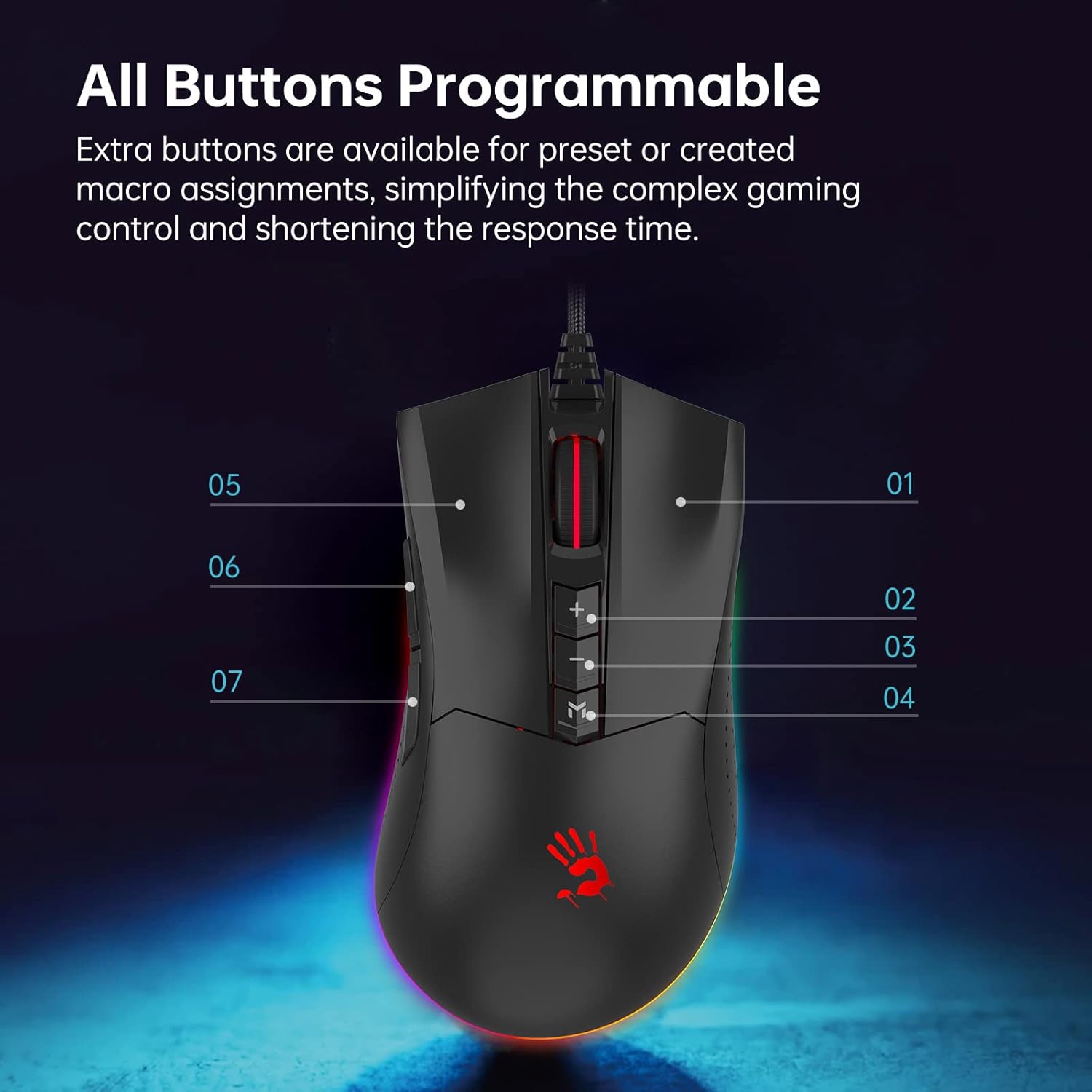
Image: Top-down view of the Bloody ES9Pro mouse, indicating its programmable buttons with numerical labels for customization.

Image: Side view of the Bloody ES9Pro mouse, highlighting the 4M onboard memory capacity for storing macros and settings.
Report Rate and Lift Off Distance (LOD) Adjustment
The mouse allows for adjustment of both Report Rate (polling rate) and Lift Off Distance (LOD) directly from the mouse's underside. This enables users to fine-tune responsiveness and tracking behavior to their preference.

Image: Underside of the Bloody ES9Pro mouse, illustrating switches for adjusting Report Rate (Hz) and Lift Off Distance (mm) with corresponding indicator lights.
RGB Lighting Customization
The ES9Pro features 15-zone RGB animation. Customize the lighting effects and colors using the Bloody Esports Software to match your gaming setup or personal style.

Image: The Bloody ES9Pro mouse showcasing its vibrant RGB lighting effects along the base.
X & Y Axis Calibration
Achieve pixel-perfect accuracy with X & Y Axis Calibration. This feature, often managed through the software, ensures precise tracking tailored to your mousepad and movement style.

Image: A graphic illustrating the X & Y Axis Calibration feature of the Bloody ES9Pro mouse, emphasizing accurate pixel tracking for enhanced precision.
Official Product Video
Video: An official product video from BloodyGaming showcasing the ES9Pro Gaming Mouse and its features.
Maintenance
- Cleaning: Use a soft, dry cloth to clean the mouse. Avoid abrasive cleaners or solvents.
- Sensor Care: Keep the optical sensor on the underside of the mouse clean and free from dust or debris for optimal tracking performance.
- Cable Management: Avoid sharp bends or excessive pulling on the USB cable to prevent damage.
- Storage: Store the mouse in a dry, cool place when not in use.
Troubleshooting
Mouse Not Responding
- Ensure the USB cable is securely plugged into a working USB port on your computer.
- Try plugging the mouse into a different USB port or another computer to rule out port or system issues.
- Restart your computer.
Inaccurate Tracking or Jittery Cursor
- Clean the optical sensor on the underside of the mouse.
- Ensure you are using the mouse on a suitable surface (preferably a mousepad).
- Check and adjust the CPI/DPI settings via the mouse buttons or Bloody Esports Software.
- Perform X & Y Axis Calibration if available in the software.
RGB Lighting Not Working Correctly
- Ensure the Bloody Esports Software is installed and running.
- Check the RGB settings within the software to ensure desired effects are selected.
- Update the mouse firmware through the software if an update is available.
Specifications
| Feature | Detail |
|---|---|
| Brand | Bloody |
| Model | ES9Pro |
| Sensor | PMW3389 Optical Sensor |
| CPI/DPI | 100 - 16000 (Adjustable) |
| Report Rate | 2000Hz |
| Tracking Speed | 400 IPS |
| Onboard Memory | 4M (stores up to 120K macros) |
| Connectivity | USB Wired |
| RGB Lighting | 15-Zone RGB Animation |
| Special Features | Programmable Buttons, X'Glide Metal Feet |
| Item Weight | 3.81 ounces |
| Package Dimensions | 7.36 x 5.04 x 2.01 inches |
Warranty & Support
Bloody provides a two-year manufacturer warranty for the ES9Pro FPS RGB Gaming Mouse. For technical support, driver downloads, or warranty claims, please visit the official Bloody website or contact their customer service.
Website: www.bloody.com (Please refer to the product packaging or official website for the most current support information.)
Ask a question about this manual
Ask about setup, troubleshooting, compatibility, parts, safety, or missing instructions. Manuals+ will review the question and use this page’s manual context to help answer it.