Introduction
The JOBY Compact Advanced Full Size Tripod is a robust and multifunctional support system designed for photographers and videographers. Crafted from reinforced aluminum, this tripod offers durability and reliability while maintaining a lightweight profile for effortless portability. Its intelligent 3-way head design allows for smooth and precise adjustments, enabling professional-looking content creation. The inclusion of a Quick Release (QR) plate, compatible with the JOBY BallHead 3K, simplifies transitions between different support systems. This tripod is versatile, suitable for various applications including still photography, video recording, landscapes, portraits, time-lapses, and cinematic movements. Its foldable control bars and lever leg locks ensure easy packing and transport.
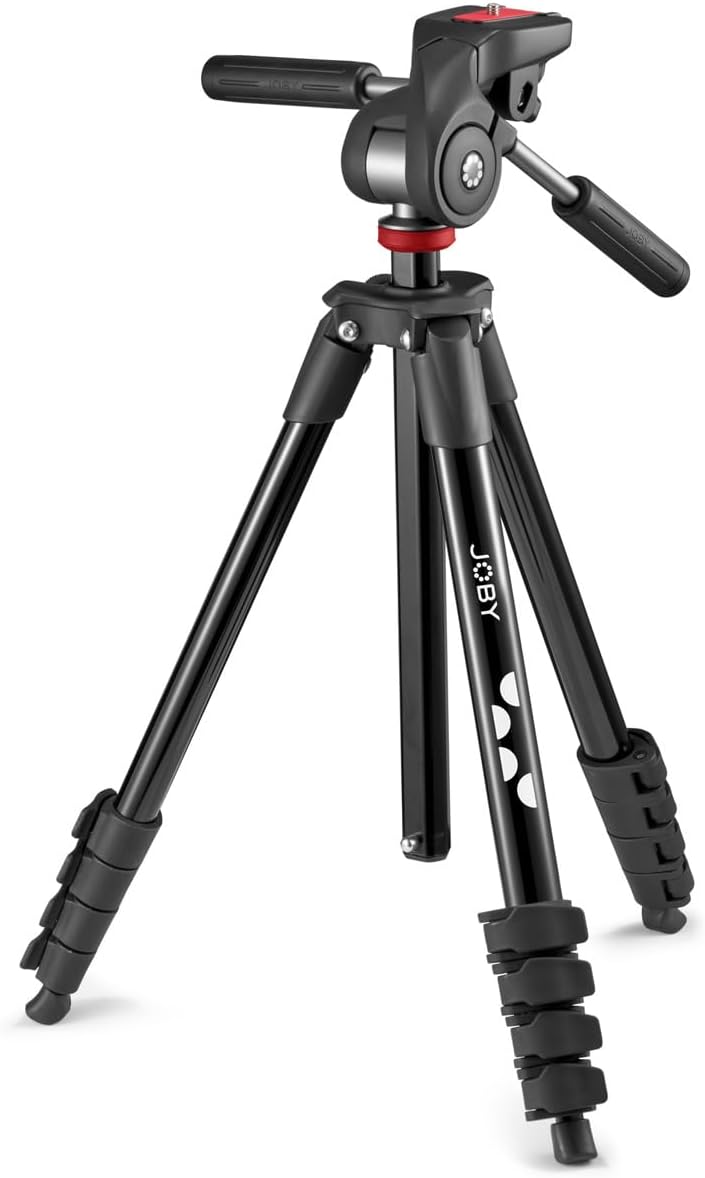
Image: The JOBY Compact Advanced Full Size Tripod in its full setup, showcasing its black finish and sturdy design.
Setup
- Unpacking: Carefully remove the tripod from its packaging. Ensure all components, including the tripod body, 3-way head, and quick release plate, are present. The tripod comes with a convenient carrying case for transport.
- Extending the Legs: Unlock the lever leg locks on each of the three tripod legs. Extend the legs to the desired height. The tripod features four individual latches per leg, allowing for significant extension.
- Adjusting Height: The tripod can extend from a minimum height of approximately 19.5 inches (44 cm) to a maximum height of about 56 inches (142 cm) with the center column retracted. An additional 10 inches (25 cm) can be gained by extending the center column, reaching a total height of approximately 66 inches (167 cm).
- Leveling: Utilize the integrated level bubble on the 3-way head to ensure the tripod is perfectly level on uneven surfaces.
- Attaching the Quick Release Plate: Secure the quick release plate to the bottom of your camera or device. This plate is identical to the one used with the JOBY BallHead 3K, allowing for seamless interchangeability.
- Mounting Your Device: Slide the quick release plate with your attached device into the 3-way head until it clicks securely into place.

Image: The JOBY Compact Advanced Tripod in its folded state, ready for transport or storage.
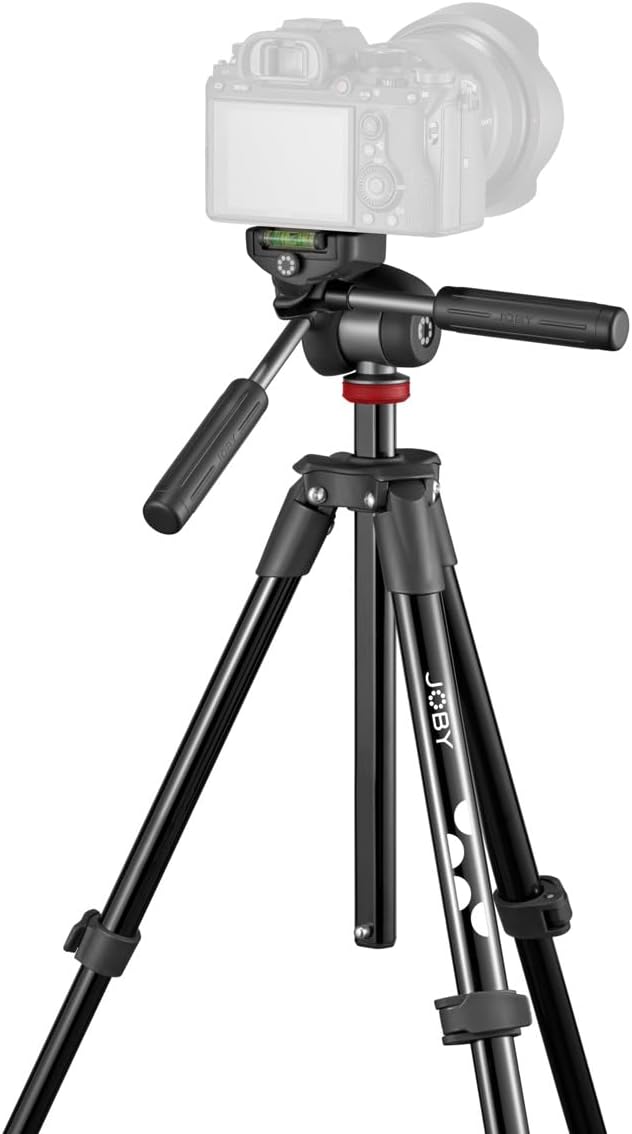
Image: The JOBY Compact Advanced Tripod with a camera mounted, highlighting the integrated level bubble for precise leveling.
Operating
The 3-way head of the JOBY Compact Advanced Tripod provides independent control over pan, tilt, and portrait/landscape orientation, allowing for precise framing and smooth movements.
- Pan Control: Use the horizontal handle to smoothly pan your camera left or right. Loosen the corresponding knob to adjust, then tighten to secure.
- Tilt Control: Use the vertical handle to tilt your camera up or down. Loosen the corresponding knob to adjust, then tighten to secure.
- Portrait/Landscape Orientation: The head allows for quick switching between horizontal and vertical shooting orientations. Adjust the quick release plate's position as needed.
- Phone Holder: The tripod includes a cell phone holder for mobile content creation. Attach your smartphone to the holder and then mount it to the quick release plate.

Image: A close-up view of the JOBY Compact Advanced Tripod's 3-way head, showing the handles for pan and tilt control.

Image: The JOBY Compact Advanced Tripod being used outdoors, demonstrating its stability and versatility in a real-world setting.
Maintenance
- Cleaning: Wipe down the tripod with a soft, damp cloth after each use to remove dust, dirt, or moisture. Avoid using harsh chemicals or abrasive materials.
- Lubrication: Periodically check the leg locks and head mechanisms for smooth operation. If any stiffness is noted, apply a small amount of silicone-based lubricant to the moving parts.
- Storage: When not in use, store the tripod in its provided carrying case in a cool, dry place to protect it from dust and environmental elements.
- Inspection: Regularly inspect all screws, bolts, and moving parts to ensure they are secure. Tighten any loose components as needed.

Image: The JOBY Compact Advanced Tripod neatly stored in its black carrying bag, emphasizing its portability and ease of storage.
Troubleshooting
| Problem | Possible Cause | Solution |
|---|---|---|
| Tripod is unstable or wobbly. | Legs not fully extended or locked; uneven surface; excessive weight. | Ensure all leg locks are securely fastened. Adjust leg lengths to compensate for uneven ground. Verify device weight does not exceed the 3kg capacity. |
| Head movement is stiff or jerky. | Accumulation of dirt or dust; lack of lubrication. | Clean the head mechanism thoroughly. Apply a small amount of silicone-based lubricant to moving parts. |
| Quick release plate not securing device. | Plate not fully inserted; locking mechanism is loose or damaged. | Ensure the quick release plate is fully seated and the locking lever is engaged. Inspect the locking mechanism for any visible damage. |
Specifications
- Product Dimensions: 5.12 x 5.12 x 20.08 inches
- Item Weight: 2.2 pounds (1 Kilogram)
- Model Number: JB01763-BWW
- Brand: Joby
- Color: Black
- Compatible Devices: Compact Cameras, Phones
- Special Feature: Includes Cover
- Material: Aluminum
- Weight Limit: 6.6 Pounds (3 kg)
- Maximum Height: 165 Centimeters (approx. 65 inches)
- Minimum Height: 44 Centimeters (approx. 17.3 inches)
- Tripod Head Type: 3-way Pan/Tilt Head
Warranty and Support
For information regarding product warranty, technical support, or replacement parts, please visit the official Joby website or contact their customer service. Keep your purchase receipt as proof of purchase for warranty claims.