
RecPro Vento Deluxe RP-2027-W
RecPro RV Roof Vent Fan Vento Deluxe Instruction Manual
Model: RP-2027-W
1. Introduction
Thank you for choosing the RecPro RV Roof Vent Fan Vento Deluxe. This manual provides essential information for the safe and efficient operation, installation, and maintenance of your new RV roof vent fan. Please read this manual thoroughly before installation and use, and retain it for future reference.
2. Safety Information
Always observe the following safety precautions to reduce the risk of injury or damage:
- Ensure the power supply is disconnected before installation, maintenance, or cleaning.
- Installation should be performed by a qualified individual or technician.
- Wear appropriate personal protective equipment (PPE) during installation.
- Verify correct wiring connections (12V DC) to prevent electrical hazards.
- Do not operate the fan if any part is damaged or malfunctioning.
3. Product Features
- 10-speed fan with reversible direction for optimal airflow.
- Automatic fan mode and integrated rain sensor for automatic lid closure.
- Automatic lift dome for convenient opening and closing.
- Thermostat control with a range of 29℉ (-2℃) to 99℉ (37℃).
- Keypad with manual controls and speed adjustment knob.
- Remote control for convenient operation from a distance.
- Rated for 900 CFM (Cubic Feet Per Minute) airflow.
- Designed for standard RV roof openings of 14" x 14".
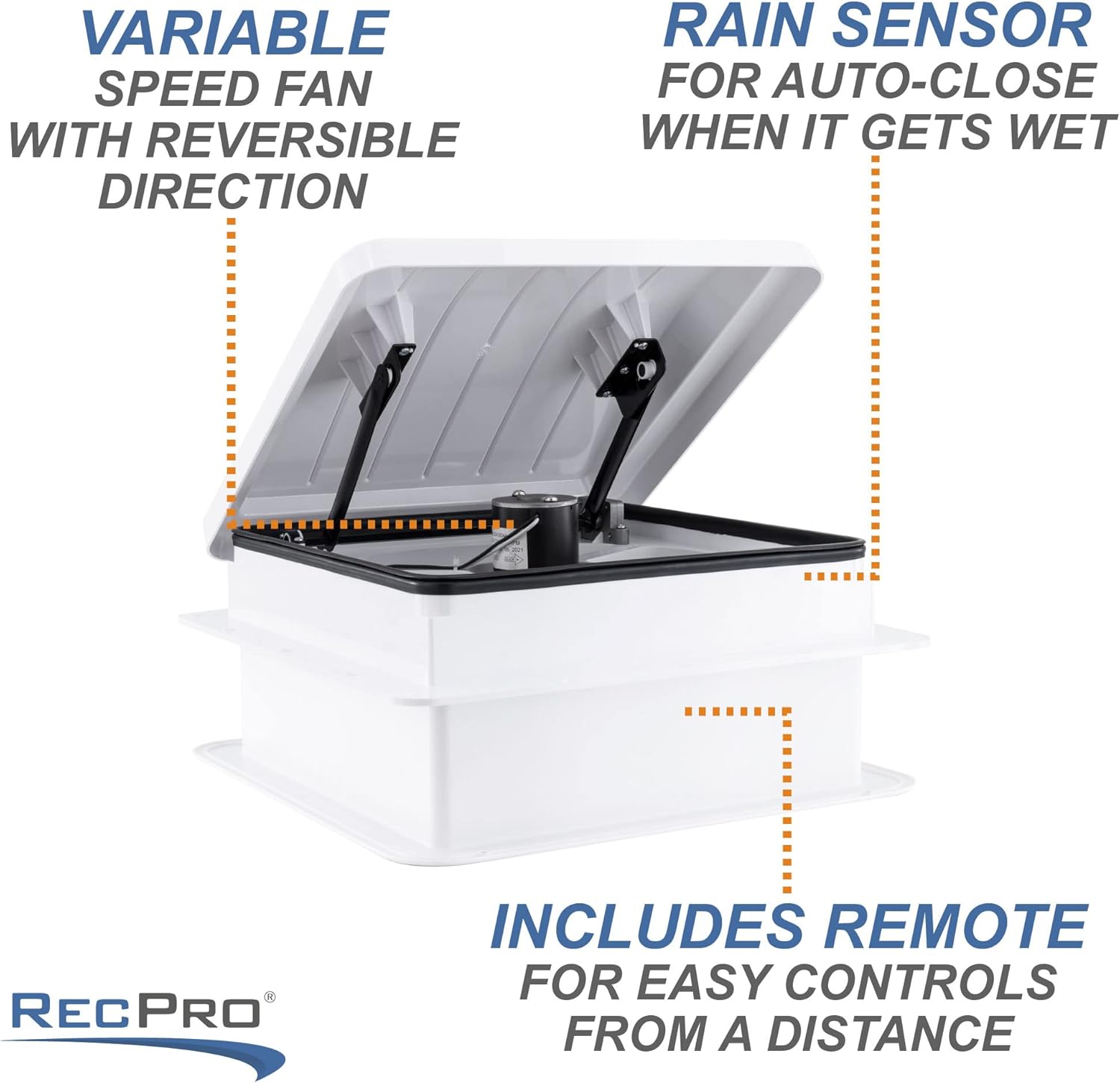
Image: This illustration highlights the key features of the RecPro RV Roof Vent Fan, including its variable speed, integrated rain sensor for automatic closing, and the convenience of remote control operation.
4. Setup and Installation
The RecPro Vento Deluxe RV Roof Vent Fan is designed for installation in a standard 14" x 14" RV roof opening. Professional installation is recommended.
4.1 Pre-Installation Check
- Verify that the roof opening dimensions are 14" x 14".
- Ensure the roof thickness is between 1.9" and 7" (trim may be needed for thicker roofs).
- Gather necessary tools: screwdriver, sealant, caulk gun, wire strippers, and appropriate fasteners.
4.2 Installation Steps (General Overview)
- Prepare the Opening: Clean the existing roof opening thoroughly, removing any old sealant or debris.
- Apply Sealant: Apply a continuous bead of approved RV roof sealant around the perimeter of the roof opening.
- Position the Fan: Carefully place the fan unit into the prepared opening, ensuring it is centered and flush with the roof surface.
- Secure the Fan: Fasten the fan unit to the roof using appropriate screws, ensuring a tight seal. Apply additional sealant over the screw heads and around the fan's base for weatherproofing.
- Electrical Connection: Connect the fan's 12V DC wiring (300V 16AWG) to your RV's electrical system. Ensure correct polarity (positive to positive, negative to negative).
- Install Interior Garnish: Attach the included garnish ring to the interior ceiling, covering the rough edges of the opening and securing the fan in place.

Image: The RecPro RV Roof Vent Fan shown with its lid open, revealing the fan blades and motor, alongside its remote control. This image provides a clear view of the unit's components and its operational state.
5. Operating Instructions
Your Vento Deluxe fan can be operated via the included remote control or the manual keypad on the unit.
5.1 Remote Control Operation
- Power On/Off: Press the power button to turn the fan on or off.
- Lid Control: Use dedicated buttons to open or close the fan lid automatically.
- Fan Speed: Adjust the fan speed through 10 levels using the speed control buttons.
- Direction: Select 'Air In' or 'Air Out' to reverse the fan's direction for intake or exhaust.
- Thermostat: Set your desired temperature. The fan will operate automatically to maintain this setting.
- Rain Sensor: Activate or deactivate the rain sensor. When active, the lid will automatically close upon detecting rain.
5.2 Manual Keypad Operation
The keypad on the fan unit provides direct access to essential functions:
- Power Button: Turns the fan on/off.
- Speed Adjustment Knob: Manually adjust the fan speed.
- Direction Control: Buttons to switch between intake and exhaust.
- Lid Open/Close: Manual buttons for lid operation.
- Automatic Mode/Rain Sensor: Buttons to engage automatic thermostat control and activate/deactivate the rain sensor.

Image: A close-up view of the manual control panel on the RecPro RV Roof Vent Fan, showing buttons for thermostat, fan direction, automatic mode, and a speed adjustment knob.
6. Maintenance
Regular maintenance ensures optimal performance and longevity of your fan.
- Cleaning the Screen: Periodically remove the interior screen and clean it with mild soap and water to ensure unrestricted airflow.
- Cleaning Fan Blades: With power disconnected, carefully wipe down the fan blades to remove dust and debris.
- Exterior Inspection: Regularly inspect the exterior lid and sealant around the fan for any cracks or damage. Reapply sealant as needed to prevent leaks.
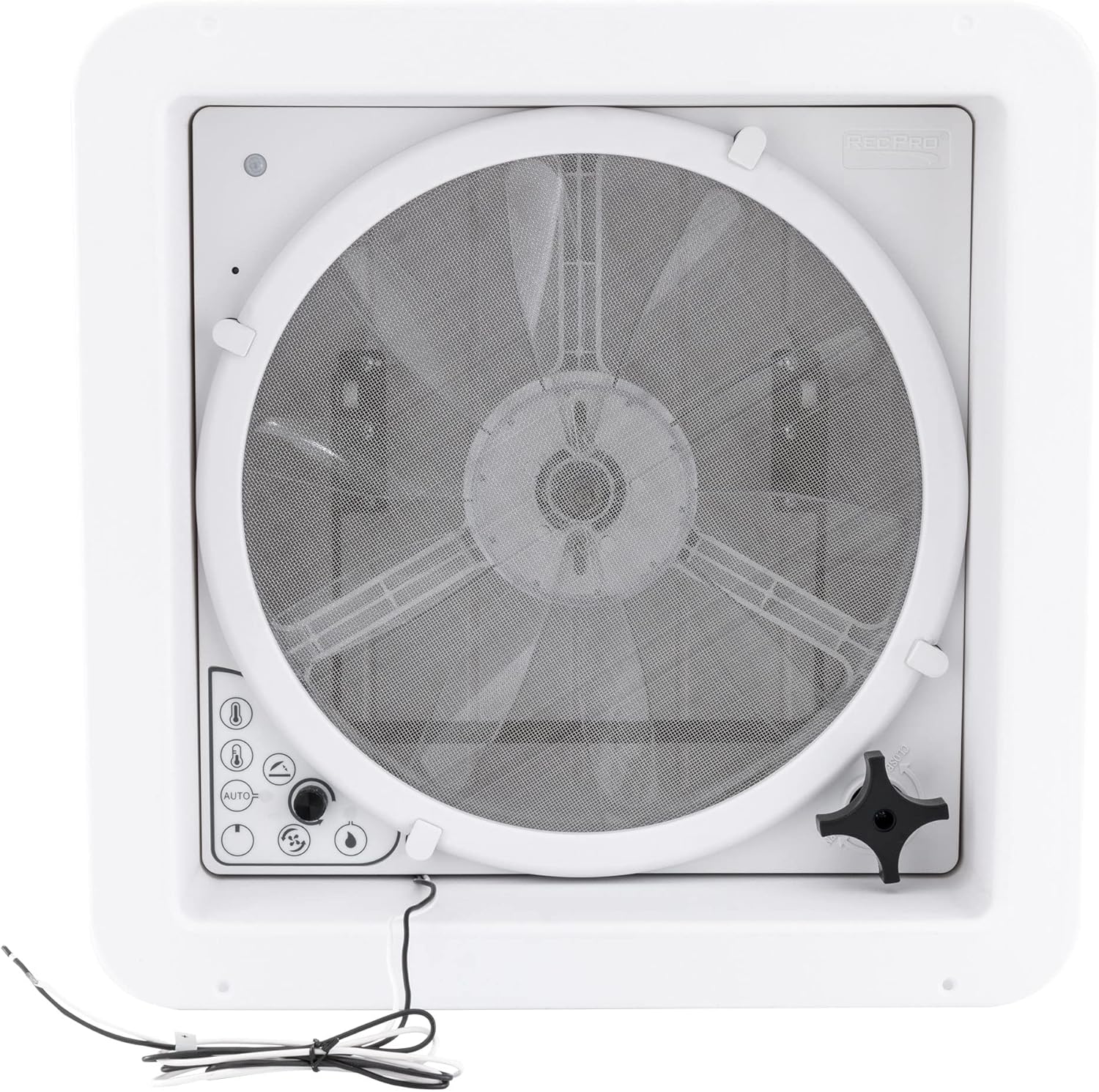
Image: An interior view of the RecPro RV Roof Vent Fan, showing the protective screen and fan blades. This component is designed for easy removal to facilitate cleaning and maintenance.
7. Troubleshooting
If you encounter issues with your fan, refer to the following common troubleshooting steps:
- Fan Not Operating: Check the 12V DC power supply and ensure all electrical connections are secure. Verify the fuse is intact.
- Lid Not Opening/Closing: Ensure the rain sensor is not activated if you are trying to open the lid manually during wet conditions. Check for any obstructions.
- Remote Not Responding: Replace the batteries in the remote control. Ensure there are no obstructions between the remote and the fan unit.
- Reduced Airflow: Clean the fan screen and blades as described in the Maintenance section.
For persistent issues, contact RecPro customer support.
8. Specifications
| Feature | Specification |
|---|---|
| Brand | RecPro |
| Model Name | Vento Deluxe |
| Item Model Number | RP-2027-W |
| Color | White |
| Electric Fan Design | Exhaust Fan |
| Power Source | DC |
| Voltage | 12 Volts (DC) |
| Wattage | 16 watts |
| Air Flow Capacity | 900 Cubic Feet Per Minute |
| Number of Power Levels | 10 |
| Special Feature | Remote Controlled, Rain Sensor, Thermostat |
| Included Components | Remote |
| Installation Size | 14" x 14" RV roof opening |
| Item Weight | 13.02 pounds |
| UPC | 193652040774 |

Image: This diagram illustrates the key dimensions of the RecPro Vento Deluxe Roof Vent Fan, providing essential measurements for proper installation and fit within an RV roof opening.
9. Warranty and Support
For warranty information or technical support, please refer to the documentation included with your product or visit the official RecPro website. Keep your purchase receipt for warranty claims.
Ask a question about this manual
Ask about setup, troubleshooting, compatibility, parts, safety, or missing instructions. Manuals+ will review the question and use this page’s manual context to help answer it.