
Introduction
Thank you for choosing the Rampage KM-R96 ELEMENTAL RGB Gaming Keyboard and Mouse Combo. This set is designed to enhance your gaming experience with responsive controls, customizable RGB lighting, and ergonomic design. This manual provides detailed instructions to help you get the most out of your new gaming peripherals.
Package Contents
Please ensure all items are present in the package:
- Rampage KM-R96 ELEMENTAL RGB Gaming Keyboard
- Rampage ELEMENTAL 7200 dpi Gaming Mouse
- User Manual (this document)
Setup
Follow these steps to connect your Rampage KM-R96 ELEMENTAL gaming set to your computer.
Keyboard Setup
- Locate an available USB port on your computer.
- Plug the USB connector of the Rampage KM-R96 keyboard into the USB port.
- Your operating system will automatically detect and install the necessary drivers. This may take a few moments.
- Once installed, the keyboard's RGB lighting will illuminate, indicating it is ready for use.

Image: Angled view of the Rampage KM-R96 ELEMENTAL RGB Gaming Keyboard, showcasing its full layout and RGB backlighting.
Mouse Setup
- Locate another available USB port on your computer.
- Plug the USB connector of the Rampage ELEMENTAL mouse into the USB port.
- The operating system will detect and install the drivers for the mouse.
- The mouse's RGB lighting will activate, confirming it is operational.

Image: Top-down view of the Rampage ELEMENTAL 7200 dpi Gaming Mouse, highlighting its ergonomic shape and honeycomb design.
Operating Instructions
This section details the various functions and features of your gaming keyboard and mouse.
Keyboard Functions
The Rampage KM-R96 keyboard offers a range of features for gaming and multimedia control.
- RGB Backlighting Control: Use the dedicated lighting keys (often located near the F-keys or as a combination with the Fn key) to cycle through various RGB lighting modes, adjust brightness, or turn the lighting on/off. Refer to the keyboard's specific key legends for exact controls.
- Multimedia Keys: The keyboard includes dedicated multimedia function keys (F1-F12, often accessed with the Fn key) for quick access to volume control, media playback, and other system functions.
- Programmable G-Keys: The keyboard features G1-G5 keys on the left side, which can be programmed for macros or specific in-game commands using compatible software (if available, check manufacturer's website for software).
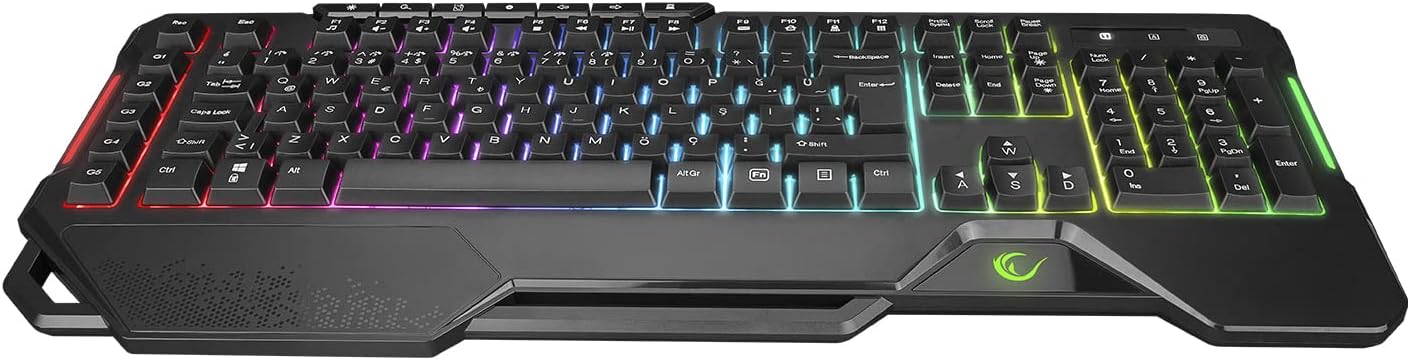
Image: Top view of the Rampage KM-R96 ELEMENTAL RGB Gaming Keyboard, showing the full QWERTY layout, multimedia keys, and G-keys.
Mouse Functions
The Rampage ELEMENTAL mouse provides precise control and customizable features.
- DPI Adjustment: Use the DPI button, typically located behind the scroll wheel, to cycle through different DPI (dots per inch) sensitivity settings. The mouse features up to 7200 dpi for precise tracking. Each DPI level may be indicated by a change in the mouse's RGB lighting color.
- Side Buttons: The mouse includes side buttons, usually on the left side, which can be used for forward/backward navigation in web browsers or programmed for in-game actions.
- RGB Lighting: The mouse features dynamic RGB lighting that can often be customized or linked to DPI settings.

Image: Front view of the Rampage ELEMENTAL 7200 dpi Gaming Mouse, highlighting the scroll wheel and DPI button.
Maintenance
Proper care will extend the lifespan of your gaming peripherals.
Cleaning
- Keyboard: Disconnect the keyboard from your computer. Use a soft, dry cloth to wipe down the keys and surface. For stubborn dirt, a slightly damp cloth with mild soap can be used, ensuring no liquid enters the keyboard. Compressed air can remove debris from between keys.
- Mouse: Disconnect the mouse. Use a soft, dry cloth to clean the surface. For the optical sensor, use a cotton swab lightly dampened with isopropyl alcohol to gently clean the lens.
Storage
When not in use for extended periods, store the keyboard and mouse in a cool, dry place away from direct sunlight and extreme temperatures. Avoid placing heavy objects on them.
Troubleshooting
If you encounter issues, refer to the table below for common problems and solutions.
| Problem | Possible Cause | Solution |
|---|---|---|
| Keyboard/Mouse not responding | Loose USB connection, faulty USB port, driver issue. | Ensure USB cables are securely plugged in. Try a different USB port. Restart your computer. |
| RGB lighting not working | Lighting turned off, software conflict. | Press the dedicated lighting control keys on the keyboard. Check if any software is overriding the lighting settings. |
| Mouse cursor erratic or unresponsive | Dirty optical sensor, unsuitable surface. | Clean the mouse's optical sensor. Use the mouse on a clean, opaque mouse pad or surface. |
| DPI adjustment not working | DPI button malfunction. | Ensure the mouse is properly connected. Try pressing the DPI button firmly. |
Specifications
Key technical details for the Rampage KM-R96 ELEMENTAL Gaming Keyboard and Mouse Combo:
- Brand: Rampage
- Model: KM-R96 ELEMENTAL
- Color: Black
- Keyboard Type: Multimedia Gaming Keyboard
- Keyboard Layout: QWERTY
- Mouse DPI: Up to 7200 dpi
- Compatible Devices: Personal Computer
- Power Source: USB Powered (No external battery required)
- Product Weight: 0.88 Kilograms (approximate for the set)

Image: Packaging for the Rampage KM-R96 ELEMENTAL RGB Gaming Keyboard and Mouse Combo, showing both devices.
Warranty and Support
Warranty Information
The Rampage KM-R96 ELEMENTAL RGB Gaming Keyboard and Mouse Combo comes with a 2-year warranty from the date of purchase. This warranty covers manufacturing defects and ensures the product functions as intended under normal use. Please retain your proof of purchase for warranty claims.
Customer Support
For technical assistance, troubleshooting beyond this manual, or warranty inquiries, please contact Rampage customer support through their official website or the retailer where the product was purchased. Have your product model number (KM-R96) and proof of purchase ready when contacting support.