
1. Product Overview
The Caymuller DT16 Wireless Earbuds are designed for sports and active lifestyles, featuring Bluetooth 5.0 connectivity, a dual LED digital display charging case, and IPX5 waterproofing. They offer deep bass stereo sound and convenient one-button controls.

Image: Caymuller DT16 Wireless Earbuds in their charging case, displaying battery levels.
2. What's in the Box
Ensure all items are present in your package:
- Caymuller Wireless Sports Earbuds (Left and Right)
- Charging Case
- Ear Caps (3 Pairs: Small, Medium, Large)
- USB Charging Cable
- User Manual
- Zipper Bag
- Flannel Bag

Image: All components included with the Caymuller DT16 Wireless Earbuds.
3. Setup Guide
3.1. Charging the Earbuds and Case
The charging case features a dual LED display. The left display shows the charging case's battery percentage (0-100). The right display shows the charging status of each earbud with four independent power consumption indicators, each representing 25% of the earbud's charge. During charging, the LED indicator lights will flash. Once fully charged, the LED indicators will stop flashing.

Image: Dual LED display on the charging case indicating battery levels.
The earbuds provide up to 8 hours of playtime on a single charge. The 600mAh charging case can recharge the earbuds approximately 6 times, extending total playtime to up to 48 hours. A quick 15-minute charge can provide 1 hour of playtime.

Image: Battery life and charging capacity details.
3.2. Pairing with a Device
The Caymuller DT16 earbuds utilize advanced Bluetooth 5.0 technology for a stable connection.
- Take out the earbuds from the charging case. They will automatically power on and enter pairing mode.
- On your smartphone or Bluetooth-enabled device, go to the Bluetooth settings.
- Search for "DT16" in the list of available devices and select it to connect.
Once paired, the earbuds will automatically connect to your device when removed from the case. You can use either a single earbud (Single Mode) or both earbuds (Binaural Mode).

Image: Visual guide for one-step auto pairing.
4. Operating Instructions
4.1. Wearing the Earbuds
The earbuds are designed with adjustable ear hooks and come with three pairs of ear caps (S, M, L) to ensure a secure and comfortable fit, especially during physical activities. Choose the ear caps that best fit your ears for optimal sound quality and comfort. Gently place the earbud into your ear canal and adjust the ear hook over your ear until it feels stable.
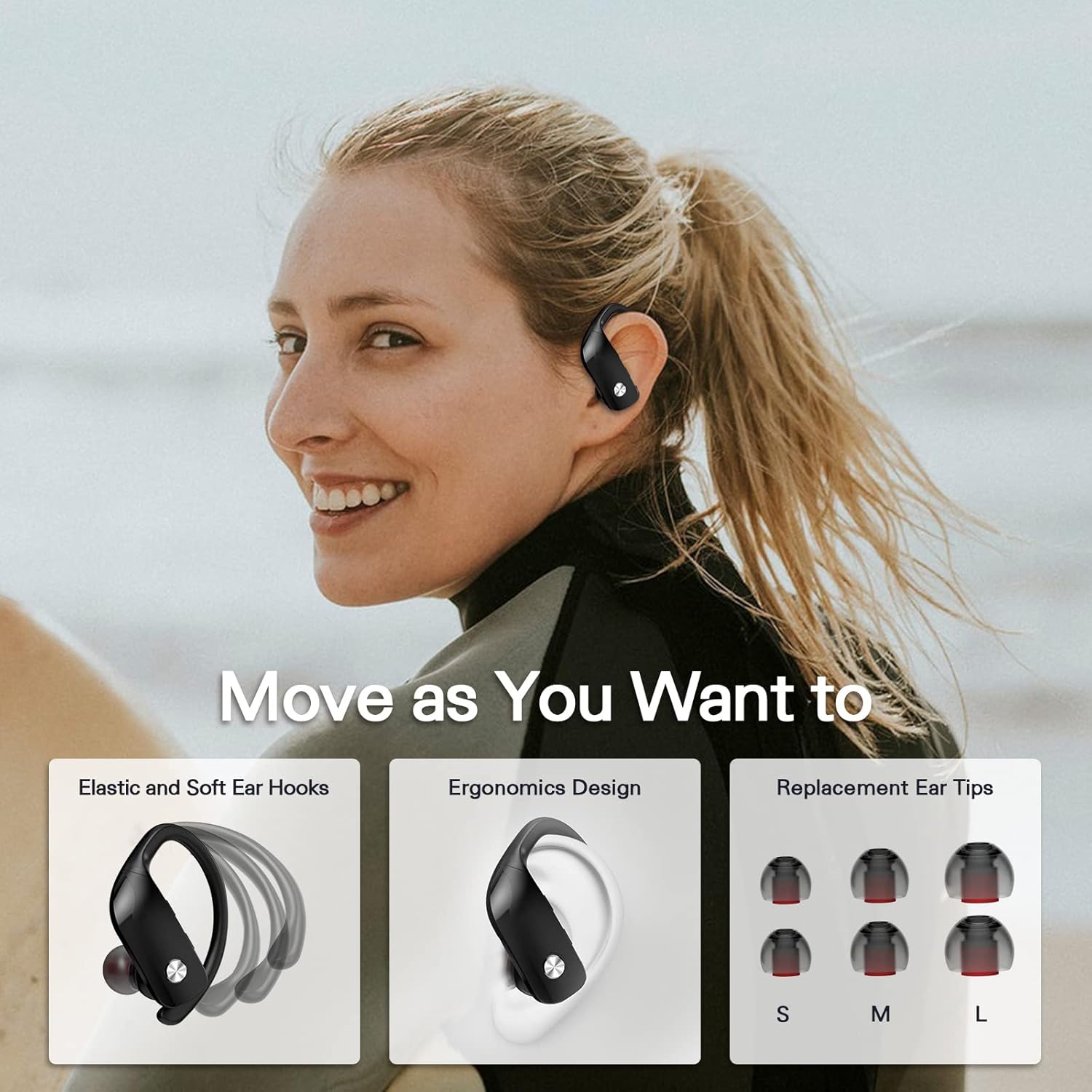
Image: Proper wearing and fit of the earbuds with ear hooks.
4.2. Button Controls
Each earbud features a multi-function button (MFB) for easy control of various functions:
| Action | Function |
|---|---|
| Press MFB once | Play/Pause music, Answer incoming call, End call |
| Hold MFB | Reject incoming call |
| Long Press MFB for 2s | Activate Voice Assistant |
| Long Press "+" Key | Next Song |
| Long Press "-" Key | Previous Song |
| Once "+" Key | Volume Up |
| Once "-" Key | Volume Down |

Image: Detailed diagram of earbud controls and their functions.
Video: Official product video demonstrating features and controls of the Caymuller Wireless Earbuds.
4.3. Single and Binaural Mode
The earbuds support both single and binaural modes. If you wish to use only one earbud, simply take one out of the charging case. The other earbud can remain in the case or be turned off. To use both, take both earbuds out of the case, and they will automatically connect to each other and your device.
5. Maintenance and Care
The Caymuller DT16 earbuds are IPX5 waterproof, protecting them from water splashes and sweat. This makes them suitable for workouts and outdoor activities. However, they are not designed for submersion in water.
To maintain optimal performance and hygiene:
- Regularly clean the earbuds and charging contacts with a soft, dry cloth.
- Ensure the charging case is dry before placing the earbuds inside.
- Store the earbuds and case in a cool, dry place away from extreme temperatures.
- Avoid using abrasive cleaners or harsh chemicals.
6. Troubleshooting
- Earbuds not pairing with each other or device: Ensure both earbuds are fully charged. Place them back in the charging case, close the lid, then open it again and remove them. Re-attempt the pairing process as described in Section 3.2.
- Only one earbud working: Check if the non-working earbud is charged. Place both earbuds back in the case, then remove them simultaneously to ensure they connect in binaural mode.
- Charging case not charging: Verify the USB cable is securely connected to both the case and a power source. Check if the power source is active.
- Poor sound quality: Ensure the ear caps are properly fitted and form a good seal in your ear. Clean any debris from the earbud speakers. Check your device's volume settings.
- Earbuds falling out: Experiment with different sizes of ear caps to find the most secure fit. Adjust the ear hooks to comfortably and firmly grip your ear.
7. Specifications
| Feature | Detail |
|---|---|
| Model Name | DT16 |
| Connectivity Technology | Bluetooth 5.0, Wireless |
| Battery Life (Earbuds) | Up to 8 hours per charge |
| Battery Life (with Charging Case) | Up to 48 hours |
| Charging Case Capacity | 600mAh |
| Water Resistance Level | IPX5 (Waterproof) |
| Control Method | Touch |
| Audio Driver Type | Dynamic Driver |
| Special Features | Dual LED Digital Display, Flexible Earhooks, Built-in Microphones, Noise Reduction |
| Compatible Devices | Desktops, Laptops, Tablets, Telephones |
| Item Weight | 3.53 ounces (100 Grams) |
| Product Dimensions | 3 x 2 x 1 inches |
| UPC | 768484451403 |
8. Warranty and Support
For warranty information or technical support, please refer to the warranty card included in your product packaging or contact Caymuller customer service directly. Contact details can typically be found on the manufacturer's official website or through your purchase platform.