
Product Overview
The Beurer BF 915 Diagnostic Scale is designed to provide comprehensive body analysis, making it an ideal companion for managing your health goals, whether it's weight reduction, muscle development tracking, or weight gain. This advanced personal scale goes beyond simple weight measurement to offer detailed insights into your body composition.
Based on your personal data, the BF 915 accurately determines your body fat percentage, body water percentage, muscle percentage, and bone mass. It also calculates your Basal Metabolic Rate (BMR), Active Metabolic Rate (AMR), and Body Mass Index (BMI), providing a holistic view of your health. Its modern design, featuring an XXL display, ensures clear readability and adds a sleek touch to any bathroom.
Key Features:
- Comprehensive Body Analysis: Measures body weight, body fat, muscle percentage, body water, bone mass, and calculates BMR, AMR, and BMI.
- App Connectivity: Seamlessly transmits measured values to the "beurer HealthManager Pro" app via Bluetooth for detailed body analysis and graphical evaluation.
- Modern Design: Features a sleek black Signature Line design with an illuminated XXL display and a large 35 x 30 cm standing surface.
- Individual Measurement: Supports up to eight user memories with automatic user recognition and five activity levels, suitable for the entire family.
- Robust Construction: Made with durable 8 mm safety glass, capable of supporting a load capacity of up to 200 kg.
Setup Guide
1. Unpacking and Initial Inspection
- Carefully remove the scale from its packaging.
- Inspect the scale for any signs of damage. If damaged, do not use and contact customer support.
- Ensure all components are present as listed in the packaging.
2. Battery Installation
- Locate the battery compartment on the underside of the scale.
- Open the battery compartment cover.
- Insert the required batteries (usually AAA, check the compartment for type and polarity) ensuring correct polarity (+/-).
- Close the battery compartment cover securely.
3. App Installation and Pairing
- Download the "beurer HealthManager Pro" app from your smartphone's app store (App Store for iOS or Google Play Store for Android).
- Install the app and create a user account if you don't already have one.
- Enable Bluetooth on your smartphone.
- Open the "beurer HealthManager Pro" app and follow the on-screen instructions to add a new device.
- Step onto the scale briefly to activate it and make it discoverable via Bluetooth. The scale's display should show a Bluetooth symbol.
- The app will guide you through the pairing process. Once paired, your personal data (height, age, gender, activity level) can be entered into the app for accurate body analysis.
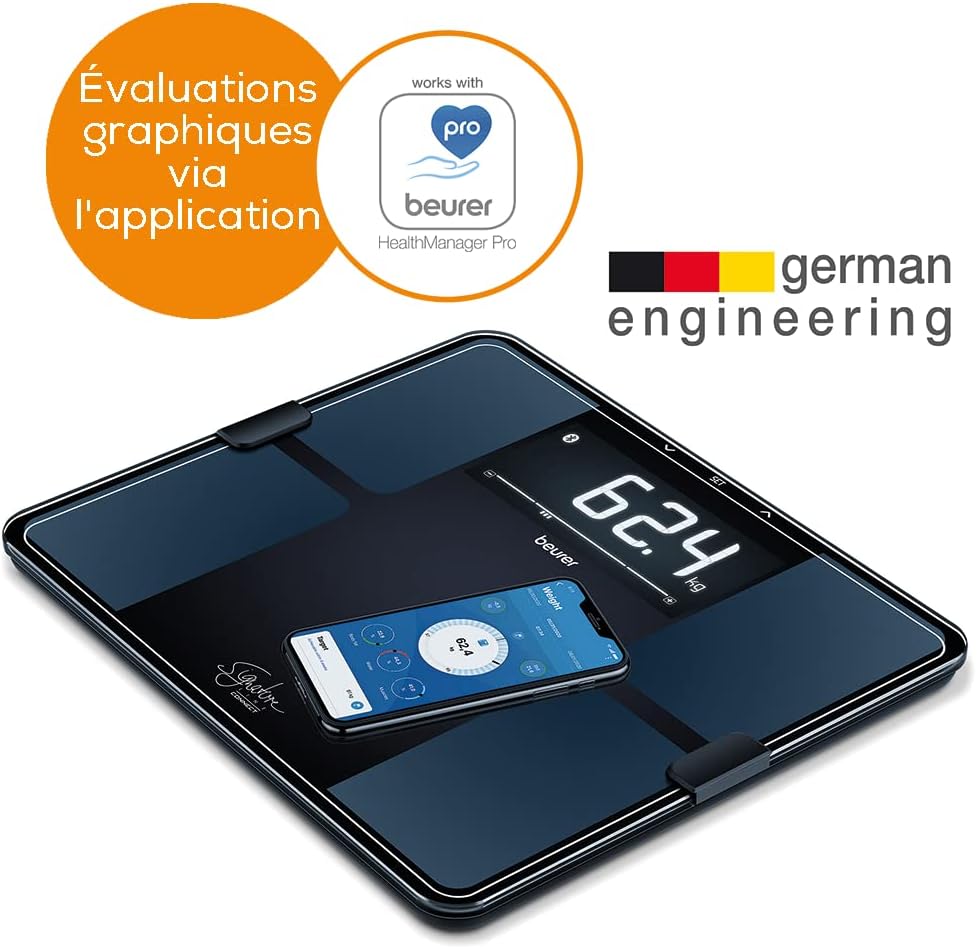
Image: The Beurer BF 915 scale connected to the Beurer HealthManager Pro app, demonstrating the graphical evaluation feature. The scale displays weight, and the app shows detailed body composition data.

Image: The Beurer BF 915 diagnostic scale, highlighting its large display and connectivity with the Beurer HealthManager Pro mobile application. The app interface shows weight, body fat, water, and muscle percentages.
Operating Instructions
1. Taking a Measurement
- Place the scale on a firm, flat surface (e.g., tile or hardwood floor). Avoid carpets or uneven surfaces, as this can affect accuracy.
- Step onto the scale barefoot with even weight distribution. Ensure your feet are positioned on the electrodes for body analysis measurements.
- Remain still until your weight and other body composition values are displayed on the scale's XXL screen.
- If the scale is paired with the app, the data will automatically transfer to your profile in the "beurer HealthManager Pro" app.

Image: A user standing on the Beurer BF 915 scale, demonstrating the process of taking a measurement for comprehensive body analysis, including weight, body fat, muscle, body water, and bone mass.
2. Understanding Your Readings
- Weight: Your total body mass in kilograms (kg).
- Body Fat (%): The percentage of your total body weight that is fat.
- Body Water (%): The percentage of your total body weight that is water.
- Muscle Percentage (%): The percentage of your total body weight that is muscle.
- Bone Mass (kg): The total weight of your bones.
- BMI (Body Mass Index): A measure that uses your height and weight to work out if your weight is healthy.
- BMR (Basal Metabolic Rate): The number of calories your body needs to perform basic, life-sustaining functions at rest.
- AMR (Active Metabolic Rate): The total number of calories your body burns in a day, including physical activity.
3. User Profiles and Automatic Recognition
- The BF 915 scale can store data for up to eight different users.
- Once your profile is set up in the "beurer HealthManager Pro" app with your personal data, the scale will attempt to automatically recognize you based on your weight and body composition.
- If multiple users have similar measurements, the scale may prompt you to select your profile in the app or on the scale itself (if applicable).
- Ensure your activity level is correctly set in the app for accurate AMR calculation.
Maintenance
1. Cleaning the Scale
- Clean the scale regularly with a slightly damp cloth.
- Do not use abrasive cleaning agents or immerse the scale in water.
- Ensure the surface is dry before storage or next use.
2. Battery Replacement
- When the battery indicator appears on the display, replace all batteries simultaneously.
- Use batteries of the correct type and dispose of old batteries according to local regulations.
3. Storage
- Store the scale in a dry place, away from extreme temperatures and direct sunlight.
- Avoid placing heavy objects on the scale when not in use.
Troubleshooting
| Problem | Possible Cause | Solution |
|---|---|---|
| Scale does not turn on. | Batteries are dead or incorrectly inserted. | Check battery polarity or replace batteries. |
| Inaccurate readings. | Scale on uneven surface; user not standing still; scale not calibrated (first use). | Place scale on a hard, flat surface. Stand still during measurement. For first use or after moving, step on and off the scale once to calibrate to '0.0'. |
| Body analysis values (fat, muscle, water) not displayed. | User is wearing socks/shoes; feet not making proper contact with electrodes; personal data not entered in app. | Step on the scale barefoot. Ensure feet are clean and make full contact with the electrodes. Enter or verify your personal data in the "beurer HealthManager Pro" app. |
| App not connecting to scale. | Bluetooth is off; app not open; scale not activated; pairing issue. | Ensure Bluetooth is enabled on your phone. Open the app. Step on the scale to activate it. Try re-pairing the device in the app settings. |
| "Err" message on display. | Overload (weight exceeds 200 kg); measurement error. | Ensure weight is within the 200 kg limit. Step off and then back on the scale. If persistent, contact support. |
Technical Specifications
| Feature | Specification |
|---|---|
| Model Number | BF 915 (Type 2118) |
| Weight Limit | 200 kg (440 lbs) |
| Measurement Accuracy | +/- 0.1 kg |
| Display Type | Digital XXL Display, Illuminated |
| Connectivity | Bluetooth (for "beurer HealthManager Pro" app) |
| User Memories | 8 user profiles with automatic recognition |
| Activity Levels | 5 levels |
| Material | 8 mm Safety Glass |
| Product Dimensions (L x W x H) | Approx. 35 x 30 x 0.8 cm |
| Product Weight | Approx. 1 kg |
| Color | Black |
Warranty and Support
Beurer products are manufactured to high quality standards and are designed for reliable performance. For specific warranty information regarding your Beurer BF 915 Diagnostic Scale, please refer to the warranty card included with your product or visit the official Beurer website.
For technical support, troubleshooting assistance beyond this manual, or to inquire about spare parts, please contact Beurer customer service. You can often find contact details on the official Beurer website or through the "beurer HealthManager Pro" app.
You can also visit the official Beurer store on Amazon for more information and product updates: Beurer Amazon Store