
Introduction
This manual provides instructions for the safe and efficient operation of your KitchenAid Professional 600 Series Stand Mixer, model KP26M9PCER. This appliance is designed for mixing, kneading, and beating ingredients in various culinary applications.
The mixer features a durable DC motor, a 5.7-liter (6-quart) stainless steel bowl, and 10 speed settings for precise control. Its bowl-lift design allows for easy attachment and removal of the mixing bowl.

Image: The KitchenAid Professional 600 Series Stand Mixer in Empire Red, featuring its robust design and stainless steel bowl.
Important Safety Instructions
When using electrical appliances, basic safety precautions should always be followed, including the following:
- Read all instructions before operating the mixer.
- To protect against risk of electrical shock, do not immerse the mixer base in water or other liquid.
- Close supervision is necessary when any appliance is used by or near children.
- Unplug from outlet when not in use, before putting on or taking off parts, and before cleaning.
- Avoid contact with moving parts. Keep hands, hair, and clothing, as well as spatulas and other utensils, away from beaters during operation to reduce the risk of injury to persons and/or damage to the mixer.
- Do not operate any appliance with a damaged cord or plug, or after the appliance malfunctions or has been dropped or damaged in any manner.
- The use of attachments not recommended or sold by KitchenAid may cause fire, electric shock, or injury.
- Do not use the appliance outdoors.
- Do not let cord hang over edge of table or counter.
- Do not let cord contact hot surfaces, including the stove.
Package Contents
Your KitchenAid Professional 600 Series Stand Mixer package includes the following items:
- Stand Mixer Base (Empire Red)
- 5.7-liter (6-quart) Stainless Steel Bowl
- Polished Metal Flat Beater
- PowerKnead Spiral Dough Hook
- Balloon Whisk (Wire Whip)
- Bowl Whisk with Flexible Edge (if included in specific model variant)
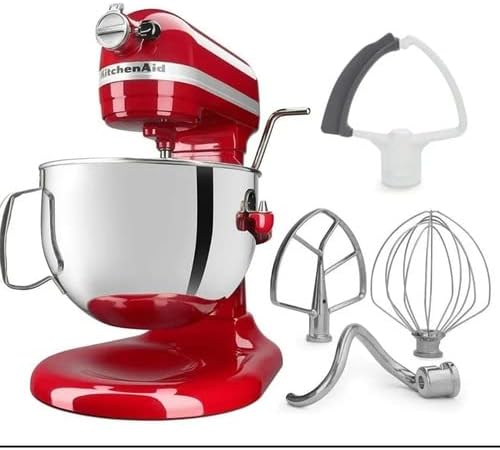
Image: The KitchenAid stand mixer shown with its standard attachments, including the flat beater, dough hook, wire whip, and a flex edge beater.

Image: A close-up view of the three primary attachments: the spiral dough hook, the flat beater, and the wire whip.
Setup
- Placement: Place the mixer on a dry, flat, and stable surface. Ensure there is adequate space around the mixer for operation and ventilation.
- Attaching the Bowl:
- Lift the bowl lift handle to the down position.
- Place the bowl supports over the locating pins on the mixer base.
- Press down on the back of the bowl until the bowl pin snaps into the spring latch.
- Lower the bowl lift handle to the up position to secure the bowl.
- Attaching an Accessory:
- Ensure the mixer is unplugged and the speed control is set to "OFF".
- Slide the accessory onto the beater shaft and push upward as far as possible.
- Rotate the accessory to the right, hooking the accessory over the pin on the shaft.
- Power Connection: Plug the mixer into a grounded 120 Volt, 60 Hz electrical outlet.

Image: The KitchenAid stand mixer with its bowl in the lifted position, demonstrating the bowl-lift mechanism.
Operating Instructions
- Adding Ingredients: With the mixer unplugged and the bowl in the down position, add your ingredients to the mixing bowl.
- Securing the Bowl: Lift the bowl lift handle to the up position to secure the bowl for mixing.
- Selecting Speed: Turn the speed control lever to the desired speed setting (1-10). Start at a lower speed and gradually increase as needed to prevent splashing.
- Mixing: Allow the mixer to operate until ingredients are thoroughly combined or processed as required by your recipe.
- Stopping the Mixer: Turn the speed control lever to "OFF" to stop the mixer.
- Removing Bowl and Accessory:
- Unplug the mixer.
- Lower the bowl lift handle to the down position.
- Remove the accessory by pushing it upward and rotating it to the left, then pulling it off the shaft.
- Remove the mixing bowl by lifting it off the locating pins.

Image: A side view of the mixer highlighting the speed control dial and the bowl lift handle for operational adjustments.

Image: A close-up view inside the mixing bowl, showing sugar and butter being creamed by the flat beater attachment.
Attachments and Their Usage
The KitchenAid Professional 600 Series Stand Mixer comes with several attachments, each designed for specific tasks:
- Flat Beater: Ideal for normal to heavy mixtures such as cakes, cookies, pastries, quick breads, mashed potatoes, and pie crusts.
- Spiral Dough Hook: Used for mixing and kneading yeast doughs such as bread, pizza dough, and pasta dough.
- Balloon Whisk (Wire Whip): Incorporates air into ingredients. Best for mixtures that need air, such as eggs, egg whites, heavy cream, boiled frostings, and mayonnaise.
- Flex Edge Beater (Optional/Included in some models): Features a flexible edge that scrapes the sides of the bowl while mixing, reducing the need to stop and scrape manually. Suitable for most mixtures that use the flat beater.
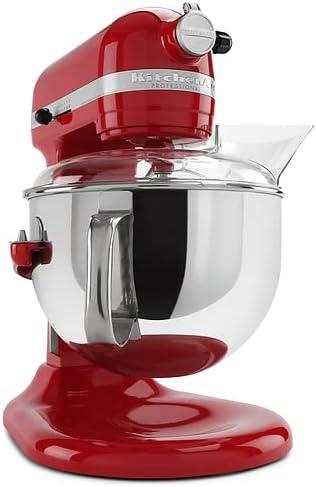
Image: The stand mixer equipped with a clear pouring shield, which helps prevent splashes and allows for easy addition of ingredients during mixing.
Cleaning and Maintenance
Proper cleaning and maintenance will ensure the longevity and optimal performance of your mixer.
- Always unplug the mixer before cleaning.
- Mixer Base: Wipe the mixer base with a damp cloth. Do not use abrasive cleaners or immerse the mixer in water.
- Stainless Steel Bowl: The stainless steel bowl is dishwasher-safe. Alternatively, wash with warm, soapy water and rinse thoroughly.
- Attachments (Flat Beater, Dough Hook, Wire Whip):
- The polished metal flat beater and spiral dough hook are generally dishwasher-safe (top rack recommended) or can be hand-washed.
- The wire whip should be hand-washed in warm, soapy water and dried immediately to prevent tarnishing.
- Refer to the specific care instructions for any optional attachments you may own.
- Power Cord: Inspect the power cord regularly for any signs of damage. If damaged, contact KitchenAid service for replacement.
Troubleshooting
If your mixer experiences issues, consult the following common troubleshooting steps:
| Problem | Possible Cause | Solution |
|---|---|---|
| Mixer does not start. | Not plugged in; power outlet not functioning; speed control not set to "OFF" before plugging in. | Ensure mixer is securely plugged into a working outlet. Turn speed control to "OFF" then back to desired speed. |
| Attachment hits the bottom of the bowl or does not reach ingredients. | Beater-to-bowl clearance needs adjustment. | Refer to the KitchenAid service manual or contact customer support for beater-to-bowl clearance adjustment instructions. This is typically a screw adjustment on the mixer head. |
| Mixer stops during operation. | Overload protection activated; thermal overload. | Turn the speed control to "OFF" and unplug the mixer. Let it cool for 10-15 minutes. Reduce the load if possible, then plug in and restart. |
| Unusual noise or smell. | Normal operation for heavy loads; potential mechanical issue. | A slight humming or gear noise is normal, especially with heavy doughs. If the noise is excessive or accompanied by a burning smell, discontinue use and contact KitchenAid service. |
For issues not covered here, please contact KitchenAid Customer Service.
Specifications
| Model: | KP26M9PCER |
| Brand: | KitchenAid |
| Capacity: | 5.7 liters (6 Quarts) |
| Voltage: | 120 Volts |
| Frequency: | 60 Hz |
| Number of Speeds: | 10 |
| Material: | Stainless Steel (Bowl), Metal (Motor/Housing) |
| Item Weight: | 6 kg (approximately 13.2 lbs) |
| Parcel Dimensions: | 49 x 43 x 34 cm (approximately 19.3 x 16.9 x 13.4 inches) |
Warranty and Support
KitchenAid products are manufactured to high-quality standards. For detailed warranty information, please refer to the warranty card included with your product or visit the official KitchenAid website.
For customer support, service, or to purchase additional attachments, please visit the KitchenAid Store or contact KitchenAid Customer Service directly.


