Introduction
This manual provides detailed instructions for the safe and effective operation of your MESTEK IR02C-Y Infrared Thermometer. This device is designed for non-contact surface temperature measurement and includes a K-type thermocouple probe for internal temperature readings. It also features ambient temperature and humidity measurement, dew point calculation, and specialized alarm modes for mildew and temperature differences.
Safety Information
- Do not measure human or animal body temperature. This device is intended for industrial, culinary, and general surface temperature measurements only.
- Avoid direct eye exposure to the laser beam. The laser is used for targeting purposes only.
- Do not point the laser at reflective surfaces, as the reflected beam could cause eye injury.
- Keep the device away from children.
- Do not use the thermometer in environments with explosive gas, vapor, or dust.
- Allow the thermometer to acclimatize to the ambient temperature for 10-20 minutes before use, especially if moving between environments with significant temperature differences. This ensures accurate readings.
Package Contents
- 1 x MESTEK IR02C-Y Infrared Thermometer
- 1 x K-type Temperature Sensor Probe
- 2 x 1.5V AAA Batteries
- 1 x Leather Handbag
- 1 x User Manual
Product Overview
Familiarize yourself with the components and display of your MESTEK IR02C-Y thermometer.
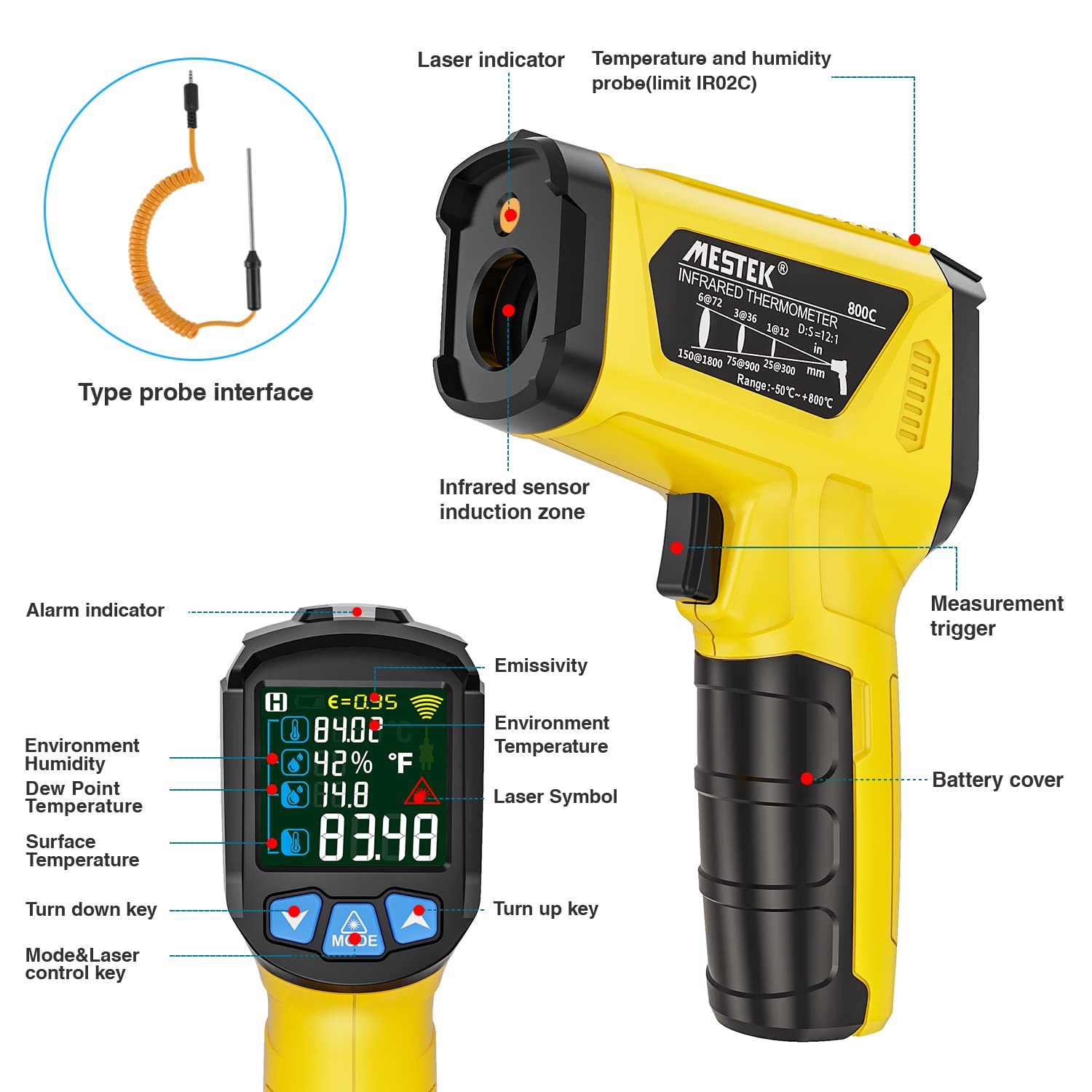
Figure 1: Labeled diagram of the MESTEK IR02C-Y Infrared Thermometer, highlighting its various components and display elements.
Setup
Battery Installation
- Locate the battery compartment on the handle of the thermometer.
- Open the battery cover.
- Insert two 1.5V AAA batteries, ensuring correct polarity (+/-).
- Close the battery cover securely.
Video 1: This video demonstrates the process of installing batteries into the MESTEK IR02C-Y Infrared Thermometer and provides an overview of its display parameters and three main functions.
Operating Instructions
1. Infrared Temperature Measurement
- Point the infrared sensor towards the target object.
- Press and hold the measurement trigger. The laser pointer will activate (if enabled) to indicate the measurement area.
- The surface temperature will be displayed on the LCD screen. Release the trigger to hold the reading.

Figure 2: The thermometer in use, showing the laser guidance for precise targeting during infrared temperature measurement.
2. K-Type Thermocouple Measurement
This mode is ideal for measuring the internal temperature of liquids or semi-solids, providing a more stable and accurate reading than surface infrared measurement.
- Insert the K-type thermocouple probe into the designated port on the thermometer.
- Immerse the metal tip of the probe into the substance you wish to measure.
- The thermometer will display both the K-type probe temperature and the infrared surface temperature simultaneously.

Figure 3: Demonstrates the use of the K-type thermocouple probe to measure the internal temperature of a liquid, alongside the infrared reading.
3. Mildew Alarm Mode
This mode helps assess the risk of mildew formation based on surface temperature and dew point temperature.
- Press the 'MODE' button repeatedly until the mildew alarm icon is displayed.
- Point the thermometer at the surface to be tested.
- The indicator light will show:
- Green: No mildew detected.
- Yellow: Tendency for mildew.
- Red: Mildew detected.
4. Temperature Difference Alarm Mode
This mode alerts you to significant temperature differences between the measured surface and the ambient environment.
- Press the 'MODE' button repeatedly until the temperature difference alarm icon is displayed.
- Point the thermometer at the surface to be tested.
- The indicator light will show:
- Green: Temperature difference is less than 5°C (41°F).
- Yellow: Temperature difference is between 5°C (41°F) and a higher threshold.
- Red: Temperature difference is greater than the higher threshold (e.g., indicating a significant anomaly).
Advanced Functions
Adjusting Emissivity (ε)
Emissivity is a crucial factor for accurate infrared temperature measurement. Different materials have different emissivity values. The MESTEK IR02C-Y allows adjustment from 0.10 to 1.00.
- Press the 'MODE' button three times to enter emissivity adjustment mode. The emissivity value (ε) will flash on the screen.
- Use the Up (▲) and Down (▼) buttons to adjust the value according to the material being measured.
- Refer to common emissivity tables for guidance. For example, most organic materials and painted surfaces have an emissivity of 0.95.

Figure 4: Examples of measuring various materials with adjustable emissivity, such as ice, grilled meat, fried food, and wood.
Unit Conversion (°C/°F)
To switch between Celsius and Fahrenheit:
- Press the 'MODE' button four times.
- Use the Up (▲) or Down (▼) buttons to select your desired unit.
Laser ON/OFF
To toggle the laser pointer:
- Press and hold the Up (▲) button for 2 seconds.
- The laser symbol on the display will indicate its status.
MAX/HOLD Function
The device automatically holds the last measured value when the trigger is released. It can also display the maximum temperature recorded during a continuous scan.
Auto Power-Off
To conserve battery life, the thermometer will automatically shut off after 30 seconds of inactivity.
Low Battery Indicator
A low battery icon will appear on the display when the batteries need to be replaced.
Applications
The MESTEK IR02C-Y Infrared Thermometer is suitable for a wide range of applications, including:
- Cooking: Ovens, grills, frozen foods, frying.
- Home Use: Checking refrigerator/freezer temperatures, HVAC systems, radiators.
- Automotive: Engine diagnostics, electrical repairs.
- Industrial: Factory machinery, electrical circuits, monitoring fire hazards.
- Horticulture: Soil temperature, environmental humidity.
- General: Water temperature, adapters, and other household appliances.

Figure 5: Diverse applications of the thermometer, including culinary, automotive, and home heating system checks.
Maintenance
- Cleaning: The product cannot be washed. Clean the device with a soft, damp cloth. Do not use abrasive cleaners or solvents.
- Storage: Store the thermometer in its provided handbag in a dry, cool place when not in use.
- Battery Replacement: Replace batteries promptly when the low battery indicator appears to ensure continued accuracy and functionality.
Troubleshooting
- Inaccurate Readings: Ensure the device has acclimatized to the ambient temperature for 10-20 minutes. Verify the emissivity setting matches the material being measured. Keep the measurement distance (D:S ratio) appropriate for the target size.
- No Display/Power: Check battery installation and ensure batteries are not depleted. Replace with fresh AAA batteries if necessary.
- Laser Not Working: Ensure the laser is enabled (refer to 'Laser ON/OFF' section).
- K-Type Probe Not Working: Ensure the probe is securely inserted into the port.
- Error Messages: If an error message appears, try restarting the device by removing and reinserting the batteries. If the issue persists, contact customer support.
Specifications
| Feature | Specification |
|---|---|
| Temperature Measurement Range (Infrared) | -50 ℃ ~ 800 ℃ (-58 ℉ ~ 1472 ℉) |
| Temperature Measurement Range (K-Type Probe) | -10 ℃ ~ 500 ℃ (14 ℉ ~ 932 ℉) |
| Accuracy (-50 ℃ ~ 0 ℃) | ± 3 ℃ (± 6 ℉) |
| Accuracy (0 ℃ ~ 800 ℃) | ± (1.5% reading + 2 ℃) / ± (1.5% reading + 4 ℉) |
| Ambient Temperature Accuracy (0 ℃ ~ 45 ℃) | ± 1.0 ℃ (± 2 ℉) |
| Ambient Temperature Accuracy (-10 ℃ ~ 0 ℃, 45 ℃ ~ 60 ℃) | ± 1.5 ℃ (± 32 ℉) |
| Humidity Accuracy (20% ~ 80% RH) | ± 4.0% RH |
| Humidity Accuracy (0% ~ 20%, 80% ~ 100% RH) | ± 5.0% RH |
| Response Time | ≤ 0.5s |
| Distance to Spot Ratio (D:S) | 12:1 |
| Emissivity | Adjustable 0.1 - 1.0 |
| Power | 2 x 1.5V AAA Batteries (included) |
| Display Type | Color LCD with Backlight |
| Special Functions | MAX/HOLD, Low Battery Indication, Auto Power-Off, Non-contact Laser Measurement, K-type Probe Measurement, Mildew Alarm Mode, Temperature Difference Alarm Mode, Ambient Temperature/Humidity, Dew Point Temperature |
| Product Dimensions | 13.99 x 9.39 x 3.2 cm |
| Product Weight | 310 g |
| Material | Plastic |
| Certifications | CE, EMC, FCC, RoHS, WEEE |
Warranty and Support
MESTEK offers a lifetime warranty for this product. If you encounter any issues or have questions regarding the operation or performance of your IR02C-Y Infrared Thermometer, please contact MESTEK customer support for assistance. Our professional engineers have thoroughly checked the product to ensure quality and reliability.


