1. Introduction
Thank you for choosing the MESTEK IR02C-Y Infrared Thermometer. This device is designed for safe, non-contact temperature measurement of various surfaces, and also includes a K-type probe for contact temperature measurement. Additionally, it can measure ambient temperature, humidity, and dew point. Please read this manual thoroughly before use to ensure proper operation and safety.
Important Safety Note: This infrared thermometer is not intended for measuring human or animal body temperature.
2. Product Overview
The MESTEK IR02C-Y features a clear color LCD, adjustable emissivity, and various alarm modes to assist in diverse measurement tasks.
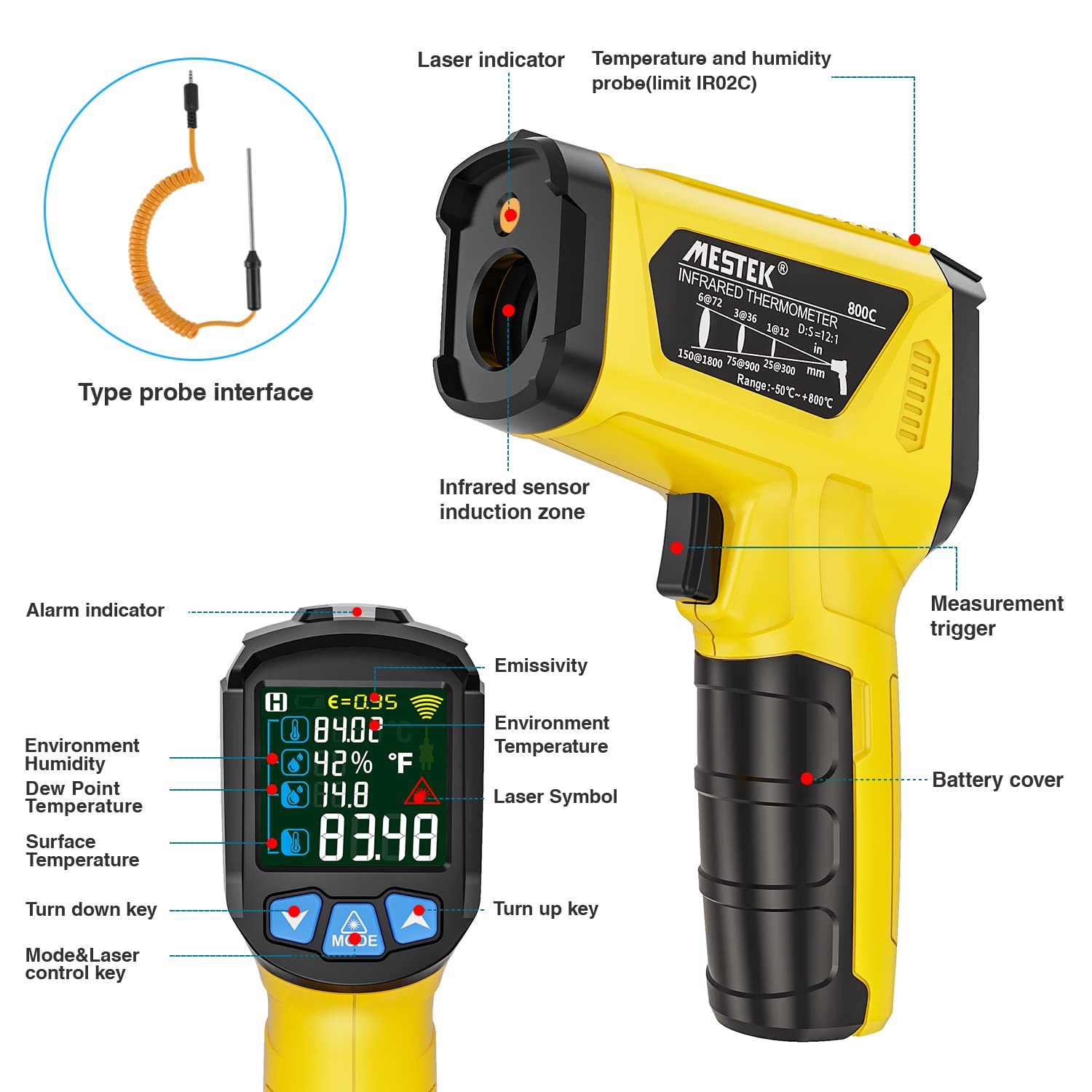
Figure 1: MESTEK IR02C-Y Infrared Thermometer with labeled components including laser indicator, infrared sensor, display, and buttons.
Key Components:
- Infrared Sensor Zone: For non-contact temperature measurement.
- Laser Indicator: Helps pinpoint the measurement target.
- Display: Color LCD screen showing temperature, humidity, dew point, emissivity, and alarm indicators.
- Measurement Trigger: Activates measurement.
- Mode & Laser Control Key: Cycles through measurement modes and controls the laser.
- Up/Down Keys: Adjust settings like emissivity or alarm thresholds.
- Type Probe Interface: Port for connecting the K-type thermocouple probe.
- Battery Cover: Houses the AAA batteries.
3. Setup
3.1. Battery Installation
The MESTEK IR02C-Y requires two (2) AAA batteries (included). To install:
- Locate the battery cover on the handle of the thermometer.
- Open the battery cover.
- Insert two 1.5V AAA batteries, ensuring correct polarity (+/-).
- Close the battery cover securely.
Video 1: Demonstrates battery installation and basic operation modes.
3.2. Connecting the K-Type Probe (Optional)
If you need to measure internal temperatures of liquids or semi-solids, connect the K-type thermocouple probe:
- Insert the K-type thermocouple probe connector into the designated port on the thermometer.
- The thermometer will automatically detect the probe and display K-type temperature readings alongside infrared measurements.
4. Operating Instructions
4.1. Power On/Off
- To power on, press the Measurement Trigger.
- The device will automatically power off after 30 seconds of inactivity to conserve battery life.
4.2. Taking a Measurement (Infrared)
- Point the infrared lens towards the target object.
- Press and hold the Measurement Trigger. The laser indicator will activate (if enabled) to show the measurement area.
- The temperature reading will appear on the display. Release the trigger to hold the reading.
4.3. Taking a Measurement (K-Type Probe)
With the K-type probe connected:
- Insert the metal tip of the probe into the liquid or semi-solid material you wish to measure.
- Press the Measurement Trigger. The display will show both the infrared surface temperature and the K-type probe temperature.
4.4. Mode Selection
Press the MODE button to cycle through different display modes:
- Environment Surface Temperature: Displays the infrared temperature of the target surface.
- Temperature Probe Function: Displays K-type probe temperature (if connected) and infrared temperature.
- Adjustable Emissivity Function: Allows adjustment of emissivity.
- Unit Switch (°C/°F): Toggles between Celsius and Fahrenheit.
Video 2: Explains screen parameters, mildew alarm mode, temperature difference alarm mode, and K-type thermocouple temperature measurement.
4.5. Adjustable Emissivity
Emissivity (ε) is a measure of an object's ability to emit infrared energy. Different materials have different emissivities. For accurate readings, adjust the emissivity setting (0.10-1.00) to match the material being measured. Consult a standard emissivity table for common materials.

Figure 2: The thermometer's adjustable emissivity feature allows for accurate temperature readings across different surfaces, from ice to grilled foods and wood.
4.6. Alarm Modes
The thermometer features two alarm modes:
- Mildew Alarm Mode: The device judges the likelihood of mildew based on the surface temperature and the dew point temperature of the environment. A green indicator means no mildew, yellow indicates a tendency for mildew, and red indicates mildew.
- Temperature Difference Alarm Mode: The meter compares the surface temperature of the object with the ambient temperature. A green indicator lights up if the difference is less than 5°C/41°F. A red indicator lights up if the difference is greater than 5°C/41°F. Other cases result in a yellow indicator.
4.7. Laser ON/OFF
To toggle the laser on or off, press and hold the Up button for 2 seconds.
5. Applications
The MESTEK IR02C-Y is suitable for a wide range of applications, including:
- Cooking, baking, grilling, and monitoring frozen foods.
- Automotive maintenance and electrical repairs.
- Household tasks such as checking appliance temperatures or HVAC systems.
- Industrial use for monitoring machinery and processes.
- Horticulture and viticulture.

Figure 3: Examples of the thermometer's diverse applications, from culinary to automotive and home heating.
6. Maintenance
6.1. Cleaning
- Wipe the device with a soft, damp cloth. Do not use abrasive cleaners or solvents.
- Keep the infrared lens clean for accurate readings. Use a soft cloth or cotton swab with a small amount of isopropyl alcohol if necessary.
6.2. Storage
- Store the thermometer in a cool, dry place when not in use.
- Remove batteries if the device will not be used for an extended period to prevent leakage.
7. Troubleshooting
| Problem | Possible Cause | Solution |
|---|---|---|
| Device does not power on. | Low or dead batteries; incorrect battery installation. | Replace batteries with new 1.5V AAA batteries, ensuring correct polarity. |
| Inaccurate readings. | Dirty infrared lens; incorrect emissivity setting; distance to spot ratio exceeded. | Clean the lens; adjust emissivity to match the material; ensure measurement is within the 12:1 D:S ratio. |
| Laser not visible. | Laser is turned off. | Press and hold the Up button for 2 seconds to toggle the laser on. |
| K-type probe not working. | Probe not properly connected; damaged probe. | Ensure the probe is fully inserted into the port. If still not working, the probe may need replacement. |
8. Specifications
- Infrared Temperature Range: -50°C to 800°C (-58°F to 1472°F)
- K-Type Probe Temperature Range: -10°C to 500°C (14°F to 932°F)
- Accuracy: ±1.5% or ±2°C/4°F (whichever is greater)
- Response Time: ≤ 0.5 seconds
- Distance to Spot Ratio (D:S): 12:1
- Emissivity: Adjustable from 0.10 to 1.00
- Ambient Temperature Measurement: Yes
- Humidity Measurement: Yes
- Dew Point Measurement: Yes
- Display: Color LCD with backlight
- Special Features: MAX/HOLD data, Low Battery Indication, Auto Power-Off (30 seconds), Mildew Alarm Mode, Temperature Difference Alarm Mode.
- Power: 2 x 1.5V AAA batteries (included)
- Dimensions: 13.99 x 9.39 x 3.2 cm
- Weight: 310 grams
- Material: Plastic
- Certifications: CE, EMC, FCC, RoHS, WEEE
- Included Components: 1 x Infrared Thermometer, 1 x K-Type Probe, 2 x AAA Batteries, 1 x User Manual.
9. Warranty and Support
MESTEK offers a lifetime warranty for this product. If you encounter any issues or require assistance, please contact MESTEK customer support. Our professional engineers are available to provide prompt support.
Contact Information: Please refer to the contact details provided on the product packaging or the official MESTEK website for the most up-to-date support information.


