
1. Introduction
Thank you for purchasing the ENUOSUMA Bluetooth Desktop Soundbar. This manual provides essential information for setting up, operating, and maintaining your new speaker. Please read it thoroughly before use to ensure optimal performance and longevity of the product.
2. Safety Information
- Do not expose the device to water or excessive moisture.
- Avoid placing the speaker near heat sources or in direct sunlight.
- Do not attempt to disassemble or repair the speaker yourself. Refer all servicing to qualified personnel.
- Use only the provided USB cable for power.
- Keep out of reach of children.
3. Package Contents
Please check the package for the following items:
- ENUOSUMA Bluetooth Desktop Soundbar
- USB Power Cable
- 3.5mm AUX Audio Cable

4. Product Overview
4.1 Controls

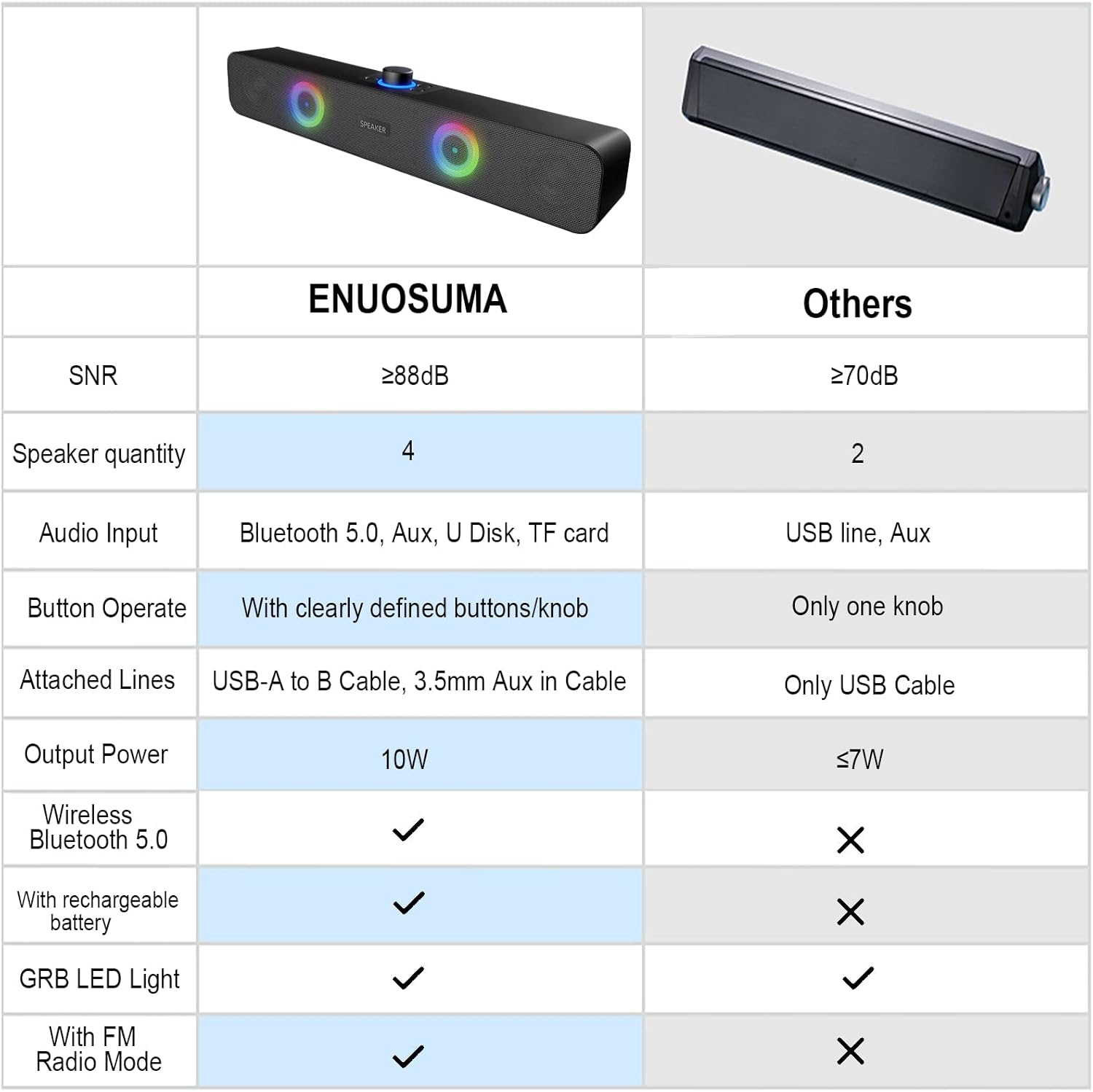
- Large Central Knob: Turn on/off, adjust volume.
- Play/Pause Button: Play/pause audio, answer/reject calls.
- Previous Song Button: Skip to the previous track.
- Next Song Button: Skip to the next track.
- Mode Button: Switch between input modes (Bluetooth, AUX, FM Radio, USB Disk/TF Card). Double-press to turn RGB lights on/off.
4.2 Ports

- USB Power Input: For connecting the USB power cable.
- AUX Input: 3.5mm jack for wired audio connection.
- USB Disk Slot: For playing audio from a USB flash drive.
- TF Card Slot: For playing audio from a TF (Micro SD) card.
5. Setup
- Power Connection: Connect the USB power cable to the speaker's USB power input and then to a USB power source (e.g., computer USB port, USB wall adapter).
- Power On: Rotate the large central knob clockwise to turn on the speaker. The RGB lights will illuminate.
6. Operating Instructions
6.1 Power On/Off and Volume Adjustment
- To turn on, rotate the large central knob clockwise.
- To turn off, rotate the large central knob counter-clockwise until it clicks.
- To adjust volume, rotate the large central knob clockwise to increase and counter-clockwise to decrease.
6.2 Bluetooth Mode
- Turn on the speaker. It will automatically enter Bluetooth pairing mode.
- On your device (phone, tablet, computer), enable Bluetooth and search for available devices.
- Select "ENUOSUMA Speaker" (or similar) from the list to pair.
- Once paired, you will hear a confirmation sound, and you can play audio wirelessly.
6.3 AUX Wired Mode
- Connect one end of the 3.5mm AUX audio cable to the speaker's AUX input.
- Connect the other end of the 3.5mm AUX audio cable to your audio source's headphone jack (e.g., computer, laptop, MP3 player).
- Press the "Mode" button on the speaker until it switches to AUX mode.
6.4 FM Radio Mode
- Ensure the USB power cable is connected, as it acts as the FM antenna.
- Press the "Mode" button repeatedly until the speaker enters FM Radio mode.
- Press and hold the "Play/Pause" button to automatically search for and save available FM stations.
- Use the "Previous Song" and "Next Song" buttons to navigate between saved stations.
6.5 USB Disk / TF Card Playback
- Insert a USB flash drive or TF (Micro SD) card containing audio files into the corresponding slot.
- Press the "Mode" button until the speaker switches to USB Disk or TF Card mode.
- The speaker will automatically begin playing audio files. Use the "Play/Pause", "Previous Song", and "Next Song" buttons for control.
6.6 RGB Lighting Control

- The speaker features dynamic RGB lighting.
- To turn the RGB lights on or off, quickly double-press the "Mode" button.
7. Maintenance
- Cleaning: Use a soft, dry cloth to clean the speaker's surface. Do not use liquid cleaners or abrasive materials.
- Storage: When not in use for extended periods, store the speaker in a cool, dry place away from direct sunlight.
8. Troubleshooting
| Problem | Possible Cause | Solution |
|---|---|---|
| No power | USB cable not connected or power source faulty. | Ensure USB cable is securely connected to a working USB port. |
| No sound | Volume too low; incorrect mode selected; device not connected. | Increase volume; press 'Mode' button to select correct input; ensure Bluetooth is paired or AUX cable is connected. |
| Bluetooth pairing fails | Speaker not in pairing mode; device Bluetooth off; too far from speaker. | Ensure speaker is in Bluetooth mode; enable Bluetooth on your device; move device closer to speaker. |
| Poor FM reception | USB cable not connected (acting as antenna); weak signal. | Ensure USB cable is connected; try repositioning the speaker or the USB cable for better reception. |
9. Specifications

| Feature | Detail |
|---|---|
| Brand | ENUOSUMA |
| Model | Bluetooth Desktop Soundbar |
| Connectivity Technology | Bluetooth, Auxiliary (3.5mm), USB Disk, TF Card |
| Audio Output Mode | Stereo (2.0 Channel) |
| Speaker Maximum Output Power | 10 Watts (2 x 5W) |
| Special Features | RGB Lights, FM Radio |
| Power Source | Corded Electric (USB Powered) |
| Product Dimensions | 38 cm (W) x 8 cm (D) x 5 cm (H) |
| Item Weight | 598.74 Grams |
| Material | Metal |
| Color | Black |
| Recommended Uses | Gaming, Movies, Music |
| Compatible Devices | Laptop, Personal Computer, Projector, Tablet, Phone |
10. Warranty and Support
This product comes with a standard manufacturer's warranty. For specific warranty details, technical support, or service inquiries, please refer to the documentation provided with your purchase or contact the retailer/manufacturer directly.