Introduction
This manual provides detailed instructions for the setup, operation, and maintenance of your YAOHUIMI replacement remote control, model PAR-FL32MA-E. This remote is designed to be compatible with specific Mitsubishi Electric AC air conditioner units, offering a direct replacement for the original PAR-FL32MA-E remote.
Setup
1. Battery Installation
The remote control requires two AAA batteries (not included). Follow these steps to install them:
- Open the battery compartment cover located on the back of the remote control.
- Insert two new AAA batteries, ensuring the positive (+) and negative (-) terminals align correctly with the markings inside the compartment.
- Close the battery compartment cover securely.

Image: Back of the remote control with the battery compartment. This view shows where to insert the batteries.
2. Initial Use
This replacement remote control is pre-programmed and typically requires no additional setup or pairing. Once batteries are installed, it should be ready for immediate use with compatible Mitsubishi Electric AC units.
Operating Instructions
Familiarize yourself with the buttons and their functions:
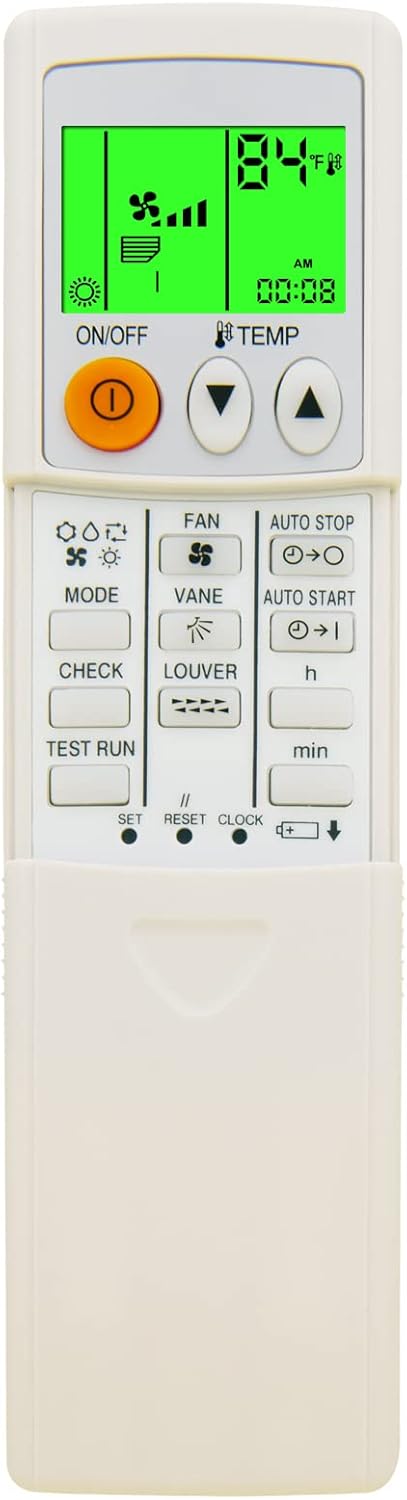
Image: Front view of the remote control, displaying the LCD screen and all control buttons.
- ON/OFF Button: Powers the air conditioner unit on or off.
- TEMP ▲/▼ Buttons: Adjusts the desired temperature setting.
- MODE Button: Cycles through operating modes (e.g., Cool, Heat, Fan, Dry, Auto).
- FAN Button: Adjusts the fan speed.
- VANE Button: Controls the vertical airflow direction (swing).
- LOUVER Button: Controls the horizontal airflow direction.
- AUTO STOP Button: Sets a timer for the unit to turn off automatically.
- AUTO START Button: Sets a timer for the unit to turn on automatically.
- h / min Buttons: Used to set hours and minutes for timer functions.
- CHECK Button: Used for system diagnostics or checking operational status.
- TEST RUN Button: Initiates a test run of the air conditioner.
- SET Button: Confirms settings or enters setup modes.
- RESET Button: Resets certain settings or the remote itself.
- CLOCK Button: Sets the current time on the remote's display.
Temperature Display (Fahrenheit/Celsius)
The remote control supports displaying temperature in both Fahrenheit (°F) and Celsius (°C). To switch between these units, refer to the specific instructions for your Mitsubishi Electric AC unit, as this function is often controlled by a combination of buttons or a dedicated switch on the remote or AC unit itself. On this remote, the display clearly indicates the active unit.

Image: Close-up of the remote control display, highlighting the Fahrenheit and Celsius temperature units and the green backlight feature.
Green Backlight
The remote features a green backlight for improved visibility in low-light conditions. This backlight activates automatically when buttons are pressed, making it easier to operate the air conditioner at night.
Maintenance
Battery Replacement
Replace batteries when the remote's display becomes dim or the remote stops responding. Always replace both batteries simultaneously with new AAA batteries. Do not mix old and new batteries or different types of batteries.
Cleaning
Wipe the remote control with a soft, dry cloth. Do not use liquid cleaners, sprays, or abrasive materials, as these can damage the remote's surface or internal components.
Storage
If the remote control will not be used for an extended period, remove the batteries to prevent leakage and potential damage to the device.
Troubleshooting
- Remote not responding:
- Check if the batteries are correctly installed and have sufficient charge. Replace if necessary.
- Ensure there are no obstructions between the remote control and the air conditioner unit's receiver.
- Verify that you are within the effective operating range of the air conditioner.
- Display is dim or blank:
- Replace the batteries with new ones.
- Air conditioner not responding to specific commands:
- Ensure the remote is pointed directly at the AC unit.
- Confirm the AC unit is powered on and not in a fault state.
- Refer to your air conditioner's original manual for specific error codes or operational details.
Specifications
| Brand | YAOHUIMI |
| Model | PAR-FL32MA-E |
| Compatible Devices | Mitsubishi Electric AC Air Conditioner (PAR-FL32MA-E) |
| Power Source | 2 x AAA Batteries (not included) |
| Special Features | Ergonomic design, Green Backlight, Fahrenheit/Celsius Display |
| Max Supported Devices | 1 |
Warranty and Support
For any questions regarding the operation, troubleshooting, or compatibility of this remote control, please contact the seller or manufacturer directly. Please refer to your purchase documentation for specific warranty information.


