
1. Introduction
Welcome to your new FreedConn Full Face Motorcycle Helmet with integrated Bluetooth 5.0. This manual provides essential information for the safe and effective use, setup, and maintenance of your helmet. Please read this manual thoroughly before using your helmet to ensure optimal performance and safety.

Figure 1: FreedConn Full Face Motorcycle Helmet
This helmet is designed for comfort, safety, and connectivity, featuring a durable ABS shell, multi-density EPS foam, and a built-in Bluetooth system for communication and entertainment on the go.
2. Safety Information
Your safety is paramount. This FreedConn motorcycle helmet meets the DOT FMVSS-218 safety standard, ensuring a high level of protection. Always ensure your helmet is properly fitted and secured before riding.
- Always wear a helmet that fits snugly and comfortably.
- Ensure the chin strap is securely fastened.
- Never modify the helmet's structure or components.
- Inspect the helmet for any damage before each use.

Figure 2: DOT FMVSS-218 Certification
The helmet's multi-layer protection structure, consisting of a high-strength ABS shell, shock-absorbing EPS buffer layer, and soft lining, is designed to enhance impact absorption and protect your head, face, and jaw.
3. Package Contents
Upon opening your FreedConn helmet package, please verify that all the following items are included:
- 1x BM12 Motorcycle Bluetooth Helmet Set
- 1x Helmet Bag
- 1x Same Size Gloves
- 1x Arm Sleeves
- 1x Headgear
- 1x USB Cable
- 1x User Manual

Figure 3: Included Accessories
4. Setup Guide
4.1 Charging the Bluetooth System
The integrated Bluetooth system is powered by a Lithium polymer battery. Ensure it is fully charged before first use.
- Charging Time: Approximately 2-3 hours.
- Talk Time: 8-10 hours.
- Music Playback Time: 10-12 hours.
- Standby Time: Up to 300 hours.
To prolong battery service life, charge it regularly (at least once a month). Do not leave it completely plugged in while charging. If the Bluetooth system is unused for a long time, the battery may enter a deep sleep state. To reactivate, charge for approximately 30 minutes, unplug, wait 30 minutes, and then charge again.
Figure 4: Bluetooth Battery and Charging Port
4.2 Bluetooth Pairing
The helmet features upgraded Bluetooth 5.0 technology for seamless connectivity with your smartphone or other Bluetooth devices.
- Turn on the Bluetooth system by pressing and holding the main control button (refer to Figure 5).
- Activate Bluetooth on your smartphone and search for available devices.
- Select "FreedConn BM12" from the list to pair. A voice prompt will confirm successful pairing.

Figure 5: Bluetooth Control Knob
5. Operating Instructions
5.1 Visor Operation
The helmet is equipped with a dual visor system for versatile use in various lighting conditions.
- The outer clear visor provides a wide field of vision and protects against wind, dust, and insects. It can be easily opened and closed.
- The retractable dark visor is built-in and can be deployed to shield your eyes from bright sunlight. Operate it using the external control lever on the side of the helmet.
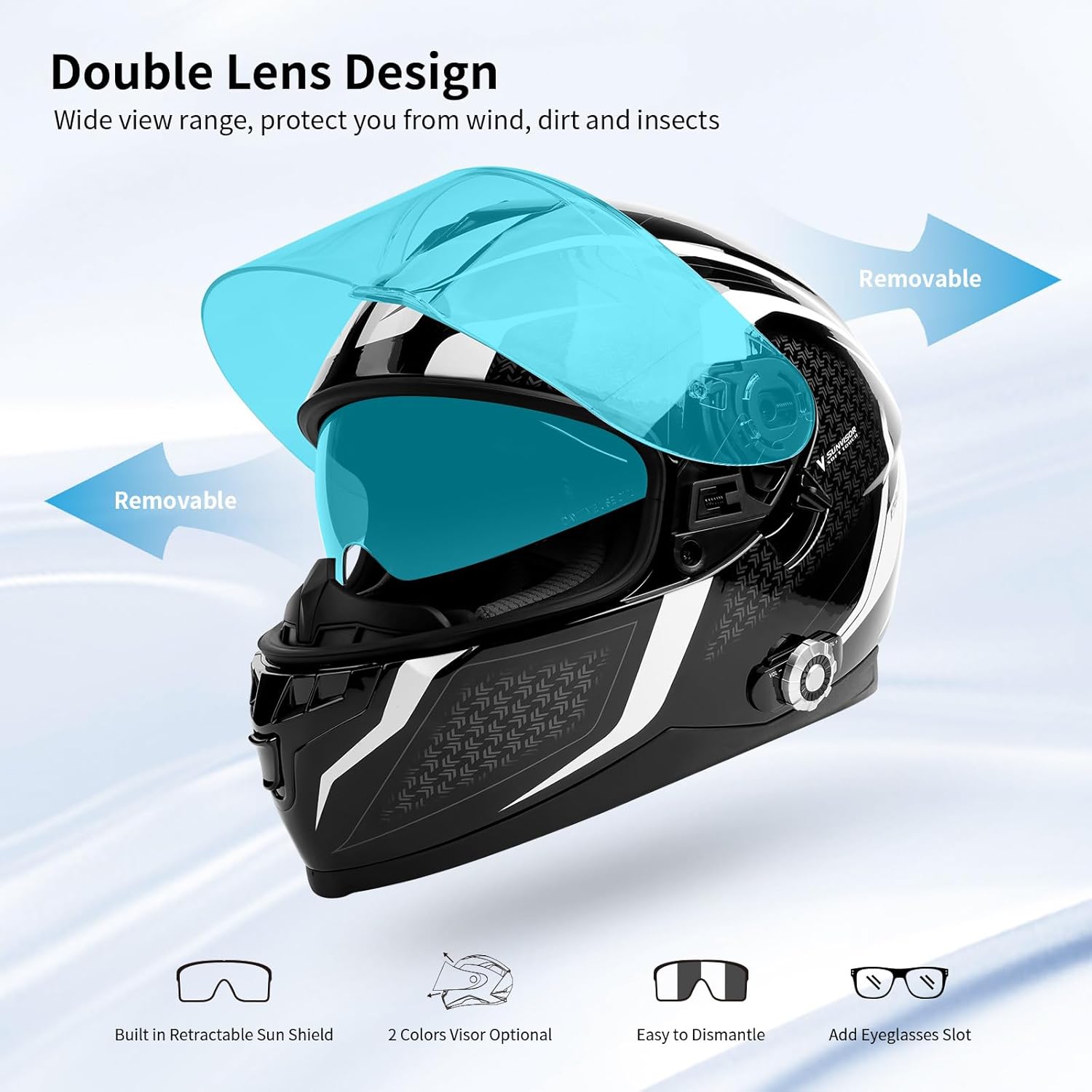
Figure 6: Dual Visor Design
5.2 Ventilation System
The helmet features a 3-way ventilation system designed to ensure constant airflow and prevent stuffiness during rides.
- Adjustable air intake vents are located at the top and front (chin area) of the helmet.
- Rear exhaust vents allow hot air to escape, maintaining a comfortable internal temperature.

Figure 7: 3-Way Ventilation System
5.3 Bluetooth Functions
Once paired, the Bluetooth system offers various functionalities:
- Hands-Free Calls: Supports auto-answering and hands-free calls with a noise-cancelling microphone.
- Music Playback: Enjoy your favorite music with clear audio and AVRCP support for previous/next song functions.
- FM Radio: Built-in FM tuner allows you to listen to radio stations.
- 2-Way Intercom: Communicate with a riding buddy up to 500 meters (1680 feet) away. The system supports 3 riders connecting, with 2 able to talk simultaneously.
- GPS Guidance: Receive clear GPS voice guidance from your smartphone.
- DSP Noise Cancellation: Advanced DSP technology digitally reduces ambient noise for crystal clear intercom and music.
6. Maintenance
6.1 Cleaning the Helmet
Regular cleaning will maintain the helmet's hygiene and extend its lifespan.
- The internal lining is fully washable and sweat-absorbing. Remove the lining carefully for cleaning.
- Use mild soap and water for cleaning the lining. Allow it to air dry completely before reinserting.
- Clean the outer shell with a soft, damp cloth and mild soap. Avoid abrasive cleaners or solvents.
- Clean visors with a soft cloth and water. Do not use harsh chemicals that could scratch or damage the surface.
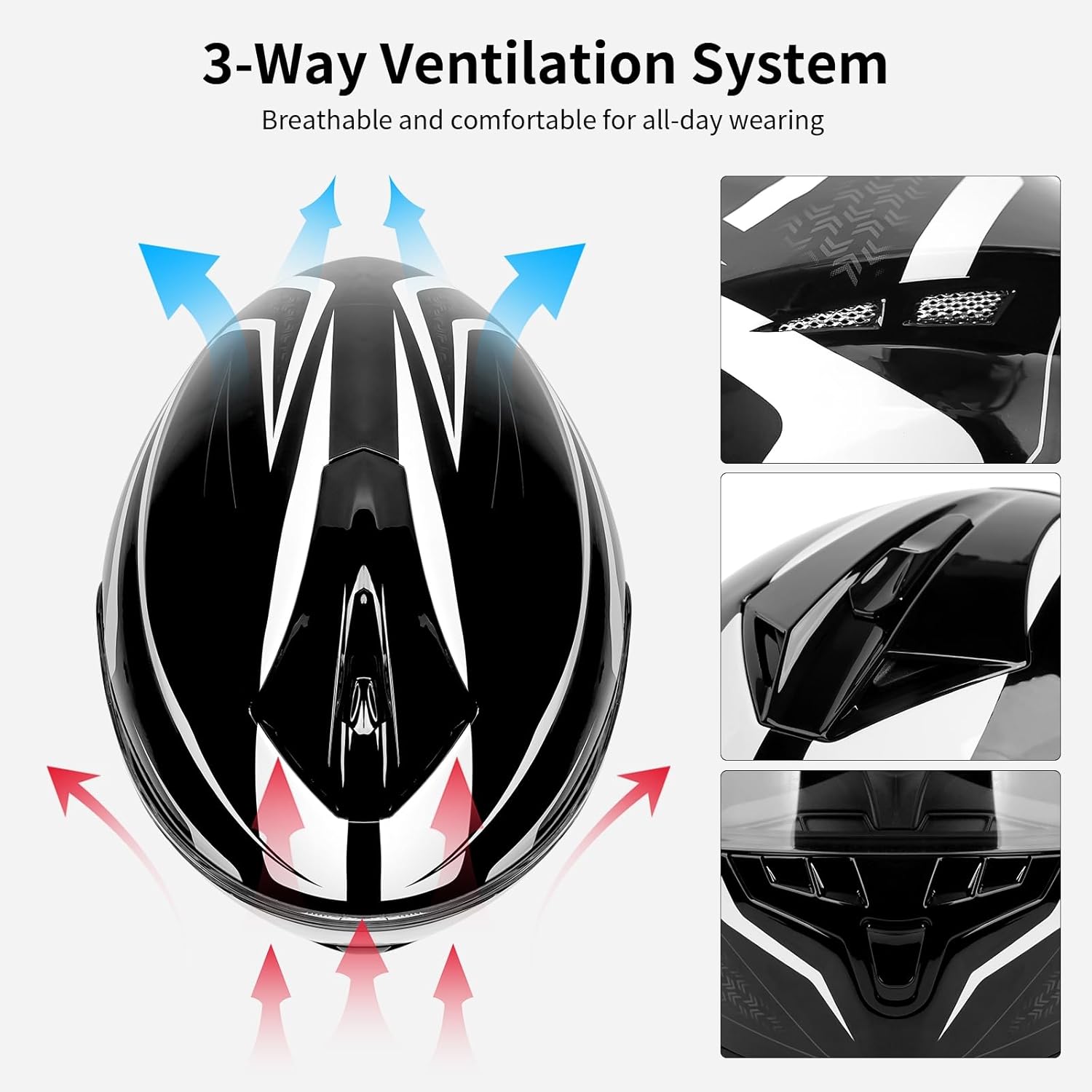
Figure 8: Breathable and Washable Paddings
6.2 Padding Adjustment and Replacement
The helmet's design allows for customization of fit through replaceable paddings.
- The internal padding is designed to be breathable and replaceable for a clean and fresh use, and to achieve a more snug or loose fit.
- If your helmet fit is not ideal, contact FreedConn customer service to inquire about obtaining different thickness paddings.

Figure 9: Breathable & Replaceable Lining
7. Troubleshooting
This section addresses common issues you might encounter with your FreedConn helmet.
- Bluetooth Audio Quality (Quiet/Tinny Sound):
Ensure the volume on both your connected smartphone/device and the helmet's Bluetooth system is set to maximum. The helmet's volume controls operate independently of your device's volume. Adjust both for optimal sound. - Battery Not Charging or System Not Turning On:
If the Bluetooth system has been unused for an extended period, the battery may enter a deep sleep state. To reactivate, charge the battery for approximately 30 minutes, then unplug the charger, wait for another 30 minutes, and then plug it back in to continue charging. This process often revives the battery. - Helmet Fit Issues (Too Tight/Loose):
The helmet comes with replaceable paddings to customize the fit. If the helmet feels too tight or too loose, contact FreedConn customer service. They can provide alternative padding sizes to help achieve a more comfortable and secure fit. - Intercom Connection Problems:
Ensure both helmets are within the specified intercom range (up to 500m). Check that both units are powered on and in intercom pairing mode. Refer to the specific pairing instructions in the full user manual for detailed steps.
8. Specifications
Detailed specifications for the FreedConn BM12 Bluetooth Motorcycle Helmet:
| Feature | Detail |
|---|---|
| Certificate Type | DOT FMVSS-218 Approved |
| Finish Type | Glossy |
| Shell Type | Same Size ABS Shell |
| Specification Met | DOT |
| Shape | Aerodynamic |
| Closure Type | Quick Release Strap |
| Manufacturer | Liveconn |
| Model Name | BM12 Bluetooth Motorcycle Helmet with New EPS |
| Item Weight | 5.99 pounds |
| Package Dimensions | 15 x 11.5 x 11 inches |
| Country of Origin | China |
| Item model number | Full Face Motorcycle Helmet Bluetooth |
| Batteries | 1 Lithium Polymer batteries required. (included) |
| Manufacturer Part Number | BM12 Bluetooth Motorcycle Helmet New EPS |
| ASIN | B0CLXVX6YN |
| Color | Black & White |
| Brand | FreedConn |
| Vehicle Service Type | Motorcycle Helmet Bluetooth for Motorbike, Motocross, Street Bike, Dirt Bike, ATV, UTV and so on |
| Material | Expanded Polystyrene (EPS), Acrylonitrile Butadiene Styrene (ABS) |
| Sport | Motorcycling |
9. Warranty and Support
FreedConn is committed to providing high-quality products and customer satisfaction. For detailed warranty information, technical support, or assistance with product-related inquiries (including requests for different size paddings), please contact FreedConn customer service.
Refer to the contact information provided with your product packaging or visit the official FreedConn website for the most up-to-date support resources.
You can also visit the FreedConn Store on Amazon for more product information and support.