
Liniotech LINIOTECH 051200A-B-GBP2
Contents
Liniotech 48V 200Ah LiFePO4 Battery Power Wall User Manual
Model: LINIOTECH 051200A-B-GBP2
1. Introduction
This user manual provides essential information for the safe and efficient operation of your Liniotech 48V 200Ah LiFePO4 Battery Power Wall. This advanced solar energy storage system is designed for reliable power reserve, ideal for home backup and off-grid solar systems. Please read this manual thoroughly before installation and use.
2. Safety Information
WARNING: Improper installation or operation can lead to serious injury or damage to the equipment.
- Always ensure the system is disconnected from all power sources before performing any installation or maintenance.
- Only qualified personnel should perform installation and maintenance.
- Do not expose the battery to fire or extreme temperatures.
- Do not disassemble, puncture, or modify the battery.
- Keep out of reach of children.
- Ensure proper ventilation around the battery during operation.
- Refer to local electrical codes and regulations for installation requirements.
3. Product Features
- Residential ESS Power Storage: LiFePO4 10KWH - 160 KWH Lithium Battery Solar Energy Storage System.
- High Capacity: 200 Ah Battery Type LiFePO4, Voltage 51.2V, Operating Voltage 51.2 Vdc, Max. charging voltage 56 Vdc, Cut-off Discharge Voltage 46 Vdc, Max. charging and discharging current 150A (7680W).
- Smart and Safe: Built with great safety materials, ensuring system and whole life cycle safety. Mobile app-based monitoring available.
- Long Lifespan: Life time (25°C) 20 Years, Life cycles (80% DOD, 25°C) 8500 Cycles.
- Reliable: Features high reliability, long service life, and high energy efficiency from CATL's battery systems.
- Scalable: Can be placed in series or parallel for increased capacity.
4. Package Contents
Upon opening the package, verify that all components are present and undamaged:
- Liniotech 48V 200Ah LiFePO4 Battery Power Wall Unit
- User Manual
- Connection Cables (various colors, e.g., red, orange, black)
- Mounting Hardware (screws, wall bracket)
- Protective Foam Packaging
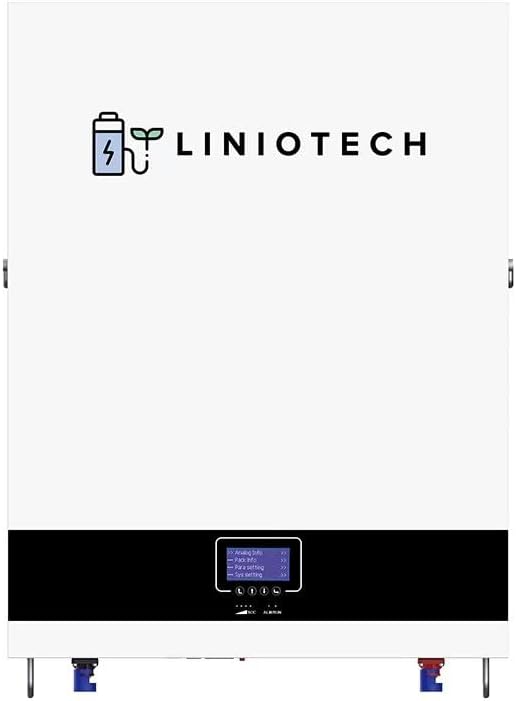
Figure 4.1: Front view of the Liniotech Battery Power Wall.
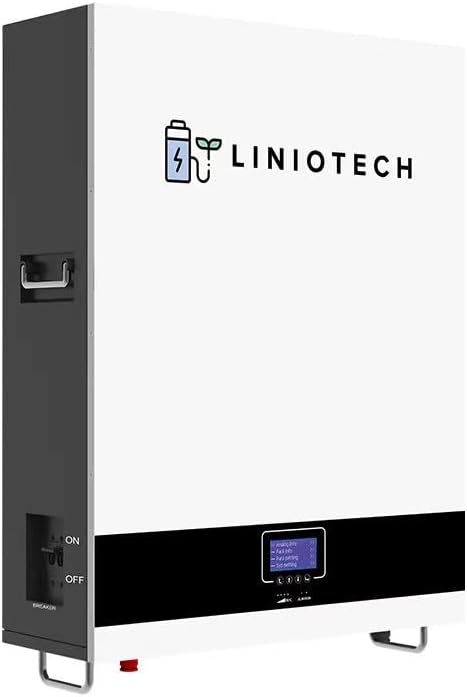
Figure 4.2: Angled view of the Liniotech Battery Power Wall, showing side handles.

Figure 4.3: Top view of the Liniotech Battery Power Wall, highlighting connection points.
5. Setup and Installation
Proper installation is crucial for the performance and safety of your Liniotech Power Wall. Follow these guidelines carefully:
5.1 Site Selection
- Install the unit in a cool, dry, and well-ventilated area.
- Avoid direct sunlight, heat sources, and flammable materials.
- Ensure the mounting surface is strong enough to support the unit's weight (approximately 216 lbs).
- Maintain adequate clearance around the unit for natural cooling.
5.2 Wall Mounting
The unit is designed for wall mounting. Use the provided wall bracket and hardware.

Figure 5.1: Wall mounting steps. Mark drill points, drill holes, insert anchors, attach bracket, then mount the unit.
5.3 Orientation
Ensure the unit is installed upright. Do not install at an angle greater than 45 degrees or lay it flat.

Figure 5.2: Correct (left, max 45-degree tilt) and incorrect (right, flat or excessive tilt) installation orientations.
5.4 Electrical Connections
Connect the battery to your solar inverter and electrical system according to the provided wiring diagram. Ensure all connections are secure and properly insulated.

Figure 5.3: Typical system wiring diagram including PV array, DC breaker, inverter, AC breaker, energy meter, utility, battery, and load.
5.5 Initial Power-Up
Locate the breaker switch on the side of the unit. Ensure it is in the "OFF" position before making connections. Once all connections are verified, switch the breaker to the "ON" position to power up the unit.

Figure 5.4: Side view of the battery unit, indicating the ON/OFF breaker switch.
6. Operating Instructions
Your Liniotech Power Wall is designed for automated operation once properly installed. The integrated Battery Management System (BMS) manages charging and discharging states, current, and voltage balancing.
6.1 Monitoring
The system supports mobile app-based monitoring. Refer to the separate app guide for setup and usage instructions to view real-time data and system status.
6.2 Parallel Operation
For increased energy storage capacity, multiple Liniotech Power Wall units can be connected in parallel. Consult a qualified electrician for proper parallel installation and configuration to ensure balanced load distribution.
7. Maintenance
The Liniotech LiFePO4 Battery Power Wall requires minimal maintenance due to its robust design and long lifespan. However, regular checks are recommended:
- Visual Inspection: Periodically inspect the unit for any signs of physical damage, loose connections, or corrosion.
- Cleaning: Keep the unit clean and free from dust and debris. Use a dry, soft cloth for cleaning. Do not use liquid cleaners.
- Ventilation: Ensure that the ventilation openings are not obstructed to allow for proper natural cooling.
- Firmware Updates: Check for any available firmware updates via the mobile app or manufacturer's website to ensure optimal performance and new features.
8. Troubleshooting
If you encounter issues with your Liniotech Power Wall, refer to the following common troubleshooting steps:
| Problem | Possible Cause | Solution |
|---|---|---|
| Unit not powering on | Breaker switch is OFF; Loose connections; No input power. | Ensure breaker is ON; Check all cable connections; Verify power input from solar array or utility. |
| Low power output | Insufficient solar input; Battery State of Charge (SOC) is low; Overload. | Check solar panel performance; Allow battery to charge; Reduce load or check for short circuits. |
| Abnormal indicator lights/alarms | Internal fault; Over-temperature; Over-voltage/current. | Refer to the mobile app for specific error codes; Ensure proper ventilation; Contact customer support if the issue persists. |
For issues not listed above or if solutions do not resolve the problem, please contact Liniotech Customer Support.
9. Specifications
| Attribute | Value |
|---|---|
| Brand | Liniotech |
| Model Number | LINIOTECH 051200A-B-GBP2 |
| Battery Type | LiFePO4 (Lithium Iron Phosphate) |
| Nominal Voltage | 51.2 Volts |
| Battery Capacity | 200 Amp Hours (10 KWH) |
| Max. Charging/Discharging Current | 150A (7680W) |
| Item Weight | 216 lbs |
| Product Dimensions (W*D*H) | 735 x 525 x 190(220)mm / 28.9 x 20.7 x 7.4 inches |
| Ingress Protection | IP21 |
| Cooling | Natural Cooling |
| Life Cycles (80% DOD, 25°C) | 8500 Cycles |
| Expected Lifetime (25°C) | 20 Years |
10. Warranty and Support
Liniotech stands behind the quality of its products.
- Warranty: This product comes with a 10-year limited warranty. Please refer to the warranty card included in your package or visit the official Liniotech website for full terms and conditions.
- Customer Support: For technical assistance, troubleshooting, or warranty claims, please contact Liniotech Customer Support. Contact information can be found on the product packaging or the official Liniotech website.
Documents and downloads
Ask a question about this manual
Ask about setup, troubleshooting, compatibility, parts, safety, or missing instructions. Manuals+ will review the question and use this page’s manual context to help answer it.