
OPPO CPH2307
OPPO Find X5 CPH2307 User Manual
Model: CPH2307 | Brand: OPPO
Introduction
Welcome to the user manual for your new OPPO Find X5 (Model CPH2307). This guide provides comprehensive instructions on setting up, operating, maintaining, and troubleshooting your device. Please read this manual carefully to ensure optimal performance and longevity of your smartphone.

Image: Front view of the OPPO Find X5, showcasing its 6.55-inch AMOLED display.
Setup
1. Unboxing and Initial Inspection
Upon opening the package, ensure all components are present and in good condition. The standard package includes:
- OPPO Find X5 Smartphone
- Charging Cable
- Power Adapter (80W SuperVOOC)
- SIM Ejector Tool
- Protective Case
- Quick Start Guide
- Safety Guide

Image: Rear view of the OPPO Find X5, highlighting the camera array and OPPO branding.
2. SIM Card Installation
The OPPO Find X5 supports Dual SIM functionality. Follow these steps to install your SIM card(s):
- Locate the SIM card tray on the side of the device.
- Insert the SIM ejector tool into the small hole next to the tray and press gently until the tray pops out.
- Place your Nano-SIM card(s) into the designated slots on the tray, ensuring the gold contacts face downwards.
- Carefully reinsert the tray into the phone until it clicks into place.

Image: Side profile of the OPPO Find X5, illustrating the placement of the power button, volume rocker, and SIM card tray.
3. Initial Power On and Setup Wizard
To power on your device, press and hold the Power button located on the side until the OPPO logo appears. Follow the on-screen instructions to complete the initial setup:
- Select your language and region.
- Connect to a Wi-Fi network.
- Review and accept the End User License Agreement.
- Sign in with your Google account or create a new one.
- Set up screen lock (PIN, pattern, password, fingerprint, or face unlock).
- Transfer data from an old device (optional).
- Configure additional settings as prompted.
Operating Your Device
1. Basic Navigation
The OPPO Find X5 features a responsive 6.55-inch AMOLED display with a 120Hz refresh rate for smooth interactions. Navigation is primarily touch-based:
- Tap: Select an item or open an app.
- Swipe: Scroll through screens, lists, or content.
- Pinch: Zoom in or out on images and web pages.
- Long Press: Access contextual menus or move app icons.
- Gestures: Utilize full-screen gestures for Home, Back, and Recent Apps, or use the traditional navigation bar.
2. Camera Usage
The OPPO Find X5 is equipped with an advanced camera system, including a 4K rear camera powered by the MariSilicon X Imaging NPU for enhanced low-light performance, and a front camera supporting up to 1080P video recording.
- Open the Camera app from the home screen or lock screen.
- Switch between photo, video, portrait, night, and other modes.
- Tap to focus, or long-press to lock focus and exposure.
- Use the zoom slider to adjust magnification.
- Access settings for resolution, aspect ratio, and advanced features.
3. Battery Management and Charging
Your device features a 4800mAh battery with support for 80W SuperVOOC fast charging and 30W AirVOOC wireless charging.
- Wired Charging: Connect the provided 80W SuperVOOC charger for rapid charging.
- Wireless Charging: Place the device on a compatible 30W AirVOOC wireless charger.
- Monitor battery usage in Settings > Battery.
- Enable Power Saving Mode to extend battery life when needed.
4. Connectivity
The OPPO Find X5 supports a wide range of connectivity options:
- Wi-Fi: Connect to wireless networks for internet access.
- Cellular: Supports 2G, 3G, 4G LTE, and 5G SA/NSA networks. Ensure your SIM card is active and has a data plan.
- Bluetooth: Pair with headphones, speakers, and other Bluetooth devices.
- GPS: Utilize location services for navigation and location-based apps.
Maintenance
1. Cleaning Your Device
To keep your OPPO Find X5 in optimal condition:
- Use a soft, lint-free cloth to wipe the screen and body.
- Avoid using harsh chemicals, abrasive cleaners, or aerosol sprays.
- For stubborn smudges, slightly dampen the cloth with water.
- Keep ports free of dust and debris.
2. Software Updates
Regular software updates provide new features, security enhancements, and bug fixes. Your device runs on ColorOS.
- Check for updates in Settings > About device > Up to date / ColorOS version.
- Ensure your device is connected to Wi-Fi and has sufficient battery life before starting an update.
3. Storage Management
Your device comes with 256GB of internal storage and 8GB of RAM, with RAM Expansion capability.
- Regularly clear cache and unnecessary files to free up space.
- Uninstall unused applications.
- Back up photos and videos to cloud storage or an external device.
- Utilize the built-in Phone Manager app for optimization.
Troubleshooting
This section addresses common issues you might encounter with your OPPO Find X5.
Device Not Powering On
- Ensure the battery is charged. Connect the charger and wait a few minutes before attempting to power on.
- Press and hold the Power button for at least 10-15 seconds to force a restart.
Network Connectivity Issues
- Check if Airplane Mode is enabled. Disable it if it is.
- Verify that your SIM card is properly inserted.
- Restart the device.
- Reset network settings: Settings > System settings > Back up and reset > Reset phone > Reset network settings.
Apps Crashing or Freezing
- Close and reopen the app.
- Clear the app's cache and data: Settings > Apps > App management > [App Name] > Storage usage > Clear cache / Clear data.
- Update the app to its latest version from the Google Play Store.
- If the issue persists, uninstall and reinstall the app.
Slow Performance
- Close background apps.
- Clear system cache using the Phone Manager app.
- Ensure sufficient storage space is available.
- Restart your device regularly.
If these steps do not resolve your issue, please refer to the Warranty & Support section for further assistance.
Specifications
Below are the key technical specifications for the OPPO Find X5 (Model CPH2307):
| Model Name | CPH2307 |
| Brand | OPPO |
| Operating System | ColorOS |
| Display | 6.55 Inches AMOLED FHD+ (1080 x 2400), 120Hz |
| RAM | 8 GB |
| Internal Storage | 256 GB |
| Battery Capacity | 4800 mAh |
| Charging | 80W SuperVOOC, 30W AirVOOC |
| Rear Camera | 4K with MariSilicon X Imaging NPU |
| Front Camera | Up to 1080P |
| Connectivity | 5G, 4G LTE, Wi-Fi, Bluetooth, GPS |
| Dimensions | 160.2mm x 72.5mm x 8.6mm (approx.) |
| Weight | 7 ounces (approx. 198g) |
| Color | Black |
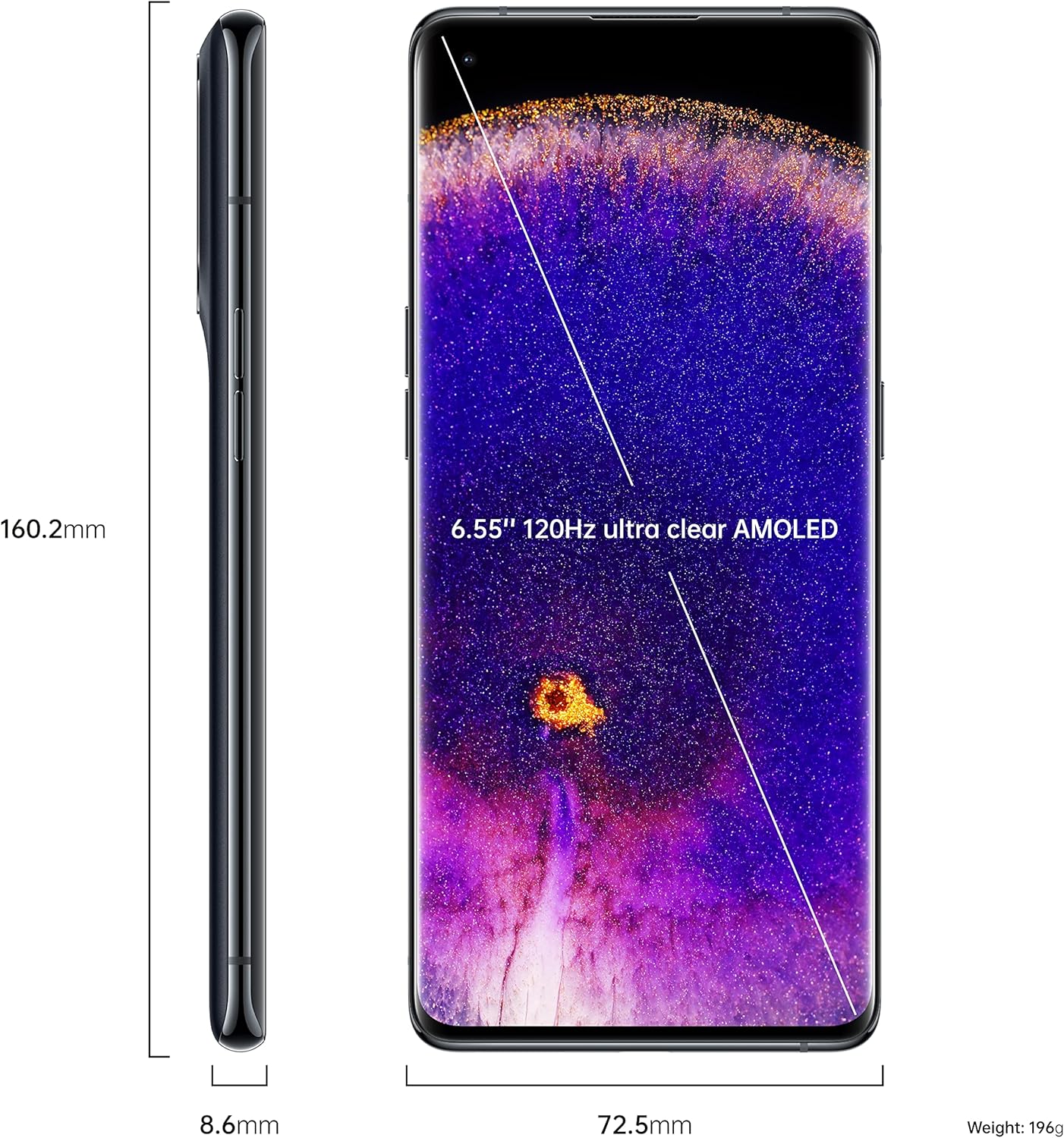
Image: Dimensional diagram of the OPPO Find X5, illustrating its height, width, and thickness.
Warranty and Support
For detailed warranty information, please refer to the warranty card included with your product or visit the official OPPO website. If you encounter issues that cannot be resolved using the troubleshooting steps in this manual, please contact OPPO customer support for assistance.
Keep your proof of purchase for warranty claims.
Related documentsCPH2307


Ask a question about this manual
Ask about setup, troubleshooting, compatibility, parts, safety, or missing instructions. Manuals+ will review the question and use this page’s manual context to help answer it.