
1. Introduction
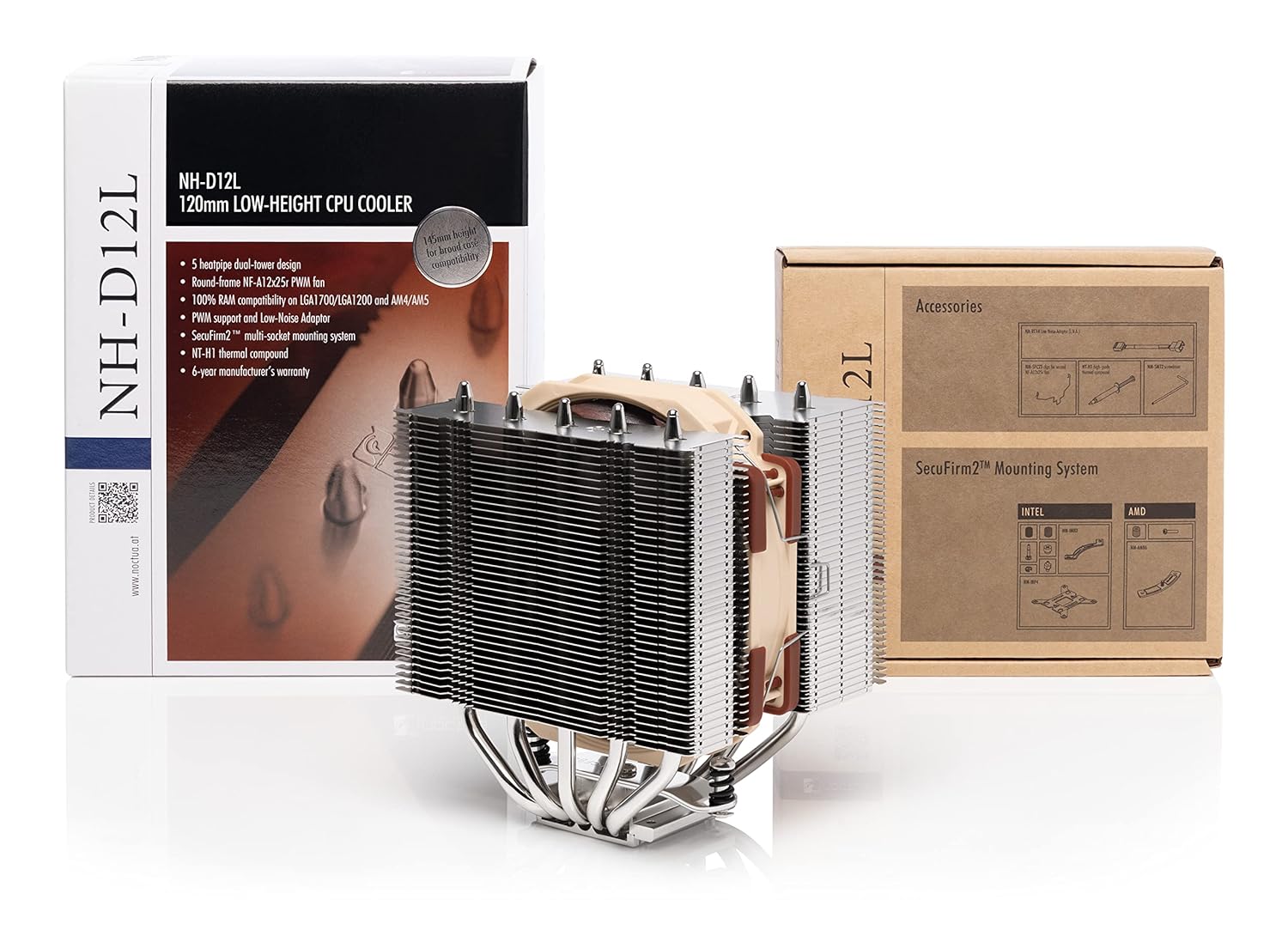
The Noctua NH-D12L is a low-height 120mm class CPU cooler designed to offer quiet cooling performance with enhanced case compatibility. Standing at only 145mm tall, it is 13mm shorter than standard 120mm Noctua models, allowing it to fit into many 4U rackmount enclosures and narrower tower cases. Its five-heatpipe dual-tower design, combined with the NF-A12x25r 120mm fan, provides efficient cooling. The single-fan configuration and asymmetrical fin stacks ensure 100% RAM compatibility on AMD AM4/AM5 and Intel LGA1700/1200 sockets by avoiding interference with memory slots.
2. Key Features
- Low-height (145mm) dual-tower heatsink for broad case compatibility, including 4U rackmount server cases.
- Single-fan configuration and asymmetrical layout ensure 100% RAM compatibility on AMD AM4/AM5 and Intel LGA1700/1200/115x sockets.
- Equipped with a state-of-the-art NF-A12x25r 120mm fan, featuring Low-Noise Adaptors and PWM for automatic speed control.
- Includes high-end NT-H1 thermal paste and the SecuFirm2 mounting system for easy installation on Intel LGA1851, LGA1700, LGA1200, LGA115x and AMD AM5 & AM4 platforms.
- Backed by a 6-year manufacturer’s warranty.
3. Package Contents
The Noctua NH-D12L package includes the following items:
- NH-D12L CPU Cooler
- NF-A12x25r PWM 120mm fan
- Low-Noise Adaptors (L.N.A.)
- SecuFirm2 multi-socket mounting system
- NT-H1 thermal compound
- Fan clips for second fan (optional, second fan not included)
4. Setup and Installation
The Noctua NH-D12L utilizes the SecuFirm2 multi-socket mounting system for secure and straightforward installation on various Intel and AMD platforms. Please refer to the detailed video guide below for a visual walkthrough of the installation process.
Video 1: Official installation guide and feature overview for the Noctua NH-D12L CPU Cooler.
4.1. General Installation Steps
- Prepare the Motherboard: Depending on your CPU socket (Intel LGA1851, LGA1700, LGA1200, LGA115x or AMD AM5, AM4), install the appropriate backplate and mounting bars as per the SecuFirm2 instructions.
- Apply Thermal Paste: Apply a small amount of the included NT-H1 thermal compound to the center of your CPU's integrated heat spreader (IHS).
- Mount the Heatsink: Place the NH-D12L heatsink onto the CPU, aligning it with the mounting bars. Secure it using the provided screws, tightening them gradually in a cross pattern until firm.
- Install the Fan: Attach the NF-A12x25r PWM fan to the heatsink using the included fan clips. Ensure the fan is oriented correctly for optimal airflow (typically blowing towards the rear exhaust fan of your case).
- Connect the Fan: Connect the fan's 4-pin PWM cable to the CPU_FAN header on your motherboard. If desired, use the Low-Noise Adaptor (L.N.A.) to reduce maximum fan speed and noise levels.
4.2. Compatibility Considerations
The NH-D12L is designed for high compatibility:
- RAM Compatibility: The asymmetrical design ensures 100% clearance for RAM modules on most motherboards, even with tall heatspreaders.
- Case Compatibility: With a height of 145mm, it fits many cases that cannot accommodate taller coolers.
- Dual Fan Option: The cooler includes clips for an optional second NF-A12x25r fan (sold separately) for enhanced cooling performance. When adding a second fan, ensure your case has sufficient clearance.


5. Operating Instructions
The NF-A12x25r PWM fan included with the NH-D12L supports automatic speed control via your motherboard's PWM function. This allows the fan to adjust its speed based on CPU temperature, providing optimal cooling performance when needed and quiet operation during lighter loads.
- PWM Control: Ensure the fan is connected to a 4-pin PWM fan header on your motherboard. You can configure fan curves in your motherboard's BIOS/UEFI settings or using compatible software to customize performance and noise levels.
- Low-Noise Adaptor (L.N.A.): For users prioritizing minimal noise, the included L.N.A. can be connected between the fan and the motherboard. This adaptor reduces the maximum fan speed, resulting in quieter operation at the expense of a slight reduction in peak cooling performance.
6. Maintenance
Regular maintenance helps ensure the longevity and optimal performance of your CPU cooler.
- Dust Removal: Periodically clean dust from the heatsink fins and fan blades using compressed air or a soft brush. Ensure the fan is not spinning during cleaning to prevent damage to the bearings.
- Thermal Paste: While Noctua's NT-H1 thermal compound offers long-term stability, it is recommended to reapply thermal paste if the cooler is removed and reinstalled, or if you observe a significant increase in CPU temperatures over time.
- Fan Inspection: Check the fan for any signs of wear, damage, or unusual noise. If a fan is malfunctioning, it may need to be replaced.
7. Troubleshooting
If you encounter issues with your Noctua NH-D12L cooler, consider the following troubleshooting steps:
- High CPU Temperatures:
- Verify proper installation of the cooler, ensuring firm contact between the heatsink base and the CPU.
- Check thermal paste application; reapply if necessary.
- Ensure the fan is spinning and connected correctly to the CPU_FAN header.
- Confirm adequate airflow within your PC case.
- Excessive Fan Noise:
- Check fan settings in BIOS/UEFI; adjust fan curves for quieter operation.
- Consider using the included Low-Noise Adaptor (L.N.A.).
- Inspect the fan for obstructions or damage.
- Fan Not Spinning:
- Ensure the fan cable is securely connected to the motherboard's CPU_FAN header.
- Check motherboard BIOS settings to ensure fan control is enabled.
- Test the fan on a different fan header or with another device if possible.
8. Specifications
| Specification | Value |
|---|---|
| Product Dimensions | 4.45"L x 4.92"W x 5.71"H (113mm L x 125mm W x 145mm H) |
| Item Model Number | NH-D12L |
| Brand | Noctua |
| Power Connector Type | 4-Pin PWM |
| Voltage | 12 Volts |
| Wattage | 1.68 watts |
| Cooling Method | Air |
| Compatible Devices | Desktop CPUs (Intel LGA1851, LGA1700, LGA1200, LGA115x; AMD AM5, AM4) |
| Noise Level | 22.6 Decibels (max) |
| Material | Copper (base and heat-pipes), aluminium (cooling fins), soldered joints & nickel plating |
| Maximum Rotational Speed | 2000 RPM |
9. Warranty and Support
The Noctua NH-D12L CPU Cooler is backed by a 6-year manufacturer’s warranty, ensuring long-term reliability and peace of mind. For technical support, warranty claims, or additional product information, please visit the official Noctua website or contact their customer service.
For more information, visit the Noctua Store on Amazon.