
Skullcandy S7PZZ-P916
Skullcandy Fat Stash 2 Portable Charger User Manual
Model: S7PZZ-P916
Introduction
The Skullcandy Fat Stash 2 Portable Charger is a compact and powerful 10000mAh power bank designed to keep your devices charged on the go. Featuring 20W USB-C fast charging and two 18W USB-A ports, it offers versatile and efficient power delivery for a wide range of devices. This manual provides essential information for setup, operation, maintenance, and troubleshooting to ensure optimal performance of your Fat Stash 2.

Image: The Skullcandy Fat Stash 2 Portable Charger, showcasing its compact design and digital display indicating 100% charge.
Key Features
- 10000mAh Capacity: Provides extended battery life for your devices, offering up to 40 hours of additional power.
- 20W USB-C Power Delivery: Enables fast charging for compatible USB-C devices and quicker recharge times for the Fat Stash 2 itself (18W input).
- Dual 18W USB-A Outputs: Two USB-A ports allow for simultaneous charging of multiple devices.
- Digital Battery Percentage Display: Clear LED display shows the exact remaining battery percentage.
- Included Dual Charging Cable: Comes with a versatile USB-A to Micro USB / Type-C splitter cable for broad compatibility.

Image: An infographic highlighting the key features of the Fat Stash 2, including its 10,000 mAh capacity, included dual charging cable, and digital battery percentage display.
What's in the Box
- Skullcandy Fat Stash 2 Portable Charger
- USB-A to Micro USB / Type-C Dual Charging Cable
- User Manual (this document)
Setup
Initial Charging of the Power Bank
Before first use, fully charge your Skullcandy Fat Stash 2. This ensures optimal battery performance and longevity.
- Locate the USB-C input port on the power bank.
- Connect the included USB-A to Type-C end of the cable to the USB-C input port on the Fat Stash 2.
- Connect the USB-A end of the cable to a compatible USB wall adapter (not included) or a computer's USB port. For fastest charging, use an 18W or higher USB-C Power Delivery adapter.
- The digital display will show the charging percentage. The power bank is fully charged when the display reads "100".

Image: A close-up view of the charging ports on the Skullcandy Fat Stash 2, including the USB-C input/output and dual USB-A outputs.
Operating Instructions
Charging Your Devices
The Fat Stash 2 can charge up to three devices simultaneously using its USB-C and two USB-A output ports.
- Connect your device's charging cable to one of the available output ports on the Fat Stash 2 (USB-C or USB-A).
- Connect the other end of the cable to your device.
- The power bank will automatically begin charging your device. The digital display will show the remaining battery percentage of the power bank.
- To stop charging, simply disconnect the cable from your device or the power bank.
Note: For optimal charging speed, use the appropriate cable for your device. The USB-C port supports 20W Power Delivery output for compatible devices.
Maintenance
- Keep the power bank away from extreme temperatures, direct sunlight, and liquids.
- Do not disassemble or attempt to repair the device yourself.
- Clean the surface with a soft, dry cloth. Avoid using harsh chemicals or abrasive materials.
- Store the power bank in a cool, dry place when not in use for extended periods.
Troubleshooting
| Problem | Possible Cause | Solution |
|---|---|---|
| Power bank not charging | Cable not properly connected; Wall adapter not working; Power bank battery depleted. | Ensure all connections are secure. Try a different wall adapter or charging cable. Allow the power bank to charge for a few minutes before checking the display. |
| Device not charging from power bank | Power bank battery depleted; Incorrect cable; Device not compatible; Cable faulty. | Recharge the power bank. Ensure you are using the correct cable for your device. Try a different cable. Verify device compatibility with USB charging. |
| Slow charging | Using a low-power adapter/cable; Device drawing high power; Multiple devices charging. | Use an 18W or 20W Power Delivery adapter for faster charging of the power bank or devices. Disconnect other devices if charging multiple simultaneously. |
Specifications
- Model Number: S7PZZ-P916
- Battery Capacity: 10000mAh
- Input (USB-C): 18W
- Output (USB-C): 20W Power Delivery
- Output (USB-A): 2x 18W
- Product Dimensions: 3 x 5 x 1 inches
- Item Weight: 3.2 ounces
- Battery Type: Lithium Polymer
- Color: Chill Grey/Yellow
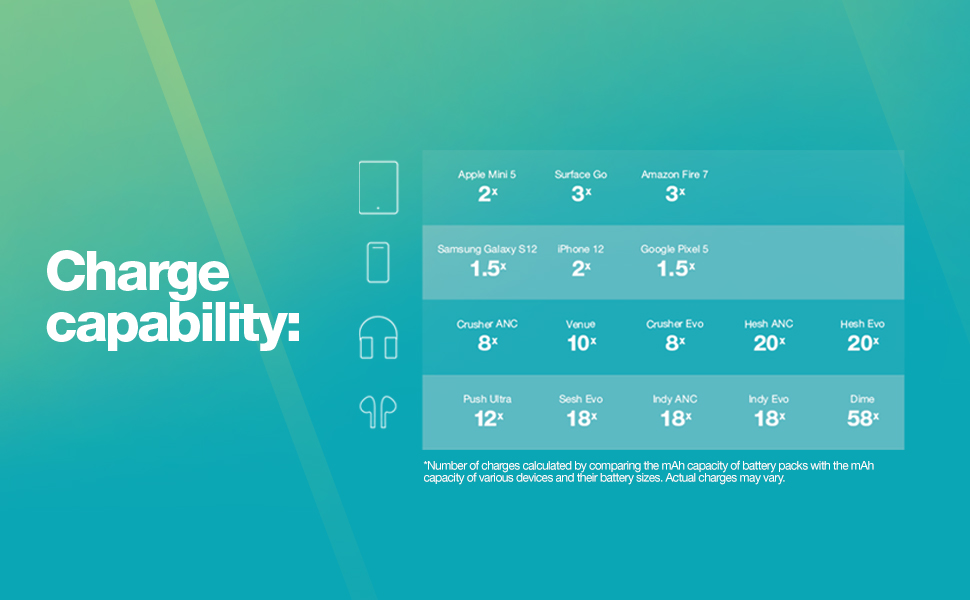
Image: A chart illustrating the approximate charge capabilities of the Fat Stash 2 for different devices, including tablets, smartphones, and headphones.
Warranty and Support
The Skullcandy Fat Stash 2 Portable Charger comes with a 1-year US warranty. For warranty claims, technical support, or further assistance, please visit the official Skullcandy support website or contact their customer service. Keep your proof of purchase for warranty validation.
You can find more information and support at the Skullcandy Store on Amazon.
Related documentsS7PZZ-P916

Ask a question about this manual
Ask about setup, troubleshooting, compatibility, parts, safety, or missing instructions. Manuals+ will review the question and use this page’s manual context to help answer it.