
VISLONE TA8151
TASI TA8151 Digital Sound Level Meter User Manual
Model: TA8151 | Brand: VISLONE
1. Introduction
The TASI TA8151 is a professional, high-precision digital sound level meter designed for accurate acoustic measurement. It is capable of measuring sound levels from 30dB to 130dB, making it suitable for a wide range of applications including environmental noise testing, quality control, and safety management in various settings such as factories, schools, communities, offices, and construction sites.
This manual provides detailed instructions for the proper setup, operation, maintenance, and troubleshooting of your TA8151 Sound Level Meter.

Image: The TASI TA8151 Digital Sound Level Meter, highlighting its 30-130dB measurement range.
2. Safety Information
Please read and understand all safety warnings and operating instructions before using this instrument. Failure to do so may result in injury or damage to the device.
- Do not attempt to disassemble or modify the instrument. Refer all servicing to qualified personnel.
- Avoid exposing the device to extreme temperatures, high humidity, or corrosive environments.
- Keep the microphone clean and free from obstructions to ensure accurate readings.
- Remove batteries if the instrument will not be used for an extended period to prevent battery leakage.
- Dispose of batteries according to local regulations.
3. Product Overview
The TASI TA8151 Sound Level Meter is a compact and robust device designed for ease of use and accurate measurements. It features a clear LCD display, intuitive controls, and a durable protective casing.

Image: Labeled diagram of the TA8151 showing its main components and overall dimensions (205mm height, 55mm width).
3.1 Components
- Sponge Ball (Windscreen): Reduces wind noise for more accurate outdoor measurements.
- Capacitive Microphone: High-precision sensor for sound detection.
- Backlight Display Screen: LCD screen with backlight for clear readings in various lighting conditions.
- Backlight Key: Activates/deactivates the display backlight.
- F/S (Fast/Slow) Weighting Key: Selects response time.
- Data Hold (H) Key: Freezes the current reading on the display.
- MAX Key: Displays the maximum measured sound level.
- MIN Key: Displays the minimum measured sound level.
- Power Switch: Turns the device on/off.
- Battery Compartment: Located at the rear for AAA batteries.
- Removable Protective Cover: Red rubber casing for enhanced durability and impact resistance.

Image: Detailed views of the capacitive microphone, the removable protective cover, and the open battery compartment.
4. Setup
4.1 Battery Installation
- Locate the battery compartment on the back of the device.
- Slide the battery compartment cover downwards to open it.
- Insert two (2) 1.5V AAA batteries, ensuring correct polarity (+/-) as indicated inside the compartment.
- Close the battery compartment cover by sliding it back into place until it clicks securely.
Note: Batteries are not included with the product.
4.2 Initial Power On
After installing the batteries, press the Power Switch button to turn on the device. The LCD screen will illuminate and display the current sound level.
5. Operating Instructions
The TASI TA8151 offers several functions to enhance your measurement experience.

Image: Visual representation of the various functions available on the TA8151 Sound Level Meter.
5.1 Basic Measurement
- Turn on the device by pressing the Power Switch.
- Hold the meter with the microphone pointed towards the sound source.
- The current sound level in decibels (dB) will be displayed on the LCD screen.
5.2 Backlight Display
To activate or deactivate the display backlight, press the Backlight Key (often indicated by a light bulb icon). This feature is useful for measurements in low-light conditions.

Image: The TA8151's backlit display showing a clear reading in a dark setting.
5.3 Data Hold Function
Press the H (Hold) Key to freeze the current reading on the display. The "HOLD" indicator will appear. Press the key again to release the hold and resume live measurement.
5.4 Maximum and Minimum Measurement
- Press the MAX Key to display the highest sound level recorded since the device was turned on or the MAX function was reset.
- Press the MIN Key to display the lowest sound level recorded since the device was turned on or the MIN function was reset.
- To exit MAX/MIN mode, press the respective key again or the Power Switch to restart.
5.5 Fast/Slow Weighting
The TA8151 offers two response speeds for measurement:
- FAST (0.5s): Suitable for measuring rapidly changing noise levels.
- SLOW (1s): Suitable for measuring average noise levels or when the sound level is relatively stable.
Press the F/S Key to toggle between FAST and SLOW response times.
5.6 Auto Power Off
The device features an automatic power-off function to conserve battery life. If no operation is performed for approximately 15 minutes, the meter will automatically shut down. To restart, press the Power Switch.
6. Maintenance
6.1 Cleaning
- Wipe the instrument with a dry, soft cloth. Do not use abrasive cleaners or solvents.
- Keep the microphone clean and free from dust or debris. Use the provided sponge ball to protect the microphone.
6.2 Storage
- When not in use for extended periods, remove the batteries to prevent leakage.
- Store the device in a cool, dry place, away from direct sunlight and extreme temperatures.
- Utilize the provided storage bag for protection.
6.3 Protective Cover
The TA8151 comes with a removable rubber protective cover. This cover helps protect the instrument from impacts and minor drops. Ensure it is properly fitted for maximum protection.
7. Troubleshooting
| Problem | Possible Cause | Solution |
|---|---|---|
| Device does not turn on. | Batteries are dead or incorrectly installed. | Replace batteries with new 1.5V AAA batteries, ensuring correct polarity. |
| Display is dim or flickering. | Low battery power. | Replace batteries. |
| Readings are inconsistent or inaccurate. | Microphone obstructed or dirty; strong electromagnetic interference. | Clean the microphone. Move away from strong electrical devices. Ensure sponge ball is properly fitted. |
| Device automatically shuts off frequently. | Auto power-off function activated; low battery. | This is normal behavior after 15 minutes of inactivity. If it happens during use, replace batteries. |
8. Specifications
Detailed technical specifications for the TASI TA8151 Digital Sound Level Meter:
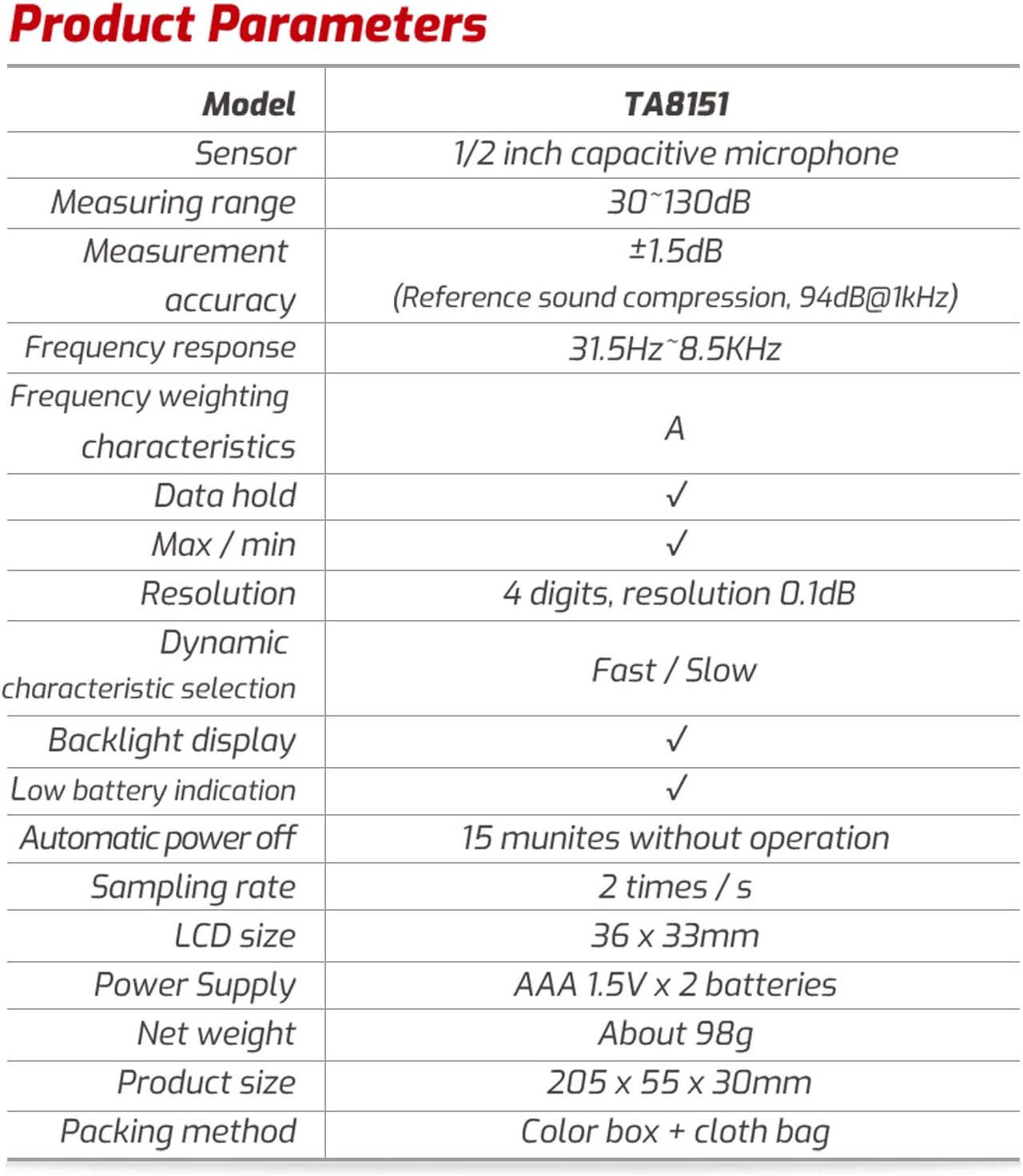
Image: A table summarizing the key product parameters and specifications of the TA8151.
| Parameter | Value |
|---|---|
| Model | TA8151 |
| Sensor | 1/2 inch electret condenser microphone |
| Measurement Range | 30~130dB |
| Resolution | 0.1dB |
| Accuracy | ±1.5dB (94dB@1kHz) |
| Frequency Range | 31.5Hz ~ 8.5kHz |
| Display | 3½ digit display (MAX.1999) |
| Response Time (Fast) | 0.5s |
| Response Time (Slow) | 1s |
| Power Supply | 2 * 1.5V AAA battery (Not Included) |
| Operating Condition | 0℃~40℃; 10%~80%RH |
| Storage Condition | -10℃~60℃; 10%~70%RH |
| Item Size | 205 * 55 * 30mm / 8.07 * 2.16 * 1.18in |
| Item Weight | 100g / 3.52oz |
9. Warranty and Support
For warranty information and technical support, please refer to the official VISLONE website or contact their customer service directly. The product typically includes a user manual in English, as stated in the product description.
For further assistance, you may visit the VISLONE Store on Amazon.
Ask a question about this manual
Ask about setup, troubleshooting, compatibility, parts, safety, or missing instructions. Manuals+ will review the question and use this page’s manual context to help answer it.