Introduction
Thank you for choosing the Muvit Lantern Bluetooth Light Speaker. This versatile device combines a powerful 10W Bluetooth speaker with an ambient LED light, designed for outdoor use. Enjoy your favorite music and create a pleasant atmosphere in your garden, patio, or any outdoor space. This manual provides essential information for the safe and efficient operation of your speaker.
Safety Information
- Read all instructions carefully before use and retain for future reference.
- Do not expose the speaker to extreme temperatures, direct sunlight for prolonged periods, or excessive humidity.
- Ensure the charging port cover is securely closed when not charging to maintain water resistance.
- Do not attempt to disassemble, repair, or modify the device. This will void the warranty and may cause damage or injury.
- Keep out of reach of children and pets.
- Use only the provided charging cable or a certified equivalent.
- Avoid placing the speaker near heat sources or open flames.
- Clean the speaker with a soft, damp cloth. Do not use abrasive cleaners or solvents.
Package Contents
Please check that all items are present in the package:
- Muvit Lantern Bluetooth Light Speaker
- USB Charging Cable
- User Manual (this document)
Product Overview
Familiarize yourself with the components of your Muvit Lantern speaker:

Image: The Muvit Lantern Bluetooth Light Speaker, featuring a cylindrical white body, a speaker grille on top, and a sturdy blue handle for portability.
- Speaker Grille: Located on the top, for audio output.
- LED Light Panel: Integrated into the main body, providing ambient illumination.
- Control Panel/Touch Controls: For power, Bluetooth, and light functions.
- Charging Port: Located on the side or bottom, protected by a rubber cover.
- Handle: A durable blue handle for easy carrying.
Setup
1. Initial Charging
Before first use, fully charge your Muvit Lantern speaker.
- Locate the charging port, usually protected by a rubber flap.
- Open the flap and connect the USB charging cable to the speaker.
- Connect the other end of the USB cable to a compatible USB power adapter (not included) or a computer USB port.
- The charging indicator light (if present) will illuminate. Once fully charged, the light may change color or turn off.
- Charging typically takes 3-4 hours. Ensure the charging port flap is securely closed after charging.
2. Placement
Place the speaker on a stable, flat surface. For optimal sound and light dispersion, avoid obstructing the speaker grille or light panel. As an outdoor speaker, it is designed to withstand splashes but should not be submerged in water.
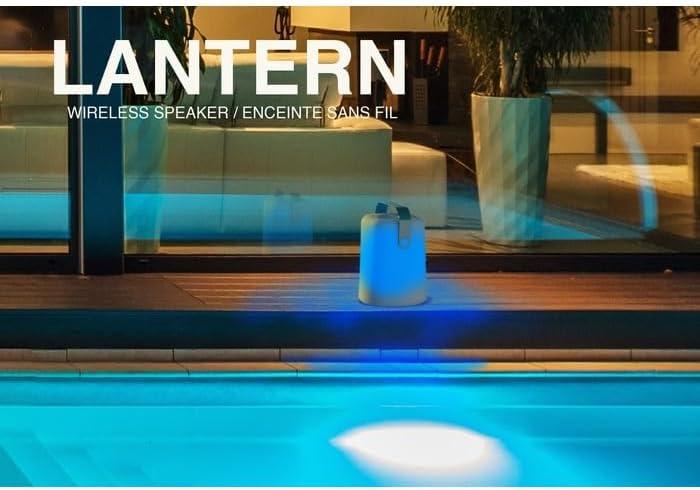
Image: The Muvit Lantern speaker positioned outdoors near a swimming pool, demonstrating its ambient blue light feature in a nighttime setting.
Operating Instructions
1. Power On/Off
- To Power On: Press and hold the Power button (or touch control area) for approximately 3 seconds. You will hear an audible prompt, and the light may illuminate.
- To Power Off: Press and hold the Power button (or touch control area) again for approximately 3 seconds. You will hear an audible prompt, and the device will shut down.
2. Bluetooth Pairing
- Ensure the speaker is powered on. It will automatically enter Bluetooth pairing mode, indicated by a flashing LED light (e.g., blue light flashing rapidly).
- On your mobile device (smartphone, tablet, computer), enable Bluetooth.
- Search for available Bluetooth devices. The speaker will appear as "Muvit Lantern" or similar.
- Select "Muvit Lantern" from the list to connect. Once connected, you will hear a confirmation sound, and the LED light will stop flashing and remain solid.
- The speaker will automatically reconnect to the last paired device when powered on, if the device is within range and Bluetooth is enabled.
3. Controlling Music Playback
Control music playback directly from your paired device. Some basic controls may be available via touch on the speaker:
- Play/Pause: Single tap the designated control area.
- Volume Up/Down: Swipe or tap specific areas (refer to product diagram if available, otherwise assume device control).
- Next/Previous Track: Double tap or swipe (if applicable).
4. Light Modes
The Muvit Lantern features various light modes, controlled by touch:
- Turn Light On/Off: Short press the Light button (or designated touch area).
- Change Light Color/Mode: Repeatedly short press the Light button to cycle through available colors (e.g., blue, green, red, white) and modes (e.g., solid color, color-changing).
- Adjust Brightness: Long press the Light button or use a specific swipe gesture (if applicable) to adjust brightness levels.
Maintenance
Cleaning
- Ensure the speaker is powered off and disconnected from the charging cable before cleaning.
- Wipe the exterior of the speaker with a soft, slightly damp cloth.
- Do not use harsh chemicals, abrasive cleaners, or solvents, as these may damage the surface.
- Do not immerse the speaker in water or allow water to enter any openings.
Battery Care
- To prolong battery life, avoid fully discharging the battery frequently.
- If storing the speaker for an extended period, charge it to approximately 50% every 3-6 months.
- Do not expose the battery to extreme temperatures.
Storage
Store the speaker in a cool, dry place away from direct sunlight and extreme temperatures when not in use.
Troubleshooting
| Problem | Possible Cause | Solution |
|---|---|---|
| Speaker does not power on. | Battery is depleted. | Charge the speaker fully using the provided USB cable. |
| No sound from speaker. | Volume is too low on speaker or paired device. Speaker not paired correctly. Device is out of Bluetooth range. | Increase volume on both the speaker and your paired device. Re-pair the speaker with your device. Move the device closer to the speaker (within 10 meters/33 feet). |
| Bluetooth connection is unstable or drops. | Interference from other devices. Device is too far from speaker. | Move speaker away from other wireless devices. Ensure no physical obstructions between speaker and device. Move device closer to speaker. |
| Light is not working. | Light function is off. Battery is low. | Press the Light button to turn it on or cycle modes. Charge the speaker. |
Specifications
| Brand | Muvit |
| Model Number | MUSSP0042 |
| Speaker Output | 10 Watts |
| Connectivity | Bluetooth |
| Power Source | Battery Powered |
| Light Source | LED |
| Control Method | Touch |
| Material | Metal (internal components), Plastic (exterior) |
| Intended Use | Outdoor (Garden) |
Warranty and Support
The Muvit Lantern Bluetooth Light Speaker comes with a 2-year manufacturer's warranty from the date of purchase. This warranty covers defects in materials and workmanship under normal use.
The warranty does not cover damage caused by:
- Accident, abuse, misuse, or improper operation.
- Unauthorized repair or modification.
- Failure to follow operating instructions.
- Damage from liquids (beyond intended water resistance) or extreme temperatures.
For warranty claims or technical support, please contact your retailer or visit the official Muvit website for contact information. Please have your proof of purchase and product model number (MUSSP0042) ready.


